Threat intelligence is the process of turning raw data about cyber threats into actionable insights that let a business defend itself before damage happens. When teams implement it well, they can reduce incident response time by 73% and mitigate 68% more security breaches than organizations without dedicated intelligence programs.
If you’re an MSP partner, you’ve likely seen the problem firsthand. A client gets a generic alert about a suspicious domain, a leaked credential, or a new phishing campaign, and the next question is always the same: does this matter to us right now? Raw feeds rarely answer that. They tell you something happened somewhere. They don’t tell you whether a law firm with five offices, a regional manufacturer, or a healthcare SMB should patch, block, escalate, or ignore.
That’s where threat intelligence starts to earn its keep. It gives your team context, priority, and next actions. For MSPs, that means better client protection and stronger service delivery. For SMBs, it means spending limited security budget on the threats most likely to affect the business, not the loudest alerts in the console.
Beyond Data A New Definition of Intelligence
A client calls after three users click a phishing email that looked legitimate. Your tools already had pieces of the story. A suspicious domain. A new sender pattern. An endpoint alert. A vulnerability notice tied to the client’s mail platform. None of that helped fast enough because the team lacked the missing ingredient: context.
That is the definition of threat intelligence for an MSP. It is the process of turning scattered signals into a decision about what matters, which clients are exposed, and what your team should do first. For SMBs, that same process turns security from a pile of alerts into practical protection they can afford and act on.
Why raw threat data isn’t intelligence
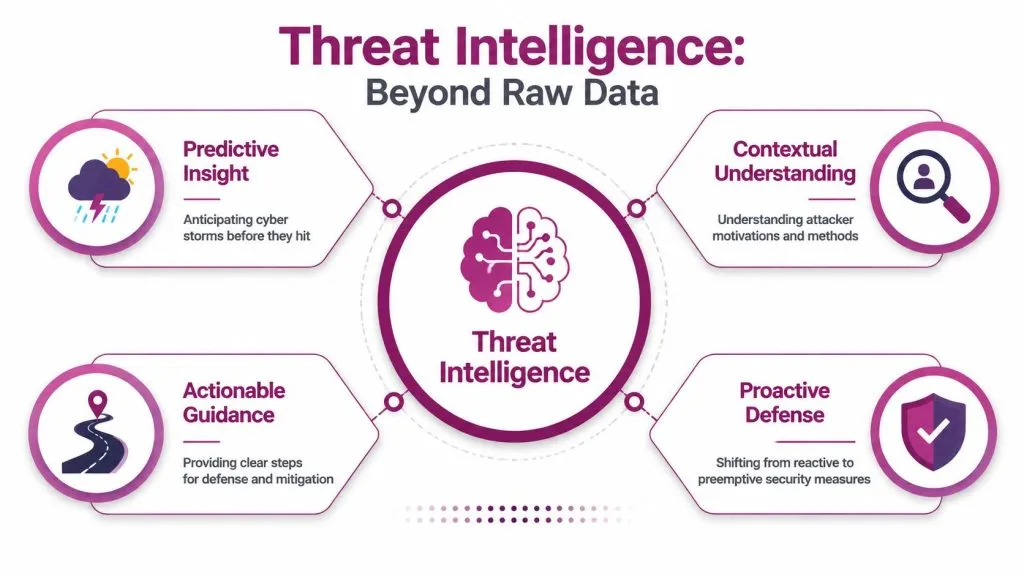
Security teams collect more raw material than they can reasonably use. Firewall logs, EDR alerts, DNS events, OSINT, dark web chatter, indicators of compromise, and vulnerability disclosures all arrive as fragments. Useful intelligence starts only after someone examines those fragments and connects them to a specific environment, business process, or client risk.
For an MSP, that translation layer is where service value appears.
A feed may show a malicious domain. Intelligence answers whether that domain targets a client’s industry, whether any managed tenant has communicated with it, whether the client relies on the impersonated vendor, and whether the right response is blocking, monitoring, patching, or a user warning. Generic feeds rarely answer those business-specific questions, which is why many SMBs end up paying for signal they cannot use.
Four questions separate noise from intelligence:
- Relevance: Does this affect the client’s users, systems, suppliers, or line-of-business applications?
- Priority: Does the team need to act now, investigate later, or close it as routine noise?
- Business impact: If the threat succeeds, what stops working? Email, payroll, remote access, customer portals, production, or vendor trust?
- Action: Which control should change first? Email filtering, endpoint rules, patching, identity settings, vendor access, or user communication?
Context depends on visibility. If you do not know which assets a client has exposed to the internet, you cannot judge whether a new campaign or vulnerability is relevant. That is why many MSPs pair intelligence with attack surface analysis for external exposure. It gives analysts the map they need before they decide where to send the fire crew.
Raw indicators show what exists. Intelligence shows what matters to this client, today.
What Gartner means by evidence-based knowledge
Gartner defines threat intelligence as evidence-based knowledge about existing or emerging threats, including context, mechanisms, indicators, implications, and action-oriented advice for assets, as outlined in Gartner’s threat intelligence glossary. That definition is useful because it sets a higher bar than alert collection. Intelligence is analyzed output that helps a team choose a response.
The phrase evidence-based knowledge matters. It means an analyst, platform, or provider has done the work of validation and interpretation. They have taken observations from multiple sources and turned them into guidance a defender can use. In practice, that means fewer dead-end investigations and better prioritization.
A new MSP analyst usually understands the difference when they see it in sequence:
- Data shows a suspicious domain.
- Intelligence shows that the domain belongs to a phishing cluster targeting finance staff.
- Useful intelligence shows that three managed clients use the spoofed vendor, one has a mail configuration weakness that raises the chance of abuse, and the help desk should send a warning before invoices start arriving.
That last step is where enterprise-grade concepts become profitable MSP services and practical SMB defense. You are no longer selling access to a feed. You are delivering triage, prioritization, control changes, and client-specific recommendations. That protects clients better, reduces analyst fatigue, and gives the service a business case beyond “more alerts.”
Strategic Tactical and Operational Intelligence
Not all threat intelligence is built for the same reader. A client executive doesn’t need a list of hashes. A SOC analyst doesn’t need a quarterly geopolitical summary when they’re triaging a fresh alert. The value comes from delivering the right form of intelligence to the right person at the right time.
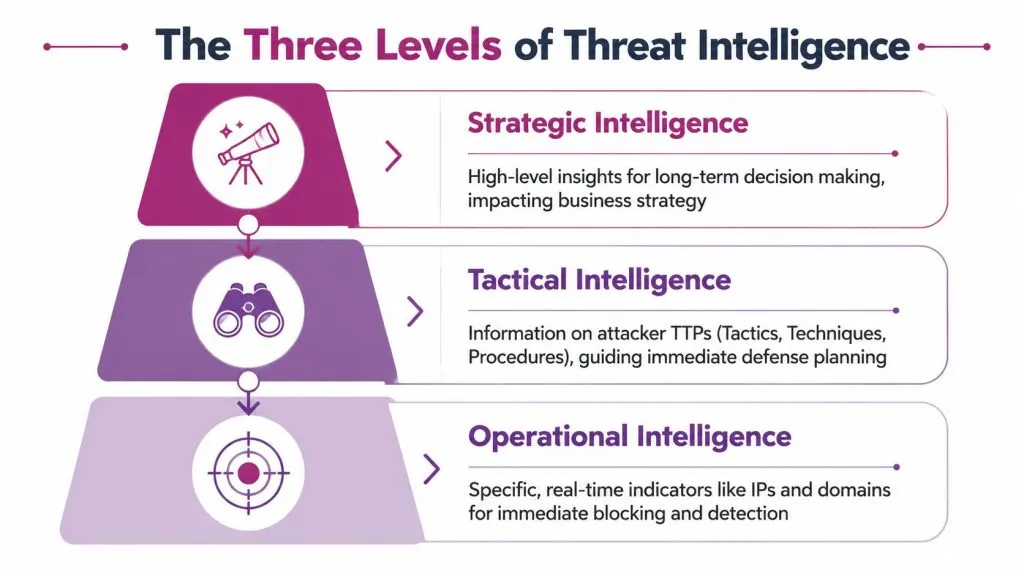
Three levels with three different jobs
| Type | Audience | Timeframe | Example Questions Answered |
|---|---|---|---|
| Strategic | Executives, owners, client leadership | Long-term | Which threat trends should influence budget, policy, insurance, and vendor risk decisions? |
| Tactical | Security analysts, engineers, tool owners | Near-term | Which attacker techniques are being used, and which controls should we tune to detect or block them? |
| Operational | Incident responders, SOC teams, service desk | Immediate to short-term | Which campaigns, actors, indicators, or lures are active right now, and what do we do today? |
Strategic intelligence helps leadership make business decisions. It explains the risk environment in plain language. For an SMB client, that might mean showing why identity protection deserves budget before adding another point tool. For an MSP account manager, it supports a quarterly business review that ties security work to business exposure.
Operational intelligence sits closer to the active threat. It tracks campaigns, attacker behavior, likely targets, and timing. This is the layer that helps a security team recognize that a cluster of login failures, suspicious email lures, and brand impersonation activity are part of the same play.
Tactical intelligence is highly practical. It focuses on TTPs, control tuning, and detection logic. Analysts use it to write better rules, improve playbooks, and decide which telemetry matters most.
How an MSP uses each type
An MSP that only consumes tactical feeds usually stays stuck in ticket mode. The team can block indicators, but it struggles to explain value to clients or package that value into a service.
A stronger model looks like this:
- Strategic for client communication: Turn trends into business guidance. Explain what a client should fund, defer, or change in policy.
- Operational for service coordination: Brief SOC, service desk, and account teams on active campaigns affecting specific client types.
- Tactical for tool enforcement: Push relevant indicators and detection updates into EDR, email security, SIEM, and firewall policies.
Practical rule: If the output can’t guide either a business decision or a defensive action, it isn’t finished intelligence yet.
This split also helps with pricing. Clients will pay for curated guidance tied to their environment more readily than for another generic feed. That’s especially true in smaller environments, where the problem isn’t lack of data. It’s lack of interpretation.
The Threat Intelligence Lifecycle Explained
Threat intelligence doesn’t appear by magic. Teams produce it through a repeatable process. That matters because many new MSP partners assume intelligence is just a subscription feed. It isn’t. The feed is only one input.
The actual work happens in a cycle.
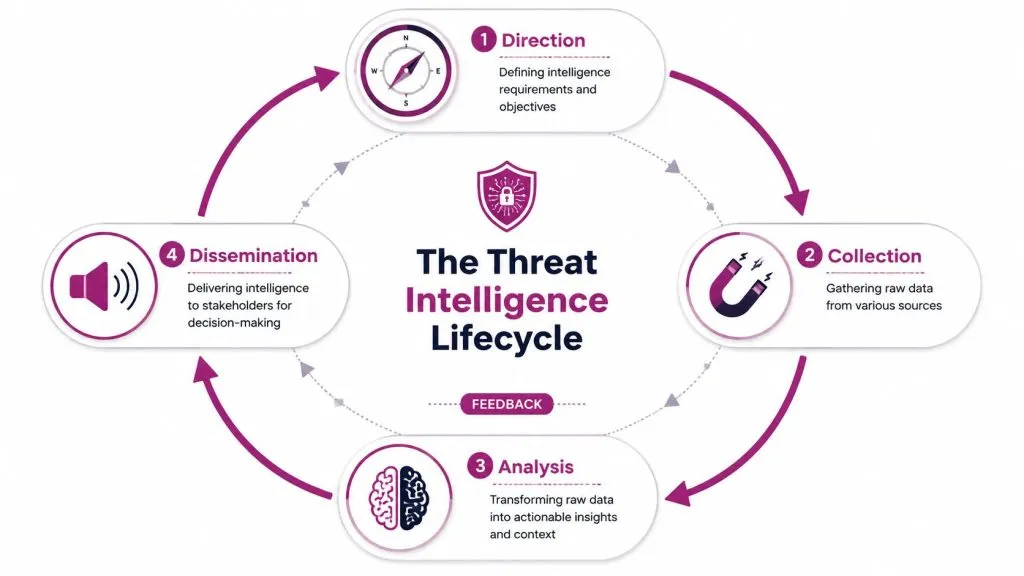
The four stages that turn data into decisions
The standard lifecycle includes Direction, Collection, Analysis, and Dissemination. Gartner-based descriptions of this process frame threat intelligence as transforming raw inputs from sources such as OSINT, dark web monitoring, and internal indicators into action-oriented output.
- Direction
Start with the question, not the feed. Which clients are most exposed? Which assets are most valuable? Which threats would hurt the business most? An MSP serving legal firms may prioritize credential theft, business email compromise, and client impersonation. A manufacturer may care more about exposed remote access, ransomware precursors, and vendor compromise. - Collection
Gather relevant data from internal telemetry and outside sources. That can include SIEM logs, endpoint alerts, open-source reporting, dark web signals, brand abuse findings, and vulnerability disclosures. Good collection is selective. More data isn’t automatically better.
Before the next stage, it helps to see the lifecycle visually in another format.

- Analysis
The team earns the word intelligence during this stage. Analysts correlate events, compare patterns, remove false positives, assess intent, and decide relevance. They ask whether the signals point to random internet noise or to a campaign that fits the client’s footprint and business model. - Dissemination
Deliver the result in a form people can use. A C-level summary, a SOC watchlist, a help desk advisory, an automated blocklist, or a patching priority notice can all be valid outputs. The format depends on who needs to act.
Why the lifecycle keeps looping
Many teams get stuck because they treat intelligence like a report they publish once. Good programs don’t work that way. Each incident, false alarm, escalation, and client question improves the next cycle.
A simple example helps. Suppose a client reports suspicious password reset messages. That feedback sharpens direction. The team then collects relevant email and identity data, analyzes whether it matches a known lure pattern, and disseminates a targeted advisory plus updated filtering logic. The next time a similar event appears, triage moves faster because the questions are already better.
- Feedback sharpens priorities: Repeated client issues reveal where collection should improve.
- Analyst notes improve future detection: Lessons from one incident become playbooks for the next.
- Business context changes: New vendors, acquisitions, exposed apps, or remote work models all change what matters.
That cyclical discipline is what separates a usable intelligence function from a pile of subscriptions.
Activating Intelligence with SIEM SOAR and TIPs
A common MSP problem looks like this. One client gets a phishing alert, another has suspicious sign-in activity, and a third shows outbound traffic to an unfamiliar domain. The team has feeds, logs, and alerts, but no clear way to turn those inputs into fast, repeatable action. That is where SIEM, SOAR, and TIPs earn their place. They convert intelligence from reference material into client protection.
What Each Platform Does
These three platforms solve different parts of the same problem.
A Threat Intelligence Platform (TIP) works like an operations desk for intelligence. It collects indicators from multiple sources, removes duplicates, adds context, and helps an analyst judge whether a signal matters to a specific client. That last part matters for MSPs. A generic feed may flag thousands of IPs or domains, but only a small fraction will intersect with a law firm, manufacturer, or medical practice in a meaningful way.
A SIEM collects logs and events from systems across the client environment and looks for patterns worth investigating. Threat intelligence improves that process by giving the SIEM reference points such as malicious domains, IP addresses, file hashes, and campaign markers. Microsoft describes technical threat intelligence in those practical terms in its overview of threat intelligence.
A SOAR platform executes the response steps. If the SIEM sees a known bad domain in email telemetry and endpoint logs, SOAR can trigger a playbook to create a case, quarantine a message, isolate a device, notify the assigned team, and document the action. The result is a repeatable process instead of a scramble.
Used together, the primary benefits are speed and consistency.
The easiest way to picture the stack is as a managed workflow. The TIP decides what deserves attention. The SIEM checks whether it appears inside the client environment. The SOAR platform carries out the approved response. For an MSP, that structure turns enterprise-style intelligence into something billable and usable for smaller clients who cannot fund a full in-house analysis team.
A practical workflow often looks like this:
- TIP ingests and scores indicators: It filters low-confidence noise, groups related signals, and ties them to threat context that an analyst can validate.
- SIEM correlates with client telemetry: It checks whether those indicators appear in authentication logs, endpoint activity, cloud apps, mail flow, or firewall events.
- SOAR launches playbooks: It escalates, blocks, quarantines, enriches, or opens a ticket based on confidence, client policy, and service level.
The value of the tooling shifts with business context. If a feed says a new phishing campaign targets accounting staff, that only becomes useful for an SMB client when the stack maps the threat to the people, vendors, and systems that client relies on. Otherwise, the MSP is paying for volume instead of relevance.
That same principle applies to data-layer threats. Teams that protect finance systems, ERP platforms, or customer databases should review this guide to early database attack detection, because intelligence works best when it informs detection close to the asset an attacker wants.
External exposure belongs in this activation layer too. Stolen credentials, impersonation attempts, and criminal forum mentions become far more useful after they are correlated with user identities, domains, and client assets. That is why many providers pair internal telemetry with dark web monitoring for external threat visibility.
The end goal is straightforward. Intelligence should help the MSP make faster, more accurate decisions for each client, with less analyst effort and fewer missed signals.
Threat Intelligence Use Cases for MSPs and SMBs
The biggest gap in the market isn’t access to feeds. It’s relevance for smaller businesses. Enterprise-grade content often assumes a large SOC, dedicated analysts, and complex tooling. Most SMBs don’t have that. Many MSPs don’t have spare analyst hours either.
That mismatch is documented. Threat intelligence for SMB contextualization is often underserved because 78% of existing CTI frameworks are built for enterprise complexity, while 63% of SMBs report receiving threat intelligence that doesn’t match their risk profile, and 89% of SMB-specific phishing campaigns use novelty techniques untracked by enterprise-grade CTI feeds, according to CrowdStrike’s threat intelligence overview.
An MSP service story
A regional MSP manages a portfolio of professional services firms, small manufacturers, and healthcare practices. The team already has email security, EDR, and vulnerability scanning in place. Clients keep asking for better protection, but they don’t want another dashboard.
So the MSP changes the offer. Instead of selling “threat feeds,” it packages a contextual intelligence service:
- Client-specific watchlists: The team maps key vendors, exposed assets, privileged users, and high-value business processes.
- Prioritized advisories: Analysts send short, relevant notices when a threat intersects with a client’s environment.
- Quarterly business reviews with security meaning: Leadership sees what was blocked, what was likely to matter, and which controls deserve next-quarter budget.
That model is more billable because it connects security work to business exposure. It also improves retention because clients can understand what they’re paying for. For MSPs that want to build this kind of external monitoring into a managed service, dark web monitoring for managed service providers is a practical complement to internal telemetry.
An SMB defense story
Now take an SMB with a lean IT team. It receives generic alerts from several tools, but most aren’t actionable. One day, the business starts getting convincing messages that appear to reference a real supplier relationship. A generic feed might treat that as just another phishing wave.
Contextualized threat intelligence changes the handling:
- The business’s critical vendors are already mapped.
- The MSP recognizes that the lure references a supplier used by this client.
- Security controls are adjusted around email, identity, and user awareness for the employees who would receive that message.
- The client gets a short advisory in plain language, not a long technical bulletin.
That is the practical answer to “what is threat intelligence” for an SMB. It’s not more alerts. It’s fewer, better decisions.
The best threat intelligence for a small business is often narrower, simpler, and more tied to daily operations than the intelligence built for a global enterprise.
Implementing Your Threat Intelligence Program
A successful threat intelligence program starts with discipline and clear operating rules. Picture an MSP onboarding a new client, turning on three feeds, and getting hundreds of alerts in the first week. If nobody has defined which systems matter most, who owns each response, or what an alert should trigger, the team has purchased noise instead of protection.
That is the gap many SMBs and MSPs run into. Enterprise threat intelligence concepts are useful, but they only create value when they are translated into decisions a lean team can make quickly and consistently. For an MSP, that means building a service that clients can understand, buy, and renew. For an SMB, it means spending limited budget on the threats most likely to interrupt revenue, operations, or trust.
The business case is clear when the program is set up well. IBM found that organizations with effective cyber threat intelligence programs reduce incident response time and limit breach impact more effectively than organizations without dedicated intelligence capabilities, according to IBM’s threat intelligence research. IBM also found that integrating intelligence with SIEM workflows can reduce business impact and recovery costs in mid-sized enterprises.
What to fix before you buy more feeds
Failed programs usually break for simple reasons. The team collects indicators before it defines relevance. It sends findings before it defines ownership. It buys data before it defines the service.
A good way to frame this is to treat intelligence like a routing system, not a warehouse. More boxes in the warehouse do not improve delivery. Clear labels, the right destination, and a driver with instructions do.
Focus on these gaps first:
- No defined crown jewels: Identify the users, systems, vendors, data, and business processes that matter most. Without that map, relevance stays vague.
- Too much overlapping input: Five feeds with similar coverage can create duplicate alerts and analyst fatigue. One curated source, paired with analysis and tuning, often produces better results.
- Weak delivery model: Intelligence has to reach the right person in the right format. Analysts need detection guidance. Executives need business risk. Service desk staff need short, clear instructions.
- No action path: Every recurring finding type needs a response playbook. Otherwise, alerts pile up and protection does not improve.
One practical option for teams building a client-facing program is a platform that covers external exposure, dark web monitoring, impersonation, and threat intelligence in a format an MSP can deliver under its own brand. InsecureWeb provides those capabilities for MSPs and security firms, including API access for integration into existing workflows.
A practical first 90 days
Start with a narrow mission and make it operational fast. Early success matters because it proves the service model, helps analysts trust the process, and gives clients something concrete they can see.
- Choose one or two use cases
Start with problems that have obvious business value, such as credential exposure, brand impersonation, high-risk phishing, or internet-facing asset monitoring. - Define the client’s crown jewels
List the identities, systems, vendors, and workflows that would cause the most damage if disrupted. This becomes your filter for relevance. - Assign action owners
Decide who handles each type of finding. That may include the SOC, service desk, account manager, client IT lead, or executive sponsor. - Use a simple scoring model
Score findings by relevance, confidence, and business impact. Keep it consistent. A plain model that the team uses every day is better than a complex one nobody trusts. - Tie intelligence to controls
Every alert category should connect to a specific action such as block, monitor, enrich, escalate, notify, or patch. If no action exists, reconsider collecting that signal. - Create two reporting formats
Build one operational output for analysts and one plain-language summary for client stakeholders. The same finding should not be explained the same way to both groups. - Review weekly
Check what created action, what created noise, and what the team missed. Then tune collection, scoring, and response steps.
This is how MSPs turn threat intelligence into a profitable service instead of a research exercise. The program becomes easier to package, easier to explain, and easier to renew because it is tied to visible outcomes. SMBs benefit for the same reason. They get focused protection that matches their actual exposure, not a diluted version of an enterprise program built for someone else.
Threat intelligence is most useful when it fits your clients’ real exposure and daily operations. If you want to turn external threat visibility into a practical managed service, InsecureWeb gives MSPs and security teams tools for threat intelligence, dark web monitoring, fake site and account detection, vulnerability scanning, and white-label delivery through API-friendly workflows.