Data Breach News13 min read
Threat Intelligence Feeds: An MSP’s Ultimate Guide
By InsecureWeb Team
This report reflects observations of dark web activity. InsecureWeb makes no representations regarding the accuracy of this data.

Your team already knows the feeling. The SIEM is full, the firewall is noisy, endpoint alerts keep rolling in, and every client wants fast answers. Most of those alerts go nowhere. A few matter. The hard part is telling the difference before an analyst burns half a shift on a dead end.
That’s where threat intelligence feeds earn their keep. Not as another dashboard. Not as another pile of indicators. Used properly, they help an MSP decide what deserves attention, what can be blocked automatically, and what needs escalation with client context attached. The move from basic monitoring to intelligence-led defense usually starts there.
From Alert Fatigue to Proactive Defense
Most MSP security teams don’t have a visibility problem. They have a prioritization problem.
A client’s stack might include Microsoft 365 alerts, firewall events, EDR detections, DNS logs, identity anomalies, and web filtering hits. Every tool does its job, but the SOC still ends up triaging noise. When that happens long enough, analysts start treating alerts as background activity. That’s when real threats get room to breathe.
Threat intelligence feeds help when they’re used as a filter and enrichment layer. Instead of asking an analyst to inspect every suspicious domain, login, or outbound connection from scratch, you let intelligence add context early. Is the destination tied to malware delivery? Is the domain newly weaponized for impersonation? Does the file hash belong to a known campaign? Those answers change response speed.
The market growth around this category reflects that shift. The global threat intelligence market was valued at $13.5 billion in 2023 and is projected to reach $43.3 billion by 2033, according to Hunt’s threat intelligence feeds overview. MSPs aren’t buying into feeds because they want more data. They’re buying because manual monitoring doesn’t scale.
Practical rule: If a feed adds alerts without improving triage or action, it’s not helping your SOC.
This gets especially useful in abuse patterns that are easy to miss in routine operations. Brand impersonation, typo domains, and fake login infrastructure often show up before a full incident unfolds. For teams that need to sharpen that side of monitoring, this guide to preventing typosquatting is worth reviewing because it connects domain abuse to practical defensive checks MSPs can operationalize.
Traditional indicators also miss activity that surfaces outside standard logs. That’s why many MSPs are expanding their workflows with dark web monitoring for managed service providers, especially when credential exposure becomes the earliest usable signal.
Demystifying Threat Intelligence Feeds and Their Role
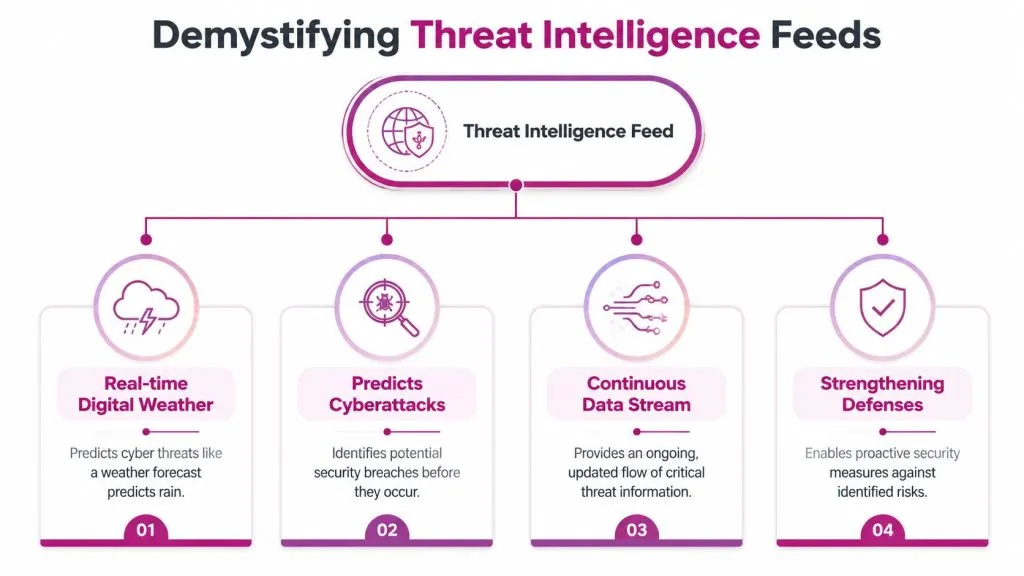
A threat intelligence feed is best understood as a cyber weather forecast. It doesn’t stop storms by itself. It tells your tools and analysts what’s forming, what’s already moving, and where to pay attention first.
Why raw indicators are not enough
An IP, domain, URL, or file hash on its own is just data. It only becomes useful when your team knows what it represents and whether it matters to the client environment in front of you.
That distinction matters in day-to-day SOC work:
- Raw data is an observable such as a domain or hash.
- Information adds a label such as malware hosting, phishing, or botnet activity.
- Intelligence adds context you can act on. Who uses it, how it’s being used, and whether it aligns with the sectors, systems, or behaviors relevant to your clients.
That’s why good feeds aren’t just lists. They support decisions. A tactical block on a firewall needs confidence. An analyst escalation needs campaign context. A client briefing needs business relevance.
For teams extending intelligence beyond standard perimeter telemetry, dark web monitoring workflows often fill a gap that traditional indicator feeds leave open.
The feed matters less than the decision it enables. If your team can’t explain what action an indicator should trigger, the indicator is still unfinished work.
The three tiers that matter operationally
Threat intelligence is commonly split into tactical, operational, and strategic tiers, as outlined in Cyware’s guide to threat intelligence feeds. This structure matters because each tier serves a different operator.
Here’s how it looks in an MSP environment:
| Tier | What it contains | Who uses it | Best use |
|---|---|---|---|
| Tactical | Machine-readable IOCs such as IPs, URLs, and hashes | SIEM, EDR, firewall, email security tools | Automated matching, blocking, and alert enrichment |
| Operational | TTPs, campaign behavior, attacker methods | SOC analysts, threat hunters, incident responders | Correlation, investigation, scoping, and playbook tuning |
| Strategic | High-level risk trends and business impact | Security leadership, account managers, client stakeholders | Budgeting, service design, and risk communication |
Tactical intelligence cuts down dwell time because machines can act on it quickly. Operational intelligence improves correlation because analysts can connect isolated events into a pattern. Strategic intelligence gives MSP leadership a way to explain why a client needs a control, not just what alert appeared overnight.
A mature practice uses all three. A weak practice buys tactical feeds only, dumps them into a SIEM, and wonders why analysts still spend hours sorting low-context matches.
Navigating the Landscape of Feed Types and Formats
Once you move past the idea of “we need a feed,” the key question is much less glamorous. Which feeds fit the way your SOC operates?
Many MSPs often make expensive mistakes. They buy broad coverage, then discover the feed doesn’t align with the client base, arrives in an awkward format, or demands more analyst cleanup than it saves.
Where feeds come from
Most MSPs will deal with three broad source categories.
Open-source feeds are useful when you need coverage fast and budget is tight. They can expose active malware infrastructure, phishing artifacts, abused domains, and community-shared indicators. They’re also where many teams get burned, because raw open-source indicators often arrive with uneven validation and little environmental context.
Commercial feeds usually offer stronger curation, clearer confidence scoring, support, and better metadata. They tend to be easier to integrate into a production SOC because the vendor has already done more of the cleanup work. That doesn’t make them automatic buys. Some are broad but shallow. Others are excellent for one use case and weak everywhere else.
Government or sector-sharing sources can be useful for regulated environments and sector-specific threats. The value depends on timeliness, formatting, and how directly the material maps to the client environments you support.
How the data is delivered
Feed format affects analyst workload more than most buyers expect.
A feed delivered as CSV or flat text may be fine for simple blocklists, but it’s weak when you need metadata, confidence, source history, or campaign linkage. JSON is usually more practical for programmatic ingestion. STIX/TAXII is better suited for structured sharing and richer intelligence workflows, especially when multiple platforms need to consume and normalize the same content.
What matters operationally is simple:
- Can your SIEM ingest it cleanly
- Can your firewall, EDR, or email security stack consume it without manual rework
- Can you preserve useful context after ingestion
- Can you suppress or age out stale indicators
If the answer to any of those is no, the feed may still have value, but it belongs in analyst research, not automated enforcement.
A lot of MSPs run into this same issue when they try to expand from standard IOC ingestion into broader exposure monitoring. Even adjacent services such as free dark web monitoring at market scale sound simple until the team has to normalize and triage what comes in.
Open-Source vs. Commercial Threat Feeds for MSPs
| Attribute | Open-Source Feeds | Commercial Feeds |
|---|---|---|
| Cost | Usually low-cost or free to access | Paid subscription or platform bundle |
| Data quality | Variable. Often mixed signal and noise | Usually more curated and standardized |
| Context | Often limited | Usually richer metadata and attribution context |
| Update handling | Can be inconsistent across sources | Usually more predictable |
| Support | Community-driven or none | Vendor support and documentation |
| Best fit | Research, supplementary enrichment, niche use cases | Production blocking, large-scale correlation, client-facing services |
| Main risk | Analyst overload and false blocking | Cost without measurable operational value |
Buy feeds for use cases, not for coverage claims. An MSP that protects Microsoft 365-heavy SMBs needs different intelligence than one handling industrial networks or large developer shops.
A strong program often blends both. Use open-source selectively where it adds niche value. Use commercial intelligence where your automation depends on reliability and low operational drag.
How to Separate Signal from Noise in Threat Feeds
The biggest operational failure with threat intelligence feeds isn’t underbuying. It’s overtrusting.
MSPs often assume more indicators mean better protection. In practice, bad intelligence creates rework. Your SIEM gets noisier, your blocklists get riskier, and your analysts lose confidence in the feed fast. Once that happens, even high-value matches get second-guessed.
Independent analyses show that 40–60% of raw indicators from open-source threat intelligence feeds are false positives or stale, according to Anomali’s discussion of open-source threat intelligence operationalization. For an MSP, that’s not a small annoyance. It can mean blocked client traffic, wasted analyst time, and brittle automations no one trusts.
What to test before you trust a feed
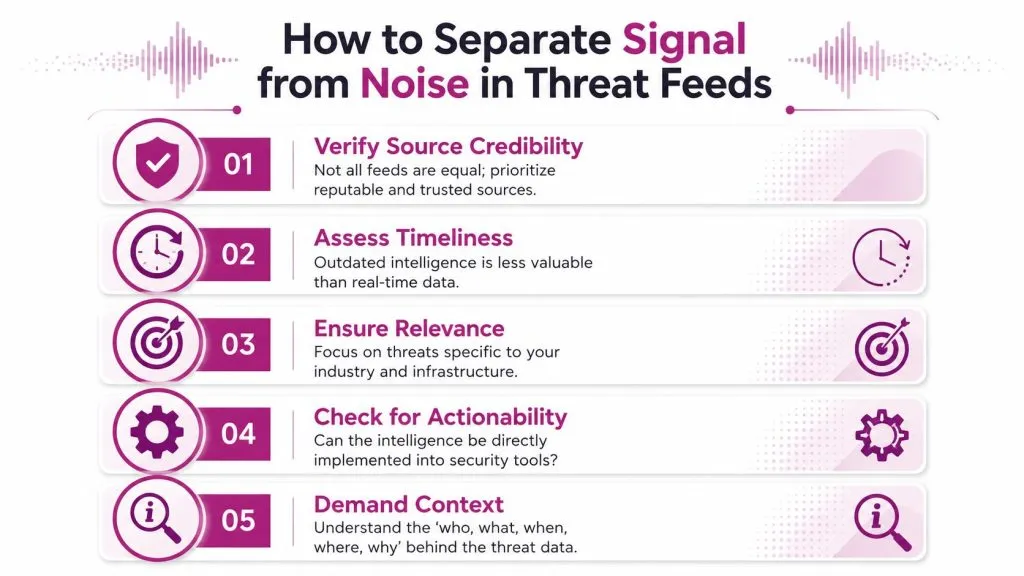
A feed should be evaluated like any other production input. Four checks matter immediately.
- Accuracy: If false positives are common, don’t push that feed directly into hard blocks.
- Timeliness: Fast-moving phishing and malware infrastructure ages out quickly. Old indicators clog detections.
- Relevance: A high-volume feed aimed at broad internet abuse may not help a client set dominated by identity risk and SaaS misuse.
- Context: An IOC without confidence, source type, or threat family is expensive to investigate.
The most useful feeds also carry enough metadata to support different actions. High-confidence indicators can drive automated blocking. Medium-confidence indicators can enrich alerts. Low-confidence indicators can stay in hunt workflows until validated.
A practical vetting checklist
Use a short acceptance checklist before adding any new feed to production:
- Run it in monitor mode first. Let it enrich alerts before it blocks anything.
- Check age and churn. See how quickly indicators go stale and how often they’re replaced.
- Measure client fit. Compare hits against the kinds of incidents your MSP encounters.
- Inspect context fields. If the feed can’t explain why an indicator matters, analysts will have to.
- Decide action paths in advance. Not every indicator should trigger the same control.
Treat every new feed like a junior analyst. It may be useful, but it still needs supervision until it proves judgment.
This is the step often skipped because it looks slow. Yet, it is what keeps the rest of the program usable.
Putting Intelligence into Action with SIEM and Automation
A threat intelligence feed sitting in a portal has almost no operational value. The value appears when your stack turns it into detection logic, prioritization, and response.
That’s where MSPs separate themselves. Clients don’t pay for indicator collections. They pay for faster identification, cleaner triage, and action that reduces risk across multiple tenants without creating chaos.
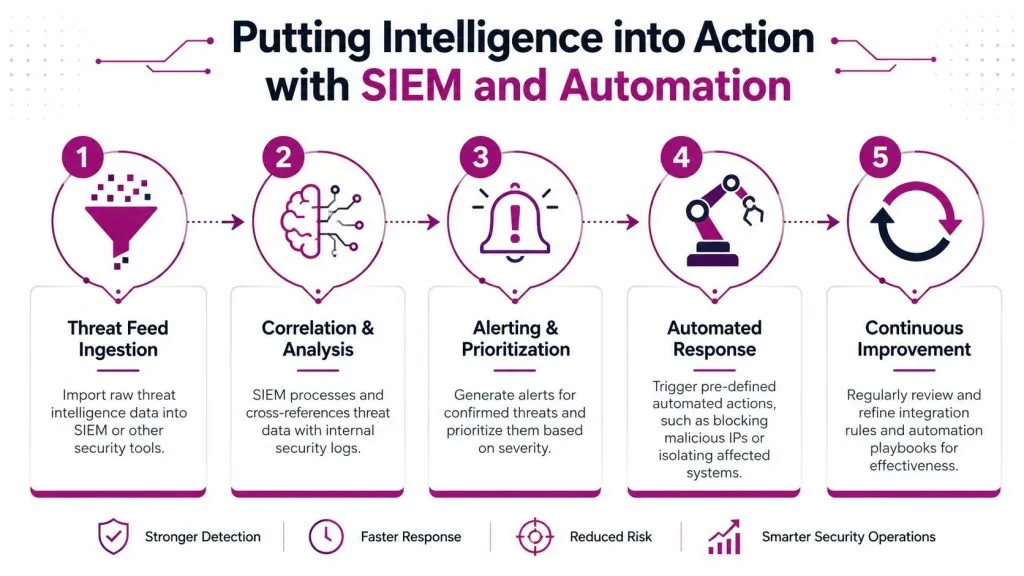
To ground the workflow, this visual shows the path from ingestion to continuous improvement:
The workflow that actually works
A practical operating model usually follows five steps.
Ingest. Pull the feed into a SIEM, TIP, or another control plane that can manage multiple sources. Good ingestion preserves metadata such as source, confidence, indicator type, and last-seen timing. If your platform strips all that away, you’ve already reduced the feed’s usefulness.
Normalize. Convert data into a common structure. Tactical indicators from one source shouldn’t require a different parser or rule style than the same indicator type from another. At this stage, many MSPs decide whether they need a dedicated TIP or whether their SIEM can handle normalization well enough.
Enrich. Add internal context before raising severity. Is the destination already seen in your client environment? Is the targeted asset high-value? Is the user privileged? Intelligence without tenant context is still generic.
After enrichment, many teams benefit from seeing the process in a second format before building playbooks:

Correlate and score. Match the intelligence against firewall logs, endpoint telemetry, DNS activity, cloud alerts, email events, and identity data. A single low-confidence hit may not matter. The same hit paired with suspicious login activity or malware execution probably does.
Automate the right action. Automation should reflect confidence and blast radius. Hard-blocking on every match is lazy engineering. Better playbooks include different outcomes such as alert enrichment, case creation, firewall block, endpoint isolation, user disablement, or analyst review.
Where MSPs prove value to clients
Organizations that properly integrate threat intelligence feeds into their security tools can achieve a 60–75% reduction in mean time to detection, according to Stellar Cyber’s CTI platform overview. The practical takeaway for MSPs is straightforward. Good integration shortens the gap between external threat discovery and internal response.
What clients notice isn’t the feed. They notice things like:
- Faster triage: Alerts arrive with context, not just observables.
- Cleaner escalations: Account managers and client IT teams get incidents with business relevance attached.
- Consistent containment: Known bad infrastructure can be blocked across tenants through governed playbooks.
- Defensible service value: You can show how intelligence changes response, not just that a subscription exists.
A TIP often helps here because it ingests, normalizes, enriches, and correlates multiple sources before pushing updates into the rest of the stack. Some MSPs do this with their SIEM alone. Others mix a TIP with firewall, EDR, and SOAR workflows. Either model can work if ownership is clear.
If you need a practical example of a tool category in this space, InsecureWeb provides threat intelligence feeds for malicious IPs, domains, hostnames, MD5, and SHA256 indicators that can be imported into security tools such as Wazuh CDB Lists. That kind of fit matters more than branding. The useful question is whether the data can be consumed cleanly by the systems your SOC already runs.
Automation should remove repeatable work, not remove judgment. The fastest bad block is still a bad block.
Avoiding Common Pitfalls and Meeting Compliance
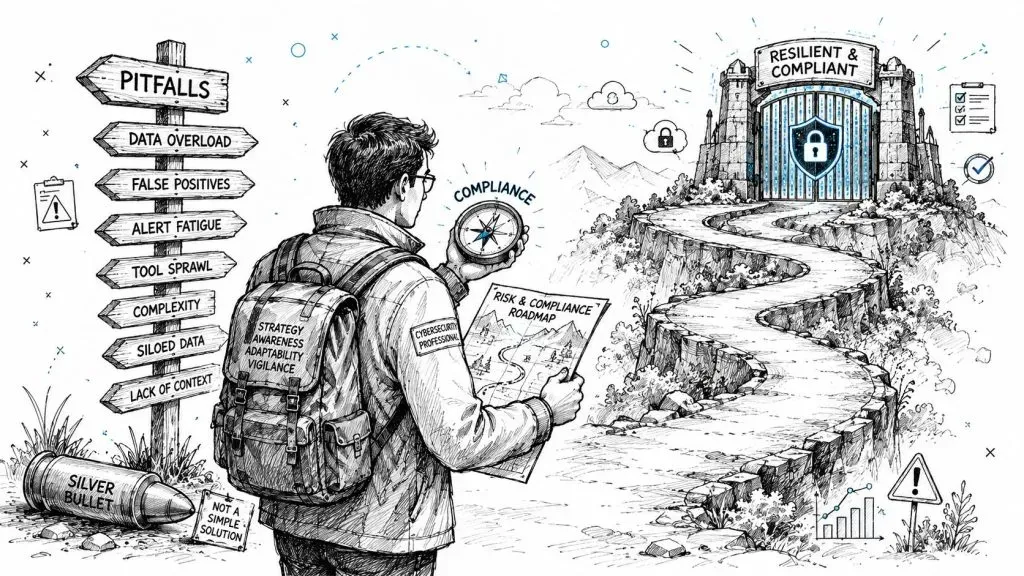
The set-and-forget model fails with threat intelligence feeds because attackers change infrastructure, feeds age out, and client environments aren’t static. An MSP that loads indicators once and never revisits tuning will eventually create one of two outcomes. Either the controls become noisy enough that analysts ignore them, or they become so heavily suppressed that they stop catching anything useful.
Why set-and-forget fails
A few implementation mistakes show up repeatedly:
- Blind auto-blocking: Teams push low-confidence indicators directly into enforcement.
- No expiry logic: Old indicators remain active long after they stop being useful.
- No tenant tuning: One client’s normal traffic becomes another client’s incident.
- No feedback loop: Analysts close cases, but nobody feeds the lesson back into rules.
That last one matters most. If your SOC doesn’t review which feed matches led to incidents, harmless noise, or missed context, the program won’t improve.
Traditional threat intelligence also misses a growing slice of early warning activity. A significant gap is the lack of integration with dark web and social media monitoring, where 35% of credential theft discussions now occur, according to BitSight’s overview of cyber threat intelligence feeds. For MSPs serving SMBs, that creates a blind spot because stolen credentials and account abuse often surface there before the indicators become clean enough for standard machine-readable feeds.
Where compliance and intelligence overlap
Threat intelligence feeds don’t satisfy compliance by themselves, but they support the parts auditors care about:
- Risk management: You can show that external threat information influences control decisions.
- Incident response: Alerts and cases include documented context that supports triage and escalation.
- Continuous monitoring: Feed ingestion, correlation, and rule updates demonstrate an active process rather than a paper policy.
- Evidence of tuning: Change records and playbooks show the program is maintained over time.
That’s useful across frameworks because auditors usually want to see repeatable handling of threats, not just technology purchases.
From Data Streams to Strategic Advantage
Threat intelligence feeds are only valuable when they change operations. For an MSP, that means fewer wasted investigations, better correlation, faster response, and clearer proof that your service is reducing client risk.
The mature posture isn’t “collect more feeds.” It’s “ingest the right data, validate it, map it to action, and keep tuning.” Tactical indicators help machines move fast. Operational context helps analysts make better calls. Strategic intelligence helps you explain service decisions to clients who need business impact, not raw telemetry.
That shift is what moves a team from reactive monitoring to proactive defense. The payoff isn’t just technical. It affects client trust, service quality, and how confidently your SOC can scale.
MSPs that want to turn external exposure into usable security signals can look at InsecureWeb as one option for combining threat intelligence with dark web monitoring, fake site detection, vulnerability scanning, and API-ready workflows that fit managed security services.