Your team probably knows the feeling. The PSA queue is full, the SIEM won’t stop firing, and every client wants to know whether the newest ransomware headline affects them. Analysts burn time triaging alerts that go nowhere, while the few signals that matter are buried inside noise.
That’s where AI-powered threat intelligence becomes useful. Not as another dashboard. Not as another feed. As a way to change how you work so your team spends less time reacting after damage starts and more time identifying which threats are likely to matter for a specific client before they turn into incidents.
For MSPs and SMB security teams, that shift matters because generic threat data isn’t enough. A global warning only becomes actionable when you can connect it to a client’s exposed assets, vulnerable software, executive identities, business workflows, and tolerance for downtime. If you can’t do that, you’re still running an alert factory. You’ve just made it faster.
Introduction Beyond Reactive Alerts
Most security teams still defend like firefighters. An alert appears, someone grabs it, checks whether it’s real, opens three more tools, and starts asking whether the environment is affected. That model worked when threat volume was lower and systems were simpler. It breaks down when each client has cloud apps, remote users, identity providers, email platforms, endpoints, and an expanding external footprint.
According to IBM’s overview of predictive cybersecurity, artificial intelligence has transformed threat intelligence from a reactive to a proactive discipline by enabling organizations to predict cyberattacks before they materialize through analysis of historical data and global threat trends using machine learning, deep learning, and natural language processing. That matters operationally. It means teams can look for likely attack paths before an attacker uses them.
Why reactive operations keep failing
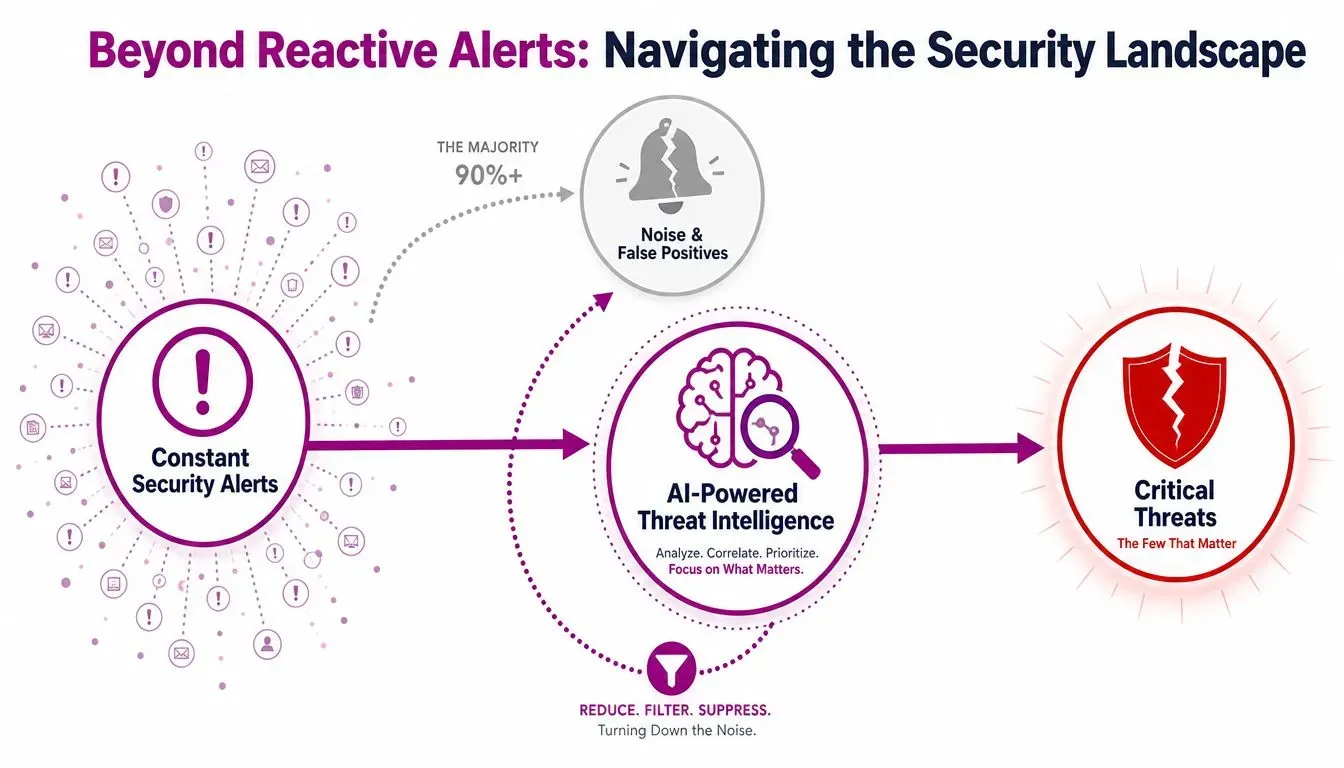
Reactive security produces two expensive outcomes at once. Analysts waste time on low-value alerts, and leadership starts treating security as overhead because the team always seems busy but rarely appears ahead of the problem.
That’s not usually a tooling problem alone. It’s a context problem. A feed may warn about a phishing kit, a malware family, or a compromised credential set. But your team still has to decide which clients are exposed, which assets matter most, and what action should happen first.
Practical rule: Threat intelligence only helps when it changes a decision. If it doesn’t alter priority, validation, or response, it’s just more data.
What changes when AI sits in the middle
AI-powered threat intelligence acts like a filtering and correlation layer between raw security input and operational action. It can learn from historical attack patterns, adapt to new cyber risks in real time, and help teams forecast likely attacks or identify vulnerabilities most susceptible to exploitation, as described in IBM’s explanation above.
For MSPs, that changes the business conversation. Instead of saying, “We saw a new threat report,” you can say, “This matters for these clients, because they run the affected software, expose the related service, or have staff who fit the targeting pattern.” That’s a more defensible service model. It also makes security easier to explain to nontechnical buyers, because you’re tying intelligence directly to business exposure.
What AI-Powered Threat Intelligence Actually Is
AI-powered threat intelligence isn’t magic, and it isn’t a robot analyst. It’s a set of systems that ingest large amounts of structured and unstructured security data, detect patterns and anomalies inside it, and turn that into usable guidance for defenders.
The plain-language definition
A simple analogy helps. Traditional threat intelligence is like a security guard reviewing camera footage after someone breaks into a warehouse. AI-powered threat intelligence is closer to a building system that studies normal movement, badge use, door access, and outside activity patterns so it can flag a likely break-in before the intruder reaches the server room.
That distinction matters because many teams confuse information with intelligence. A list of indicators, leaked credentials, or forum chatter is information. Intelligence is what you get after that raw material has been filtered, correlated, and translated into a decision such as block, patch, isolate, monitor, or escalate.
Traditional vs AI-assisted workflows
| Capability | Traditional Threat Intelligence | AI-Powered Threat Intelligence |
|---|---|---|
| Data intake | Analysts manually pull from feeds, reports, and advisories | Systems ingest large mixed data sources continuously |
| Pattern detection | Heavily rule-based and dependent on prior knowledge | Models identify patterns and anomalies across datasets |
| Handling unstructured text | Slow and analyst-heavy | NLP helps parse reports, posts, and threat actor chatter |
| Prioritization | Often generic and queue-driven | Correlation helps surface what’s more relevant and urgent |
| Output | Static reports and broad indicators | More contextual alerts and workflow-ready actions |
The core technologies without the hype
Machine learning is the pattern engine. Think of it as a junior analyst that has reviewed far more activity than any one person could and has become good at spotting combinations that don’t fit normal behavior.
Natural language processing helps systems read messy human language. Threat reports, dark web discussions, social posts, takedown notices, and actor communications rarely arrive in neat fields. NLP helps extract useful pieces from that text.
Deep learning is useful when the relationships are layered and hard to model with simple rules. It’s better suited for situations where signals are weak on their own but meaningful when combined.
If you want a concrete example of how detection logic gets operationalized after intelligence is gathered, a Python intrusion detection system is a practical reference point. It shows how teams can turn patterns and behavioral clues into workflows that inspect events rather than just documenting them.
Good AI threat intelligence doesn’t replace analyst judgment. It gives analysts a better starting point.
The important mindset shift is this: the value isn’t “AI.” The value is faster interpretation of more data, with enough context to support action.
How AI Transforms the Threat Intelligence Lifecycle
The strongest way to understand AI-powered threat intelligence is to look at the full lifecycle. Modern platforms don’t just analyze threats at the end. They reshape how data is collected, structured, analyzed, distributed, and improved over time.
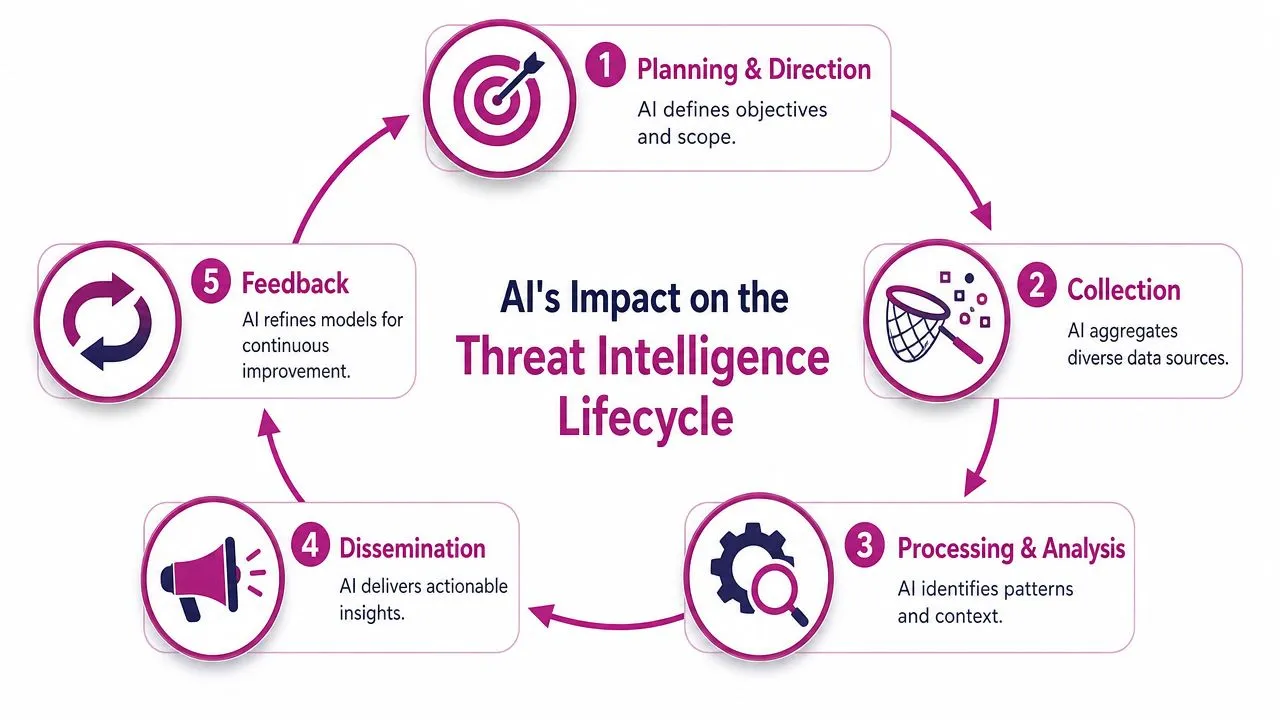
Collection at machine speed
In the collection phase, AI automates and accelerates intake from diverse sources such as open-source intelligence, dark web forums, social media, and reports, according to Palo Alto Networks’ explanation of AI in threat detection. The same source notes that AI-powered threat intelligence processes millions of logs and events instantly, enabling speed and scale beyond human capability while reducing noise and prioritizing high-fidelity alerts.
For an MSP, that means your team no longer has to wait for a human to read every advisory before deciding whether to care. The system gathers and pre-sorts input continuously.
A useful analogy comes from text analytics. In a practical guide to sentiment analysis, you can see how AI extracts signals from messy language at scale. Security teams use a similar idea. Instead of classifying positive or negative sentiment, the platform looks for attack indicators, actor behavior, and references to tools, victims, or tactics inside unstructured content.
Structure and analysis with context
Raw collection creates clutter unless it’s normalized. Through normalization, AI-native platforms become more valuable than simple feed aggregators.
According to Seceon’s cyber threat intelligence overview, AI-native platforms use Natural Language Processing and advanced pattern recognition to parse unstructured data from dark web forums, social media, and threat actor communications, then correlate indicators in real time to extract attacker tactics, techniques, and procedures for enriched alerts. The same source states that benchmark data shows AI-driven systems automate the five-phase lifecycle and integrate actionable intelligence into SIEM, SOAR, and XDR systems, accelerating incident triage and reducing time-to-mitigation by hours or days compared to manual processes.
That has a direct workflow implication. A suspicious domain mention, an exploit reference, and an endpoint event may look unrelated in isolation. Correlated together, they can indicate an active campaign against a technology stack used by one of your clients.
When teams pair this with attack surface analysis practices, the intelligence becomes even more useful. You’re not just asking whether a threat exists. You’re asking whether the client exposes the service, software, or identity path the threat targets.
Dissemination and feedback inside the stack
AI’s job doesn’t end with a confidence score. It also helps route intelligence into the right tools and teams.
That can include pushing detections into a SIEM for investigation, triggering SOAR playbooks for containment, or updating block and watch lists in XDR and email security controls. Feedback then matters because outcomes improve the system. If analysts confirm an alert was useful, noisy, or irrelevant to a client type, future prioritization gets sharper.
A healthy lifecycle works like this:
- Planning and direction define what matters most by client, asset class, or threat scenario.
- Collection brings in external and internal data at scale.
- Processing and analysis turn signals into threat context.
- Dissemination places that intelligence where operators can act on it.
- Feedback tunes the models and rules based on real investigations.
That loop is where mature teams pull ahead. They don’t just consume intelligence. They train their operations around it.
Practical Use Cases for MSPs and SMB Security Teams
The gap many security teams struggle with isn’t access to threat intelligence. It’s turning broad threat reporting into decisions for a specific client environment.
According to Intezer’s guidance on AI in threat intelligence, the most underserved angle is the lack of actionable frameworks for MSPs to operationalize AI-driven threat intelligence for client-specific risk context, rather than generic global alerts. That’s exactly the operational challenge MSPs face when one client runs Microsoft 365 with a thin IT bench, another runs an aging on-prem application stack, and a third is mostly worried about executive impersonation and brand abuse.
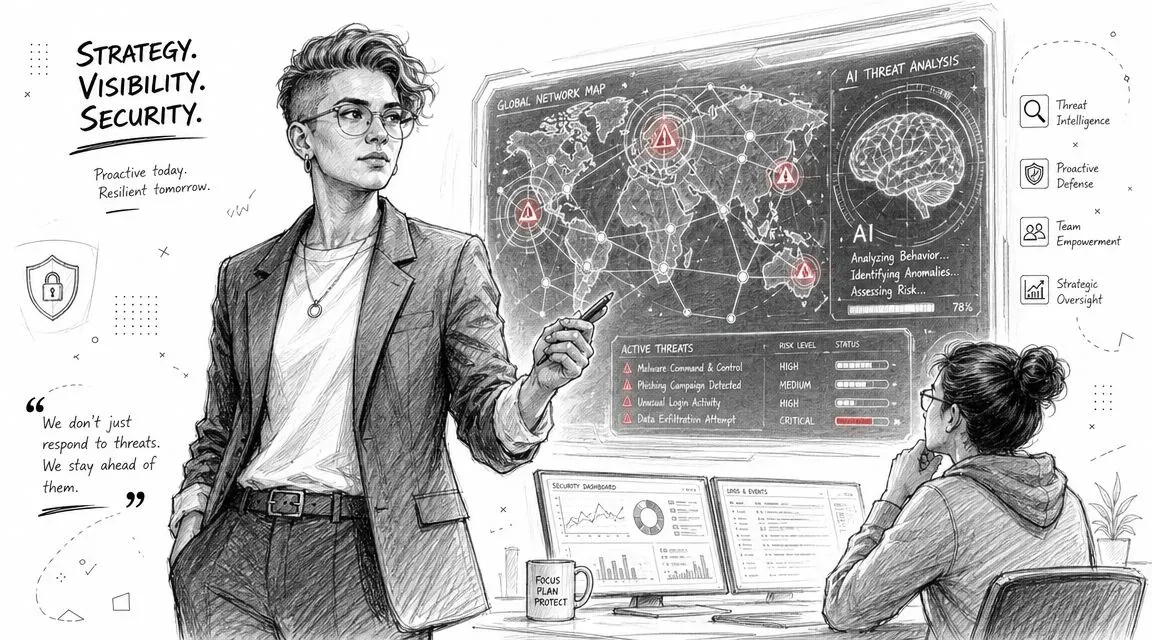
Turning generic alerts into client-specific warnings
Consider a common MSP scenario. Your platform ingests external chatter about credential theft, phishing infrastructure, and a malware operator targeting finance staff. A generic feed tells you the campaign is active. That alone doesn’t answer the client question.
Now add client context:
- Asset inventory: Which clients rely heavily on email-based approvals and shared mailboxes?
- Exposure profile: Which clients have internet-facing login portals or weak MFA coverage?
- People risk: Which executive names, finance contacts, or brand assets are likely to be impersonated?
- Business impact: Which clients would face immediate disruption if accounts payable were compromised?
Once AI maps the global signal to those local facts, the work changes. A broad campaign becomes a specific action list. Tighten email controls for one client. Watch for executive impersonation for another. Validate stolen credential exposure and reset access paths where needed.
For MSPs that already use dark web monitoring for managed service providers, this context layer is especially useful. Dark web data by itself can be noisy. Connected to real client assets and identities, it becomes actionable.
The winning move isn’t collecting more alerts. It’s shrinking the distance between a threat report and a client decision.
Service opportunities for MSPs
MSPs can package AI-powered threat intelligence into services clients understand.
Proactive threat hunting retainers work well when you define them around client risk themes rather than vague “monitoring.” A healthcare client may need more focus on identity abuse and exposed remote access. A professional services firm may care more about business email compromise and document-sharing misuse.
Quarterly security planning gets stronger when threat intelligence explains why a control investment matters now. Instead of recommending MFA hardening or email protection as a generic best practice, you can tie the recommendation to observed threat patterns that match the client’s environment.
Cross-client prioritization becomes more defensible too. MSP leaders constantly choose where analysts spend time. AI helps rank which alerts deserve immediate review based on relevance, not just severity labels from a feed.
High-value workflows for SMB security teams
SMB teams usually don’t have the luxury of investigating everything. They need narrow workflows with clear payoff.
One strong use case is patch prioritization. Don’t ask, “Which vulnerabilities exist?” Ask, “Which vulnerabilities matter in our stack and appear connected to active adversary behavior?” That focuses limited maintenance windows on the most meaningful work.
Another is identity-centric monitoring. If external intelligence points to phishing infrastructure, executive impersonation, or credential resale, your team can monitor login anomalies, email rule changes, finance workflow abuse, and unusual access patterns in the accounts most likely to be targeted.
After teams see the workflow in action, this short video offers a useful visual primer:

A third use case is client communication. AI-enriched intelligence helps you send shorter, better advisories. Clients don’t need a long write-up of every threat trend. They need to know whether they’re exposed, what changed, and what your team is doing next.
Implementation and Integration into Your Security Stack
Adopting AI-powered threat intelligence works best when you treat it as an operational design project, not a shopping exercise. The platform has to fit your workflows, your telemetry, and your client service model.
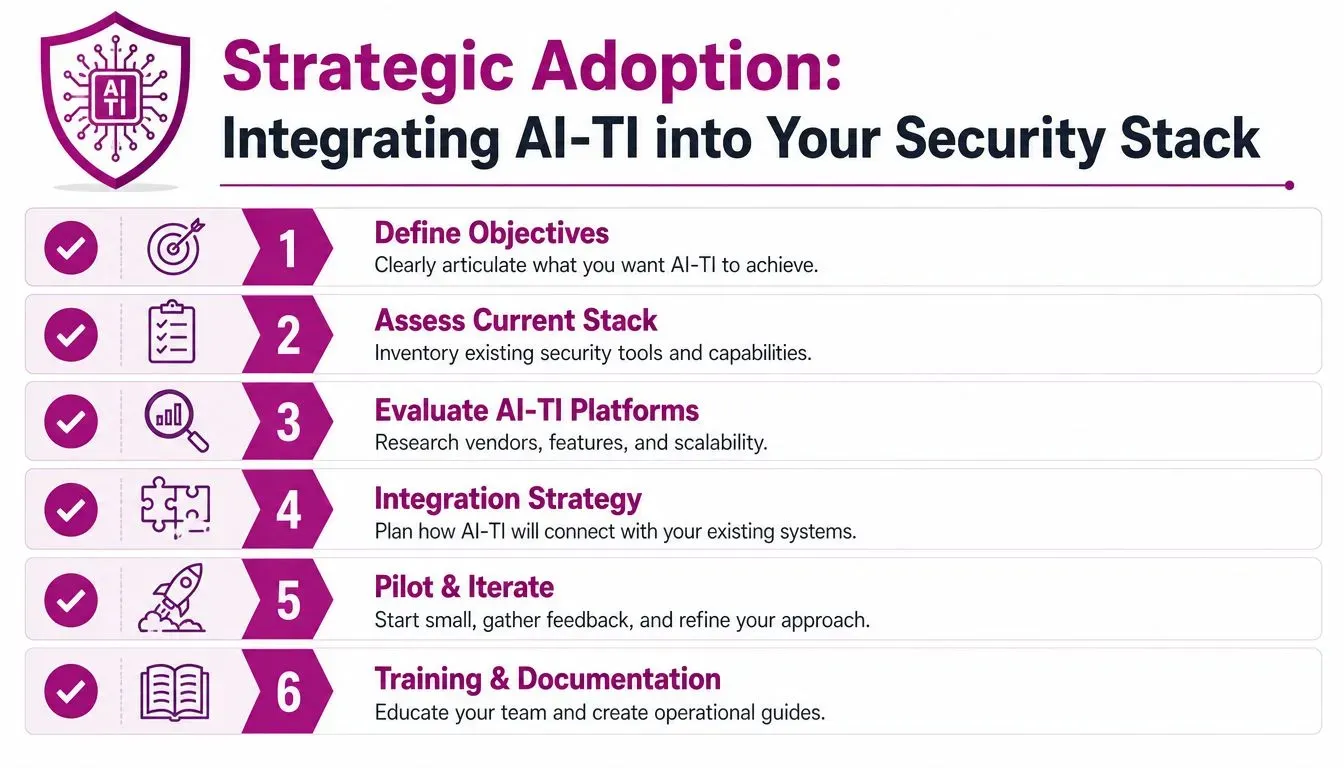
What to evaluate before you buy
Start with the data path. If a platform can’t ingest the sources you care about and deliver output into the tools your team already uses, it will become another isolated console.
Look for these traits:
- Strong ingestion coverage: The platform should handle both structured and unstructured inputs, including technical telemetry and narrative threat content.
- Clear enrichment logic: You want to understand how the system adds context, such as TTP extraction, asset matching, or severity ranking.
- Operational outputs: Prioritized intelligence should flow into your SIEM, SOAR, XDR, ticketing, and reporting processes.
- Client segmentation: MSPs need the ability to separate findings by tenant, risk profile, business unit, or service tier.
The reason integration matters is practical, not architectural. As noted earlier from Seceon’s overview, AI-driven systems can dynamically integrate actionable intelligence into SIEM, SOAR, and XDR systems and reduce time-to-mitigation by hours or days compared to manual processes. That only happens when output lands where your team already works.
How operations need to change
Tooling alone won’t fix a reactive SOC. Analyst roles need to move from “close alerts” to “validate hypotheses and drive next action.”
A workable model looks like this:
- Triage analyst reviews the AI-prioritized queue instead of starting from raw event volume.
- Threat hunter validates context by checking whether the affected client has the relevant asset, identity, or exposure.
- Automation handles repeatable actions such as enrichment, watchlist updates, or ticket creation.
- Senior analyst decides containment or escalation when the intelligence points to active risk.
Operator advice: If analysts still spend most of their day copying indicators between tools, your AI layer hasn’t reached the workflow that matters.
This is also where TTP extraction becomes valuable. AI can parse reports and discussions to identify attacker behavior patterns, not just atomic indicators. That gives defenders something more durable to hunt for across changing infrastructure and campaigns.
A rollout model that keeps trust high
The fastest way to lose trust in AI is to deploy it wide before your team understands its behavior. Start with a pilot bounded by one client segment, one threat category, or one workflow such as phishing-related intelligence or exposed credential monitoring.
Then document three things carefully:
- What the system flags
- What analysts confirm or dismiss
- What action follows each confirmed scenario
Run human review in parallel long enough to identify noise patterns and blind spots. Tune thresholds, tagging rules, and routing logic before you expand coverage.
A good implementation path usually follows this order:
| Stage | What happens | Why it matters |
|---|---|---|
| Pilot | Use one narrow use case | Builds confidence without flooding the team |
| Validation | Compare AI output with analyst review | Exposes false assumptions early |
| Integration | Connect to SIEM, SOAR, XDR, and ticketing | Removes swivel-chair work |
| Expansion | Add more clients and scenarios | Scales only after workflows are proven |
| Governance | Document ownership and response rules | Prevents ambiguity during incidents |
The best deployments are boring in the right way. Intelligence appears in the stack, analysts know what it means, and response starts faster without adding chaos.
Measuring Success and Navigating the Future
A lot of teams struggle to prove the value of threat intelligence because the best outcome is often a non-event. Nothing happened. The phishing wave didn’t land. The exposed account got reset before abuse. The client never saw the attack path develop.
What success actually looks like
Measure workflow improvement, not vendor promises.
Useful indicators include:
- Detection speed: Are analysts recognizing relevant threats sooner?
- Response speed: Is the time between validation and action getting shorter?
- Alert quality: Are investigators seeing fewer dead-end escalations?
- Client relevance: Are advisories increasingly tied to actual client assets and exposures?
- Preventive actions: How often does intelligence drive patching, blocking, takedowns, credential resets, or control updates before an incident occurs?
Keep one rule in mind. If the team can’t show which operational decision changed because of the intelligence, the program still needs work.
Common mistakes to avoid
The first mistake is treating AI like a final authority. It isn’t. Models inherit the strengths and weaknesses of their data, and attackers adapt. Human validation still matters, especially when the decision affects business continuity, legal exposure, or customer communication.
The second mistake is measuring output volume. More indicators, more alerts, and more reports don’t prove maturity. They often prove the opposite.
The third mistake is forgetting incident learning. If your team handles a real compromise and never feeds those findings back into future detection and prioritization, the intelligence program stalls. Post-incident review should directly influence what the system watches next. That’s also why clear steps after a data breach matter operationally. Recovery actions, communication patterns, and root-cause findings should refine future threat monitoring.
AI-powered threat intelligence works best when humans stay in the loop for interpretation, escalation, and business judgment.
The near-term future isn’t analyst replacement. It’s analyst amplification. Teams that use AI well won’t win because they have the most feeds. They’ll win because they can convert outside threat signals into client-specific action faster, more consistently, and with less fatigue.
If you want to turn external threat signals into client-ready workflows, InsecureWeb gives MSPs and security teams a practical way to monitor the open web, dark web, brand impersonation, vulnerabilities, and reputation risks, then connect those findings into the tools and services they already run.