Data Breach News12 min read
Zero Day Attack Meaning: Protect Your Business in 2026
By InsecureWeb Team
This report reflects observations of dark web activity. InsecureWeb makes no representations regarding the accuracy of this data.
You’re probably dealing with the same tension most IT managers face right now. The business wants uptime, users want speed, vendors want patch windows, and your team wants fewer surprises. Then a headline drops about an exploit with no patch, no signature, and no warning, and suddenly the question isn’t whether your stack is “secure enough.” It’s whether you can detect trouble before it spreads.
That’s the reason people search for zero day attack meaning. They’re not looking for a glossary entry. They’re trying to answer a harder business question: what happens when an attacker gets the first move and your team starts behind.
For MSPs, MSSPs, and SMB IT teams, zero-day risk is worse because resources are limited. You may not have a large SOC, a deep bench of reverse engineers, or time to chase every alert. You still need a practical response. You need to know what a zero-day attack is, why it’s different from ordinary vulnerability management, and which controls effectively help when no patch exists yet.
What Is a Zero-Day Attack Really
Start with the simplest analogy
Think of a building with a hidden side entrance that nobody on the security team knows exists. The lock installer missed it, the guards don’t watch it, and the alarm system doesn’t cover it. An intruder finds that door first and uses it before anyone even realizes there’s an opening.
That’s the easiest way to understand zero day attack meaning in practical terms. A zero-day attack happens when an attacker finds a software, hardware, or firmware flaw before the vendor or defender has fixed it, then uses that flaw to get in.
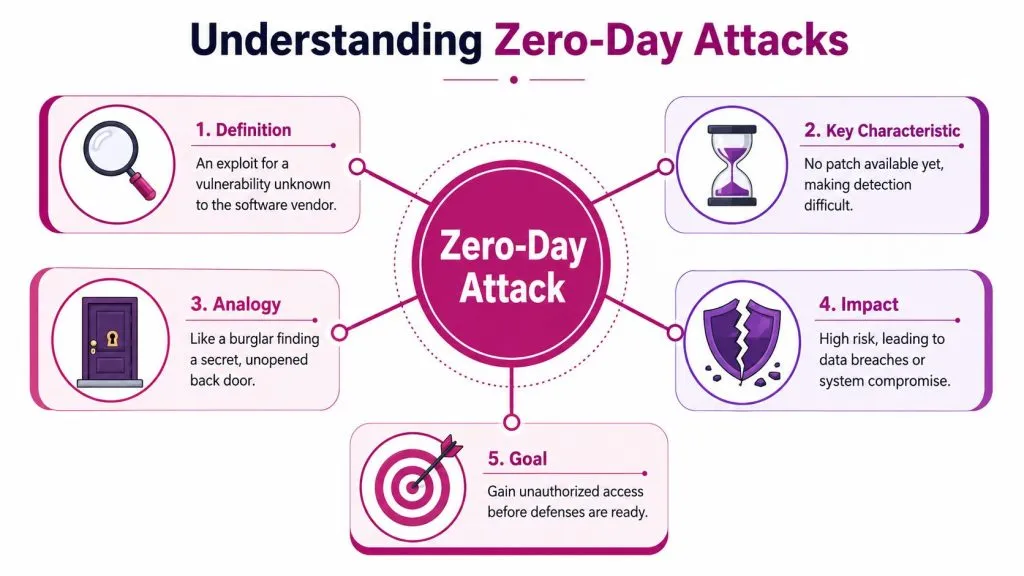
A key point trips people up. “Zero-day” doesn’t mean the attack lasts one day. It means defenders had zero days to prepare because the flaw was unknown at the time of exploitation. As Acronis explains in its zero-day overview, the pattern is direct: an attacker discovers a hidden flaw before the vendor, develops an exploit, and deploys it against targets before a patch or signature exists.
Practical rule: If your main control depends on known bad files, known indicators, or published patches, a true zero-day attack starts outside that control set.
The three terms people mix up
Security teams often use three terms as if they mean the same thing. They don’t.
| Term | Plain meaning | Why it matters |
|---|---|---|
| Vulnerability | The hidden weakness | This is the flaw in code or system design |
| Exploit | The method or code used to abuse the weakness | This is the weapon an attacker builds |
| Attack | The real-world use of the exploit against a target | This is the intrusion itself |
That distinction matters for response. You don’t patch an exploit. You patch the underlying vulnerability. You don’t detect a vulnerability by waiting for a vendor bulletin. You often detect the attack through strange behavior on endpoints, identities, or network paths.
Here’s the sequence in plain language:
- A flaw exists undetected. Nobody on the defender side is acting on it because they don’t know it’s there.
- An attacker finds it first. That creates an information advantage.
- They build or obtain an exploit. This turns a weakness into an access path.
- They use it in a live environment. That’s the zero-day attack.
For IT managers, the “so what” is simple. A zero-day threat isn’t dangerous just because it’s advanced. It’s dangerous because your normal decision cycle starts late. Your tools may be healthy, your patch process may be solid, and you can still miss the first strike because the problem wasn’t known yet.
The Anatomy of a Zero-Day Threat Lifecycle
How the exposure window forms
A zero-day threat has a lifecycle, and the most dangerous part is the stretch when the attacker knows more than the defender. That’s the exposure window your team has to survive.
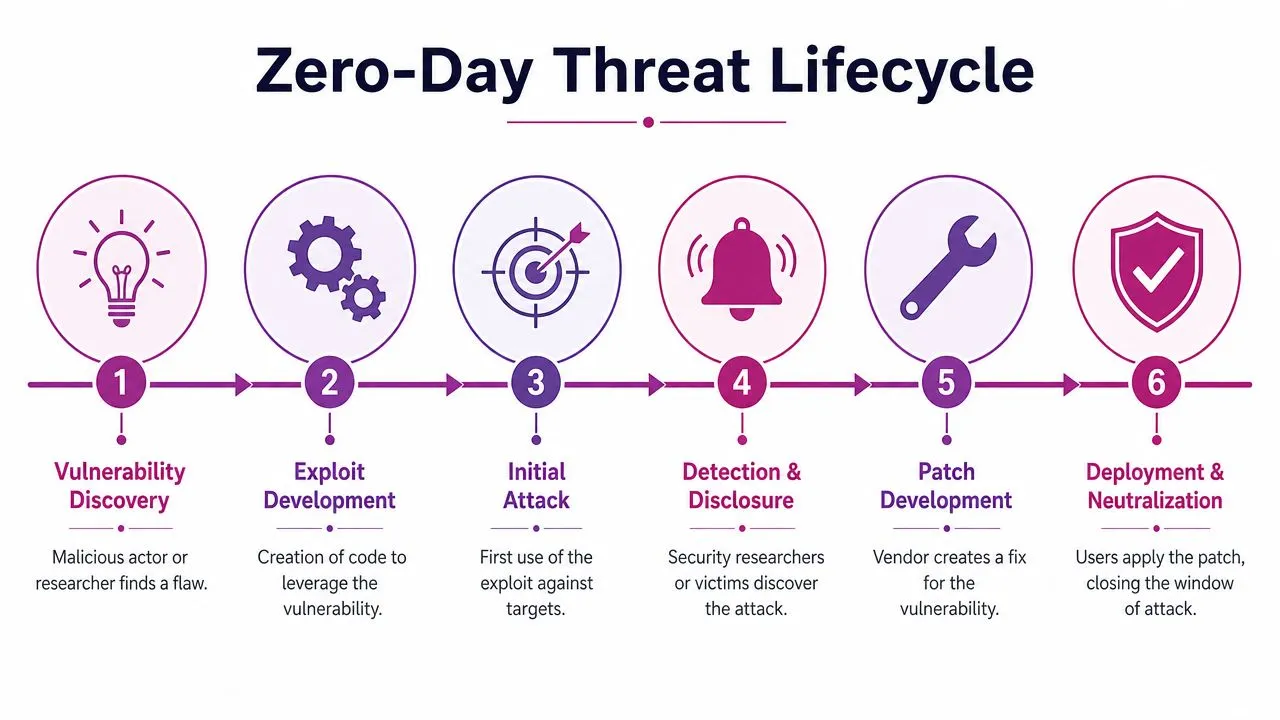
The formal definition helps here. Rapid7’s explanation of the NIST definition describes a zero-day attack as exploitation of a previously unknown vulnerability for which no patch or remedy exists at the time of attack. For defenders, that means exactly what it sounds like: you have no prebuilt fix ready when the attack starts.
The lifecycle usually looks like this:
- Discovery by an attacker or researcher
Someone finds a flaw. If that person is malicious, the clock starts against you immediately. - Exploit development
The flaw becomes usable, transforming theory into operational risk. - Initial intrusion
The exploit gets used against actual systems. - Detection or disclosure
Victims, researchers, or vendors finally realize something is wrong.
Before going further, this short video gives a helpful visual walkthrough of how this kind of attack unfolds.

After disclosure, the work shifts to the defender:
- Patch development by the vendor
- Testing and deployment by customers
- Cleanup, monitoring, and validation by IT teams
The hardest part of a zero-day incident isn’t always the exploit itself. It’s the silent period before your team knows what to look for.
Why this matters to service providers
MSPs and MSSPs don’t defend one environment. They defend many. That changes the lifecycle from a technical timeline into an operational problem.
If one client runs exposed edge infrastructure, another has weak segmentation, and a third delays updates for business reasons, the same zero-day can produce very different outcomes. Your challenge isn’t only to patch when a fix appears. It’s to recognize suspicious patterns during the phase when there is no vendor guidance yet.
That’s why the phrase “zero days” matters so much. It defines the defender’s disadvantage. No matter how mature your patching process is, patching starts after discovery. During the unknown phase, detection discipline, segmentation, logging, and identity controls do the heavy lifting.
For small teams, this changes the order of priorities. You don’t build your entire program around perfect prevention. You build for fast detection, contained blast radius, and clear decision-making under uncertainty.
Real-World Examples and Business Impact
When the target is operations, not just data
Some zero-day attacks matter because they steal information. Others matter because they interrupt the business itself.
Stuxnet is the classic example. It showed the world that a zero-day attack could move beyond office systems and affect industrial processes. For IT managers, the lesson still holds. If a hidden flaw gives an attacker access to systems that control production, logistics, or service delivery, the problem isn’t limited to cybersecurity. It becomes an operations issue.
Another example many teams remember is Log4Shell. Even though organizations experienced it in different ways, the business effect was immediate. Security teams had to identify where the vulnerable component existed, assess exposure across many systems, and make decisions before every dependency path was fully visible. That’s the nightmare scenario for SMB IT groups that don’t maintain a full software inventory.
Why SMB teams should care
A common mistake is assuming zero-days are mainly a big-enterprise problem. The current threat picture says otherwise. In 2025, 90 zero-day vulnerabilities were actively exploited in the wild, and 48% targeted enterprise technologies, which Vectra describes as an all-time high driven by attacks on edge infrastructure and internal networks in its zero-day threat analysis.
That matters to MSPs and SMB teams because enterprise technologies often show up in midmarket environments too. Remote access appliances, collaboration systems, file transfer tools, and line-of-business platforms are common across client estates. Attackers don’t need your company to be famous. They need your software stack to be exposed and your response to be slow.
Business impact usually shows up in a few predictable forms:
- Operational disruption because teams isolate systems, take services offline, or suspend access
- Data exposure when attackers move from initial access to collection or exfiltration
- Emergency labor as internal teams and outside partners scramble to scope and contain the issue
- Trust damage when customers, partners, or leadership lose confidence in your control environment
You can see how fast public trust becomes part of the incident in examples of large breaches such as the Twitch breach and leaked data incident. Even when the initial exploit path differs, the business conversation quickly shifts from technical root cause to visibility, accountability, and fallout.
For service providers, that’s the takeaway. A zero-day event isn’t just a vulnerability problem. It’s a client communication problem, an operations problem, and often a reputation problem at the same time.
Strategies for Zero-Day Detection and Mitigation
Why signature-based tools fall short
Traditional antivirus still has value. Firewalls still matter. Patch management still matters. But none of those controls can fully solve a zero-day problem on their own.
The reason is straightforward. Signature-based controls depend on something already being known. A true zero-day starts before known indicators are available. Splunk notes in its zero-day defense guidance that these attacks follow a predictable kill chain from reconnaissance to command and control, and that behavioral analysis is the most effective technical approach for detection because signature-based detection is impossible at the outset.
That changes what your team should watch for. Instead of asking, “Do we know this file hash?” you ask, “Why is this process spawning in this context?” Instead of asking, “Is this malware family on a blocklist?” you ask, “Why is this account accessing systems it doesn’t usually touch?”
What a lean layered defense looks like
Small teams need a defense model that works under pressure and doesn’t assume infinite staff. The practical version is layered, behavior-focused, and containment-oriented.
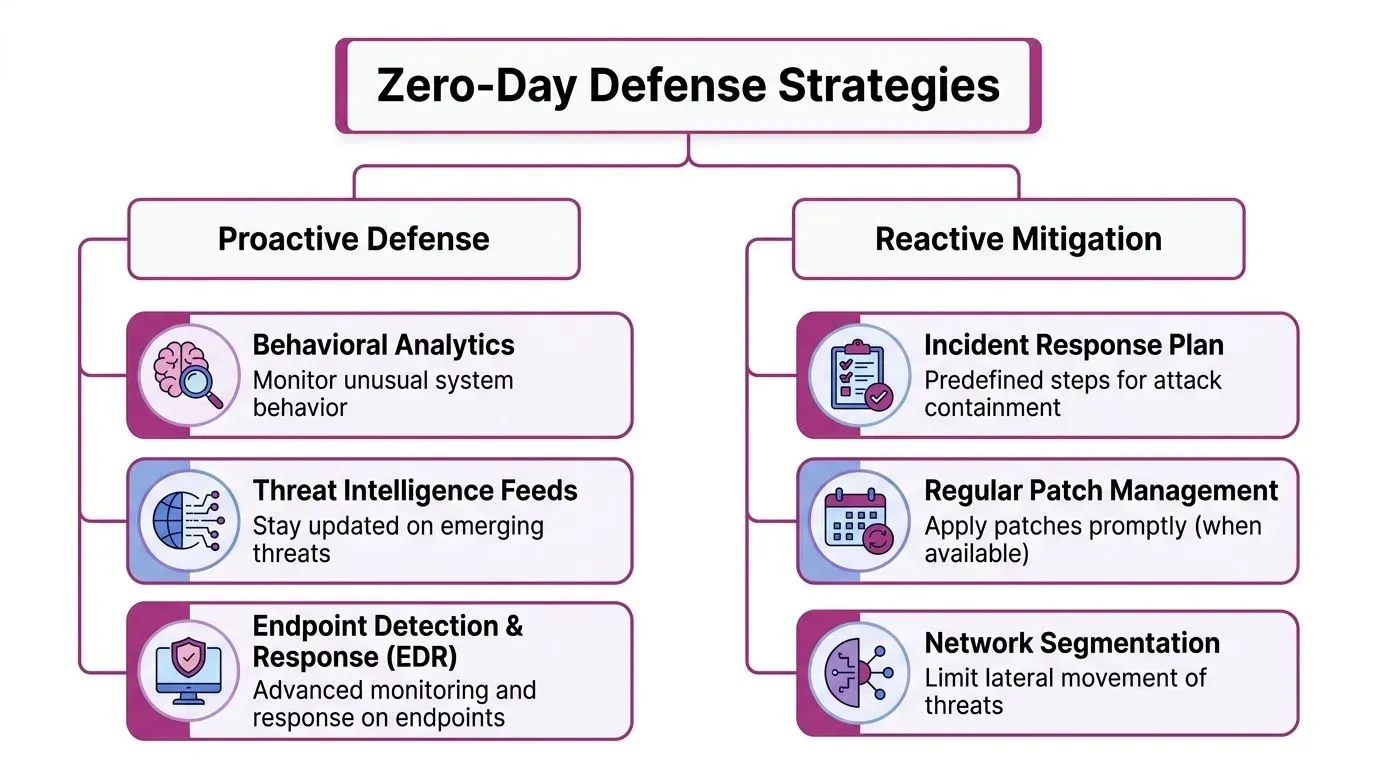
A workable stack usually includes:
- Behavioral monitoring on endpoints
EDR tools help your team spot suspicious parent-child process chains, privilege escalation, persistence mechanisms, and unexpected execution patterns. - Network segmentation
If an attacker lands on one system, segmentation makes it harder to roam freely. This is one of the most cost-effective ways to reduce damage after initial compromise. - Aggressive patch management for known issues
You can’t patch an unknown zero-day in advance, but attackers often combine unknown and known weaknesses. Closing known gaps reduces the attacker’s room to maneuver. - Identity controls and least privilege
Initial access hurts less when admin rights are limited and sensitive systems require tighter verification.
A mature zero-day posture doesn’t assume you’ll stop every first action. It assumes you can catch abnormal behavior quickly and prevent lateral movement.
For teams formalizing their response process, this guide to the incident response lifecycle and roles is useful because zero-day events punish vague ownership. If nobody knows who approves containment, who handles communications, and who validates recovery, response slows down at the exact moment speed matters most.
It also helps to think in terms of exposure, not just alerts. Attack surface visibility gives context to every suspicious event. That’s why a disciplined review of your attack surface analysis process can improve zero-day readiness even before a specific exploit is known.
For MSPs and SMB IT teams, I’d prioritize in this order:
- Get endpoint visibility first
- Segment critical systems next
- Reduce privilege everywhere you can
- Tighten patch SLAs for high-risk systems
- Rehearse containment decisions
That order works because it reflects reality. During an unknown exploit, speed of visibility and containment usually matters more than elegance.
Building a Proactive Defense Stack for MSPs
Choose tools that reduce blind spots
MSPs can’t sell “zero-day prevention” as if it’s absolute. Nobody can. What you can build is a stack that shortens detection time, reduces exposure, and gives clients evidence that you’re watching the right places.
A proactive stack for service providers usually combines several categories:
| Tool category | What it helps you do | Why it matters for zero-day risk |
|---|---|---|
| Vulnerability scanning | Find known weaknesses and exposed services | Reduces easy follow-on paths attackers often use after initial access |
| Threat intelligence | Track emerging exploitation patterns and affected technologies | Improves prioritization before your clients ask questions |
| Dark web monitoring | Detect stolen credentials or early signs of exposure | Helps catch downstream abuse tied to compromised identities |
| Penetration testing | Validate whether controls work in the real world | Reveals gaps policy reviews often miss |
This approach lines up with what mature platforms emphasize in public trust documentation such as Supercenter platform security. Buyers increasingly want evidence that vendors and partners think in layers, not isolated tools. That same expectation now applies to MSP security services.
Build services clients can understand
Many SMB clients don’t buy based on exploit mechanics. They buy based on business outcomes. They want to know whether you can help them answer four questions fast:
- Are we exposed
- Did anything happen
- How far could it spread
- What do we do next
That’s why the best MSP security offerings package technical controls into understandable service motions.
One useful model looks like this:
- Continuous external monitoring for emerging risks tied to domains, credentials, and impersonation
- Routine vulnerability review to reduce known weaknesses before attackers chain them
- Periodic adversary-style testing to validate that segmentation, identity, and endpoint controls work under pressure
- Clear incident playbooks so the client knows who gets called and what decisions happen first
A lot of providers undervalue external signals. They focus only on internal telemetry and miss what’s already visible outside the perimeter. For MSPs serving multiple clients, that’s a mistake. External exposure often gives the earliest clue that a client is entering a higher-risk window. That’s one reason many providers now treat dark web monitoring for managed service providers as part of the core stack rather than an add-on.
Clients rarely ask for “better telemetry.” They ask for fewer surprises, faster answers, and less business disruption. Your stack should be designed around that expectation.
The strongest proactive defense stack isn’t the one with the most logos. It’s the one your team can operate every day across many customers. If the alert volume overwhelms your analysts, if the findings don’t map to actions, or if the tools don’t support triage at client scale, the stack looks better on paper than it performs in production.
Conclusion Shifting from Reactive to Proactive Security
A zero-day attack isn’t just another vulnerability story. It’s a reminder that defenders often enter the fight after the first move has already been made.
That’s the practical meaning behind the term. The issue isn’t only that a flaw exists. It’s that the flaw is exploited before your team has a patch, a signature, or vendor guidance. For MSPs, MSSPs, and SMB IT teams, that reality changes how security has to work. You can’t rely only on blocking known bad things. You need visibility into behavior, tighter segmentation, disciplined identity control, and an incident process people can execute under pressure.
The mindset shift matters more than any single tool. Stop framing zero-day risk as a rare edge case. Treat it as part of normal operating conditions in modern IT. Build for detection. Build for containment. Build for recovery.
Teams that do that won’t eliminate uncertainty. They will handle it better, communicate it better, and protect the business more effectively when the unknown shows up.
If you want to strengthen that proactive posture, InsecureWeb helps MSPs, security teams, and service providers monitor external threats, spot exposed credentials and impersonation risks, scan for vulnerabilities, and test defenses before attackers do. It’s a practical way to add earlier warning and clearer visibility to the parts of the attack surface many organizations struggle to watch consistently.