It’s 8:17 a.m. and a client calls before your team has finished the first coffee. Their files are encrypted, staff can’t log in to Microsoft 365, the EDR console is noisy, and the office manager wants to know whether they should shut everything down. Someone opens the incident response plan. It says to “assess impact, notify stakeholders, and begin containment.” That’s not enough.
For MSPs and SMBs, this is the crucial gap. Many organizations don’t fail because they lack a policy. They fail because they don’t have a usable incident response playbook that tells the right person what to do next, in what order, with what authority, and under what conditions to escalate. A generic plan sounds fine in a compliance review. It falls apart during a live incident.
Why Your Team Needs More Than a Generic Plan
A lot of SMB incidents start with confusion, not malware. One admin isolates a laptop. Another starts restoring from backup before anyone confirms scope. The owner asks whether customers need to be notified. The MSP is waiting for approval to disable accounts. Meanwhile, the attacker is active in email, cloud storage, and identity.
That kind of drift is why a high-level plan no longer works on its own. Modern intrusions don’t stay in one place. Palo Alto Networks’ Unit 42 reported that 87% of intrusions spanned multiple attack surfaces, and 67% involved three or more surfaces, including endpoints, networks, cloud, SaaS, and identity systems, which is exactly why siloed response breaks down fast in real environments (Unit 42 incident response findings).
The difference between a plan and a playbook
An incident response plan answers broad governance questions. It defines who owns response, who approves external communications, and when legal or leadership gets involved. You need that.
A playbook handles the operational details the plan skips. It tells the analyst when to disable sessions, when to preserve evidence, when to stop making changes, when to call the client contact, and when to move from “suspicious” to “confirmed.”
Practical rule: If your team has to debate basic actions during containment, you have a plan, not a playbook.
For MSPs, the gap is even sharper. You may know how to contain a business email compromise, but the harder question is whether you’re allowed to reset credentials, block forwarding rules, or contact the client’s cyber insurer without explicit approval. A battle-tested incident response playbook solves those permission and sequencing problems before the incident begins.
Generic documents don’t survive client reality
Templates copied from a framework or vendor blog often assume one company, one toolset, one chain of command, and one communications owner. MSPs rarely have that luxury. Each client has a different stack, tolerance for downtime, backup maturity, and decision-maker availability.
Healthcare clients are a good example. If you support clinics or business associates, your playbook needs tighter handling around access, data exposure review, and communication discipline. Teams looking to harden those processes should also review practical healthcare data security practices because they expose the operational controls that often determine whether a response stays contained or turns into a reporting problem.
Here’s what generic plans usually miss:
- Authority boundaries: Who can approve account lockouts, host isolation, or emergency vendor engagement.
- Client-specific triggers: Which alerts are noisy and which ones require immediate escalation.
- Tool-specific actions: What your team can do in Microsoft 365, Google Workspace, an EDR console, or a firewall.
- Communication timing: Who gets called first when the technical team finds evidence that the incident is broader than originally reported.
A usable playbook reduces hesitation. That matters most when small teams are under pressure and every delay creates more room for attacker movement.
The Anatomy of an Effective Incident Response Playbook
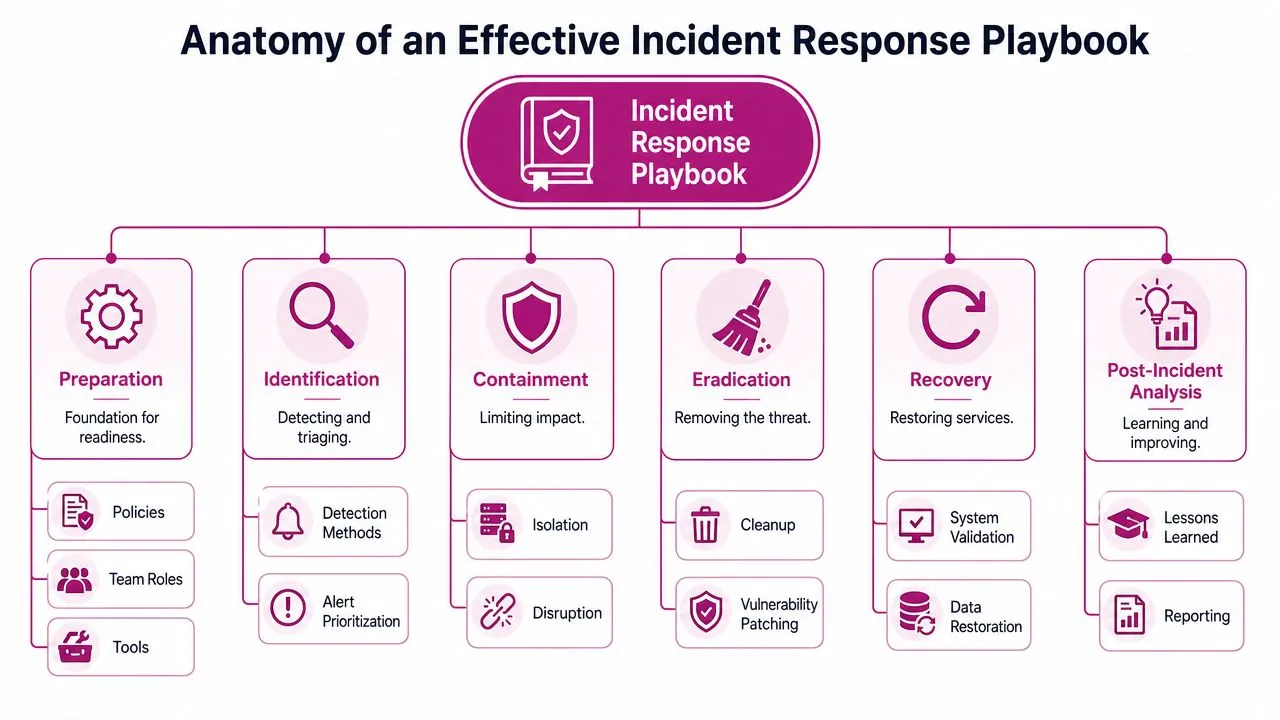
The strongest playbooks are structured around a sequence responders can follow under pressure. CISA’s Cybersecurity Incident Response Playbook uses the six NIST lifecycle phases of preparation, detection and analysis, containment, eradication, recovery, and post-incident activity, which makes it a practical benchmark for building documents that minimize disruption and restore operations cleanly (CISA benchmark summary).
What the playbook must contain
Start with preparation. Here, most weak playbooks show their age. Preparation isn’t a policy statement. It’s the part that lists tooling, contact paths, evidence handling expectations, backup decision points, and approval authority. If those details are missing, everything downstream gets slower.
In detection and analysis, the playbook should define what counts as an initiating event. That could be an EDR alert, impossible travel event, mailbox forwarding rule, suspicious OAuth consent, ransomware note, or user report. It should also define who validates the signal and what data they must collect before declaring an incident.
A practical structure looks like this:
| Phase | What belongs in the playbook |
|---|---|
| Preparation | Contacts, systems in scope, authority matrix, evidence handling, tooling access |
| Detection and analysis | Trigger conditions, triage steps, severity rules, false-positive checks |
| Containment | Immediate actions, approval gates, isolation options, short-term workarounds |
| Eradication | Root cause removal, credential resets, malware cleanup, vulnerability closure |
| Recovery | Restore sequence, validation tests, business sign-off, monitoring period |
| Post-incident activity | Lessons learned, control updates, owner assignments, version changes |
What good structure looks like in practice
Good playbooks are short where they can be and precise where they must be. They don’t bury urgent actions in long prose. They separate required steps from supporting notes.
For example, containment should answer operational questions fast:
- Can the SOC isolate endpoints immediately, or does the client need to approve first?
- If identity is involved, who disables sessions and resets credentials?
- If a mailbox is compromised, who reviews inbox rules and delegated access?
- If backups exist, who decides whether they are safe to use?
That last point matters more than many teams expect. Recovery decisions often get made too early. If the attacker still has identity access, “restoring” can reintroduce the same problem into a clean environment.
A playbook should read like an emergency procedure, not like a control framework.
Communication also belongs inside the operational flow. Don’t put it in a separate policy appendix and assume people will find it. If legal review is required before external notification, the playbook should say exactly when that handoff happens. If executives need an update at incident declaration, write the trigger into the workflow.
For teams that want to strengthen early signal collection before an incident is fully confirmed, dark web monitoring benefits for security teams are worth evaluating as part of preparation and detection. It’s one of the few controls that can give responders context before a user report or endpoint alert fills in the rest.
One more practical point. The best playbooks assume imperfect staffing. If your primary contact is on leave, or the client’s IT manager is unreachable, the document still needs a path forward. Named backups, approval alternatives, and fallback communication channels aren’t administrative extras. They’re what keep a response moving.
Creating Your Playbook from the Ground Up
Playbook writing is often made harder than it needs to be. Many approach it by starting with formatting, policy language, or a giant template. Start with the incident itself. Ask one question first: what event causes this playbook to begin?
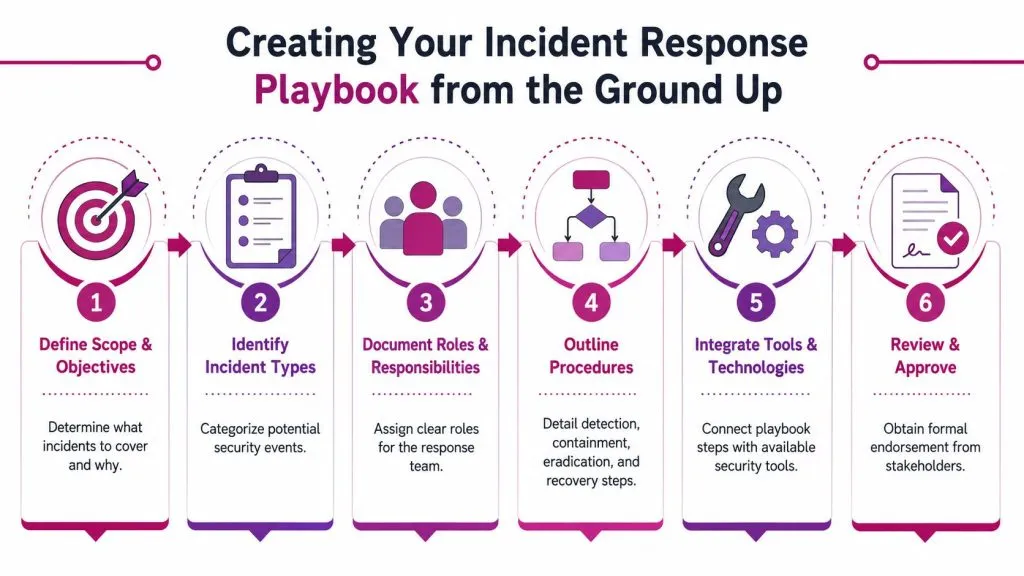
A solid methodology defines the initiating condition, lists all possible actions and dependencies, separates required actions from optional ones, builds the core workflow from required steps, and sets clear end states such as resolved or escalated (structured playbook methodology). That sequence works because it forces you to design for action, not documentation.
Start with incidents you actually see
Don’t try to write ten playbooks in a week. Build the first few around incidents your team handles most often.
Good starting categories for MSPs and SMBs include:
- Ransomware activity involving endpoint encryption, suspicious lateral movement, or mass file modification.
- Business email compromise with account takeover, forwarding rules, or payment fraud risk.
- Malware or remote access tool infection detected by endpoint tooling or user behavior.
- Identity compromise tied to suspicious sign-in patterns, MFA fatigue, or unauthorized app consent.
- Data exposure or suspected breach where access logs, downloads, or credential abuse suggest unauthorized access.
If you need an outside reference point while drafting, this guide on creating an incident response playbook is useful because it reinforces the difference between broad planning and actionable, scenario-based steps.
Write the workflow before you write the prose
The fastest way to build a workable incident response playbook is to draft it as a decision flow, not as paragraphs. Use plain language. One action per line. Add approvals only where they’re really needed.
A simple authoring sequence looks like this:
- Define the trigger: “EDR detects ransomware behavior on a production workstation” is better than “malware event occurs.”
- Set the first responder action: isolate host, capture relevant details, open incident record, notify incident lead.
- Mark dependencies: if the device hosts a critical application, contact the application owner before shutdown.
- Separate mandatory from optional: session revocation may be mandatory. Deep forensic image collection may be optional depending on severity and client retainer terms.
- Declare end states: resolved, transferred to client, escalated to legal, escalated to insurer, or moved to a separate breach-response workflow.
Here’s a compact example:
| Step | Required or Optional | Owner | End condition |
|---|---|---|---|
| Validate alert against endpoint telemetry | Required | SOC analyst | Confirmed or false positive |
| Isolate affected host | Required | SOC or client IT | Host removed from network |
| Review adjacent accounts and sessions | Required | Identity admin | Active access risk reduced |
| Launch deeper forensic collection | Optional | IR lead | Evidence preserved |
| Notify client executives | Conditional | Account lead | Severity threshold met |
A lot of teams also benefit from documenting what not to do. Don’t reimage a system before evidence is collected if there’s a chance you’ll need to understand scope. Don’t restore from backup until identity and persistence questions are answered. Don’t let multiple people communicate externally from different email threads.
Build in modern validation steps
The playbook shouldn’t stop at classic containment. Modern response often requires checking whether the attacker can pivot somewhere else while the team is focused on the obvious issue. That’s where validation steps belong.
For example, after a confirmed breach involving identity or a public-facing application, the playbook can trigger targeted testing to look for adjacent weaknesses, exposed credentials, or paths the attacker may still have. If the incident may involve regulated data or customer information, teams should also review a practical checklist for steps after data breach so the response doesn’t drift into pure technical cleanup while legal and business obligations lag behind.
This is also where AI-guided penetration testing fits well inside a modern playbook. Used carefully, it can help a team validate containment assumptions during an incident. If a test reveals that the same vulnerable service is reachable elsewhere, or that backup systems expose the same weakness, the playbook should tell the team to widen containment before recovery proceeds.
Before you publish a draft internally, walk through one real incident from the past year. If the playbook doesn’t match how your tools, clients, and responders work, it isn’t finished.
Later in the drafting process, it helps to hear how another practitioner frames the build process:

Adapting Playbooks for MSP and MSSP Environments
Most published guidance assumes the responder owns the environment. MSPs and MSSPs usually don’t. You may manage security tooling, but the client owns the systems, the business risk, and the final authority. That difference changes how the incident response playbook must be written.
A 2025 CM-Alliance report found that 78% of MSSPs struggle with playbook portability when onboarding new clients, largely because generic templates don’t define third-party escalation triggers or responsibility boundaries. That tracks with what service providers run into every day. The problem isn’t writing one good playbook. The problem is making it usable across many clients without rewriting everything from scratch.
Portability is the real design problem
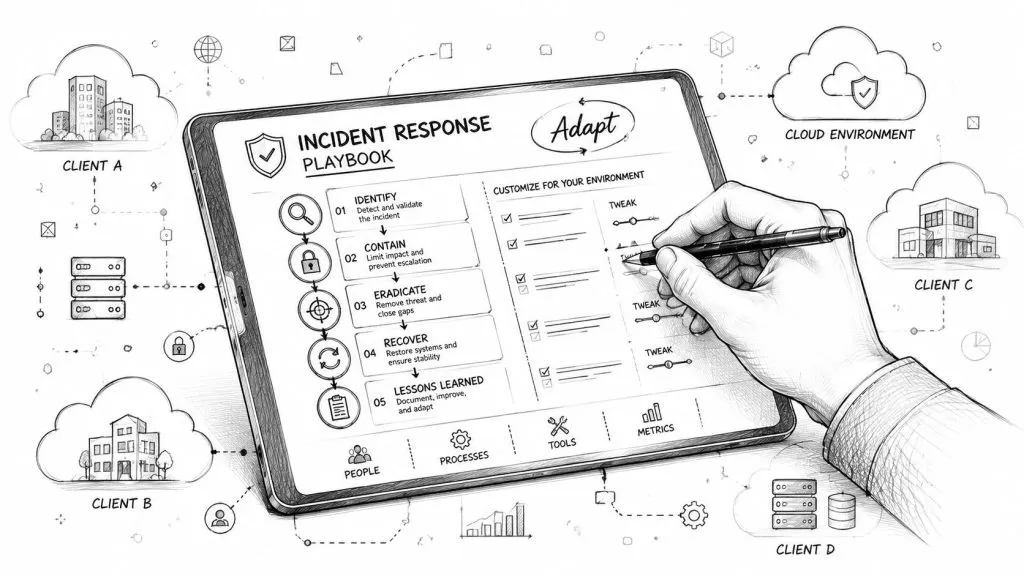
A portable playbook has two layers. The first layer is your master operational model. That includes common logic your team uses across all clients, such as severity levels, triage discipline, evidence handling, and internal escalation within the MSP or MSSP.
The second layer is a client overlay. That’s where you record tenant-specific contacts, tool access, business-critical assets, approval rules, notification preferences, and prohibited actions. The overlay is what keeps the master document reusable.
If your analysts need to remember client exceptions from memory, portability has already failed.
A strong client overlay usually includes:
- Authority map: what your team can do without approval, what needs approval, and who can grant it.
- Environment notes: core identity platform, backup owner, endpoint stack, firewall ownership, cloud providers.
- Business constraints: systems that can’t be isolated during business hours without executive sign-off.
- Communication path: who gets called for critical incidents, after-hours incidents, and suspected data exposure.
- Third-party dependencies: cyber insurer, legal counsel, cloud consultant, compliance lead, or forensic retainer.
What to standardize and what to customize
MSPs save time when they standardize response mechanics but customize decision points. Don’t customize every technical action. Customize the parts that create friction.
This split works well:
| Standardize across clients | Customize per client |
|---|---|
| Severity framework | Named approvers |
| Core triage checklist | Allowed containment actions |
| Evidence handling process | Tool access and tenant permissions |
| Internal analyst handoff rules | Critical assets and downtime tolerance |
| Executive update format | Regulatory and contractual contacts |
That approach lets your team respond consistently while respecting client differences. It also makes onboarding cleaner because the sales-to-operations handoff has a defined place to store response authority, not just technical inventory.
For service providers building managed security offerings, dark web monitoring for managed service providers can complement this portable model by giving client-specific exposure data that fits naturally into preparation and detection overlays.
One more operational reality matters here. Shared-brand response requires explicit agreement on who speaks for whom. If your SOC sees signs of compromise in a client tenant, can your team contact the client’s users directly? Can you suspend accounts? Can you notify a downstream vendor? Those answers belong in the playbook package and the contract, not in an email search during the incident.
The MSPs that handle incidents well usually do one thing differently. They treat response authority as a design input, not a legal footnote.
Testing Maintaining and Improving Your Playbooks
A playbook can look polished and still fail on the first real incident. The usual reasons are familiar. The instructions are too long, key decisions require people who aren’t available, or the document still reflects tools and responsibilities that changed months ago.
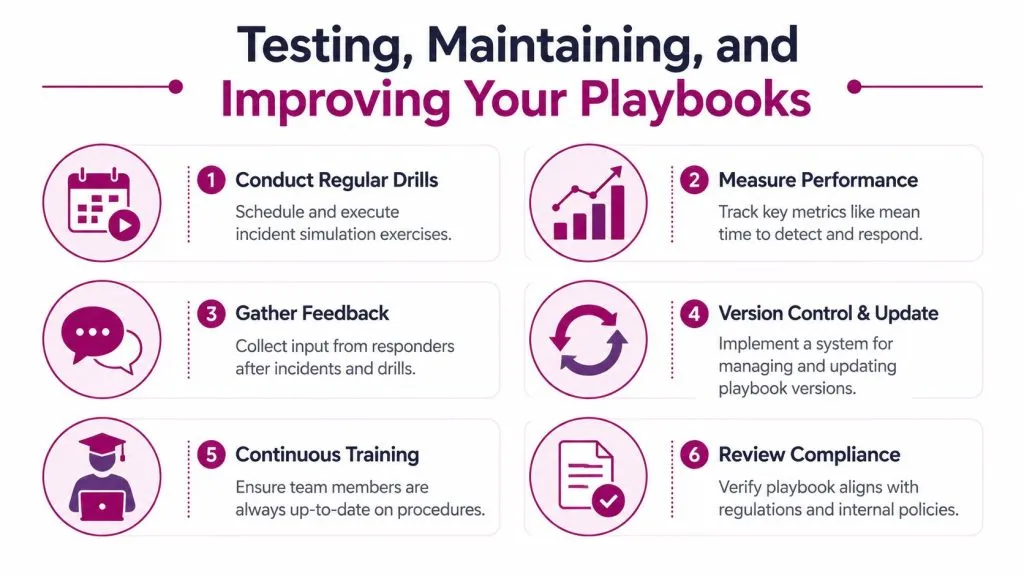
That’s why testing matters as much as writing. Detailed playbooks can deliver a 58% improvement in response speed and efficiency, but teams that fail to update them after incidents often repeat the same mistakes. In one benchmark set, 40% of teams repeated response errors, while regular simulations improved execution consistency by 30% (playbook testing and maintenance benchmarks).
Why playbooks fail in the field
The most common failure isn’t lack of effort. It’s excess complexity. Teams try to account for every possible branch inside one document, then hand analysts a dense file they won’t use under stress.
Watch for these failure modes:
- Too much narrative: responders need decision points and actions, not pages of explanation.
- Unclear ownership: if “IT” or “security” owns a step, nobody owns it.
- No review trigger: if incidents don’t automatically generate playbook updates, lessons never turn into process.
- Missing escalation criteria: analysts hesitate when severity rises but the handoff threshold isn’t written down.
A tested three-page playbook is more valuable than a perfect twenty-page playbook no one can execute.
A maintenance rhythm that small teams can sustain
You don’t need a giant governance program to keep an incident response playbook current. You need a repeatable rhythm and named owners.
A workable cadence for MSPs and SMBs looks like this:
- Run a tabletop each quarter. Pick one realistic scenario tied to a current client risk.
- Log friction during the exercise. Note every step where someone asks, “Who approves this?” or “Where do I find that?”
- Update the document within days, not months. Fresh memory matters.
- Version the playbook. Responders should know they are using the current copy.
- Check contacts and tooling access regularly. A dead phone number can waste critical time.
- Retire old branches. If the tool or process no longer exists, remove it.
A simple maintenance register helps:
| Review item | Owner | What to verify |
|---|---|---|
| Contacts and escalation paths | Service manager | Names, numbers, backup contacts |
| Technical actions | SOC lead | Steps still match current tools |
| Client approvals | Account owner | Authority levels still valid |
| Recovery process | Infrastructure lead | Backup and restore assumptions still hold |
| Lessons learned | IR lead | Recent incidents reflected in updates |
The best test is always realism. Use incidents your team has seen. If a tabletop scenario feels theatrical, it probably won’t improve the document much. If it feels uncomfortably familiar, you’re testing the right things.
Actionable Templates to Get You Started
A good template gives your team a starting point they can adapt today. Keep these short. Put them in your ticketing system, wiki, or SOAR platform, then customize the client-specific fields.
Ransomware playbook skeleton
Initiating conditions
| Incident Type | Primary Trigger(s) |
|---|---|
| Ransomware | Endpoint encryption alert, ransom note, mass file rename activity, user report of inaccessible files |
| Phishing or account compromise | User-reported suspicious email, suspicious mailbox rule, unusual sign-in activity, unauthorized app consent |
Core workflow
- Confirm the alert with endpoint, user, or file activity evidence.
- Isolate affected hosts using the approved containment method.
- Identify whether the issue is limited to one device or includes shared storage, identity, or remote management tools.
- Notify the incident lead and client authority contact.
- Preserve evidence required for investigation before destructive changes.
- Disable compromised accounts or sessions if identity abuse is suspected.
- Review backups and restoration readiness, but don’t begin recovery until containment is verified.
- Remove persistence, close the root cause, and validate that attacker access is gone.
- Restore systems in priority order.
- Monitor closely after recovery and document lessons learned.
Decision prompts
- Is this a single-host event or a broader identity-driven intrusion?
- Do we have approval to isolate additional systems immediately?
- Are backups likely clean?
- Does this incident require legal, insurer, or customer notification?
Phishing playbook skeleton
Initiating conditions
A user reports a suspicious message, the email security stack flags a likely phish, or the SOC detects signs of account misuse tied to mail activity.
Core workflow
- Validate the message: review sender indicators, links, attachment behavior, and delivery scope.
- Search and contain: remove matching messages from other inboxes where tooling allows.
- Assess account impact: check whether the user clicked, submitted credentials, approved MFA prompts, or granted app access.
- Contain identity risk: reset credentials, revoke sessions, review mailbox rules, and inspect delegated access if compromise is suspected.
- Notify affected stakeholders: keep internal messaging factual and brief.
- Document artifacts and closeout: preserve key indicators and update defenses if the phish bypassed existing controls.
Sample internal communication draft
Use this as an internal status message during the first stage of an active incident:
We are investigating a security incident affecting part of the environment. The response team has started containment actions and is reviewing scope, access impact, and system exposure. Until we provide the next update, do not reboot affected systems, delete suspicious emails, or make configuration changes unless the incident lead approves them. Direct all questions and external communications through the designated response contacts.
This kind of draft matters because scattered communication creates its own incident. Teams lose time when users get conflicting instructions from IT, management, and outside providers.
The best first version of an incident response playbook isn’t the most complete one. It’s the one your team will open and use.
If you want to turn these playbooks into managed, repeatable services, InsecureWeb is built for that model. It helps MSPs, MSSPs, and security teams monitor dark web exposure, detect fake sites and accounts, scan for vulnerabilities, and run AI-guided penetration testing under their own brand, with API access included for tighter workflow integration.