Data Breach News14 min read
Cyber Threat Intelligence Platforms: A Practical 2026 Guide
By InsecureWeb Team
This report reflects observations of dark web activity. InsecureWeb makes no representations regarding the accuracy of this data.
Your client’s SIEM fires all night, your analysts review the same indicators in multiple consoles, and the morning report still can’t answer a basic question: which alerts require action right now? Adding another commercial feed rarely solves that problem. Without normalization, context, and workflow integration, raw intelligence creates more noise for an already stretched team.
That’s the practical role of cyber threat intelligence platforms, or TIPs. A useful platform turns scattered threat data into intelligence that your SIEM, SOAR, EDR, XDR, and ticketing systems can use. For MSPs and mid-sized security teams, the buying question shouldn’t be “Which vendor has the most feeds?” It should be “Which platform helps my existing team make better decisions with less manual work?”
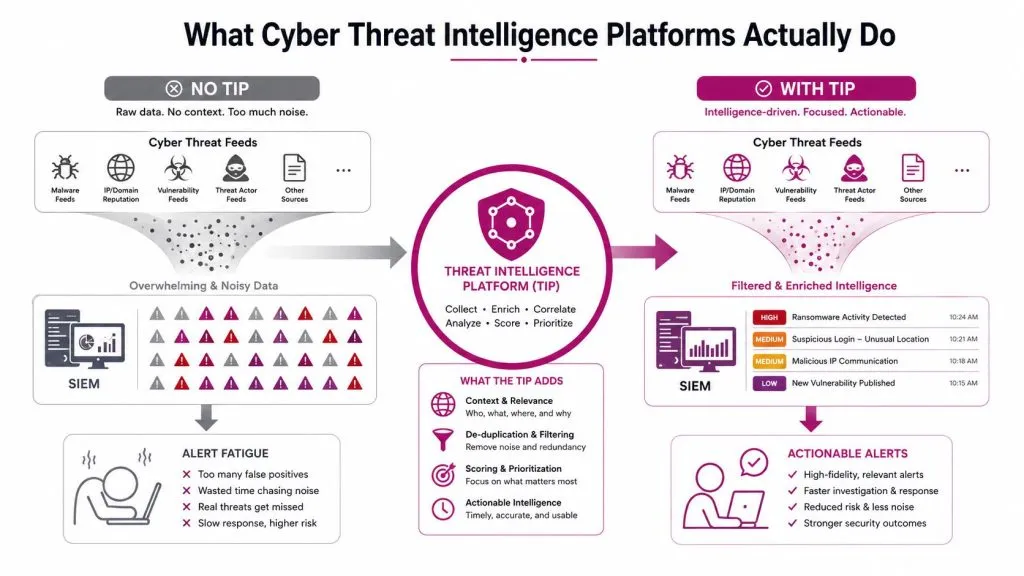
What Cyber Threat Intelligence Platforms Actually Do
A client asks why the SIEM keeps flagging suspicious domains that nobody can confidently prioritize. The answer is often simple: the system is receiving indicators, but it isn’t receiving enough context to distinguish an urgent threat from an old, duplicated, or irrelevant one.
A cyber threat intelligence platform sits between intelligence sources and security operations. It collects information from OSINT, commercial providers, internal telemetry, security research, and, where appropriate, dark web monitoring. It then normalizes, enriches, scores, correlates, and distributes that intelligence to the tools your team already uses.
Data is not intelligence
A threat data point might be a domain, hash, IP address, malware family, or vulnerability reference. A threat feed is a stream of those data points, usually supplied in a consistent or semi-consistent format. Intelligence adds meaning, such as confidence, likely attribution, relevance to your client’s assets, and the action your team should take.
A TIP should answer questions that a feed alone can’t:
- Is the indicator trustworthy?
- Has another source reported the same item?
- Does it relate to a client asset or identity?
- What tactic, technique, or procedure does it represent?
- Should the team block it, investigate it, monitor it, or ignore it?
That distinction matters because cyber threat intelligence platforms have moved beyond niche research tooling. Market forecasts now treat CTI as a distinct enterprise security category. One forecast estimates growth from $14.11 billion in 2025 to $34.02 billion by 2030, at an 18.6% CAGR, while another projects growth from $10.19 billion in 2024 to $22.97 billion by 2030, at a 14.7% CAGR. These projections are reported by The Business Research Company’s cyber threat intelligence market analysis.
That expansion reflects a procurement shift. Organizations increasingly budget for continuous intelligence operations rather than treating threat research as an occasional add-on to a SIEM or endpoint product.
Where a TIP belongs
Think of the architecture as a pipeline:
- Collection sources provide raw observations.
- The TIP cleans, correlates, enriches, and prioritizes them.
- Security tools consume the resulting intelligence.
- Analysts and responders investigate and act through established workflows.
For MSPs, the platform also needs tenant separation, reusable policies, client-specific scoring, and clear audit trails. If you’re assessing external exposure alongside feed-based intelligence, a practical dark web scan can complement the broader CTI workflow. Teams protecting organizations in a specific region may also benefit from targeted guidance such as these Atlanta company cybersecurity mitigation tips.
Core Capabilities Every Platform Should Provide
A serious TIP isn’t a glossy feed directory. It’s an operational system with five connected capabilities: collection, normalization, enrichment, scoring, and sharing. If one is weak, the platform may look impressive during a demo but fail when your analysts need to act.
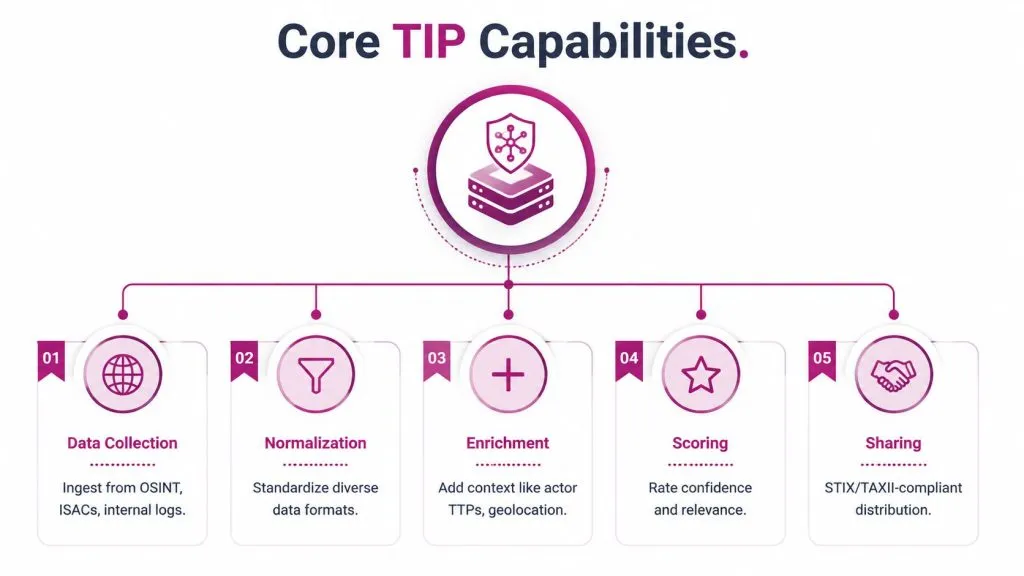
Collection must match your clients
A platform should ingest more than one premium feed. Useful sources can include OSINT, ISAC information, commercial intelligence, internal logs, vulnerability data, brand monitoring, social media signals, and dark web sources. The right mix depends on your client base. A hosting provider may care about abuse infrastructure and malicious domains, while a financial client may prioritize identity exposure, fraud indicators, and targeted campaigns.
Don’t buy feeds first and ask about use cases later. Define the threats you need to detect, then verify that the TIP can collect the relevant source types through APIs, TAXII, file imports, webhooks, or supported connectors.
Normalization removes operational friction
Different sources describe the same threat in different ways. One may provide a domain as an indicator, another may attach a confidence value, and a third may describe the related malware family in a report. Normalization gives those records a consistent structure so the platform can compare and correlate them without manual reformatting.
Look for deduplication, schema mapping, relationship handling, and version history. If analysts must clean every feed before it reaches the SIEM, the platform isn’t doing its primary job.
Enrichment and scoring create judgment
Enrichment adds useful context, including reputation, attribution, geography, related campaigns, malware associations, TTPs, and attack-surface relevance. Scoring then helps your team decide what deserves attention.
Ask vendors whether scoring is transparent and adjustable. An opaque score that can’t be explained to an analyst or client creates distrust. A useful model should let you understand why an indicator ranked highly and change the weighting when your operating model changes.
Sharing turns intelligence into control
The final capability is distribution. The platform should push curated intelligence into SIEM rules, SOAR playbooks, EDR and XDR controls, blocklists, hunting queries, and ticketing systems. Standards-based exchange is important, but so are practical APIs, webhooks, permissions, and failure handling.
The market’s expansion reinforces why these capabilities matter. Mordor Intelligence’s threat intelligence market report identifies on-premise deployment at 54.30% of the market in 2025, while cloud deployment is forecast to grow at a 16.25% CAGR through 2031. Those figures describe a maturing category with multiple deployment patterns, not a single feed product.
How STIX and TAXII Make Intelligence Actually Usable
STIX and TAXII are easiest to understand as a translation system. STIX defines how cyber threat information is structured. TAXII provides a way to exchange that structured information over HTTPS in a machine-readable form.
Without a shared language, every integration needs custom interpretation. With STIX, a platform can represent objects such as domains, hashes, IP addresses, malware families, threat actors, relationships, and TTP mappings in a consistent model.
STIX gives indicators structure
A normalized STIX object can carry more than an indicator value. It can include the indicator type, confidence, source, timestamps, relationships, and associated attack information. That makes correlation possible across sources and allows downstream tools to use the same record without guessing what each field means.
The practical benefit is less analyst translation. Analysts can investigate relationships between an indicator, a malware family, and a technique rather than copying values between spreadsheets and consoles.
TAXII moves intelligence between systems
TAXII acts as the delivery mechanism. It allows a TIP to request or receive structured intelligence from compatible systems and distribute curated content to consumers. That exchange supports automated ingestion and publication rather than relying on manual downloads.
The technical case for the standards is described in this analysis of STIX and TAXII for cyber threat intelligence. The important buying question is whether a vendor’s “STIX/TAXII support” is real and usable. Ask which versions are supported, whether the platform can publish as well as consume, how relationships are preserved, and what happens when a feed fails.
Practical rule: Treat standards support as an integration test, not a brochure checkbox. Make the vendor demonstrate a complete exchange into one of your actual security tools.
A TIP that accepts structured intelligence but exports only through a proprietary format still leaves you exposed to lock-in. Standards won’t eliminate every integration task, but they provide the common foundation needed for reliable automation.

Deployment Models and Where Each One Fits
Deployment decisions affect cost, staffing, data handling, tenant management, and integration speed. There isn’t one universally correct model for every MSP or mid-sized security team.
| Deployment Model | Best Fit For | Main Trade-off |
|---|---|---|
| On-premise | Regulated organizations, strict data-residency requirements, teams with established infrastructure | Greater control, but more maintenance and upfront operational responsibility |
| Cloud | Distributed MSPs, multi-tenant operations, teams seeking faster deployment and elastic processing | Easier scaling, but requires careful review of provider controls, data location, and service dependency |
| Hybrid | Organizations keeping sensitive intelligence locally while using cloud analytics or collaboration | Flexible architecture, but creates more integration and policy complexity |
On-premise favors control
On-premise deployment can suit clients that need intelligence and telemetry to remain within controlled infrastructure. It may also fit an MSP with mature operations, dedicated systems staff, and established processes for patching, backup, access control, and disaster recovery.
The downside is easy to underestimate. Your team owns the platform’s availability, upgrades, connector maintenance, storage, and capacity planning. For a small security operation, those responsibilities can consume the time the TIP was supposed to save.
Cloud favors distributed delivery
Cloud deployment is usually the practical choice for MSPs managing many clients across different environments. Centralized updates, remote access, API connectivity, and multi-tenant administration can reduce infrastructure work and make it easier to standardize service delivery.
The evaluation should focus on tenant isolation, data retention, export options, regional hosting, identity integration, and service-level commitments. A cloud platform isn’t automatically simpler if your team must build workarounds for client-specific policies.
Hybrid suits mixed constraints
Hybrid architectures make sense when a client needs local control over sensitive intelligence but still wants cloud-scale analytics, shared research, or centralized administration. They can also support a gradual migration from existing infrastructure.
Choose hybrid only when you can document the data flows clearly. If nobody can explain which records stay local, which leave the environment, and how access is audited, the architecture is too complicated for production.
Why Integration Matters More Than Feed Volume
More feeds don’t automatically produce better defense. They can increase duplication, conflicting verdicts, alert fatigue, and analyst workload if the platform doesn’t apply context and policy before distributing indicators.
A 2026 enterprise threat-intelligence review found that 48% of organizations cite poor integration with existing security tools as a top pain point, while 46% lack enough context to turn intelligence into prioritized action and 46% struggle to filter relevant signals from alert noise. These findings appear in Feedly’s 2026 CTI practitioners roundup.
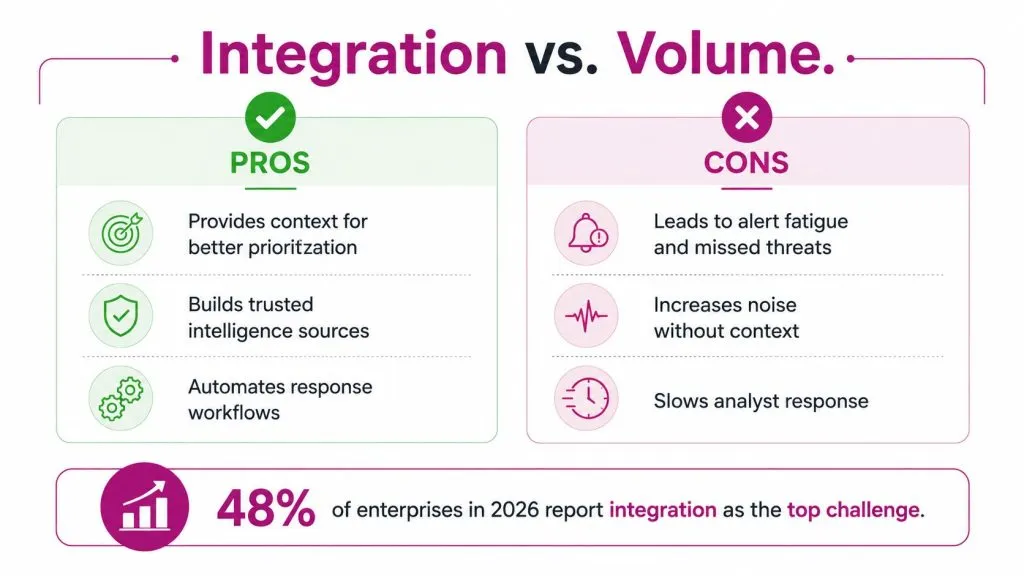
Test the workflow, not the catalog
During a demo, don’t ask only how many sources the vendor supports. Ask the vendor to show a complete path from an intelligence record to an analyst action.
A strong integration should support:
- SIEM correlation: The TIP adds context to events and helps the SIEM prioritize matches tied to relevant assets.
- SOAR orchestration: The platform triggers playbooks for actions such as enrichment, containment, investigation, or ticket creation.
- EDR and XDR distribution: Curated indicators reach endpoint and extended detection controls without manual copying.
- Ticketing synchronization: Analysts can create, update, and close work items while preserving the intelligence context.
- Bi-directional feedback: Investigation outcomes can improve confidence, suppress known noise, or update future handling.
The platform should also manage expiration. An indicator that was valuable during an incident may become irrelevant later. If every item remains active forever, your blocklists and detection rules become less trustworthy.
Make the buyer question operational
Ask, “Which platform makes my existing tools smarter?” That question exposes weak products quickly. A platform that adds another isolated console may increase visibility while reducing productivity.
For MSPs, integration must work across tenants without leaking intelligence between clients. Role-based access, client-specific policies, and auditable actions matter more than a large source directory.
The expensive failure is not missing one more feed. It’s paying analysts to manually reconcile intelligence that your platform promised to operationalize.
If external exposure is part of your service, dark web monitoring benefits for security teams should be assessed in the same workflow. The value comes from connecting a finding to an owner, a priority, and a response action.
Real Workflows for MSPs and Mid-Sized Teams
A TIP earns its place by changing what happens after detection. These workflows show the difference between collecting intelligence and operationalizing it.
Credential exposure
A monitoring source identifies employee credentials circulating in a restricted online venue. The TIP matches the identity to the client’s directory, enriches the record with privilege and account ownership, and applies the client’s response policy.
Instead of sending a generic alert to an analyst, the platform creates a ticket for the responsible IT team, requests a password reset, and records the evidence and status. The analyst still validates the finding, but the repetitive routing work no longer starts from a blank screen.
Teams that need a broader managed-service model can review dark web monitoring for managed service providers when designing this type of client workflow.
Brand impersonation and phishing
A new domain resembles a client’s brand. The TIP correlates the domain with certificate information, page content, observed infrastructure, and the client’s known attack surface. It assigns a priority based on relevance instead of treating every lookalike as equally urgent.
The resulting workflow can route the finding to a takedown provider, create a ticket with evidence, and track the service-level commitment. Analysts receive a focused queue rather than a long list of unverified lookalikes.
Supply-chain exposure
A vendor advisory identifies a vulnerability affecting a product used by one client. The TIP correlates the advisory with asset inventory, software ownership, exposure status, and compensating controls.
Only systems that match the affected product and client environment receive an investigation task. That correlation reduces unnecessary escalation and gives the account team a defensible explanation of why some clients are affected while others are not.
The pattern across all three workflows is the same:
- Identify: Collect a relevant external signal.
- Contextualize: Connect it to a client, asset, identity, or business service.
- Prioritize: Apply confidence and operational relevance.
- Act: Trigger a ticket, control, hunt, takedown, or investigation.
- Record: Preserve the decision and outcome for review.
A Practical Checklist for Choosing and Measuring ROI
A TIP evaluation should end with a working demonstration and a baseline, not a feature comparison spreadsheet. Before speaking with vendors, document how your team currently handles intelligence, who owns each action, and where analysts repeat manual work.
Procurement checklist
Require the vendor to demonstrate the following capabilities in your own environment or a representative test tenant:
- Standards and APIs: Verify STIX/TAXII support, documented APIs, webhooks, export options, and error handling.
- Multi-tenant administration: Confirm tenant isolation, client-specific policies, delegated access, and separate reporting.
- Access governance: Check role-based access, approval controls, audit logging, and identity-provider integration.
- Scoring transparency: Ask how confidence and relevance are calculated, overridden, reviewed, and expired.
- Workflow depth: Test SIEM, SOAR, EDR, XDR, ITSM, and notification integrations rather than accepting a connector list.
- Data lifecycle controls: Review retention, deletion, provenance, source reliability, and indicator expiration.
- Commercial flexibility: Model ingestion, tenant, API, storage, and analyst costs. Don’t examine only the headline subscription.
Measure outcomes your team can defend
Track the time required to detect and investigate relevant threats, analyst hours saved through automation, false-positive suppression, and automated actions triggered. These measures are useful because they connect platform activity to workload and response rather than vanity metrics such as the number of ingested records.
Establish a baseline before deployment. If the team doesn’t know its current investigation effort or noise level, it can’t prove whether the TIP changed operations.
Compliance evidence can also matter. Continuous monitoring records, documented response decisions, access logs, and repeatable workflows may support evidence collection for frameworks such as ISO 27001, SOC 2, and PCI DSS, but the TIP itself doesn’t make an organization compliant.
Red flags to reject
Be cautious when a vendor relies on proprietary schemas, refuses to explain scoring, limits exports, or charges per seat in a way that penalizes service growth. Also question dashboards that show impressive source volume but can’t demonstrate a clean path into your existing controls.
WiseGuyReports’ cyber threat intelligence platform market coverage reflects strong expansion and growing cloud and hybrid adoption, but market growth doesn’t prove product fit. Your proof should come from a workflow that reduces manual effort for your team and produces evidence your clients understand.
Implementation Best Practices and Common Pitfalls
Start with one high-value use case. Credential exposure, phishing takedown, or vulnerability-to-asset correlation usually provides a clearer test than attempting to ingest every available source on the first day.
Define the scoring policy before importing feeds. Decide what confidence means, which client assets receive priority, when an indicator expires, and which actions require human approval. Record baseline investigation effort and alert noise so your ROI claim rests on operational evidence.
Common mistakes include:
- Treating the TIP as a feed aggregator: A larger collection of indicators isn’t a strategy.
- Skipping analyst training: Staff need to understand scores, provenance, suppression, and escalation.
- Ignoring tuning: Threat relevance changes, and policies need regular review.
- Automating without guardrails: Blocking or resetting accounts should follow approval rules appropriate to the risk.
- Leaving ownership unclear: Every alert needs a defined person, queue, or service-level process.
Questions buyers ask
How long does implementation take? It depends on integrations, tenant structure, data quality, and the first use case. A focused deployment is more realistic than trying to complete every connector and workflow at once.
Can a TIP replace a SIEM? No. A TIP enriches and operationalizes intelligence, while a SIEM collects and correlates security events. They solve related but different problems.
What should a mid-sized team budget? There isn’t a responsible universal figure without knowing tenants, sources, integrations, retention, and service expectations. Ask vendors for a total-cost model that includes implementation, API access, support, and ongoing administration.
How do you justify the spend to an executive? Tie the purchase to reduced manual investigation, faster escalation, fewer irrelevant alerts, stronger client reporting, and clearer evidence of continuous monitoring. Executives don’t need a feed catalog. They need a defensible operational outcome.
InsecureWeb helps MSPs, hosting providers, and security firms monitor dark web exposure, detect fake sites and accounts, scan vulnerabilities, and access threat intelligence feeds with API integration options. Visit InsecureWeb to assess how its outside-in capabilities could fit into your existing client security workflows.