Data Breach News15 min read
Threat Intelligence as a Service: A Practical Guide
By InsecureWeb Team
This report reflects observations of dark web activity. InsecureWeb makes no representations regarding the accuracy of this data.
You’ve probably got the same problem a lot of MSP and SMB security teams have right now. The tools are in place, the dashboards are full, and someone still has to decide which indicators matter, which alerts deserve a hunt, and which issues should jump to the top of the patch queue. Threat intelligence as a service exists to close that gap, not by adding more noise, but by turning outside threat data into decisions your SOC can use.
What Threat Intelligence as a Service Really Means
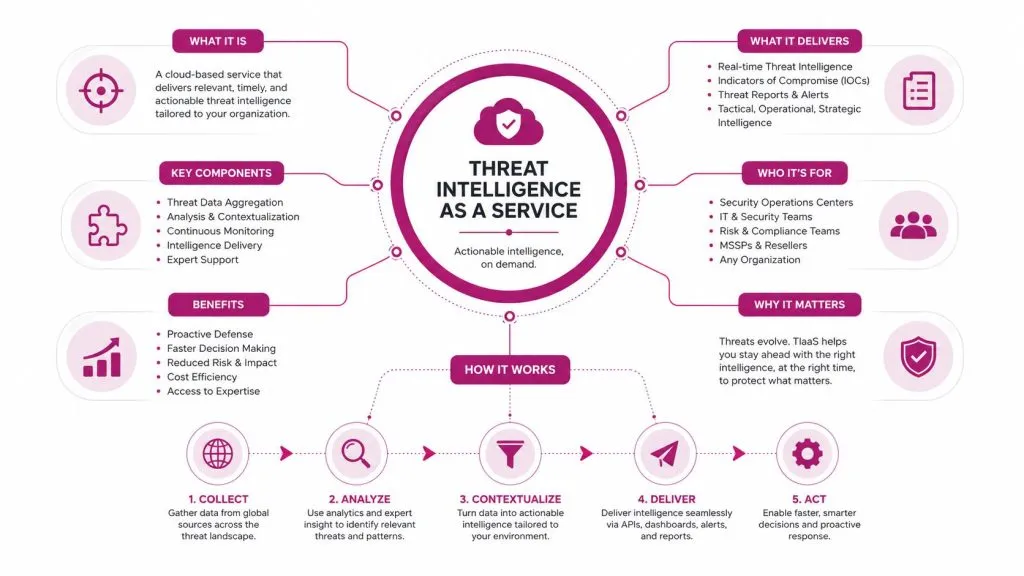
An MSP inherits the usual mess, a client’s threat feed folder is full, the alerts are noisy, and nobody can explain what changed in the last quarter. That’s the moment when threat intelligence as a service stops being a buzzword and starts being a way to reduce wasted analyst time. The point isn’t to buy more indicators, it’s to buy interpretation, context, and a workflow that fits the environment.
From raw feed to usable judgment
Raw indicators are easy to collect and hard to trust. A hostname, hash, or IP address means little on its own, especially when it lands in a SIEM without context from the customer’s environment. Independent guidance on threat intelligence platforms stresses broad ingestion from OSINT, commercial feeds, dark web sources, government advisories, and internal telemetry, then correlation and confidence scoring so the output is usable in operations, not just readable in a report Wiz guidance on threat intelligence platforms.
That’s why the “as a service” part matters. You’re not just buying data, you’re buying the labor needed to normalize, enrich, rank, and explain that data so your team can act on it. In practice, that usually means analysts who can say, “this matters to this client, in this stack, right now,” instead of dumping a feed into a folder and hoping somebody notices.
Practical rule: if a threat intel offering can’t tell you what to do next, it’s a feed, not a service.
Why the wrapper matters as much as the content
Think of the difference between hiring a security analyst team and buying a single firewall. A firewall enforces one layer of control, but an analyst team connects signals, understands the business, and changes priorities when the threat changes. TIaaS is closer to the analyst team model, because it wraps intelligence with analyst judgment, prioritization, and response context.
That wrapper also makes the service useful for customers who don’t have a mature intel program. The service can take on collection, curation, and interpretation, then hand your team something operationally clear, like a threat actor profile tied to a campaign, or a set of indicators already sorted by relevance. For MSPs, that reduces shelf-ware risk. For SMBs, it reduces the odds that the service becomes another unread feed.
If dark web exposure is part of the risk picture, this dark web monitoring overview is a useful companion lens, because it shows how stolen data and credentials can become the starting point for more targeted intelligence work. The value is not the alert itself. It’s the decision you can make faster because the alert arrived with context.
The Four Types of Threat Intelligence Explained
A new MSP client usually understands threat intel fastest when it is tied to decisions already happening in the SOC. A phishing alert needs a different answer than a board risk update, and a domain block needs a different answer than a campaign briefing. The four common types, strategic, operational, tactical, and technical, each answer a different question and support a different layer of response.
Strategic and operational intelligence
Strategic intelligence sits at the executive layer. It helps a CEO, a CISO, or a compliance lead understand what is changing in the threat environment and why that shift matters to the business. If ransomware groups are targeting a sector, strategic intel informs budget discussions, risk posture, and policy choices. It is the briefing you bring to leadership when you need to explain why the next 30 to 90 days of tuning and response work matter.
Operational intelligence is closer to the active campaign. It helps hunters and incident responders understand who is active, what they are doing, and what they are likely to do next. In an MSP, this is the layer that shapes hunt missions, incident triage, and priority-setting across multiple clients. One threat actor profile can change which tenants get extra attention this week and which detections should be tuned first.
A board needs the forecast. A hunt team needs the route map.
Tactical and technical intelligence
Tactical intelligence is the playbook layer. It covers the behaviors, tactics, and procedures that appear in real attacks, and it is the most useful layer when you are updating firewall rules, mail rules, or detection logic. If a campaign uses a common delivery trick, tactical intel tells you which controls are worth adjusting first. That matters because the first month of a TIaaS rollout should reduce noise and improve triage quality, not just add more data to the stack. If you need a practical view of how campaign context supports monitoring, this dark web monitoring overview adds useful background.
Technical intelligence is the machine-readable layer. It includes hashes, domains, URLs, IPs, and other indicators that can feed a SIEM, SOAR, TIP, or EDR. It is the roadside sign in the weather report. The sign only helps if it is accurate, current, and placed where your tools can read it. That is why many teams use Cloudflare scraping workaround guide as a reminder that collection paths and access methods can shape what data arrives for enrichment and detection.
The common operational mistake is buying too much of one type and too little of another. A CEO does not need a hash list, and a SOC analyst does not need a quarterly strategy memo while handling an active alert. The right mix depends on the audience, the decision, and the maturity of the stack. In the first 30 to 90 days, the useful question is simple, which layer helps the team decide faster and with less rework.
For MSPs and SMBs, a quick filter helps. If the output will change a business discussion, it belongs in strategic intelligence. If it will change a hunt, a rule, or a priority, it belongs in operational or tactical use. If it can be consumed by tooling, it can move straight into technical workflows. If it cannot be consumed by tooling, it may still add context, but it will not move quickly enough on its own.
Delivery Models That Match Different MSP and SMB Stages
Choosing a delivery model is like choosing how you run a kitchen. You can hire a fully outsourced kitchen, share one with a partner, or buy groceries and cook everything yourself. Each option works, but each one assumes a different amount of staff, skill, and process on your side.
Three models, three operating realities
A fully managed model gives you curated intelligence, analyst interpretation, and often reporting that’s ready for leadership or the SOC. It fits teams that need outcomes fast and don’t have the staff to maintain a separate intel function.
A co-managed model is the shared-kitchen version. Your team can tune queries, ask questions, and build workflows alongside the vendor. It’s a good fit when you already have analysts who want control but don’t want to build collection and enrichment from scratch.
A feed-only model is basically buying groceries. You get raw or lightly processed data and you’re responsible for ingesting, triaging, and making it useful. That can work for mature teams, but it hides a lot of labor in the contract assumptions.
A quick comparison for decision-making
| Model | Staffing Required | Control Level | Best Fit |
|---|---|---|---|
| Fully Managed | Light internal staffing, vendor-led analysis | Lower day-to-day control | MSPs or SMBs that need fast operational value |
| Co-Managed | Internal analyst time plus vendor support | Medium control | Teams that want tuning and shared workflows |
| Feed-Only | Strong internal intel and engineering capacity | Highest control | Mature SOCs that can operationalize raw data |
If you’re evaluating adjacent tooling and dealing with data collection at scale, the Cloudflare scraping workaround guide is a useful reminder that access methods matter as much as the data itself. In threat intelligence, the same idea applies. A feed is only useful if you can reliably move it into your stack and keep it current.
The hidden question in every contract is staffing. A feed-only deal may look simple, but someone still has to normalize fields, manage expirations, and keep false positives from piling up. A fully managed service may cost more up front, but it can be cheaper in practice if it saves your analysts from spending nights cleaning bad data.
For MSPs with smaller teams, dark web monitoring for MSPs often lands neatly into the service mix, because it pairs naturally with managed delivery. The model matters because the work still has to land somewhere.
Integrating TIaaS With SIEM, SOAR, and EDR
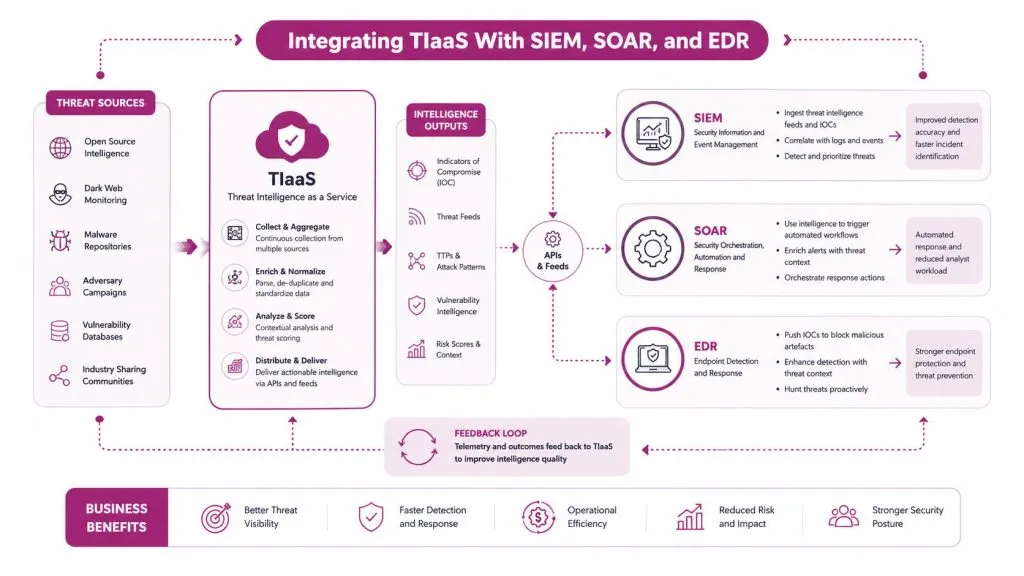
A TIaaS program starts paying off when its findings reach the tools your analysts already use. If the intelligence sits in a portal no one checks during an incident, it is only reference material. The common format for sharing structured indicators and context is STIX, and TAXII is the transport method that moves that content between systems. Market guidance on threat intel platforms also points to broad ingestion, correlation, confidence scoring, and automation across SIEM, SOAR, and EDR workflows Wiz guidance on threat intelligence platforms.
What good plumbing looks like
A clean TIaaS flow starts with ingestion, then moves into normalization, then enrichment. The vendor collects indicators from multiple sources, converts them into a common format, adds confidence and context, and sends only the parts your tools can use. If your SIEM cannot map the fields correctly, the intelligence looks impressive but does little for detection.
A practical example makes the path easier to picture. A phishing campaign gets linked to a threat actor profile, then the service enriches the indicator with campaign context, delivery patterns, and related artifacts. The SIEM receives that content as a correlation rule or detection input, the SOAR opens an enrichment playbook, and the EDR receives updated detection logic or response guidance. The ticketing system then records the decision, so the incident history does not end up buried in someone’s inbox.
Operational checkpoint: if the same indicator appears in three tools under three different names, the integration is weak.
The first 30 to 90 days should be used to prove that the stack is changing decisions, not just collecting more data. A simple way to do that is to track how often the SIEM generates alerts that the SOAR can enrich automatically, how often the EDR can act on the result, and how often analysts close cases faster because the context was already attached. Those are decision metrics, and they show whether TIaaS is reducing manual triage.
Where integrations usually break
Custom fields are a common failure point. Vendors may provide rich context, but the customer’s platform only ingests part of it, or the parser drops the metadata that would have made the alert useful. Low-confidence indicators create a second problem, because they still get ingested and can flood analysts with noise.
A good vendor should explain how they handle source transparency, retraction, and confidence scoring. That matters because analysts need to understand why an indicator exists before they decide whether to block, hunt, or ignore it. A useful platform also keeps the evidence attached to the indicator, so a later review does not start from a blank alert with no context.
The true test is not whether the vendor says they support SIEM, SOAR, and EDR. The true test is what happens when one indicator becomes an alert, a playbook trigger, and an EDR check on the same day. If the vendor can explain that chain clearly, the service can operate inside a real stack, not just sit beside it.
A Practical Vendor Evaluation Framework
Vendor demos make every service sound complete. The useful question is whether the vendor can reduce your team’s decision load, or whether they just package another stream of data for someone else to clean up. A strong threat intelligence as a service vendor should behave like an operations partner, not a download link.
Score the parts that affect operations
A simple scorecard works better than a feature checklist. Weight the areas that change outcomes.
- Data quality: Ask where the indicators come from, how often they’re refreshed, and how stale data is removed.
- Enrichment depth: Press for actor, campaign, malware, CVE, and TTP context, not just a list of IoCs.
- Analyst access: Confirm whether you can ask follow-up questions and whether that access is included or separately billed.
- Integration support: Test how quickly the vendor can land content in your SIEM, SOAR, EDR, and ticketing stack.
- Contractual clarity: Review how they define service levels, indicator retractions, and escalation paths.
- Roadmap stability: Find out whether the service evolves with your stack or constantly shifts under you.
Questions that expose weak offerings
Ask how confidence scores are assigned, because that tells you whether the vendor understands uncertainty or just hides it. Ask how quickly a false positive can be retracted, because stale data burns analyst time. Ask who tunes the integration after go-live, because many vendors promise “easy onboarding” and then vanish once the feed is live.
A weak vendor often overindexes on collection volume and underexplains decision support. That’s a sign the service may leave you with shelf-ware, especially if your analysts can’t get to the “so what” quickly. For teams who need one more practical layer of exposure discovery, InsecureWeb offers dark web monitoring and threat intelligence for businesses and MSPs, which can sit alongside broader intelligence evaluation without replacing the rest of the stack.
Use the demo to test real workflows, not slides. Hand the vendor a specific scenario, ask them to show how they would enrich it, and watch whether the answer stays operational or drifts into marketing language. If they can’t explain how an indicator becomes a detection, a ticket, or a leadership briefing, move on.
Pricing, ROI, and Decision Metrics That Actually Matter
Threat intel pricing gets noisy fast because vendors price by seat, feed, module, or access level. That doesn’t tell you much about business value. The question is whether the service saves analyst time, improves decision quality, and closes gaps before they become incidents.
Measure decisions, not consumption
The most useful ROI question is simple. Did the intelligence change a firewall rule, a hunt query, a patch priority, or an incident decision this month? If the answer is yes, the service is doing work. If the answer is no, the service may be informative but not operational.
That mindset lines up with the brief’s reminder to move from volume metrics to decision metrics. Counting consumed indicators is easy. Counting changed decisions is harder, but it’s much closer to the truth. Academic reviews and industry guidance both point to the same failure mode, intelligence that isn’t attached to a decision process doesn’t deliver much value.
A basic way to talk about ROI with finance
Finance teams usually want a clean comparison between cost and avoided loss. The safest approach is conservative and scenario based. Estimate the analyst hours you reclaim, the investigations you accelerate, and the high-risk actions you take earlier because the intel made them obvious.
A useful internal dashboard can be as simple as this:
- Analyst time saved: Did the service reduce manual enrichment or repeated triage work?
- Response acceleration: Did it shorten the path from alert to containment?
- Coverage gaps closed: Did it give you visibility into threats your own tools missed?
- Decision lift: Did it directly drive a control change or an escalation?
If you need help thinking about adjacent service economics, the pricing data for scraping engineers is a useful comparison point for labor-heavy external services, because it reinforces how much value often sits in the work around the data, not just the data itself. That’s the same logic CFOs can understand in TIaaS conversations.
CFO-friendly test: if the service didn’t change a decision, it didn’t earn its place in the budget.
Implementation Checklist for the First 90 Days
A good rollout starts with restraint. Don’t try to operationalize every possible feed on day one, because that usually creates noise, not value. The first 90 days should prove that the service can answer a small set of real questions inside your SIEM, SOAR, and incident process.
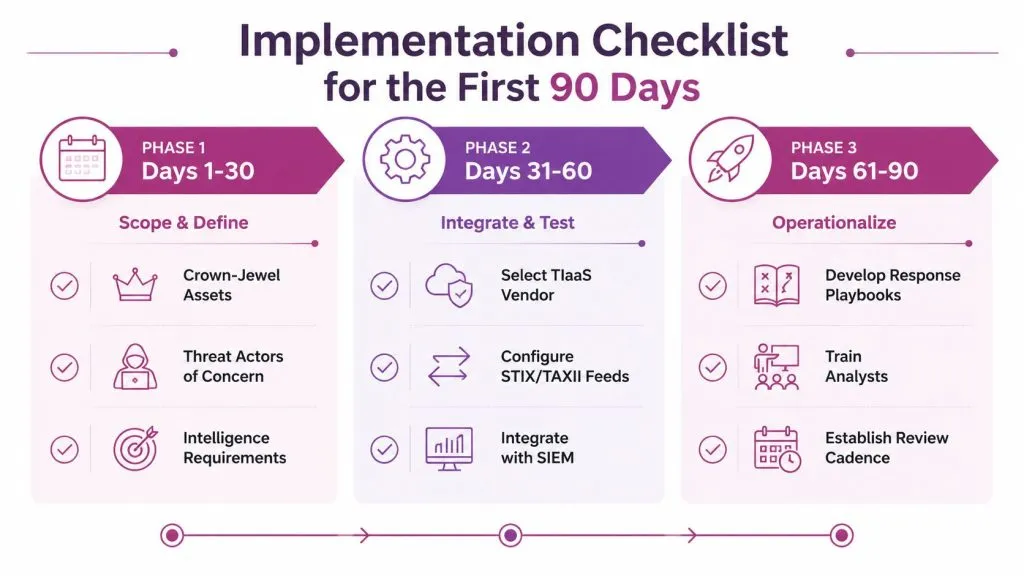
Days 1 to 30 define the mission
Start by naming the crown-jewel assets, the threat actors of concern, and the questions the intelligence must answer. If the client can’t say which assets matter most, the service will default to generic coverage and miss the point.
By the end of this phase, you should have a short intelligence requirement list. It should map business risk to operational questions, like which campaigns matter, which domains must be watched, and what kinds of findings should trigger response. The exit criteria are plain. The team agrees on scope, the use cases are written down, and the vendor knows what “relevant” means for this environment.
Days 31 to 60 wire it into the stack
Now the work gets technical. Normalize incoming content into STIX, map the fields into your SIEM, and test the first correlation rules. Use a few indicators that matter to your environment, not the entire feed.
If the service supports automation, connect a SOAR playbook that enriches the alert and routes it to the right responder. If you run EDR, make sure detections are visible where analysts already work. The exit criteria here are concrete. You can see the intelligence in your tools, at least one rule fires correctly, and the team can trace an indicator from ingestion to action.
Days 61 to 90 turn it into routine work
Embed the intel into incident response runbooks, vulnerability management, and weekly client or executive briefings. That’s where the service stops being an experiment and starts becoming part of the operating rhythm. As the brief noted, organizations often understand the lifecycle but struggle to turn it into usable output, so this is the phase where the workflow matters more than the feed.
By the end of day 90, you should be able to answer three questions without debate. Did the service change any decisions, did it reduce false positives, and did it expose any coverage gaps you can now close? If those answers are still vague, the service is probably under-integrated, not underpowered.
Putting TIaaS to Work in Real Client Scenarios
The fastest way to see value is to trace one alert all the way to a decision. A credential alert from the dark web can trigger a phishing simulation and a client conversation. A ransomware actor profile can change patch priorities. A strategic brief can give a compliance team a cleaner board update.
For MSPs, the first move is often exposure monitoring, especially when you want to translate external risk into a client-visible action. A dark web finding from InsecureWeb’s dark web scan can become a concrete outreach moment, because stolen credentials or brand abuse often create the kind of urgency clients understand quickly.
For an SMB SOC, the win is different. A campaign profile with known TTPs can move a vulnerability from “next month” to “today,” especially when the intelligence is already correlated into the SIEM and tied to a response playbook. For a compliance-led team, strategic intel can support a more grounded leadership briefing by showing what the threat environment means for policy and governance instead of just listing headlines.
A simple 30, 60, 90 day operating plan keeps the work real.
- First 30 days: define the threats and assets that matter.
- Next 60 days: connect the service to SIEM, SOAR, and EDR workflows.
- By 90 days: prove at least one decision changed because of the intel.
That’s the standard to use with any TIaaS offer. If the service helps your team decide faster, hunt smarter, and communicate risk more clearly, it’s doing its job.
If you want to turn threat intelligence into something your team can use, explore how InsecureWeb supports dark web monitoring, threat intelligence, and related exposure workflows for MSPs and security teams. It’s a practical place to compare how external risk signals can be turned into client actions, analyst workflows, and clearer reporting.