You’ve got a new network in scope, a maintenance window is short, and nobody trusts the asset list. That’s usually when a Nmap ping sweep stops being a basic command and starts becoming the first smart decision of the engagement.
Used well, it tells you where to focus. Used poorly, it wastes time, misses hosts, or creates traffic patterns that defenders notice immediately. The difference isn’t memorizing flags. It’s choosing the right discovery method for the environment in front of you.
For MSPs, internal security teams, and consultants, host discovery is often the point where reconnaissance becomes disciplined instead of reactive. You’re not just trying to find “anything alive.” You’re building a reliable map that supports hardening, validation, vulnerability scanning, and cleanup work later. If you’re already thinking beyond a flat list of IPs, resources on attack surface analysis help frame why discovery quality matters so much after the first sweep.
Why Nmap Ping Sweeps Are an Essential First Step
A ping sweep answers the first reconnaissance question that controls every decision after it. Which IPs are alive?
That sounds basic, but it shapes scope, timing, and noise. If you start with port scans against an entire range, you spend time on dead space, generate traffic you do not need, and make your results harder to trust. Good operators separate discovery from enumeration because each step has a different purpose and a different OpSec cost.
Value is not in the command itself. It is choosing the right kind of host discovery for the environment in front of you. On a flat internal network, a light sweep can confirm reachability quickly with little operational risk. On a filtered perimeter, the same probe set may miss live systems or trigger controls that tell the client’s SOC exactly what you are doing. A responsible analyst picks discovery methods based on what the network is likely to allow, what the engagement permits, and how much signal is worth the noise.
That first pass also improves attack surface analysis workflow. You are building a current list of reachable assets before you spend effort asking which services they expose or which ones deserve priority.
Why this step changes the rest of the engagement
A weak discovery phase creates avoidable problems later.
- Coverage gaps leave live systems out of scope, especially hosts that sit behind filtering rules or answer only to specific probe types.
- Scan noise rises when tooling wastes cycles on unused addresses and stale inventory.
- Triage gets slower because analysts have to sort real hosts from artifacts.
- OpSec degrades when a broad service scan hits every address instead of the subset that justified deeper inspection.
Use the least intrusive probe set that can answer the question with acceptable confidence. That is the standard. It is also where judgment matters.
For example, external assessments often require restraint. If you are doing external validation or pentesting for startups and SMBs, you may be dealing with cloud IP space, CDN edges, VPN gateways, and internet-facing hosts that respond inconsistently. In that case, discovery is not just a checklist item. It is a filtering step that tells you whether a quiet sweep is sufficient or whether you need more targeted host discovery later to avoid false negatives.
A solid ping sweep gives you a cleaner target set, a better explanation for the traffic you generated, and fewer surprises once deeper scanning begins.
Executing Your First Nmap Ping Sweep
You have a target range, a limited maintenance window, and no reason to light up every IDS rule on the network. Start with host discovery only. In Nmap, that means -sn.
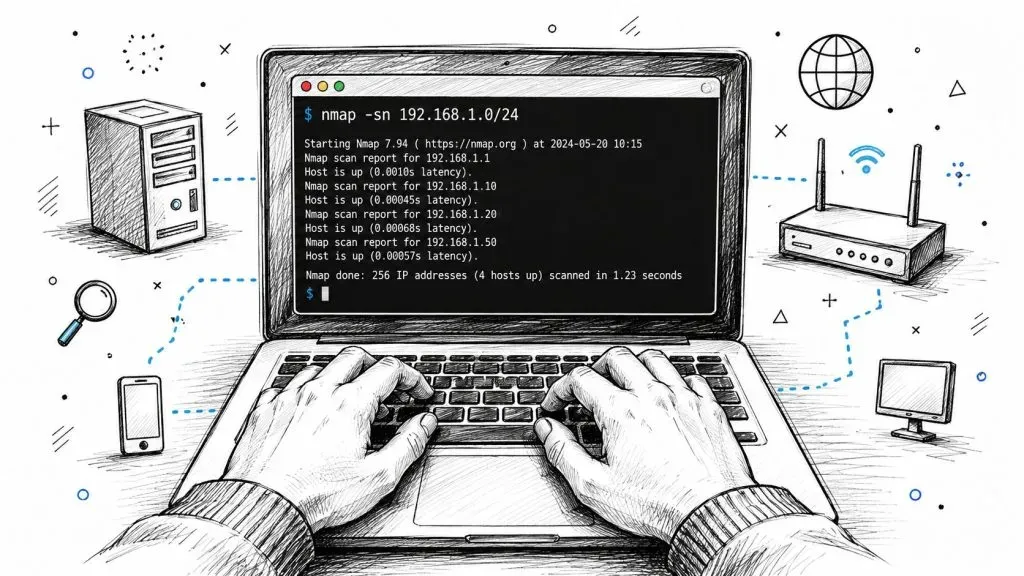
-sn tells Nmap to find responsive hosts and stop before port enumeration. That is the right first move when your immediate goal is to confirm which addresses are worth further attention.
Start with the smallest scope that answers the question
Use a single host when you are checking routing, ACLs, or whether a known system responds from your current vantage point.
nmap -sn 10.10.10.25Use a short range when you are validating a segment with a known asset cluster.
nmap -sn 10.10.10.25-60Use CIDR when you need broad coverage and the environment can tolerate it.
nmap -sn 10.10.10.0/24That choice matters. A /24 from an internal jump box is routine. The same sweep from an external assessment point can generate attention fast, especially if the client has aggressive monitoring or upstream filtering. Good operators match scan scope to the question they need answered.
Read the output for context, not just reachability
A junior analyst often sees Host is up and moves on. Slow down and read the rest.
Focus on:
- Status. Which hosts responded, and which expected systems did not.
- Latency. Useful for spotting remote links, NAT distance, or inconsistent paths.
- Reverse DNS names. These often expose naming conventions, business units, and likely system roles.
- MAC address and vendor data. On local segments, this helps separate user endpoints from printers, network gear, hypervisors, and embedded devices.
That first pass often reveals more than people expect. An odd vendor on a finance VLAN or a hostname that breaks the client’s naming standard deserves follow-up before you spend time on broad service scans.
Clean discovery output helps you prioritize. Strange assets stand out earlier, and you avoid wasting scan budget on empty space.
Later in the workflow, a short visual walkthrough can help newer team members connect the command to the output they’re seeing in the terminal.

Pick the default sweep only when the environment supports it
On many internal networks, nmap -sn works well as a first pass because the default host discovery mix gives you several ways to get a response without jumping straight to a full scan. That makes it a practical baseline for ordinary enterprise subnets.
Use the default method first when:
- You are scanning an internal segment with normal east-west reachability.
- You need a quick live-host list before deeper enumeration.
- You want lower noise than a full port scan across the same range.
- The client has not warned you about strict filtering or fragile legacy systems.
Do not treat the default as universal. In a noisy flat network, broad discovery may be acceptable because speed matters more than subtlety. In a heavily filtered environment, the same command can miss live systems and give you false confidence. In an externally visible range, even basic discovery has OpSec cost, because different probe types can create logs on firewalls, load balancers, and endpoint tools.
The practical habit is simple. Run the least noisy sweep that can answer the question, then compare the results against what you already know about the environment. Sparse results do not always mean sparse infrastructure. They often mean the probe choice, network path, or vantage point is wrong.
Advanced Sweep Techniques to Bypass Firewalls
A filtered network can make a healthy address range look empty.
That usually means your probe choice is wrong for the path, not that Nmap failed. Good host discovery under filtering is a method selection problem. The right question is not “Which flag is advanced?” It is “Which packet is this environment still likely to pass, and what will that packet look like in logs?”
Match the probe to the environment
Different discovery methods solve different problems:
-PEsends ICMP echo requests. Use it where standard ping is known to work or where you want a quick check with minimal complexity.-PS22,80,443sends TCP SYN probes to selected ports. Use it when firewalls drop ICMP but allow traffic that resembles normal service access.-PA80,443sends TCP ACK probes. Use it when you suspect stateful devices handle ACK traffic differently from SYN traffic.-PU53sends UDP probes. Use it selectively when UDP is common on the path and you can tolerate less clear responses.-PRuses ARP on the local segment. Use it on directly connected networks where layer 2 gives you a more dependable answer than routed discovery.-Pnskips discovery and treats targets as up. Use it only after you have a reason to believe discovery is being filtered.
The tactical choice matters, but the OpSec trade-off matters just as much. A SYN ping to 443 often blends into expected traffic better than broad ICMP on an external perimeter. ARP is highly effective on a local subnet, but it is also obvious to anyone watching that segment. UDP can slip through controls that block other probes, but silence is ambiguous, so analysts can easily overread weak results.
Nmap Ping Sweep Flag Comparison
| Flag | Technique | Common Use Case | Stealth Level |
|---|---|---|---|
-sn | Default host discovery | First-pass inventory on ordinary networks | Moderate |
-PE | ICMP echo request | Networks that still answer standard ping | Moderate |
-PS | TCP SYN ping | Firewalled environments where common TCP ports are more likely to pass | Higher than broad noisy probing |
-PA | TCP ACK ping | Cases where ACK traffic is more likely to traverse filtering devices | Higher than forcing full scans |
-PU | UDP ping | Environments where selected UDP traffic may slip through controls | Varies |
-PR | ARP ping | Local network segments where layer 2 discovery is the strongest signal | Lower stealth on local LAN visibility |
-Pn | Skip host discovery | High-assurance enumeration when you can’t risk missing blocked hosts | Low |
A few patterns show up repeatedly in real assessments.
On an internal VLAN, -PR usually answers the question fastest because you are resolving neighbors directly instead of asking routed devices to permit higher-layer probes. On an internet-facing range, -PS443 is often a better first adjustment than hammering away with ICMP, because HTTPS is more likely to be allowed and less likely to stand out. On tightly controlled enterprise edges, -PA sometimes finds hosts that ignore SYN probes, but you should verify carefully because filtering behavior varies by vendor and policy.
Use small tests before you widen scope. If -PS22,80,443 gets hits on a handful of known systems, that is enough evidence to scale the same method across the approved range. If it does not, changing vantage point may help more than adding more flags.
Choose the probe that best matches allowed traffic on that path, not the probe you happen to remember first.
When to use -Pn
-Pn is a force option, not a smarter default.
When you skip host discovery, Nmap assumes every target is alive and proceeds with later scan stages against all addresses in scope. That prevents filtering from hiding live systems, but it also increases traffic, scan time, and log volume. On a small, well-defined range, that trade-off can be justified. On a broad scope, it can waste time and create noise without improving your results.
Use -Pn when:
- You already tested lighter discovery methods and they clearly underreport live hosts.
- Completeness matters more than scan restraint.
- The target range is narrow enough that probing every address is still acceptable.
- You have a concrete reason to expect host discovery filtering, such as perimeter ACLs or endpoint controls.
Hold off on -Pn when the underlying problem might be scanner placement, bad port choices for -PS or -PA, or an address range that is larger than the change window allows.
A disciplined escalation path works well:
- Test a small sample with
-sn. - Shift to
-PE,-PS,-PA, or-PUbased on what the path is likely to allow. - Use
-PRfor directly connected segments. - Use
-Pnonly when missing live hosts would be the bigger failure.
That sequence improves accuracy and keeps your footprint tied to a clear reason.
Tuning Scans for Performance and Accuracy
Most scanning mistakes aren’t about syntax. They’re about impatience.
A fast sweep that misses systems is worse than a slower sweep that gives you a dependable host list. A stealthy scan that takes too long for the change window can be just as bad. Timing choices are really risk choices.
Timing is an OpSec choice
Nmap’s timing templates matter because they change how quickly and aggressively the scanner sends traffic. In practical terms, they also shape how obvious your activity looks to defenders, firewalls, and overloaded network devices.
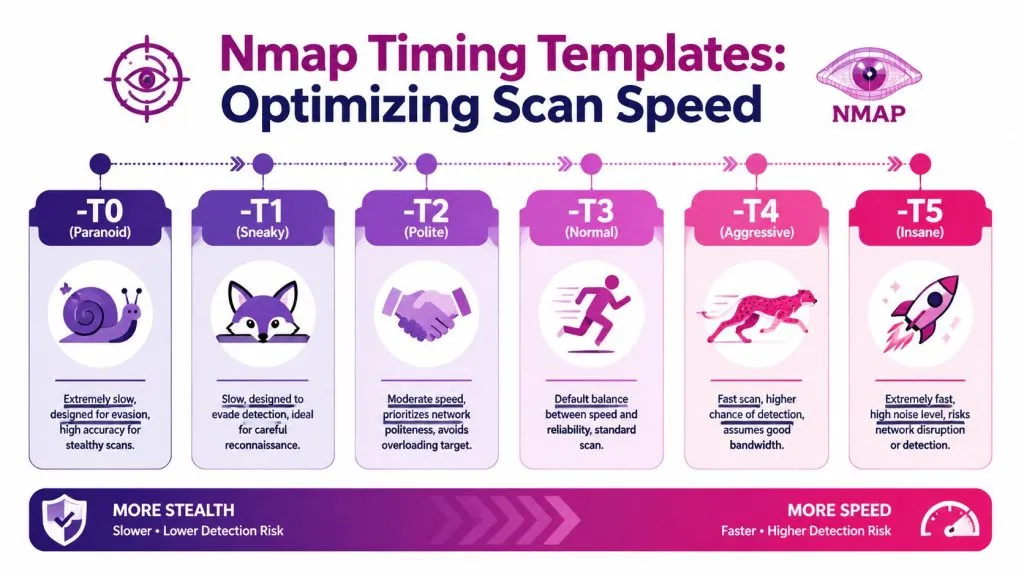
A simple way to think about the templates:
-T0and-T1fit careful reconnaissance where minimizing obvious scan behavior matters more than finishing quickly.-T2is a polite option when the network is fragile or shared with sensitive workloads.-T3is the default balance and often the right baseline.-T4is common for trusted internal work when the network can handle faster probing.-T5is aggressive enough that you should justify it before you use it.
If you’re sweeping an internal client subnet during approved testing, -T4 may be fine. If you’re validating a sensitive environment with defensive monitoring in place, slower timing reduces burstiness and helps separate genuine filtering from packet loss caused by your own aggression.
Field note: Speed doesn’t just raise detection risk. It also increases the chance that you misread the environment and call live systems dead.
Accuracy problems often come from impatience
Teams sometimes blame Nmap when the actual issue is scan tuning that doesn’t fit the path. On noisy links, overloaded VPNs, segmented networks, or older appliances, aggressive timing can produce inconsistent answers.
A few practical habits help:
- Start at a sane baseline with default timing or a moderate template.
- Increase speed only after the first sample looks stable.
- Use performance flags carefully such as
--min-hostgroupor--min-parallelismwhen large scopes need better throughput. - Re-test odd gaps before declaring a range empty, especially if adjacent systems respond normally.
The bigger point is simple. Performance tuning isn’t only about finishing faster. It’s about controlling the trade-off between coverage, confidence, and visibility. Senior analysts don’t pick timing values because they’re in a cheat sheet. They pick them because they understand what the network can tolerate and what the engagement can risk.
Legal and Ethical Guidelines for Network Scanning
A Nmap ping sweep can look harmless from the operator’s keyboard. On the receiving end, it can look like reconnaissance before an intrusion attempt. That’s why authorization isn’t paperwork overhead. It’s the boundary between legitimate security work and activity you can’t defend.
Authorization comes first
You need explicit, written permission before scanning any network you don’t own or operate under approved authority. That permission should define scope, source locations, time windows, restrictions, and who to contact if a control trips.

That standard protects both sides. Clients know what to expect. Operators know what’s allowed. If you’re helping stakeholders understand the broader role of securing digital assets with pentesting, frame scanning as one controlled part of a defensible security process, not as freelance probing in search of interesting results.
How defenders see your sweep
Blue teams don’t see your good intentions. They see patterns.
A host discovery run can trigger alerts because it touches many addresses in a short period, repeats similar probe types, or hits ports in sequences that normal user behavior doesn’t resemble. Even a restrained sweep can stand out if it originates from an unusual segment or outside approved maintenance periods.
From a defender’s perspective, common red flags include:
- Broad sequential targeting across many addresses
- Repeated ICMP or TCP probe patterns with little normal session behavior
- Traffic from unfamiliar source systems or jump boxes
- Reconnaissance before a deeper scan on the same path
That’s one reason incident response teams are right to investigate it. Organizations that have lived through major incidents know that early reconnaissance often matters, and breach reviews regularly reinforce the need for disciplined external visibility and response planning, especially in the context of what to do after big data breaches in 2023.
If a SOC analyst can’t distinguish your authorized scan from hostile reconnaissance, your coordination process is weak.
A simple operating checklist
Keep the process boring and defensible.
- Get written approval before the first packet leaves your system.
- Confirm scope boundaries so cloud assets, remote offices, and third-party ranges aren’t scanned by accident.
- Notify the right teams including SOC, network operations, and client contacts.
- Choose the least intrusive discovery method that still answers the question.
- Log what you ran so you can explain timing, flags, and source hosts later.
- Stop if results don’t match the authorization and resolve the discrepancy before continuing.
Good scanning practice isn’t only about technical skill. It’s about being able to justify every decision after the fact.
From Discovery to Actionable Intelligence
At this stage, the scan has done its job. The next step is deciding what each result means in the context of the environment you were authorized to assess.
A useful host list supports triage, ownership checks, segmentation review, and follow-on testing. If a subnet returns systems that are missing from inventory, treat that as an asset tracking issue until proven otherwise. If expected systems stay quiet, investigate whether the problem is filtering, routing, stale documentation, or a bad assumption about where those assets live. Good analysts do not treat discovery output as truth. They test it against what the network should look like.
Turn host lists into decisions
Classify results fast, then assign a next action.
- Known and expected hosts move into service enumeration, validation, or vulnerability assessment.
- Unexpected but explainable hosts go to the system owner for confirmation and documentation cleanup.
- Unexpected and unexplained hosts get priority review because they can indicate shadow IT, mis-scoped assets, or unauthorized infrastructure.
- Silent ranges deserve a separate check against firewall policy, ACLs, VPN segmentation, and acquisition history.
Context matters here. A quiet range in a heavily filtered environment often means you need better validation before you conclude the space is empty. The same result in a flat lab network points to a different problem, usually bad inventory or an IP plan that drifted over time. On mature internal engagements, I care less about the raw host count than whether the results line up with how the client says the network is built.
A workflow that stands up during review
Use a process you can defend later.
- Normalize the output into a clean list of IPs, hostnames, and responding interfaces.
- Compare it to known inventory from CMDBs, cloud consoles, DHCP data, and previous assessment notes.
- Flag mismatches by risk so unexplained internet-facing or server-segment systems rise to the top first.
- Assign an owner or investigation path for every anomaly.
- Feed confirmed hosts into the next phase such as port scanning, service fingerprinting, or targeted validation.
- Record assumptions and gaps so the client understands what was confirmed, what was inferred, and what still needs access or firewall review.
This is also where OpSec decisions show their value. A noisier discovery approach may give broader coverage, but it can also trigger SOC review, distort baselines, or create friction with operations teams if you did not coordinate timing well. A quieter approach may miss edge cases and leave blind spots that matter later. The right choice depends on the goal of the engagement, the client’s monitoring maturity, and how much certainty you need before deeper testing begins.
Teams that want broader context on how reconnaissance fits into defensive work can review curated cyber security articles. External visibility also matters after host discovery, especially when exposed assets connect to credential leakage, impersonation, and monitoring gaps, which is why the benefits of dark web monitoring often come up during remediation planning.
A ping sweep earns its keep when it sharpens the next decision. If the output changes your testing priorities, exposes inventory drift, or reveals network assumptions that do not hold up, the scan produced intelligence rather than a list.