A stolen account isn’t just a login problem anymore. It’s a business continuity problem, a fraud problem, and, for MSPs, a service opportunity. Vectra reports that account takeover attacks surged by 250% year over year, and that a key 2026 trend is that 1 in 3 attacks now uses AI-generated deepfakes or synthetic data.
That changes the conversation. Basic MFA rollouts and password reset policies still matter, but they no longer define a serious account takeover prevention program. Clients need layered controls that address stolen credentials, AI-driven impersonation, risky sessions after login, and brand abuse that starts outside the network.
For MSPs, this is one of the clearest places to package security into an ongoing managed service. The work is operational, measurable, and tied directly to client outcomes: fewer compromised accounts, fewer fraud incidents, tighter identity controls, and faster response when exposed credentials show up where they shouldn’t.
Introduction The New Battlefield for MSPs
Account takeover used to be discussed like a narrow identity issue. It isn’t. When an attacker gets into Microsoft 365, a payroll portal, a CRM, a banking interface, or an admin console, they gain a trusted foothold inside the client’s business. They can impersonate staff, reroute payments, harvest data, and launch internal phishing from a legitimate account.
That’s why account takeover prevention has become a strong service line for MSPs and MSSPs. Clients rarely have the staff, telemetry, and process discipline to handle this well on their own. Most can buy MFA. Far fewer can decide which MFA is resilient, monitor for exposed credentials, correlate login anomalies, and respond before a stolen session becomes a fraud event.
The profitable MSP posture is simple: stop treating ATO as a help desk issue and start treating it as an identity defense program. That means building controls at four levels. First, reduce credential exposure. Second, harden authentication. Third, watch for behavior that doesn’t fit the legitimate user. Fourth, respond quickly when external signals suggest an attack is being staged.
Practical rule: If your service only checks whether MFA is enabled, you’re measuring a setting, not reducing takeover risk.
Clients will buy this when you tie it to operational outcomes. Fewer compromised inboxes. Less payment fraud exposure. Lower executive impersonation risk. Better evidence for insurers, auditors, and leadership. That’s where account takeover prevention stops being a technical checkbox and becomes a managed security offering worth paying for.
What Is Account Takeover and Why It Demands Attention
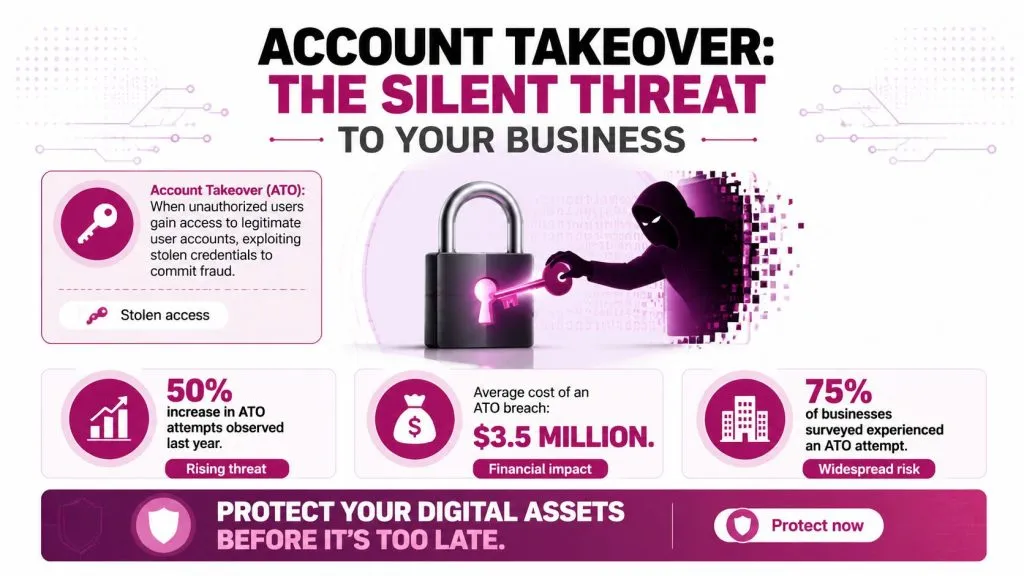
Consumer Reports notes that account takeover scams caused about $15.6 billion in losses in 2024, with millions of Americans affected. MSPs should read that as a warning about business risk, client exposure, and service opportunity.
Account takeover, or ATO, is what happens when an attacker gets control of a real user account and operates under that user’s identity. In client environments, that usually means email, Microsoft 365, payroll, banking, CRM, remote access, or an admin console. The attacker does not need to break perimeter defenses if valid credentials, a hijacked session, or a weak recovery flow gets them in.
In practice, the entry point may be a reused password, a phishing kit that captures MFA tokens, an infostealer infection, or an AI-assisted impersonation call that tricks a user or help desk into resetting access. Some threat actors also mine public data and tools such as social media scraping APIs to build convincing pretexts around executives, finance staff, or privileged admins. Once the login succeeds, trust shifts to the attacker.
Why a single account matters so much
Clients often frame an account as one user and one password. Attackers frame it as access to payment approvals, reset paths, internal trust, and downstream systems. A compromised mailbox can expose invoices, vendor threads, password reset emails, and approval chains. A compromised admin account can create persistence, weaken defenses, and expand access across identity infrastructure.
That is the scale MSPs need to remember when a client treats ATO like basic password hygiene.
| Client view | What the attacker gains |
|---|---|
| Email account | Trusted impersonation, invoice fraud, internal phishing |
| Finance portal | Payment changes, fraudulent transfers, account changes |
| CRM or SaaS login | Customer data access, fraud against downstream users |
| Admin console | Privilege escalation, user changes, persistence |
Why clients are underestimating the risk
Many clients still reduce ATO to weak passwords and missing MFA. That view is outdated. Credential theft still matters, but current attacks also involve session theft, MFA fatigue, adversary-in-the-middle phishing, help desk social engineering, and post-login behavior designed to avoid detection.
For some clients, this reaches the board because it affects fraud exposure, regulatory reporting, cyber insurance, and customer trust. For MSPs, it directly affects margin because cleanup is expensive, liability questions arrive fast, and reactive support hours pile up after a compromise. If a stolen mailbox leads to wire fraud, no one will be satisfied with “MFA was enabled on most accounts.”
ATO becomes dangerous when a valid login gives an attacker room to act like a trusted user long enough to move money, steal data, or set up persistence.
That is why effective account takeover prevention goes beyond MFA deployment. MSPs need layered controls that reduce credential exposure, push clients toward phishing-resistant and passwordless authentication where it fits, monitor for abnormal use after login, and watch external signals such as dark web credential exposure before the attacker tries to cash in.
Common ATO Attack Vectors and Their Footprints
Attackers tend to reuse a handful of methods because they work. The mistake many teams make is focusing only on the method and not on the footprint it leaves behind. MSPs need both. You need to know how the attack starts and what telemetry should force a closer look.
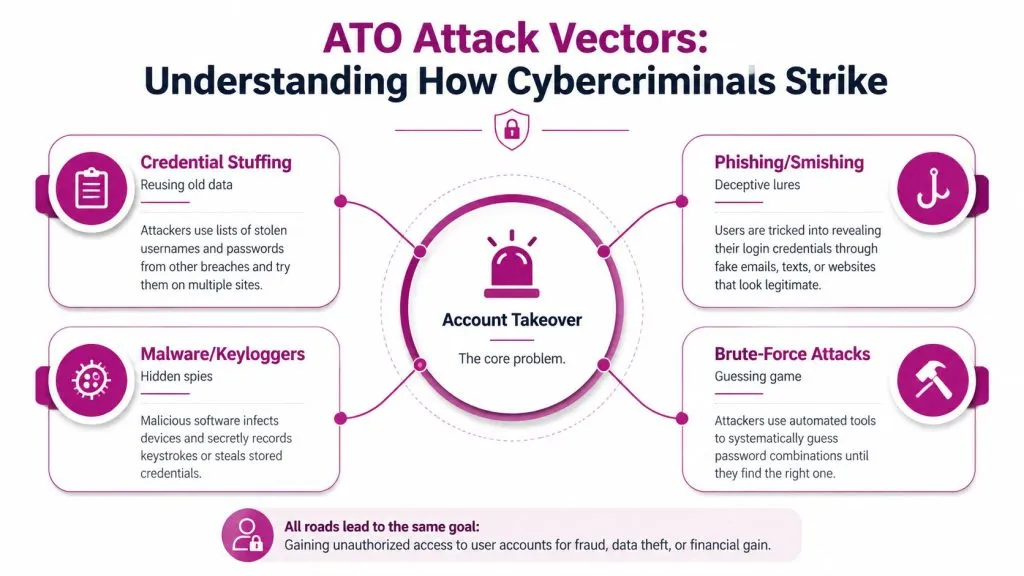
Classic paths attackers still use
Credential stuffing remains one of the most practical ATO paths because users still reuse passwords. Attackers buy breach data, automate login attempts, and look for accounts where old credentials still work. The footprint usually includes bursts of failed login attempts, repeated attempts against many accounts, and successful logins that don’t match the user’s normal device or geography.
Phishing and smishing are still effective because they target trust, not just technology. The footprint often shows up as odd sign-ins after a user interacts with a fake login page, unexpected MFA prompts, mailbox rule changes, or logins from an unfamiliar browser profile.
Malware and infostealers shift the signal toward endpoint and identity correlation. A user may log in successfully, but the surrounding behavior changes. New session patterns appear. Access expands into apps they don’t normally use. Data access becomes broader or faster than usual.
A short explainer can help align client teams on the basics:

What AI-driven impersonation looks like in practice
The newer problem is that attackers don’t always need to steal a login first. Sometimes they use one compromised account to create pressure on another employee through voice notes, video calls, or urgent messages that appear to come from a known executive.
That has changed what “suspicious communication” means. MSPs should coach clients to scrutinize sudden executive requests, unusual urgency, requests to bypass standard process, and media messages that create social pressure to act before verifying.
Useful signals MSPs can operationalize
Not every indicator needs a SIEM engineer to interpret. Start with a small detection set that operations teams can readily use.
- Failed login concentration: Multiple failures against one account or many accounts from related infrastructure often points to stuffing or brute force.
- Context mismatch: A successful login from a new device, browser, or region should trigger additional verification, especially if followed by sensitive actions.
- Post-login behavior change: New forwarding rules, rapid data access, or unusual admin actions are often more meaningful than the login itself.
- External impersonation noise: Monitoring public channels helps when attackers gather context for phishing or impersonation. Teams that study exposed executive data and public brand mentions sometimes use tools such as social media scraping APIs to collect open-source signals for investigation and brand abuse monitoring.
The point isn’t to collect every signal. It’s to promote the few that help an MSP decide when to challenge, freeze, or investigate an account.
Foundational Prevention Controls Every Client Needs
Credential theft still works because many clients are running identity stacks that were built for convenience, not abuse resistance. A profitable MSP service starts by standardizing a control set you can deploy, audit, and renew across the client base.
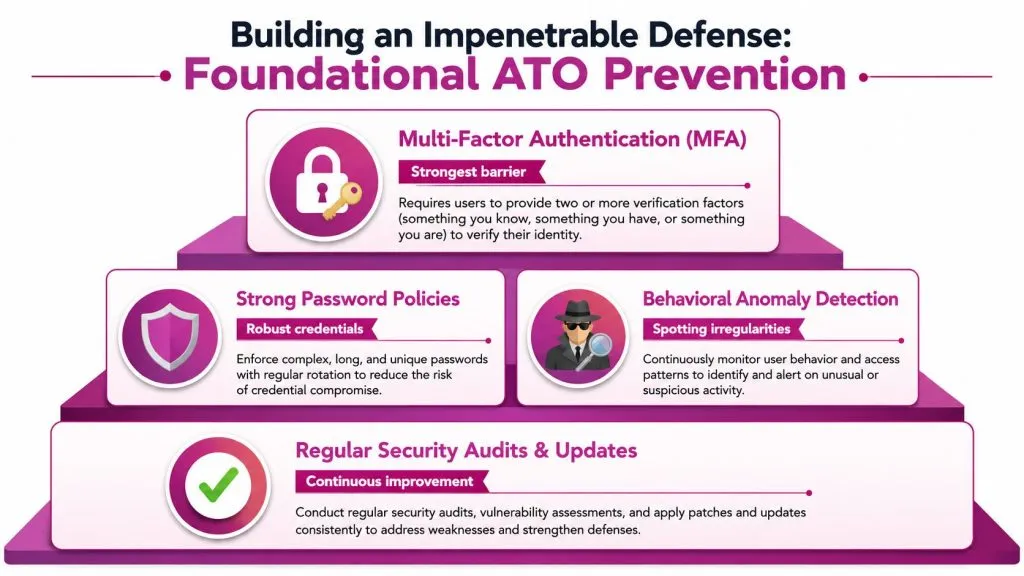
What works as a baseline
Start with authentication strength. Phishing-resistant MFA should be the target state, not basic SMS codes and not push prompts users can approve by mistake. The FIDO Alliance reports that passkeys built on FIDO standards are resistant to phishing and credential replay because the authenticator is bound to the legitimate site and does not expose a reusable secret to the user or the attacker (FIDO Alliance passkey resources). For MSPs, the practical takeaway is simple. Use passkeys, security keys, or platform authenticators for admins first, then extend to email, VPN, finance, and remote access.
Control login abuse next. Rate limiting, IP reputation checks, impossible travel review, CAPTCHA on high-risk flows, and lockout rules tuned to stop bot traffic all cut down the volume attackers can push through. These controls do not stop every targeted intrusion, but they reduce the return on credential stuffing and password spraying. That matters because ATO is often a volume business before it becomes a fraud case.
Email trust still belongs in the baseline because phishing and impersonation remain common entry points. A quick external validation during onboarding or quarterly reviews helps catch obvious gaps. A free DMARC checker is useful for confirming whether a client has published policy correctly and whether alignment problems need follow-up.
Identity controls also need to be mapped to internet exposure. Public login portals, forgotten subdomains, stale remote access services, and unmanaged SaaS sign-in pages all expand the number of places an attacker can test credentials or stage impersonation. Pair identity reviews with attack surface analysis so clients can see which exposed systems increase ATO risk and which ones should be retired, restricted, or put behind stronger authentication.
Why passwordless should be the destination
The long-term fix is to reduce dependence on passwords.
MFA lowers risk, but passwords still create recovery abuse, phishing opportunities, and replay risk. Passwordless methods, especially passkeys and security keys, remove the secret attackers most often steal, buy, or trick users into handing over. That is the shift many MSPs miss. If your service ends at “MFA enabled,” you have improved security, but you have not changed the attacker’s preferred target.
The trade-off is rollout complexity. Older line-of-business apps may not support modern authentication. Some clients need fallback methods for shared devices, frontline workers, or contractors. Recovery workflows need close review because a weak help desk reset process can undo a strong sign-in flow in one phone call.
A workable migration path is narrow and deliberate:
- Start with high-impact accounts: Admins, executives, finance, email admins, and remote access users should move first.
- Choose phishing-resistant authenticators: Prefer passkeys or hardware-backed keys over SMS and app push approvals.
- Rebuild recovery before broad rollout: Identity proofing, help desk scripts, and exception handling need tighter controls.
- Limit fallback options: Every backup method should be justified, logged, and reviewed.
- Track operational payoff: Password reset volume, risky sign-ins, and account lockout noise should decline as adoption increases.
That approach gives MSPs something clients will pay for. You are not just deploying MFA. You are reducing credential exposure, shrinking impersonation paths, and building an identity layer that holds up better against AI-assisted phishing and large-scale credential abuse.
Go on the Offensive with Proactive Monitoring
ATO defense fails when monitoring starts at the login page. By then, the attacker may already have the credential, the target list, and an automated workflow ready to test access at scale. MSPs that want a service clients will renew need earlier visibility into exposure, impersonation, and abuse patterns that show up before a confirmed takeover.
Set a response clock on exposed credentials
Credential theft now moves faster than many help desks. Google Cloud reported in its analysis of credential stuffing that attackers automate login attempts with large sets of previously stolen usernames and passwords, turning exposed credentials into immediate attack inventory. That is the operating condition MSPs have to design for.
An exposed password should trigger a runbook, not a ticket backlog. Confirm whether the credential matches an active identity, check where that account can authenticate, force remediation where policy requires it, and review whether the user still has weak fallback methods that make re-entry easy for the attacker. If the client has not adopted passwordless for high-risk users, this is often where the business case becomes obvious.
Dark web intelligence belongs in that workflow because it gives you lead time. A practical model is to pair exposed-credential alerts with identity inventory, login telemetry, and response ownership. MSPs that want to package that work into a billable service should study how dark web monitoring supports managed service providers and then tie that intelligence to specific remediation steps and reporting.
Monitor the signals that show intent
Good monitoring covers four categories of evidence, and each one should map to an operational action.
- Credential exposure: Newly leaked usernames, passwords, and session data matched to active client accounts
- Login abuse: Spikes in failed sign-ins, impossible testing volume, password spray patterns, and abuse of password reset flows
- Impersonation infrastructure: Lookalike domains, cloned sign-in pages, executive impersonation profiles, and fake support outreach
- Post-authentication anomalies: New mail rules, unusual MFA changes, impossible travel, token misuse, and privilege changes that do not fit the account baseline
That mix matters because next-gen ATO is no longer limited to a password replay attempt. AI-assisted phishing can produce convincing lures fast. Impersonation campaigns can prepare the victim for a help desk social engineering call. Session theft can bypass controls that only watch the initial login. A monitoring service that only checks for failed sign-ins will miss too much of the attack chain.
How to make monitoring profitable
Many MSPs buy a feed, forward alerts, and call it monitoring. Clients rarely keep paying for that. They pay for triage, containment, and fewer incidents reaching the business.
Build the service around actions your team can execute consistently.
| Monitoring input | MSP action | Client value |
|---|---|---|
| Exposed credential found | Validate identity, reset access, review recovery methods and recent sign-ins | Reduces the chance of credential stuffing success |
| Fake domain or cloned login page | Confirm ownership, notify the client, start takedown and user warning steps | Lowers phishing and impersonation risk |
| Executive impersonation signal | Escalate to security and leadership contacts, preserve evidence, monitor related accounts | Reduces fraud exposure and response confusion |
| Bot activity against login or reset paths | Tighten rate limits, add challenges, review targeted accounts and source patterns | Cuts automated takeover attempts before compromise |
Service quality depends on speed and decision-making discipline. Define who owns validation, what triggers forced resets, when to suspend risky sessions, and how quickly the client gets notified. If those choices are vague, monitoring becomes noise. If they are documented and measured, proactive monitoring becomes one of the clearest ways an MSP can prove security value.
Building an ATO Prevention Program for Your Clients
A workable program needs structure. The mistake is trying to deploy every identity control at once. The better approach is phased: establish the baseline, define normal behavior, add proactive intelligence, then tighten the response loop.
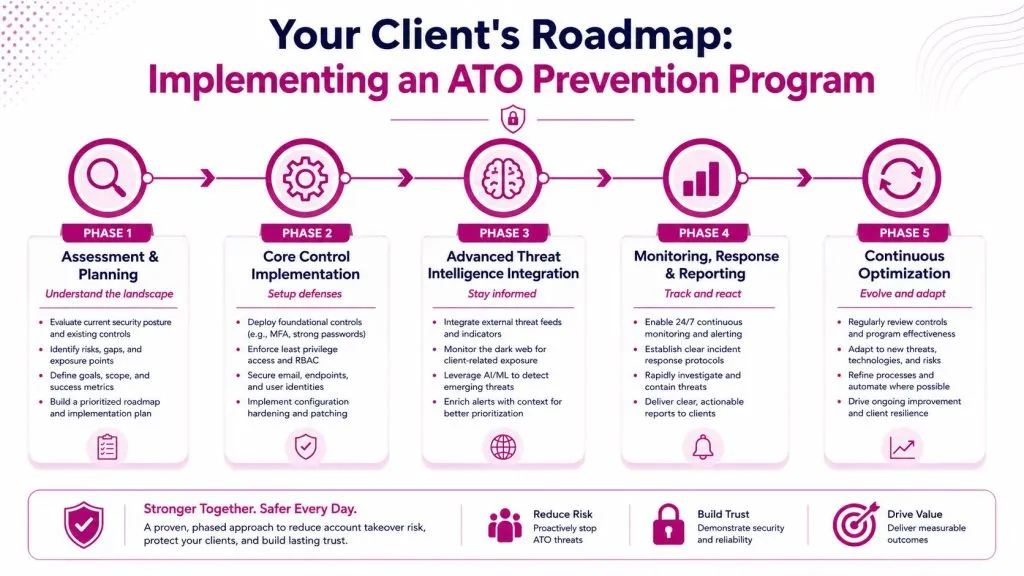
Phase 1 assessment and baselining
Start by mapping the client’s identity stack. That means directory services, SSO, remote access, email, finance systems, admin consoles, customer-facing portals, and any legacy apps that still rely on weak authentication paths.
Then baseline normal usage. Which users regularly travel? Which apps should never be accessed from unmanaged devices? Which admin actions are routine, and which should always trigger review? If you don’t define normal, every anomaly program turns into noise.
A useful kickoff checklist:
- Identify crown-jewel accounts: Executives, finance staff, administrators, and support engineers usually need stronger controls first.
- Review current authentication paths: Note where passwords, SMS, push MFA, passkeys, and hardware tokens are in use.
- Map sensitive workflows: Password resets, payment changes, forwarding rules, and privileged changes deserve explicit monitoring.
- Document response ownership: Decide who resets accounts, who approves blocks, and who handles client communications.
Phase 2 control deployment
This phase is where MSPs often prove their maturity. Roll out phishing-resistant authentication where possible. Enforce rate limits and anti-automation controls on login and reset paths. Reduce standing privilege. Tighten recovery processes so social engineering can’t bypass your stronger login.
Then add adaptive access controls. Proofpoint notes that effective ATO prevention requires behaviorally grounded, risk-based authentication, and that behavioral biometrics analyzing keystrokes, mouse movements, typing speed, and navigation patterns can detect ATO attempts with over 95% accuracy by identifying deviations from a user baseline, even when credentials are valid. That matters because some of the most damaging ATO incidents involve valid credentials that passed the front door.
Phase 3 proactive intelligence and response
At this point, move beyond enforcement and into anticipation. Add breach matching, dark web monitoring, domain impersonation checks, and workflows for suspected AI-driven social engineering. This is also where clients need a written playbook for executive impersonation, payment diversion attempts, and mailbox compromise.
If the client has already suffered a breach, the recovery plan shouldn’t stay informal. A clear guide on steps after a data breach helps frame containment, credential resets, stakeholder communication, and follow-up monitoring in a way clients can execute under pressure.
Phase 4 optimization and incident readiness
The program won’t stay effective if it becomes static. Review false positives, update risk rules, retire weak exceptions, and monitor adoption barriers around passkeys or hardware tokens. Mature programs also test help desk flows because attackers love the support channel when direct login attacks get harder.
Use a simple operating model to keep the program healthy:
| Program area | What to review regularly |
|---|---|
| Authentication | Exceptions, fallback methods, recovery paths |
| Monitoring | Alert quality, escalation speed, missed signals |
| User behavior | High-risk roles, unusual workflows, training gaps |
| Incident response | Playbook accuracy, ownership, communication steps |
The profitable MSP move is to productize this. Package the assessment, rollout, monitoring, incident response, and quarterly optimization into a single managed identity protection service.
Measuring Success and Demonstrating Value
Clients won’t judge account takeover prevention by policy language. They’ll judge it by whether fewer bad things happen and whether your team can prove it.
The best reports are short and operational. Show how many exposed credentials were found and remediated, how many risky login events were challenged or blocked, how many impersonation findings were escalated, and how quickly the team acted. Include a narrative summary for notable incidents so the client sees decision quality, not just counts.
A simple reporting set usually works best:
- Compromised credentials detected and remediated
- Suspicious login attempts investigated
- Accounts moved to phishing-resistant authentication
- Time from exposure detection to client action
- High-risk impersonation or brand abuse findings closed
Good reporting answers a client’s real question: are we less exposed this quarter than we were last quarter?
When you consistently show reduced exposure, faster containment, and stronger authentication coverage, the service stops looking like an add-on. It becomes part of the client’s core risk management.
If you want to turn account takeover prevention into a managed service instead of a collection of one-off tools, InsecureWeb gives MSPs a practical way to do it. You can monitor dark web credential exposure, detect fake sites and impersonating accounts, track external threats, and deliver those capabilities under your own brand with API access included.