Data Breach News14 min read
Compromised Passwords Meaning: Prevent Data Breaches
By InsecureWeb Team
This report reflects observations of dark web activity. InsecureWeb makes no representations regarding the accuracy of this data.
A compromised password is any password that has been exposed in a data breach and is now known to attackers, which means it is no longer secret and cannot be trusted to protect any account. In 2024, the record-breaking Mother of All Breaches exposed approximately 16 billion compromised passwords, making it clear that compromised passwords meaning has shifted from a user mistake to a business-wide risk.
That change matters to MSPs because a leaked password rarely stays confined to the service where it first appeared. Once a credential leaves the control of its owner, it becomes part of attacker tooling, password spray attempts, and credential-stuffing lists used to test access across email, cloud apps, remote access portals, and admin accounts. For an MSP, the issue isn’t just whether a password was leaked. It’s whether that leak gives an attacker a path into a client environment today, next week, or months from now.
The Unseen Epidemic of Leaked Credentials
Billions of leaked credentials are now circulating in criminal markets and breach collections. For an MSP, that changes the job. Password exposure is no longer a rare exception tied to one user ticket. It is a recurring operational risk that can affect multiple clients at once.
The mistake I still see is treating a leaked password as an isolated identity problem. In practice, the actual risk sits in reuse. One exposed password from a third-party service can give an attacker a valid starting point against Microsoft 365, VPN, RMM, payroll, or line-of-business apps if the user repeated it. The leak happened elsewhere. The business impact lands in your client environment.
That shift should change how MSPs talk to clients. The old conversation was, “We enforce complexity and rotate passwords.” The better conversation is, “We track whether client credentials have appeared in breach data, measure how many accounts are reusing exposed passwords, and reduce the time between exposure and reset.” Those are operating metrics. They give clients something concrete to review: exposed accounts by client, privileged accounts affected, MFA coverage on exposed identities, and median remediation time.
Practical rule: If a password has been exposed, treat it as failed authentication material, not as a password that might still be safe.
Teams that handle this well stop debating whether the password was strong when it was created. They ask two harder questions instead. Has this credential shown up in breach data, and where else might the same user have used it? That is the difference between basic password policy and credential risk management.
For MSPs, that means breach monitoring cannot sit off to the side as a nice-to-have alert feed. It has to feed service desk workflows, client reporting, privileged access reviews, and reset procedures. A leaked credential is a technical event. Reused credentials turn it into a systems problem.
What a Compromised Password Really Means for Your Business
A password becomes compromised the moment it exits the control of its rightful owner and lands with unauthorized parties. That can happen through a breach, phishing, malware, or weak storage practices that allow attackers to recover the original value. Once it’s exposed, secrecy is gone. At that point, complexity doesn’t save it.
Exposure beats complexity
Imagine a master key. If someone copies that key and sells copies in a public market, the original key doesn’t remain trustworthy because it was made from strong metal or had a complex shape. It’s compromised because strangers can now use it.
That is the core of compromised passwords meaning in real operations. Security comes from secrecy. Once a password appears in a breach corpus or attacker list, it no longer matters that it had symbols, length, or a mixed character set. It is known.
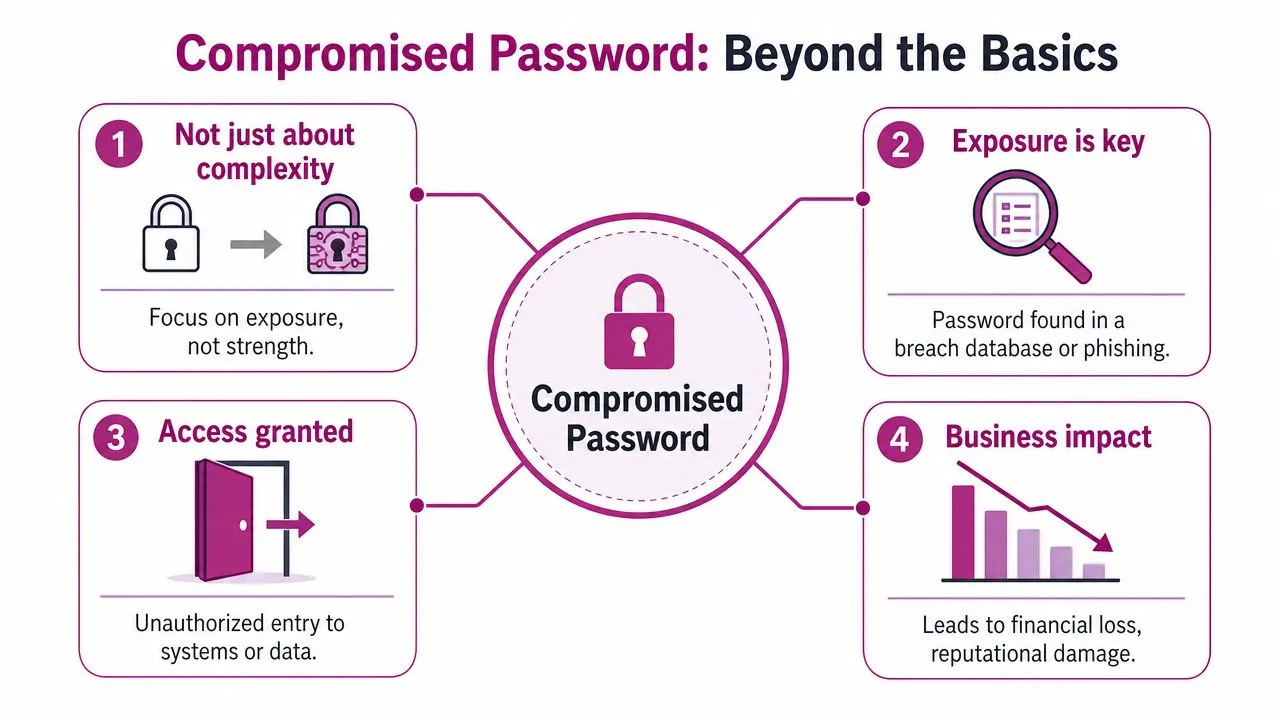
Attackers also profit from poor password storage. If an application stores passwords badly, or hashes them weakly and without salting, attackers can crack them and turn a database breach into usable credentials. After that, they don’t just log into the breached service. They test the same username and password across email, cloud dashboards, VPNs, and admin consoles.
Why attackers care about lists, not single passwords
The reason this matters at business scale is automation. The Verizon 2022 Data Breach Investigations Report found that over 90% of all verified data breaches involved compromised credentials, as cited by Exabeam’s explanation of compromised passwords. Attackers don’t need your client to be individually targeted. They just need one working credential in a list.
For MSPs, that means a leaked password on a low-value consumer service can become a doorway into a high-value business system if the user reused it. A finance user reuses a password on webmail. A tenant admin reuses one on a forgotten forum account. A remote worker stores credentials in a browser that gets scraped by malware. The entry point may look minor. The operational impact isn’t.
| What teams often assume | What actually matters |
|---|---|
| The password was long, so it’s still safe | If it’s exposed, it’s unsafe |
| The breach happened on another site | Reuse can carry the risk into business systems |
| MFA prompts mean the account is protected | Repeated prompts can be a sign attackers already have the password |
A compromised password isn’t a weak password. It’s a known password.
How Passwords Get Compromised in the First Place
Most compromised credentials don’t come from one dramatic event inside your client environment. They come from many small failures across the wider internet and user behavior. That matters because MSPs can’t limit their thinking to the systems they directly manage.
Three common paths into credential theft
Phishing still works because users don’t log into a fake page with bad intentions. They think they’re solving a normal business problem. An attacker sends a cloud storage notice, an MFA reset notice, or a payroll message. The user enters credentials into a convincing login page, and the attacker captures them in real time.
Infostealer malware changes the picture further. When it lands on a workstation, it can scrape saved passwords, session data, browser-stored credentials, and other authentication artifacts. That turns one infected endpoint into a source of multiple compromised accounts.
Third-party breaches are the quiet source many teams underestimate. Your client may secure its own stack reasonably well and still be exposed because employees signed up for unrelated services using business email addresses and familiar passwords. When those external platforms are breached, the stolen credentials don’t stay tied to the original service.
A useful way to think about this is to review credentials as part of a broader attack surface analysis process. Password exposure isn’t isolated from the rest of your risk. It’s one of the clearest signs that outside-facing risk has become inside access risk.
Why this matters for MSP operations
The practical lesson is uncomfortable but important. Password compromise is often outside the direct control of the client and the MSP. You can’t stop every third-party breach. You can’t rely on every user to spot every phishing lure. You can’t assume every device stays clean.
That reality changes the job. Instead of trying to prevent every exposure event, MSPs need processes that assume exposure will happen and focus on fast detection, containment, and durable preventive controls.
Telltale Signs of Widespread Password Exposure
Credential exposure rarely announces itself with a clean alert that says “this password was leaked and used.” More often, teams see scattered symptoms across identity, support, and endpoint channels. The trick is recognizing the pattern before a single account issue becomes a broader incident.
What teams usually see first
A user reports an MFA prompt they didn’t initiate. Another user says their password stopped working even though they didn’t change it. The help desk sees a sudden run of lockouts against accounts that are not typically problematic. None of those signals proves a compromise on its own, but together they deserve attention.
You may also see successful sign-ins that don’t fit the user’s normal workflow. That could mean access from an unusual region, impossible travel patterns, odd timing, or logins to applications the user rarely touches. In many environments, the first human clue isn’t a SOC alert. It’s an employee saying, “Something about this account feels off.”
When users report unexplained MFA prompts, assume the password may already be in attacker hands and verify before dismissing it as user error.
What deserves immediate escalation
Some indicators should move straight to priority handling:
- Repeated account lockouts across multiple users often suggest automated login attempts, not ordinary forgotten passwords.
- Unexpected password reset emails can indicate attackers are testing which accounts are active and reachable.
- Mailbox rules, forwarding changes, or altered recovery settings often show post-login activity, not just failed attempts.
- Dark web monitoring alerts for business email accounts provide the clearest early warning because they point to exposed credentials before visible misuse occurs.
MSPs that build good escalation habits don’t wait for confirmed damage. They treat clusters of identity anomalies as operational signals and start validation early.
The Domino Effect of a Single Leaked Password
A leaked password is rarely a one-account problem. In a client environment, it often becomes the first step in a chain: account access, internal impersonation, password resets, privilege gain, and then disruption that looks like a normal user session until the damage is already underway.
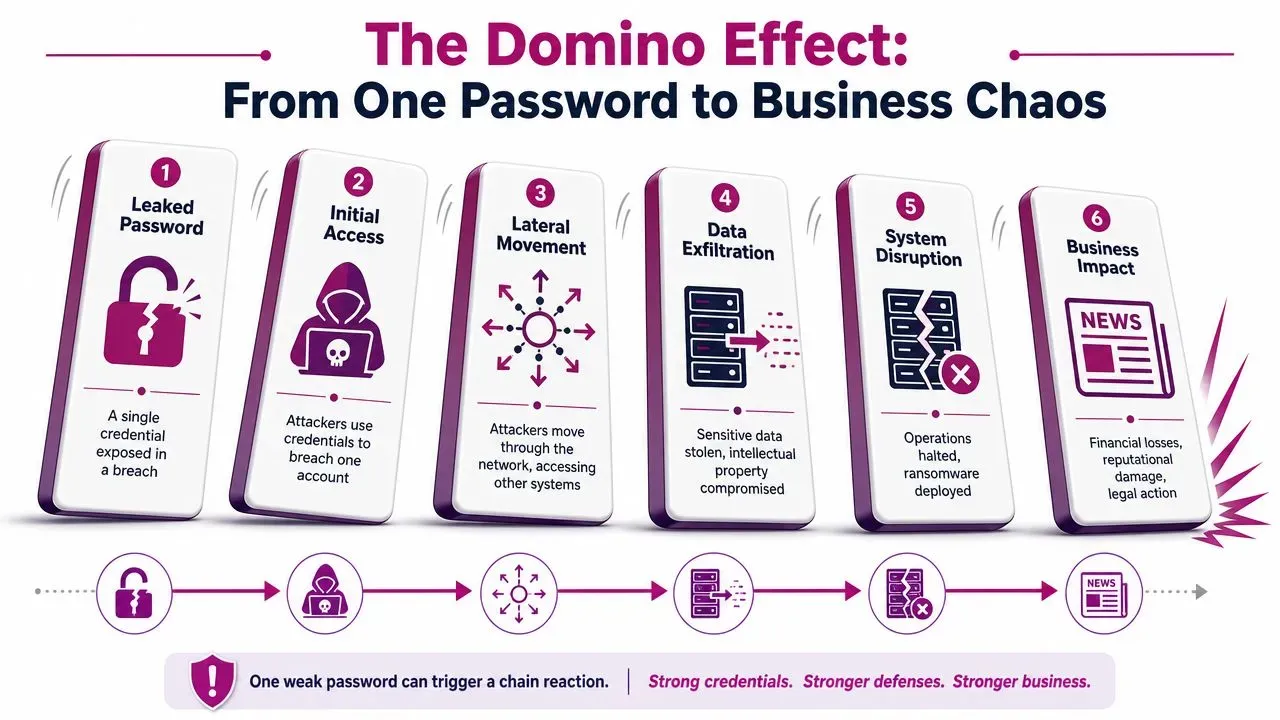
From account access to business disruption
Attackers do not need an exploit if they have a valid login. They sign in, inherit the user’s trust, and start looking for the fastest path to money, data, or control.
Email is often enough. An attacker can review invoices, intercept approvals, search for password reset messages, and study who has authority over finance, vendors, or IT changes. Collaboration platforms add another layer because they let the attacker send convincing internal messages from a real account. If the same credential also works on remote access tools, admin portals, or line-of-business apps, one leaked password can turn into a multi-system incident very quickly.
Password reuse is what makes this pattern so expensive for MSPs to contain. The first compromised account is only the visible entry point. The underlying risk is shared across Microsoft 365, VPN, SaaS apps, backup portals, and personal services where the same user chose convenience over separation. That is why one leak can force broad scoping, tenant-wide resets, and client communications that go far beyond the original account. For business leaders, the best framing is simple: a password leak is a technical event that creates operational risk.
Why reused credentials turn one incident into many
Credential reuse gives attackers a low-cost way to test for wider access. They try the same username and password combination across common services and look for anything that opens. No malware required. No noisy exploit chain. Just valid authentication against systems that were never meant to share the same secret.
A short briefing video can help frame this risk for technical and non-technical stakeholders alike.

For MSPs, this changes how response should work. Containing the known account is only part of the job. Teams also need to identify where else the credential may have been used, which recovery paths are tied to that user, whether administrative workflows depend on that mailbox, and whether any regulated reporting duty applies. If a client operates under regional rules, review obligations such as Israeli cybersecurity incident reporting early so legal and technical response stay aligned.
Use a business-focused explanation with clients: one reused password can create trusted access in several systems at once, which makes detection slower and recovery broader. That is also why proactive monitoring matters. Services that watch for exposed credentials and trigger resets before attackers act can cut off the chain much earlier. If you need a client-facing reference on response planning after exposure, point them to these steps after a data breach.
The practical takeaway is direct. Treat every leaked password as a potential cross-system incident, not a routine reset ticket.
Your Immediate Incident Response Checklist
When a password compromise is suspected, speed matters more than elegance. Teams lose time when they debate confidence levels instead of cutting off attacker access. Start with the account. Then expand outward based on evidence.
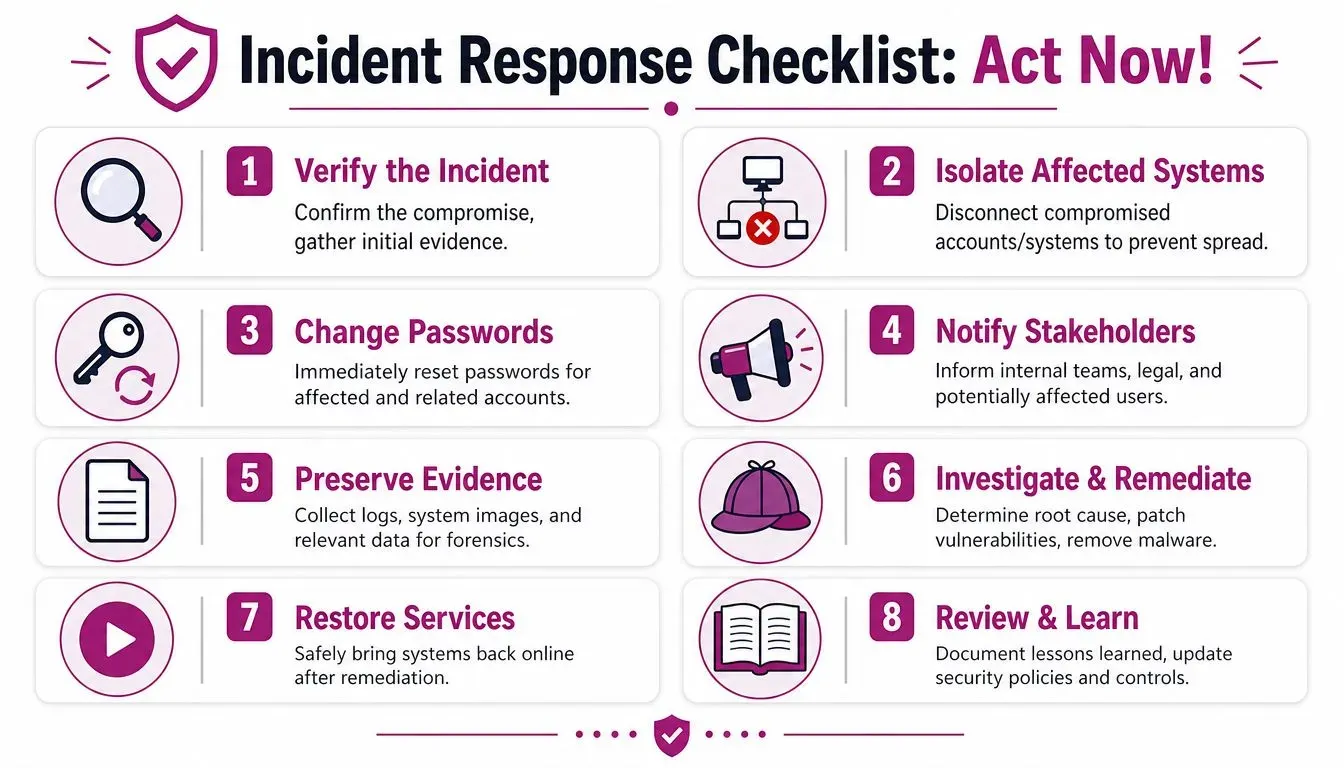
Contain the account before you investigate everything else
- Force a password reset immediately. Reset the affected account and any account that shares the same or similar credential pattern.
- Revoke active sessions. Don’t assume a password change alone will terminate existing authenticated sessions.
- Require MFA re-registration if needed. If the attacker may have altered recovery settings or enrolled devices, reset the trust chain.
- Temporarily restrict risky access paths. If necessary, disable external access, admin access, or remote sign-in until you confirm control is restored.
Field advice: Revoke sessions first, or at least at the same time as the reset. Otherwise the attacker may keep a live foothold.
Preserve evidence and scope the blast radius
Containment is only half the job. You also need to know what the attacker touched.
- Pull identity logs for recent sign-ins, failed attempts, MFA events, and token activity.
- Review mailbox and SaaS changes such as forwarding rules, delegated access, file shares, and recovery settings.
- Check endpoints tied to the account for malware, especially browser credential theft.
- Map related accounts including shared mailboxes, service accounts, privileged identities, and accounts with password similarity.
If the incident crosses reporting thresholds or affects regulated environments, legal and compliance review should happen early. For teams dealing with regional obligations, this overview of Israeli cybersecurity incident reporting is useful because it frames how reporting duties can intersect with cyber events.
If your team needs a broader post-breach workflow, this guide on steps after a data breach is a practical reference for organizing response actions beyond the identity layer.
Recover cleanly and document the response
Recovery isn’t “the user can log in again.” Recovery means you’re confident the attacker no longer has a path back.
- Reimage or clean affected devices if malware is suspected.
- Patch the root cause whether that was phishing exposure, a weak app, poor password storage, or missing policy enforcement.
- Notify internal stakeholders including leadership, legal, and impacted client contacts.
- Document the timeline so future incidents don’t start from zero.
- Update detections and playbooks based on what you learned from this event.
The teams that handle password compromise best are the ones that rehearse these steps before they need them.
Proactive Prevention Controls and Managed Services
Most organizations still lean too hard on password resets, complexity rules, and awareness training. Those controls still matter, but they don’t solve the core problem once credentials have already leaked. That’s why modern prevention needs to combine identity hardening with continuous exposure monitoring.
Controls that still matter
Start with the basics because weak fundamentals make every later control less effective.
- Use MFA broadly. It won’t make a leaked password safe, but it can block many straightforward login attempts.
- Eliminate password reuse through policy and tooling. Users need password managers and clear enforcement, not just reminders.
- Review privileged accounts separately. Admin, finance, backup, and remote support accounts need tighter handling than ordinary user identities.
- Train users on modern phishing patterns. Focus on SaaS login lures, MFA fatigue, and fake file-sharing flows rather than generic awareness slides.
Modern standards now go further than old complexity policies. The updated NIST Digital Identity Guidelines, SP 800-63B, require compromised password screening so organizations check new and existing passwords against breached credential datasets, as described in Enzoic’s review of NIST guidance. That’s the right direction because it addresses real exposure, not theoretical strength.
A practical companion to internal controls is a short checklist of Kogifi’s essential security practices. It reinforces the idea that password hygiene works best when it’s part of a broader website and application security discipline.
Where proactive monitoring changes the game
Operational upgrade for MSPs is continuous credential exposure monitoring. If you only learn a password is compromised after an account takeover, you’re already responding late. If you learn the moment a client’s credential appears in breach data or dark web chatter, you can rotate the password, invalidate sessions, and review related accounts before the attacker tests it.
That shift matters because compromised passwords meaning isn’t just “this user needs a reset.” It means your identity layer may already be partially visible to attackers.
When MSPs add continuous dark web monitoring for exposed credentials to their managed security stack, they change the service conversation. Instead of waiting for users to report weird prompts or lockouts, they can identify exposure earlier and trigger a structured response.
The most effective program usually includes:
| Control area | What works | What doesn’t |
|---|---|---|
| Password policy | Block known-breached passwords | Rely on length and symbols alone |
| Identity protection | MFA, session revocation, privileged account separation | Treat every account the same |
| Detection | Monitor for exposed credentials and identity anomalies | Depend only on user complaints |
| Response | Prebuilt reset, revoke, and review playbooks | Ad hoc handling by whichever tech is available |
Strong password policy without exposure monitoring is incomplete. You may be enforcing good-looking passwords that attackers already know.
For MSPs, this is also a service design issue. Credential risk should have an owner, a review cadence, and an automated workflow for alerting, reset coordination, and evidence capture. If that process lives only in tribal knowledge, clients will get inconsistent protection.
From Reactive Fixes to Proactive Defense
The meaning of a compromised password has changed. It no longer describes a single bad credential or a single careless user. It describes a condition where a secret is no longer secret, where reuse can spread that risk across many accounts, and where attackers can automate exploitation at scale.
That is why mature MSP security practice can’t stay stuck in break-fix mode. Resetting a password after suspicious activity is necessary, but it isn’t enough. You need identity controls that assume exposure happens, monitoring that tells you when it does, and response playbooks that cut off access fast.
The practical standard is simple. Don’t ask whether a password looks strong. Ask whether it’s still private, whether it’s been seen in breached data, and what other accounts it might endanger if it’s reused.
If you’re building a repeatable way to detect exposed credentials, monitor the dark web, and protect client brands from external threats, InsecureWeb gives MSPs and security teams a way to spot stolen credentials, fake sites, impersonation, and other outside-in risks before they turn into client-facing incidents.