Sales, updated 13 min read
24/7 Threat Monitoring: A Guide for MSPs and Businesses
By InsecureWeb Team
It’s 3:07 AM on a Saturday. A client’s remote access account starts pulling data it never touches, then a server begins spawning processes nobody on the day team would approve. No one’s at a desk. No one’s watching the dashboard. By Monday, what could have been an isolated event has turned into a business interruption, a client escalation, and a hard conversation about why the alerts were there but no response followed.
That’s the gap 24/7 threat monitoring closes. Not the gap in tooling. The gap in coverage, decision-making, and response when attackers choose the hours your staff doesn’t work. For MSPs and SMBs, this is usually where the security discussion stops being theoretical. It becomes operational.
Many teams already have logs, endpoint agents, firewalls, and cloud alerts. What they often don’t have is a monitored process that turns those signals into action at all hours. That distinction matters more than most buyers realize, especially when clients assume “we have security tools” means “someone will respond.”
The Unblinking Eye of Modern Cybersecurity
Most organizations don’t lose sleep over business-hour alerts. They lose sleep over what happens after hours, when a real incident lands and nobody is in position to validate, escalate, and contain it. That’s the operational reality behind 24/7 threat monitoring.

A lot of firms still treat monitoring as a tooling problem. It isn’t. It’s a continuity problem. The time required to contain an insider threat incident increased from 77 days in 2020 to 85 days in 2022, and downtime costs can range from $5,600 to over $9,000 per minute according to this threat monitoring analysis. Those numbers should change how leadership thinks about overnight coverage.
The practical lesson is simple. If attackers have more time inside the environment, they have more time to move, escalate, and disrupt. Continuous monitoring shortens the period between suspicious activity and human action.
Practical rule: If your response model depends on someone seeing an email alert when they start work, you don’t have 24/7 threat monitoring. You have delayed awareness.
For MSPs, this is also where client education has to mature. Buyers don’t just need another sensor. They need a service that fits into a layered security model, especially if they’re still working through how to implement defense in depth across endpoints, identity, cloud, and internet-facing assets.
That layered view matters because breaches rarely stay in one lane. Exposure often starts outside the network and then becomes an internal response problem. If you want a reminder of how quickly internet-facing risk becomes business risk, review these big data breaches in 2023 and what to do. The common thread isn’t just attacker skill. It’s delayed detection.
What Is 24/7 Threat Monitoring Really
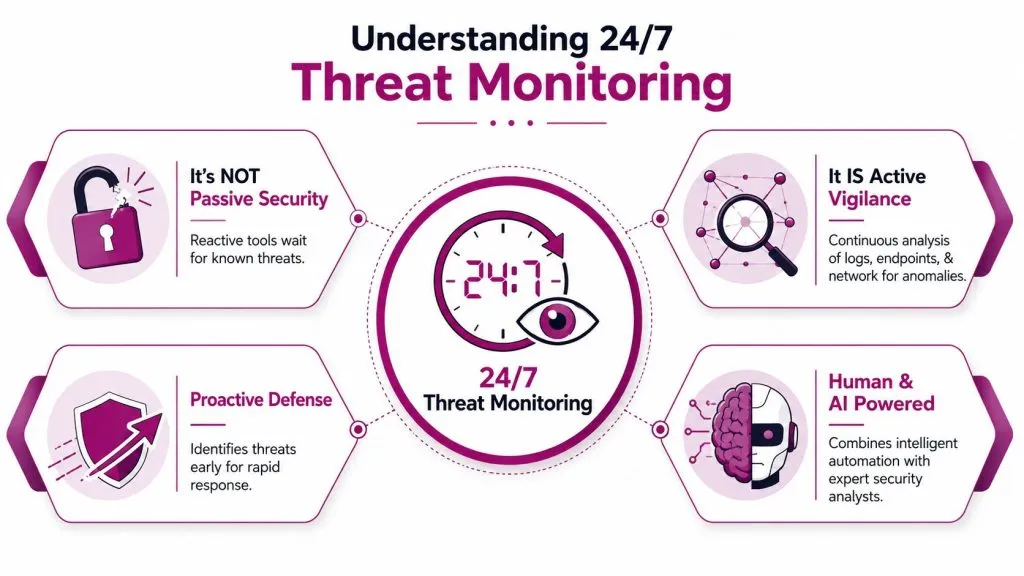
Think of the difference between a security camera that records footage and a monitored alarm system that triggers a live response. Both collect information. Only one is designed to get a person involved before damage spreads.
That’s the clearest way to understand 24/7 threat monitoring. It isn’t a single product and it isn’t just log retention. It’s an always-on operating model that collects telemetry, correlates activity, identifies anomalies, and routes credible threats to analysts who can investigate and respond.
It’s about reducing attacker dwell time
The main job of 24/7 monitoring is to reduce dwell time, meaning the span between compromise and containment. In healthcare MDR environments, continuous telemetry analysis across endpoints, networks, and cloud platforms can reduce attacker dwell time from hours or days down to minutes, using AI-driven baselining and analyst triage to flag meaningful deviations for immediate action, as described in this MDR monitoring overview.
That doesn’t happen because a tool sees “something weird.” It happens because the system has context. A login at an unusual hour may not mean much by itself. A login at an unusual hour followed by privilege changes, lateral access attempts, or abnormal file movement deserves immediate review.
What active monitoring looks like in practice
A working monitoring program usually does these things in sequence:
- Collects signals from multiple places: endpoint tools, identity providers, cloud logs, firewalls, email controls, and infrastructure logs.
- Builds a baseline: normal users, normal systems, normal traffic patterns, normal admin behavior.
- Flags deviations that matter: not every anomaly is malicious, but suspicious combinations usually tell a clearer story than a single alert.
- Escalates for action: an analyst validates the alert, enriches it, and decides whether to contain, isolate, or notify.
Good monitoring doesn’t flood teams with alarms. It filters noise so the right investigation happens fast enough to matter.
This is why mature providers map monitoring into wider governance and enterprise risk frameworks. The business question isn’t “do we have logs?” It’s “can we spot the behaviors that change our risk profile before they become an outage, fraud event, or legal problem?”
The Core Components of a Robust Monitoring Program
When monitoring fails, it usually fails in one of three ways. The team bought technology without staffing it. The team staffed it without a response process. Or the team had people and process but weak visibility across the environment.
A strong program has to hold together across people, process, and technology.
People decide what the alert means
Human analysts remain the difference between “activity detected” and “risk understood.” A modern MDR model uses automation to surface signals, but people still validate suspicious behavior, eliminate false positives, and coordinate response.
That matters most in ambiguous cases. A burst of authentication failures could be a user problem, an admin script, or credential abuse. A machine can rank that event. An analyst can place it in operational context and act accordingly.
Process keeps monitoring from turning into noise
Effective MDR follows a continuous lifecycle of Detection, Analysis, Response, and Learning, powered by 24/7 human experts, according to Rapid7’s MDR fundamentals. That process view is more useful than any vendor slogan because it shows where programs break.
Here’s what each phase needs to do:
| Phase | What it must accomplish |
|---|---|
| Detection | Gather meaningful telemetry from endpoints, networks, cloud services, and identity systems |
| Analysis | Validate alerts, remove obvious false positives, assign severity, and add context |
| Response | Execute containment steps, communicate ownership, and preserve continuity |
| Learning | Tune rules, improve playbooks, and refine escalation paths based on real incidents |
A program that only detects isn’t mature. A program that detects and analyzes but can’t contain quickly is also incomplete.
Technology provides coverage, not judgment
The tooling stack usually includes several layers:
- SIEM: centralizes and correlates logs from multiple systems.
- EDR: gives visibility and response actions at the endpoint level.
- XDR: broadens detection by correlating data across endpoints, cloud, identity, and network sources.
- Threat intelligence feeds: enrich findings with known indicators and context.
- SOAR or automation workflows: standardize repetitive triage and containment tasks.
For some MSPs, adjacent telemetry also matters. If a client’s attack surface includes public sites, login pages, or changing content that may indicate tampering, services like cloud-based page change tracking can support broader visibility outside traditional endpoint monitoring.
Operational note: Tools extend visibility. They don’t replace queue discipline, escalation design, or ownership during an incident.
The teams that get this right don’t ask, “Which dashboard should we buy?” They ask, “Which events do we need to see, who validates them, and what happens in the first minutes after confirmation?”
Operational Models In-House SOC vs MSSP
Most leadership teams eventually reach the same fork in the road. Build an internal SOC or outsource 24/7 monitoring to an MSSP or MDR provider. Both models can work. The right choice depends on budget tolerance, control requirements, staffing depth, and how fast you need the capability in place.
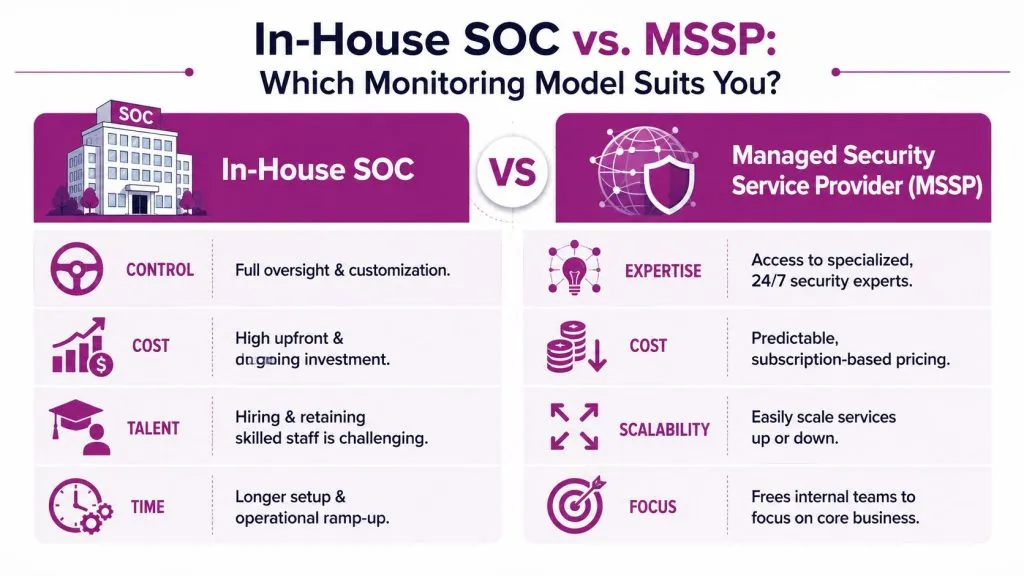
An external managed model often wins the business case because it gives round-the-clock analysts, tooling, and response operations without forcing the client to build all of that themselves. Organizations that deploy an AI-powered 24/7 managed SOC save an average of $2.22 million per year compared to those that do not, driven by real-time monitoring and rapid response outside normal business hours, according to DigitalXRAID’s managed SOC value analysis.
Where an internal SOC makes sense
An in-house SOC tends to fit organizations that already have security engineering depth, mature governance, and strong demand for operational control.
Typical advantages include:
- Full customization: internal teams can tune detections tightly around their own applications, workflows, and risk priorities.
- Direct control: escalation, containment authority, and communications stay within the company.
- Institutional context: internal analysts often understand business-critical systems faster than an external team.
The trade-off is operational strain. Internal SOCs require hiring, management coverage, process maturity, tooling integration, and ongoing analyst development. Overnight and weekend continuity is where many homegrown models start to slip.
A short explainer can help stakeholders see the distinction in operating models:

Where an MSSP usually wins
For SMBs and many mid-market firms, a managed provider is often the more realistic path.
| Decision area | In-house SOC | MSSP or MDR provider |
|---|---|---|
| Cost structure | Larger internal build and operational commitment | Subscription-based service model |
| Staffing | Requires recruiting and retaining security analysts | Access to existing analyst coverage |
| Deployment speed | Slower due to design and implementation work | Faster to stand up with existing platform and process |
| Control | Highest direct control | Shared control with defined escalation rules |
| Scale | Harder to scale quickly | Easier to expand coverage by client need |
The weak version of outsourcing is “forward alerts and hope.” The strong version is co-managed security with clear runbooks, agreed containment authority, and visibility into what the provider is doing.
If an MSSP can’t explain who investigates, who responds, and what actions can be taken without waiting for approval, the client is buying a watchtower, not a response capability.
For MSPs, that distinction matters commercially. Clients don’t stay for dashboards. They stay for confidence that someone is accountable when an alert fires at the worst possible time.
Key Implementation and Planning Considerations
Many organizations roll out monitoring in the wrong order. They install tools, connect logs, and celebrate visibility before deciding who owns after-hours decisions, what constitutes a critical alert, or how containment will work in practice.
That approach creates a dangerous illusion of readiness.
Readiness comes before tooling
A major pitfall is deploying monitoring tools without first assessing incident response readiness. Effective 24/7 monitoring requires a framework that includes readiness assessments and planning against best practices such as NIST or ISO 27001, as noted in this incident response readiness guide.
If you haven’t defined how the organization will detect, respond, and recover, the monitoring layer just generates faster confusion. That’s especially true for SMBs, where the same people often handle infrastructure, vendor coordination, user support, and incident response.
Before onboarding data sources, teams should understand their own exposure. A useful starting point is attack surface analysis, because it forces a practical conversation about what systems matter most, which assets are externally exposed, and where monitoring depth is essential.
What to define before go-live
The strongest implementations are boring in the best possible way. Roles are clear, the queue is prioritized, and everybody knows what happens when a high-confidence alert arrives.
Use this checklist before you flip the switch:
- Escalation authority
Decide who can isolate an endpoint, disable an account, block a connection, or declare an incident. If that authority only exists during office hours, your overnight coverage is weaker than it looks. - Triage logic
Define what gets auto-closed, what requires analyst review, and what triggers immediate escalation. Without triage rules, alert fatigue arrives fast. - Service levels
Agree on expected response windows, communications channels, and client notification rules. MSPs should put this in plain language, not just contract language. - Logging priorities
Start with systems that answer the highest-risk questions. Identity, endpoints, cloud administration, remote access, and internet-facing assets usually come first. - Recovery coordination
Monitoring can identify and contain. Recovery still depends on backups, system owners, legal review, communications, and leadership decisions.
A mature rollout doesn’t begin with “send us all your logs.” It begins with “show us how your organization will act when the actual alert arrives.”
Measuring Success Metrics and KPIs for Monitoring
If you can’t explain outcomes, the monitoring service will eventually be judged as overhead. Security teams know the work matters. Leadership needs evidence that the service is reducing business risk and improving response discipline.
Metrics leadership will actually care about
Start with metrics that connect operations to impact:
- MTTD: Mean Time to Detect. How long it takes to identify suspicious activity that warrants investigation.
- MTTR: Mean Time to Respond. How long it takes to contain or otherwise act once the threat is confirmed.
- Escalation quality: Whether alerts sent to the client were actionable, contextualized, and appropriately prioritized.
- False positive rate: Whether the program is being tuned or just flooding the queue.
- Coverage maturity: Which systems, identities, and cloud services are included in monitored scope.
Those aren’t vanity numbers. They show whether the team is getting faster, sharper, and less noisy over time. They also expose whether a provider is leaning too heavily on automation without enough analyst judgment.
How MSPs should report results
Don’t bury the client in raw alert counts. A monthly or quarterly review should answer a narrower set of questions:
| KPI view | What the client should learn |
|---|---|
| Detection speed | Whether the team is finding meaningful issues quickly |
| Response discipline | Whether triage and containment are improving |
| Noise reduction | Whether tuning is reducing wasted effort |
| Control gaps | Which areas still lack telemetry, playbooks, or ownership |
What executives want: fewer surprises, faster decisions, and evidence that someone is learning from each incident.
The best reports also include a brief narrative. What changed in the environment, what types of alerts increased, which playbooks were updated, and where the client still carries risk. That’s how a monitoring service moves from “vendor output” to “governed security function.”
Guidance for MSPs Building a Monitoring Service
MSPs usually make the same early mistake. They package 24/7 monitoring as a premium add-on built around tools. SMB clients hear “more software, higher bill” and push back. The stronger position is to package it as an operational service that gives them a capability they can’t realistically staff on their own.
SMBs often ask how to justify the cost of 24/7 monitoring. The practical answer is that MDR reduces business impact by providing dedicated analysts monitoring around the clock, something most small teams can’t afford internally, as explained in this OpenText discussion on why SMBs need 24/7 monitoring.
How to package the service
A practical MSP offer usually has three layers:
- Baseline monitoring: endpoint, identity, and core cloud telemetry with after-hours alert review.
- Managed response: analyst triage, guided containment, and defined escalation procedures.
- Exposure monitoring add-ons: dark web, impersonation, internet-facing risk, and external threat visibility.
Platform strategy matters. Some MSPs build their own stack. Others combine EDR, SIEM, ticketing, automation, and external visibility from specialist vendors. For example, dark web monitoring for managed service providers can complement internal telemetry by alerting clients when credentials or sensitive data appear in criminal channels. In the same category, InsecureWeb offers white-label monitoring for dark web exposure, fake sites, reputation threats, vulnerability scanning, and external intelligence, which can fit MSPs that want to broaden their security catalog without building every function themselves.
How to justify the spend to SMB clients
Don’t lead with fear. Lead with operating reality.
Explain the trade-off in plain language:
- Small teams can’t staff nights and weekends well: that isn’t a failure. It’s a resource constraint.
- Tools without review don’t reduce risk much: an unopened alert isn’t a control.
- Faster triage reduces business interruption: clients understand downtime, missed orders, and customer trust better than they understand telemetry pipelines.
- Security maturity is cumulative: once monitoring, escalation, and reporting are in place, it becomes easier to add exposure management, vulnerability remediation, and response planning.
The MSPs that sell this well also package it clearly. One service owner. Defined escalation. Named data sources. A client-ready monthly review. Optional response authority levels. No vague promises about “AI protection.” Just coverage, process, and accountability.
If you’re building or expanding a managed security offering, InsecureWeb is worth evaluating as one option for adding white-label external threat visibility, including dark web exposure, fake site detection, reputation monitoring, vulnerability scanning, and API-driven integration into your existing service stack.