Data Breach News13 min read
What Is Domain Hijacking: A 2026 Prevention Guide
By InsecureWeb Team
This report reflects observations of dark web activity. InsecureWeb makes no representations regarding the accuracy of this data.
You’re probably responsible for domains you don’t think about until something breaks. Then one morning a client calls because their website points somewhere else, staff email stops working, password reset messages never arrive, and the registrar account no longer recognizes the recovery contact. At that point, the domain isn’t just a line item on an invoice. It’s the identity layer under the client’s website, mail flow, customer trust, and brand.
That’s why MSPs need a sharper answer to what is domain hijacking than the usual “someone stole the website.” A hijacked domain can turn into an outage, a phishing platform, a legal dispute, and a brutal client communication exercise all at once. The technical issue is only half the problem. The operational fallout is what hurts.
Your Digital Front Door Has Been Stolen
A domain is the front door to a client’s online business. If an attacker takes it over, they don’t need to breach every internal system first. They can redirect traffic, interfere with email, impersonate the business, and force your team into recovery mode before anyone understands what changed.
Domain hijacking is the unauthorized takeover of an internet domain by third parties who gain access to the domain account through stolen credentials, social engineering, or exploiting expired registrations, thereby seizing control of a company’s digital address, according to Security Today’s definition of domain hijacking.
That definition matters because it separates the core issue from the symptoms. The website going offline is a symptom. Email bouncing is a symptom. The actual event is loss of control over the domain itself.
Why MSPs get pulled into the hardest part
For a small business, the domain often sits in a registrar account created years ago by a former employee, a web developer, or the owner’s personal email address. MSPs usually inherit that mess. When an attacker gets in, your team has to untangle account access, proof of ownership, DNS restoration, stakeholder updates, and sometimes legal escalation.
Practical rule: Treat every client domain like critical infrastructure, not a marketing asset.
The simplest way to explain it to clients
Use the property analogy because it lands fast.
| Concept | Plain-English explanation |
|---|---|
| Website compromise | Someone messed with what’s inside the building |
| DNS issue | Someone changed the signs pointing to the building |
| Domain hijacking | Someone stole the deed and now claims they own the building |
That’s why answering what is domain hijacking requires more than a technical definition. You’re dealing with ownership, control, continuity, and trust. For MSPs, this is as much an account governance problem as it is a security problem.
The Anatomy of a Domain Hijacking Attack
Most domain hijacks don’t start with exotic tradecraft. They start with weak account control around the registrar, the admin mailbox, or supporting DNS infrastructure. The attack succeeds because the domain sits at the intersection of identity, email, hosting, and external trust.
Here’s the attack flow that should be assumed.
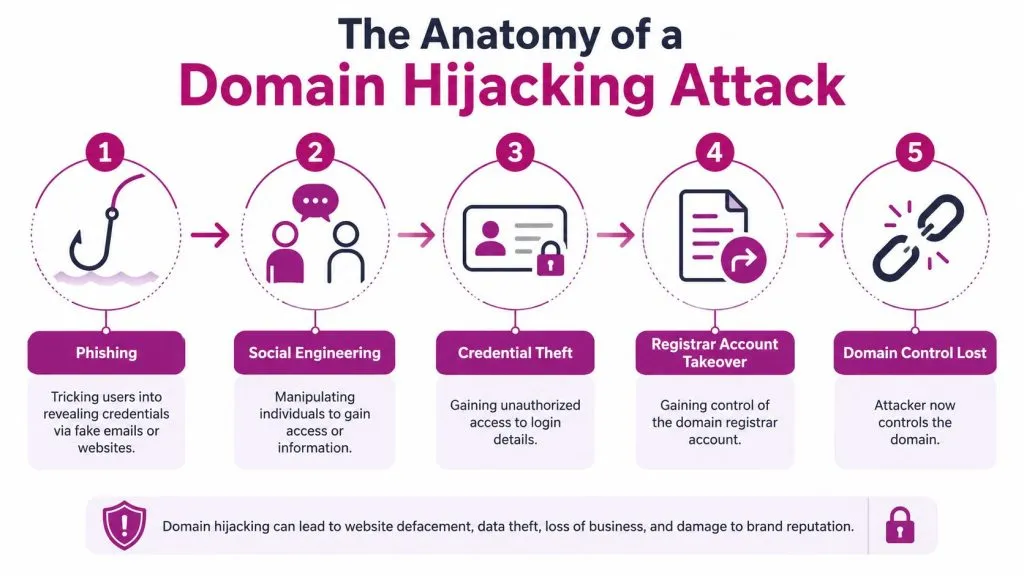
Where attackers intervene
Valimail breaks domain hijacking into four primary attack vectors: client configuration, recursive resolver, authoritative name server, and registrar account compromise. It also notes that registrar account compromise lets attackers substitute contact information, forge transfers, and alter DNS records to redirect traffic to attacker-controlled systems, as explained in Valimail’s guide to domain hijacking.
For MSPs, that list is useful because it tells you where to look first. If the registrar account was taken over, you’re dealing with ownership control. If another DNS layer was manipulated, your remediation path changes.
What the cause-and-effect chain looks like
A typical sequence looks like this:
- A phishing email lands and imitates the registrar, billing team, or renewal workflow.
- A user enters credentials into a fake portal, or reuses a password that was already exposed elsewhere.
- The attacker accesses the registrar account and changes contact details, transfer settings, or DNS records.
- Traffic and email move to systems the attacker controls.
- The legitimate owner gets locked out and has to prove ownership after the fact.
One warning sign is that domain attacks often overlap with credential exposure. If your team is already monitoring for registrar-related or identity leaks, WHOIS and credential exposure on the dark web should be treated as a domain risk signal, not just a privacy issue.
Common paths that actually work for attackers
Not every path is equally common in practice. These are the ones MSPs should care about first:
- Registrar phishing: Fake notices push users to “verify” billing, ownership, or renewal details.
- Admin email compromise: If the recovery mailbox gets taken over, the attacker can approve changes or suppress alerts.
- Weak credential hygiene: Reused passwords and missing strong second-factor protection still open the door.
- Expiration sniping: If a client lets a domain lapse, someone else can register it the moment it becomes available.
- Support manipulation: Attackers sometimes work the human process by abusing help desk workflows and ownership disputes.
The video below gives a useful visual primer before you build your own response playbook.

The registrar account is often the real crown jewel. If you secure hosting but leave registrar access weak, you’ve protected the building and left the deed on the hood of the car.
Domain Hijacking vs DNS Hijacking A Critical Distinction
MSPs lose time when they use the wrong label for the incident. If you misclassify ownership theft as a traffic-routing issue, or vice versa, you’ll apply the wrong fix first and burn valuable response time.
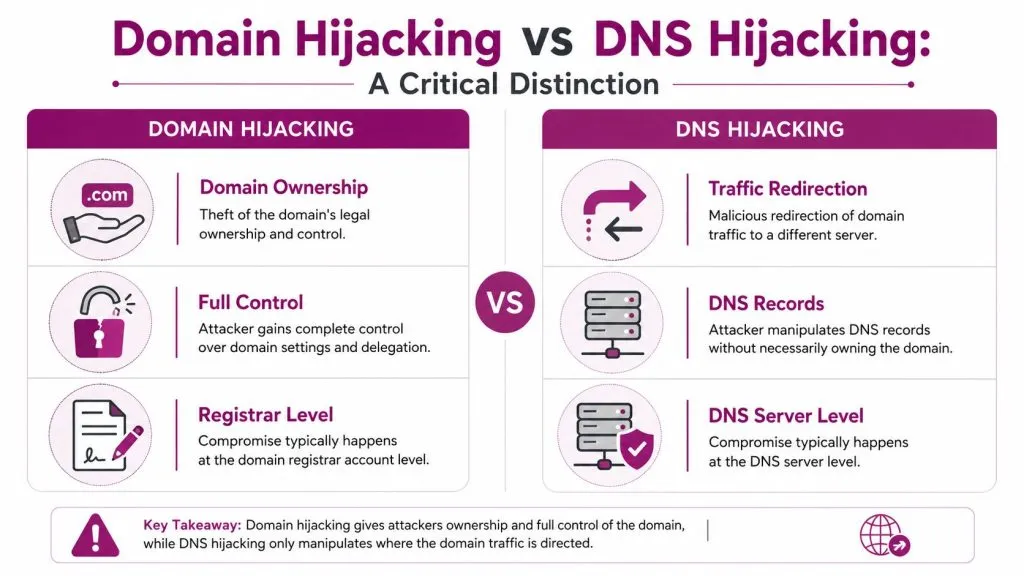
A Fortinet summary citing a 2025 Symantec report says 68% of SMBs misdiagnose DNS hijacking as domain hijacking, leading to ineffective remediation. The same source says emerging 2026 trends show AI-driven phishing is increasing registrar credential attacks by 35%. For MSPs, both points matter. Teams are already confusing two separate problems, and attackers are getting better at stealing the credentials tied to the registrar side.
The simplest distinction
Use this comparison with clients and junior technicians:
| Issue | What changed | What the attacker controls | First response focus |
|---|---|---|---|
| Domain hijacking | Ownership or registrar-level control | Domain account, transfer path, core settings | Registrar escalation and ownership recovery |
| DNS hijacking | Resolution path or query handling | Traffic direction | DNS infrastructure, routers, resolvers, or name server settings |
Why the distinction changes your response
If the problem is domain hijacking, changing firewall rules or endpoint settings won’t get the domain back. You need to secure the registrar account, prove ownership, and stop unauthorized transfers or contact changes.
If the problem is DNS hijacking, resetting the registrar password may do very little. You may need to inspect local network devices, recursive behavior, DNS hosting settings, or name server integrity depending on where the manipulation happened.
The house analogy still works
- Domain hijacking: someone stole the deed and filed paperwork under their name.
- DNS hijacking: someone changed the road signs so visitors drive to the wrong house.
If your team can’t answer “who controls the registrar right now?” you don’t yet know whether you’re handling a domain hijack or a DNS redirect problem.
That distinction should be built into your triage checklist, your client runbooks, and your escalation path.
The Real-World Impact High-Profile Consequences
When a domain gets hijacked, the technical event is immediate. The business damage spreads in waves. First the website becomes untrustworthy or unreachable. Then email starts failing or gets intercepted. Then customers, vendors, and staff stop knowing what’s legitimate.
MSPs see the blast radius from a different angle than internal IT. You’re not only restoring service. You’re answering for brand damage, client communications, and the uncomfortable question every owner asks early in the incident: “How could someone take our company name away from us?”
What breaks first
The first failures are usually visible:
- Customer-facing access: the website redirects, shows the wrong content, or disappears.
- Business email: messages bounce, misroute, or become part of a phishing campaign.
- Authentication flows: password resets, verification links, and sign-in prompts can no longer be trusted.
- Vendor trust: billing, support, and procurement conversations get delayed because nobody wants to act on suspicious mail.
Then the secondary damage starts. A hijacked domain with active email can be used to impersonate the victim brand. That’s where domain hijacking turns from outage into fraud platform.
Why clients experience it as a business crisis
Most clients don’t separate website, email, and brand identity into different systems. They experience all of it as “our business is down.” That’s the correct business view. The domain binds those services together, so losing it can disrupt sales, support, internal communication, and customer confidence at once.
A representative pattern looks like this: a small firm receives a fake registrar notice, someone clicks through, the attacker changes domain settings, staff mail stops arriving, customers hit a fake login page, and the MSP spends the next several days proving ownership while trying to contain reputational fallout. The original compromise may have taken minutes. The damage doesn’t.
What MSPs should communicate early
When clients are stressed, clarity matters more than technical detail.
- State what is known: who currently controls the registrar account or DNS path.
- State what is affected: website, email, user trust, or all three.
- State what’s being done: registrar contact, evidence collection, containment, and external notice if needed.
- State what not to trust: links, password resets, and unexpected messages from the affected domain.
The teams that handle these incidents best don’t promise quick resolution. They set scope, establish facts, and control the communication surface before the attacker gets more value from the domain.
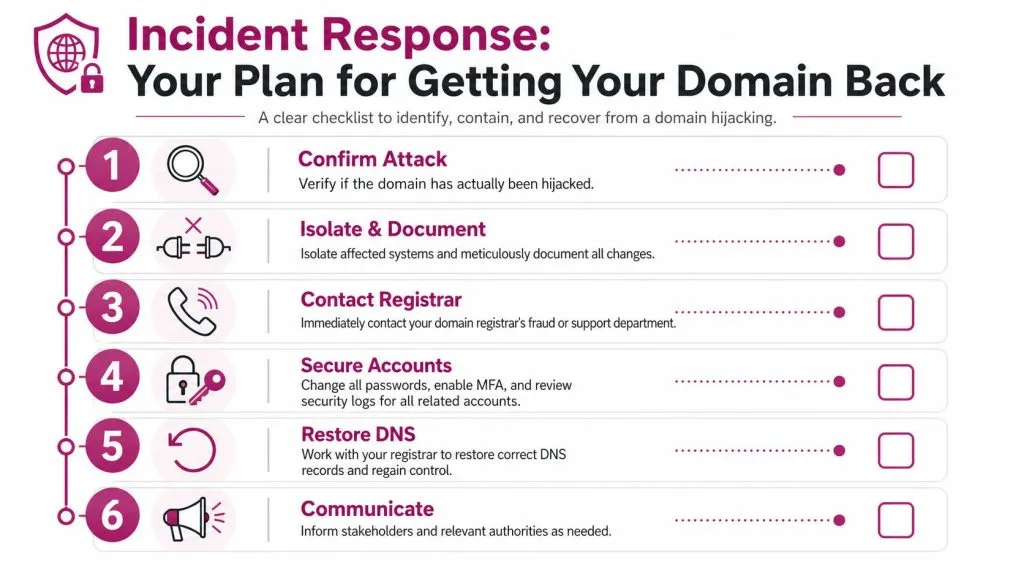
Incident Response Your Plan for Getting Your Domain Back
When a hijack is suspected, speed matters, but sequence matters more. Teams waste time when they jump straight into DNS edits before confirming whether they still control the registrar, the admin mailbox, and the registrant identity.
A SecurityScorecard article on domain hijacking recovery says 40–60% of hijacked domains remain unrecovered after 30 days because of registrar disputes and WHOIS verification delays. It also says the average recovery window is 2–6 weeks, and that recovery can require legal steps such as ICANN dispute resolution. That’s the number most MSPs need in the room early, because many clients assume this is a same-day restore. It usually isn’t.
Step one through three
Start with a disciplined sequence.
- Confirm the incident
Verify whether the registrar account, registrant details, transfer status, or authoritative settings changed without approval. Don’t assume every redirect is a domain hijack. - Document everything immediately
Capture account notices, login failures, screenshots, timestamps, DNS changes, and support interactions. Ownership disputes become evidence problems fast. - Contact the registrar’s fraud or abuse team
Don’t rely on generic support channels if a security path exists. State that this is an unauthorized takeover and request transfer freeze, account review, and restoration guidance.
If the incident may overlap with broader credential compromise, use your standard post-breach response checklist for affected accounts and evidence handling.
Step four through six
Once the initial escalation is underway, secure related systems in parallel.
- Lock down connected identities: Change credentials for the registrar account, the admin mailbox, and any delegated admin accounts. Move to stronger authentication immediately where access still exists.
- Review recovery channels: Many ownership fights are won or lost on access to the original billing records, registrant details, and historic control evidence.
- Prepare for formal dispute paths: If the registrar can’t or won’t resolve quickly, you may need to follow ICANN-related processes or seek legal direction based on jurisdiction and business impact.
Field advice: Don’t tell the client “we’ll have it back today” unless the registrar has already confirmed reversible unauthorized changes.
What good MSPs do after restoration
Restoration isn’t closure. Once the domain is back, teams need a short post-incident review that answers:
| Question | Why it matters |
|---|---|
| How did access fail? | Fixes the real entry point |
| What changed during hijack? | Reveals secondary exposure |
| Which alerts were missed? | Improves future detection |
| Who owns domain governance now? | Prevents repeat chaos |
That review should end with an updated domain governance standard, not just a closed ticket.
Proactive Prevention A Multi-Layered Defense
The best domain hijacking response is boring prevention. That means reducing the number of people, inboxes, and weak workflows that can touch the registrar account, while hardening the DNS and certificate side so an attacker has fewer ways to monetize a mistake.
Expiring.at’s advanced prevention guidance recommends FIDO2/WebAuthn hardware security keys for registrar access, CAA DNS records to block fraudulent certificate issuance, and subdomain takeover scanning in CI/CD pipelines to catch dangling DNS records before attackers do. That’s the right direction. Basic MFA and a good password are better than nothing, but they aren’t the end state for high-value domains.
Start with account governance
Most failures happen long before the attacker clicks “transfer.”
- Clean up ownership: Put the domain under a controlled business identity, not a former employee’s mailbox or a contractor’s personal account.
- Reduce admin sprawl: Fewer privileged users means fewer phishing targets and fewer support-reset complications.
- Use registrar lock features: If a domain can’t move without explicit authenticated action, you’ve removed a common abuse path.
- Turn on auto-renewal and expiry oversight: Expired domains remain one of the oldest, easiest routes to loss of control.
Then harden the technical controls
Here, mature MSP practice stands out.
| Control | Why it helps |
|---|---|
| Hardware-backed authentication | Resists phishing better than password-only access or weaker second factors |
| DNSSEC | Helps protect the integrity of DNS communications |
| CAA records | Limits which certificate authorities can issue certificates for the domain |
| WHOIS and DNS change monitoring | Detects unauthorized edits before they become a larger incident |
| Subdomain takeover scanning | Finds stale cloud-linked records attackers can claim |
Continuous review also matters outside the registrar. If your clients want a broader program to safeguard your business from digital risks, domain protection should sit alongside email security, credential hygiene, and external attack surface monitoring rather than living in a registrar-only silo.
What doesn’t work as a standalone defense
Some controls sound reassuring but fail in practice when used alone.
- Password rotation by itself: It doesn’t stop phishing against the live login flow.
- SMS-based confidence: It’s still better than nothing, but it isn’t the control I want protecting a registrar account tied to multiple clients.
- Quarterly manual checks: They’re too slow for a system an attacker can change in minutes.
- “Our registrar is reputable” thinking: A good registrar helps. Weak customer-side governance still loses domains.
Strong domain security is mostly operational discipline. The tools matter, but clean ownership, strong authentication, and alerting do more work than any single vendor feature.
MSPs should also watch the broader threat picture around exposed credentials and leaked identities. If you’re monitoring for dark web exposure tied to client credentials and external risk signals, domain-related accounts belong in scope.
Frequently Asked Questions About Domain Security
Can a domain still be hijacked if registrar lock is enabled
Yes. Registrar lock is valuable, but it isn’t magic. If an attacker gains enough control over the registrar account or successfully manipulates support workflows, the lock may not be the only line they have to cross. Treat lock features as one control in a layered model, not the whole model.
How important is auto-renewal
It’s critical. One of the oldest ways to lose a domain is still simple expiration. If the client misses renewal and the domain becomes available, an attacker or opportunistic buyer can register it. Auto-renewal, current billing details, and explicit expiry ownership should be standard for every managed client.
What should I do first if I can’t log in to the registrar account
Don’t guess. First, confirm whether the problem is a password issue, a recovery-channel issue, or a sign that account details were changed. Then contact the registrar through the security or fraud process, document every symptom, and secure the admin mailbox and other connected identities immediately.
Is domain hijacking the same as a website hack
No. A website compromise can happen while the domain remains under your control. Domain hijacking is more fundamental because the attacker controls the naming layer that users and systems rely on to find the website and email services in the first place.
What should MSPs standardize across clients
Use a baseline that includes clean ownership records, controlled registrar access, strong authentication, transfer protection, expiry management, and alerts for unexpected changes. If those items aren’t standardized, every client incident turns into custom archaeology.
If you manage domains for clients, you need visibility beyond the firewall. InsecureWeb helps MSPs and security teams monitor for external threats such as exposed credentials, fake sites, brand impersonation, and dark web activity that often surround domain-focused attacks. It’s a practical way to spot trouble earlier and give clients stronger protection where these incidents often begin.