Data Breach News15 min read
Data Breach Monitoring Service: The MSP & MSSP Guide
By InsecureWeb Team
This report reflects observations of dark web activity. InsecureWeb makes no representations regarding the accuracy of this data.
The opportunity is bigger than most MSPs treat it. The global breached credential monitoring market reached USD 1.58 billion in 2024, a signal that clients are no longer viewing exposure monitoring as a niche add-on but as a core security need tied to rising breach activity and earlier detection requirements (DataIntelo market coverage).
For an MSP or MSSP, a data breach monitoring service isn’t just another dashboard. It’s a recurring service line that can feed incident response, identity protection, compliance support, and client reporting. Done well, it creates new monthly revenue and makes every other security control you manage more valuable. Done badly, it turns into noisy alerts, weak client trust, and a pile of tickets no one can operationalize.
Why Data Breach Monitoring Is a Core MSP Service
Most MSPs still package breach monitoring like a small add-on beside email security or endpoint protection. That’s too small a view. If your clients rely on usernames, cloud identities, third-party SaaS access, and remote staff, then external identity exposure is already part of their attack surface.
A practical MSP service has to answer one business question fast: what can hurt the client right now, and what can we do about it before it becomes an incident? Data breach monitoring does that for leaked credentials, exposed employee data, brand references in published dumps, and other external signals that internal tools won’t see.
The commercial case is straightforward.
- It creates recurring revenue: clients understand monitored security services better than one-time projects because the risk doesn’t disappear after deployment.
- It supports higher-value work: breach findings often trigger access reviews, password resets, MFA enforcement, tenant hardening, and policy updates.
- It reduces churn: when clients see evidence that you’re finding and handling exposures they never knew existed, your role shifts from vendor to advisor.
Practical rule: If a service can generate actionable tickets, executive reporting, and follow-on remediation work, it belongs in your managed security catalog.
There’s also a positioning advantage. Small and mid-sized businesses often can’t build dedicated external exposure monitoring in-house. They need a provider that can package detection, triage, communication, and remediation as one operating model. That favors MSPs that can combine tooling with process.
The profitable version of this service isn’t “we send you alerts if your domain appears somewhere suspicious.” It’s “we monitor for external exposure, validate what matters, take response actions, document the result, and show you the business impact every month.”
Understanding the Modern Digital Threat Surface
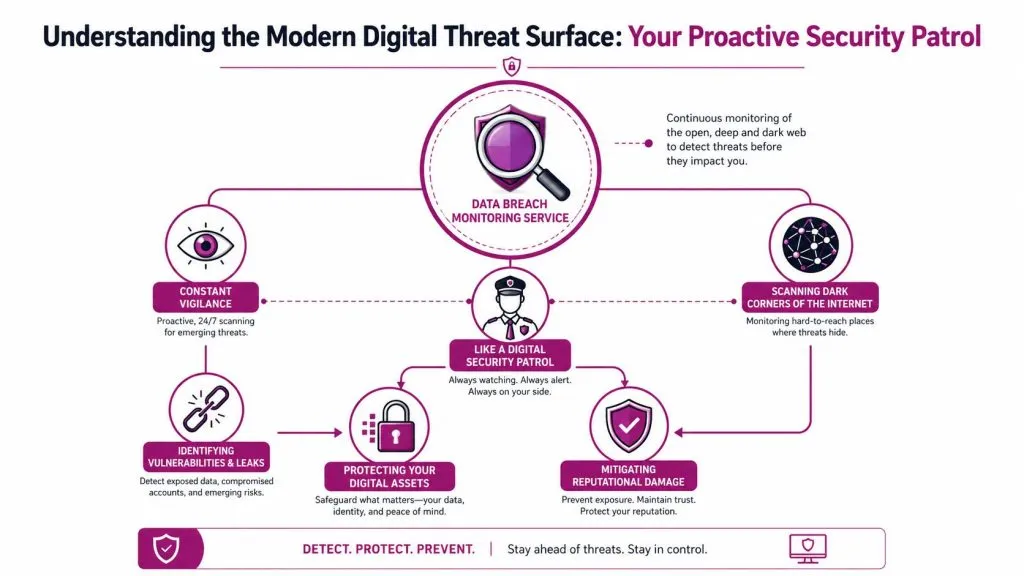
Treat a data breach monitoring service like a digital security patrol. Internal security tools watch the building. This service watches the streets outside it, where attackers trade data, leak stolen files, publish victim names, and recycle credentials into new attacks.
What the service is actually watching
The core distinction matters. Data breach monitoring targets externally leaked data in already published dumps, while dark web monitoring looks into hidden forums and marketplaces to uncover stolen credentials before they land in a known breach record (Secutec explanation of data breach monitoring).
That sounds subtle, but it changes how you build the service. MSPs need to understand both the source type and the operational meaning of a hit. A published dump may indicate broad exposure and compliance issues. A fresh criminal marketplace mention may indicate immediate misuse risk.
A mature monitoring scope usually includes:
- Published breach dumps: leaked credential datasets, employee records, and exposed customer data tied to a domain or brand.
- Ransomware leak sites: references to a client’s name, project names, or stolen files posted by extortion groups.
- Paste sites and public posts: fragments of credentials, internal strings, access notes, or API-related clues posted in public.
- Credential markets and infostealer-related material: content that points to active account abuse risk.
A lot of MSPs narrow this too much. They watch a few executive emails and call it a service. That misses contractor accounts, abandoned cloud identities, sub-brands, legacy domains, and exposed project names that attackers can still weaponize.
Why external exposure matters to MSPs
The threat surface isn’t limited to what a client owns today. It includes what they forgot, what remote workers still have, and what third parties mishandled. That’s why endpoint disposal, offboarding, and asset recovery can affect monitoring results months later. If you’re building your SOPs around remote workforce risk, Beyond Surplus’ secure ITAD insights are worth reviewing because they connect hardware recovery failures to downstream data exposure.
MSPs should also tie this service to broader exposure management. If you’re already mapping ports, apps, and internet-facing assets, pair this work with attack surface analysis guidance from InsecureWeb so breach findings don’t sit in a silo.
External exposure is where identity risk, brand risk, and third-party risk start blending together. That’s why the service can’t live as a simple alert feed.
Clients buy this when they realize a breach isn’t only an internal event. Their data can surface outside their environment long before anyone opens a helpdesk ticket.
How a Monitoring Service Works Under the Hood
A serious service doesn’t run on keyword alerts alone. It runs on a technical pipeline that turns messy internet data into decisions your analysts can act on.
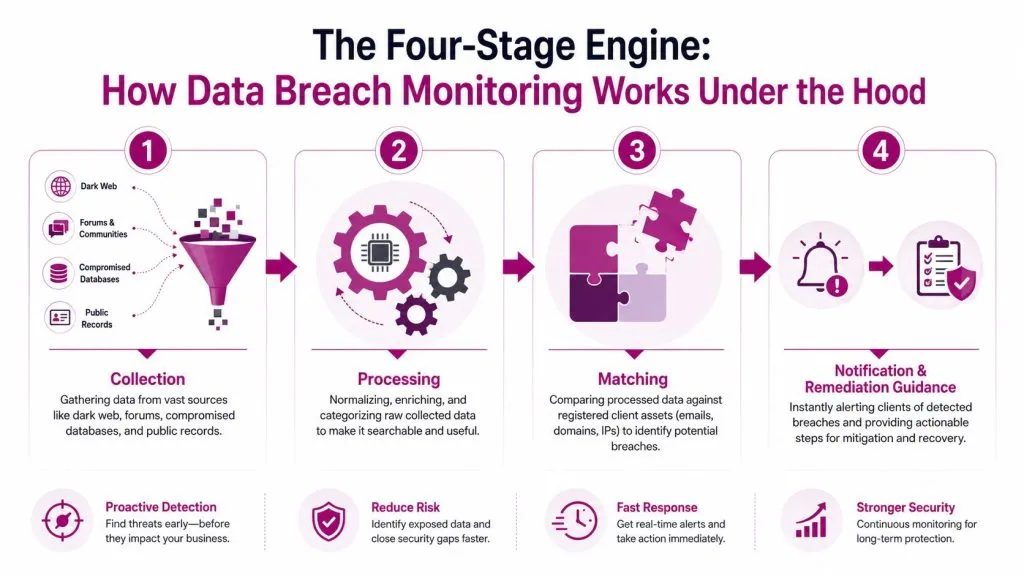
The easiest way to evaluate platform quality is to look at the engine in four stages. A mature service continuously scans dark web dumps and credential markets, correlates findings against organizational domains and users, prioritizes them with severity scoring, and then triggers remediation workflows such as password resets or SIEM escalation (DataEndure guide to 24/7 breach monitoring).
The collection and correlation engine
Stage one is collection. The platform gathers records from multiple external sources, then normalizes them so they can be searched and matched consistently. Raw leak data is chaotic. Fields are inconsistent, timestamps are unreliable, and duplicate records are common. If the vendor can’t handle that mess, your team gets buried in junk.
Stage two is correlation. At this stage, the service becomes client-specific. The platform compares what it finds against:
- Corporate domains
- Known user identities
- Cloud account naming patterns
- VIP names and project terms
- Historical domains and acquired brands
The quality of this stage determines whether you get useful findings or endless false alarms. Good platforms support domain-wide monitoring instead of making you register one address at a time. They also retain evidence, which matters when a client asks for screenshots, timestamps, or proof for auditors and legal teams.
Staffing matters here too. A lot of providers sell a strong engine but don’t explain who will maintain parsing logic, monitor feeds, or tune severity. If you’re planning to build internal coverage for triage and integrations, a role profile like nexus IT group cybersecurity staffing for data security engineers is a useful benchmark for the skills the service needs.
A quick visual helps when you explain the pipeline to clients or junior analysts:

Prioritization and automated response
Stage three is prioritization. Not every hit deserves the same response. A breached mailbox tied to SSO or finance access should rank above an old newsletter account. Severity has to reflect the business context, not just the existence of leaked data.
Useful severity logic usually looks at combinations such as:
| Signal | Why it matters to the MSP |
|---|---|
| Credential tied to a production domain | May require immediate reset and access review |
| Executive or privileged identity | Higher fraud, impersonation, and privilege risk |
| Ransomware leak mention | Triggers incident coordination and legal review |
| Repeated exposure on multiple sources | Suggests broader compromise or reuse risk |
Stage four is response orchestration. It’s the point where profit and effectiveness meet. A platform should hand off into systems you already use, such as IAM workflows, SOAR playbooks, PSA tickets, or SIEM alerts. If analysts have to copy findings manually into tickets, the service won’t scale across tenants.
A monitoring platform becomes a managed service only when it creates consistent downstream action.
The difference between a cheap feed and a real service is what happens after the match.
Core Features MSPs Must Demand from a Vendor
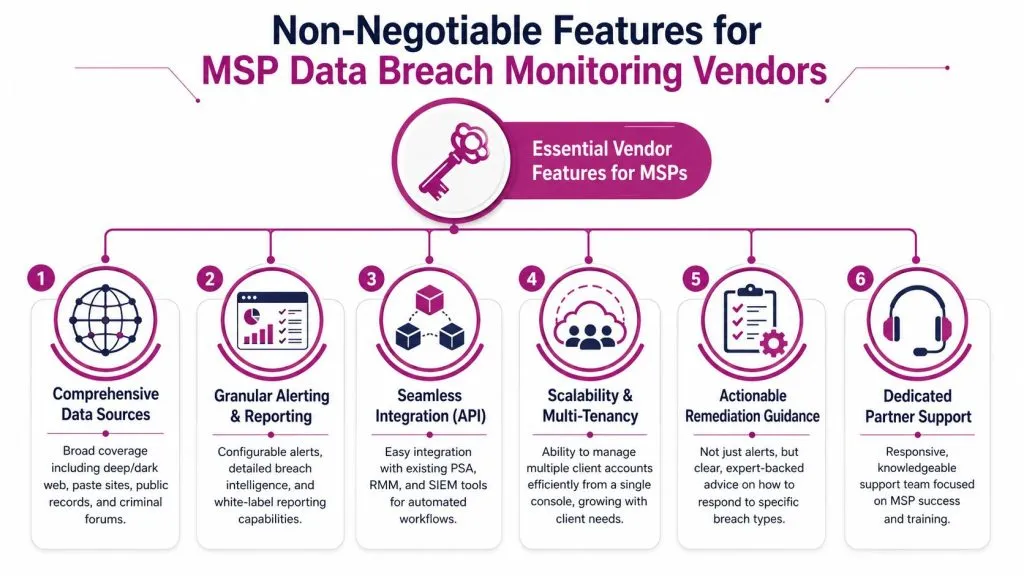
Marketing pages all sound the same. Broad coverage. Real-time alerts. Actionable intelligence. What matters is whether the platform helps your team run an efficient multi-client operation without drowning in noise.
Coverage without operational drag
Start with scope. MSPs should insist on domain-wide monitoring, not a per-email model that becomes painful to maintain. Clients change staff, create aliases, add contractors, and retire shared accounts. If your licensing and monitoring design depend on perfect identity hygiene, you’ll miss exposures.
You also want multi-tenant administration from one console. That sounds obvious, but some products still treat partners like a collection of single-customer deployments. That’s fine for a direct enterprise sale. It’s inefficient for an MSP that has to onboard, search, report, and escalate across many clients every day.
A useful vendor should also support:
- Evidence retention: screenshots, record snapshots, timestamps, and source context.
- Flexible entity matching: domains, users, brands, VIPs, and project terms.
- API access: enough depth to push alerts into PSA, SIEM, SOAR, and IAM processes.
For one option in this category, InsecureWeb offers monitoring for email addresses, usernames, and corporate domains, plus API access that MSPs can connect into existing workflows. That’s relevant if you’re comparing platforms that support partner-led service delivery rather than stand-alone alerting.
Validation matters more than alert volume
Here’s the capability most buyers miss. Many vendors can tell you that a credential appeared somewhere. Far fewer can help you answer whether the data is still operationally dangerous.
That gap matters because most services report past breaches without validating whether leaked data is still usable for live account takeover, even though roughly 65% of stolen credentials hit the dark web within 24 hours of compromise (LunarCyber analysis of identity exposure and active credential risk).
This is the difference between a historical breach alert and an identity exposure signal.
A vendor that can’t separate stale breach records from fresher session artifacts, infostealer logs, or more immediately exploitable data leaves your analysts doing expensive manual triage. That hurts margins. It also delays the actions clients care about, like password resets, session revocation, mailbox review, and conditional access checks.
Buy the platform that helps your team answer “Can this be used now?” not just “Did this appear somewhere?”
Integration and auditability
The best alert is wasted if it lands in an inbox nobody owns. Integration isn’t a nice-to-have. It’s how the service becomes billable and repeatable.
Look for vendors that support these handoffs cleanly:
- PSA and ticketing systems: every validated alert should become a tracked task or incident.
- SIEM and SOAR: for enrichment, correlation, and automated response.
- Identity tools: to trigger password resets, access reviews, or policy enforcement.
Auditability also matters more than many MSPs expect. Clients in regulated industries often need to show not only that an exposure was found, but how it was assessed and what happened next. If you’re documenting controls and investigations, these audit trail requirements for enterprise security are a useful reference point for the level of recordkeeping many environments now expect.
If you want a companion service view, dark web monitoring benefits for external threat detection can help frame how this fits into a broader external intelligence stack.
An MSPs Checklist for Evaluating Vendors
Most vendor demos are built to hide friction. They show a pretty alert, a familiar logo, and a few canned detections. That’s not what decides whether the service works in your SOC or NOC.
Public vendor pages also tend to dodge the hardest operational questions. Guidance in this area notes that buyers often can’t get clear answers on false-positive ratios, validation effort, and time-to-detection, and that providers rarely publish the practical metrics needed for comparison. The same guidance recommends seeding tests with known leaks and red-team simulations to measure false positives and validation time in your own environment (AccountableHQ guidance on evaluating external data breach monitoring).
Questions that expose weak platforms
Use the sales call to force specifics. Ask questions that reveal process, not slogans.
- How fresh are your sources? Ask how the vendor distinguishes newly acquired data from recycled breach records.
- What does a valid match require? You want to know whether matching is domain-only, identity-based, keyword-based, or context-enriched.
- How much analyst work follows an alert? If each hit requires manual verification, your margins will suffer.
- How do you score severity? A useful answer should reference asset criticality, role sensitivity, and exposure context.
- What evidence is retained? If the answer is vague, expect trouble during audits or client disputes.
- How does partner multi-tenancy work? Insist on one console, delegated access controls, and white-label reporting options.
- What can the API do? Read, write, trigger workflows, and export evidence are all different capabilities.
A weak vendor usually answers with marketing language. A strong one can describe matching logic, workflow triggers, and operational boundaries without hand-waving.
How to test before you commit
Don’t rely on the trial alone. Build a short bake-off with real operating conditions.
- Seed known entities: use controlled test identities, legacy domains, and approved known-leak scenarios.
- Route alerts into your actual workflow: PSA, SIEM, or ticket queue. See what breaks.
- Measure analyst handling: how long does your team need to validate and classify each event?
- Review report output: would a client understand what happened, what you did, and what to do next?
Plainly put, buy on operational fit. Features matter. Workflow fit matters more.
Your Implementation and Operational Playbook
Once you’ve picked a vendor, the service has to run like any other managed security offering. Clients don’t pay for raw detections. They pay for control, response, and clarity.
Onboarding and alert routing
Start onboarding with an asset inventory that reflects reality, not just the client’s HR roster. Include primary domains, secondary domains, executive identities, shared mailboxes, contractor patterns, public-facing brands, and critical project names. The first setup mistake most MSPs make is monitoring too narrowly.
Then define ownership before the first alert arrives.
- Who validates findings: SOC analyst, senior engineer, or designated security lead
- Who notifies the client: account manager, vCISO, or incident coordinator
- Who executes remediation: identity admin, helpdesk, or client-side IT
- Who signs off closure: internal service owner and client approver when needed
Pipe alerts into the same systems your team already lives in. If your analysts work from a PSA queue and your security team triages in the SIEM, build the routing there. Parallel inboxes create missed findings.
The response workflow that clients will pay for
A useful workflow is simple enough to repeat and strict enough to audit.
- Validate the finding
Confirm that the entity match is correct, assess the source, and determine whether the exposure appears historical or immediately actionable. - Assess business impact
Tie the exposure to privilege, SaaS access, financial workflow, legal sensitivity, or executive impersonation risk. - Notify the right people
Don’t blast a generic alert to everyone. Send role-based communication with clear next steps. - Remediate
That may mean password resets, session revocation, access review, mailbox analysis, or conditional access tightening. - Document everything
Store evidence, timestamps, decisions, and closure notes.
For client-facing incident advice, a practical reference like steps to take after a data breach can help standardize the post-alert communication you send.
The client remembers the response process more than the detection itself. Fast, calm, documented handling is what makes the service feel premium.
Reporting that proves the service is working
Monthly reports shouldn’t be dump lists. Clients won’t read them, and account managers can’t sell from them.
Use a report structure that answers three questions:
| Report section | What the client needs to see |
|---|---|
| What was detected | Clear summary of exposed identities, brands, or datasets |
| What was done | Resets, reviews, escalation, containment, or policy changes |
| What changed | Open risks, closed items, and recommended next actions |
Keep the language business-oriented. “Three exposed identities remediated” lands better than “multiple indicators ingested and processed.” The best reports also show trend direction qualitatively, such as repeat exposure from password reuse or persistent risk around dormant accounts.
Measuring Success and Proving ROI to Clients
Clients renew security services when they can connect activity to risk reduction. Data breach monitoring is no different. The key is to report outcomes that executives understand and security teams trust.
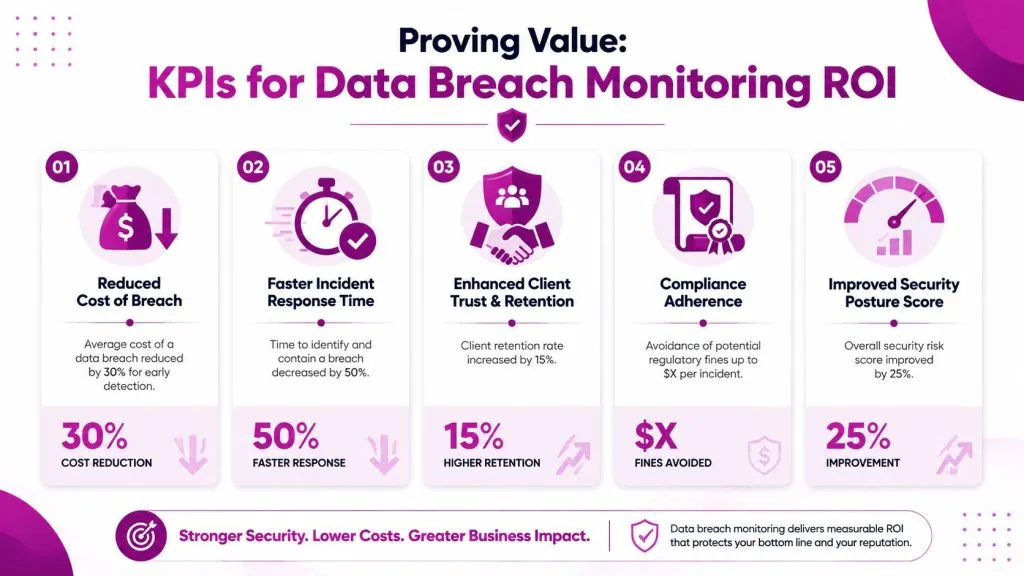
The financial argument is strong when you tie the service to containment speed. Organizations that fail to contain a data breach within 200 days face average costs exceeding USD 5.01 million, while those that resolve incidents within that window average about USD 3.87 million, a difference of up to USD 1.12 million. The same source notes that organizations using threat intelligence and automated monitoring identify threats 28 days faster on average (SentinelOne breach statistics summary).
The KPIs that matter
Skip vanity metrics like total alerts sent. Report metrics that connect to action.
- Validated exposures detected: tells the client how much noise you filtered out.
- Time from alert to triage: shows service responsiveness.
- Time from triage to remediation: shows whether the service produces real action.
- Privileged or high-risk identities remediated: links work to business-critical access.
- Repeat exposure patterns: helps justify password policy, MFA, and awareness changes.
A service becomes easier to defend in QBRs when you show movement in handling speed and reduction in unresolved high-risk findings.
How to talk about ROI without hype
Don’t claim you “saved” a precise amount for a specific client unless you can prove it from that client’s incident record. Instead, use the cost figures above as a risk framing device.
Say it this way: prompt detection and containment affect breach economics, and your monitoring service is designed to shorten the time between external exposure and corrective action. That’s credible. It also supports cross-sell conversations around identity hardening, SIEM enrichment, and response automation.
When you connect detection speed to avoided disruption, the service stops looking like alerting and starts looking like risk control.
Frequently Asked Questions
Is this the same as consumer breach alerts from a password manager
No. Consumer tools usually monitor individual credentials and notify one user. An MSP-grade data breach monitoring service covers domains, brands, user groups, evidence handling, escalation paths, and remediation workflows across an organization.
Does breach monitoring prevent attacks
Not by itself. It is a detection and response control. Its value is finding leaked data outside the client’s environment and turning that discovery into action before attackers can exploit it further.
Will clients worry about employee privacy
Some will, especially in regulated or HR-sensitive environments. The right answer is governance. Define what entities are monitored, limit who can access findings, retain only necessary evidence, and document why each monitored scope is tied to business risk.
How should MSPs position this service commercially
Don’t sell it as a feed. Sell it as a managed capability: monitoring, validation, notification, remediation coordination, and reporting. That’s what clients will retain.
What’s the biggest mistake providers make
They launch with broad promises and no response model. If alerts don’t map to owners, workflows, and client communication rules, the service becomes noise fast.
If you’re building or refining a data breach monitoring service, InsecureWeb is worth evaluating as part of your vendor shortlist. It focuses on external threats from the open internet, dark web, and social platforms, and it includes API access that MSPs can use to connect monitoring into their own service workflows and white-label delivery.