Data Breach News17 min read
Detection of Ransomware: A Modern Explainer for MSPs
By InsecureWeb Team
This report reflects observations of dark web activity. InsecureWeb makes no representations regarding the accuracy of this data.
In 2023, about 70% of all worldwide reported cyberattacks were ransomware attacks, with over 317 million attempts recorded globally. That works out to an attack every 19 seconds on average according to Statista’s ransomware overview. For MSPs, that number changes the conversation. Ransomware isn’t a niche malware problem anymore. It’s a routine business risk, and clients expect you to catch it before encryption turns into downtime, data loss, and a legal mess.
That’s why the detection of ransomware has to be treated as an engineering discipline, not a product checkbox. A single antivirus console won’t carry this job. You need telemetry from multiple places, logic that looks for behavior instead of just known files, and one layer many teams still miss: deception technology. Decoys, canary files, and honeypots give you a way to detect the attacker by tempting them to touch something no legitimate user should ever touch.
For MSP teams, that fourth layer matters because it shortens the distance between attacker action and defender awareness. When you manage many tenants, speed and confidence matter more than elegant theory. You need alerts that are early, specific, and operationally useful.
The Escalating Threat Why Ransomware Detection Is Critical
Ransomware dominates because it aligns with how attackers make money. It disrupts operations fast, pressures executives immediately, and often combines encryption with credential theft, lateral movement, and data exfiltration. For an MSP, that means one client incident can turn into service disruption, emergency communications, and a hard conversation about whether your monitoring stack saw the warning signs.
The most dangerous mistake is thinking of ransomware as the final payload. In practice, encryption is late-stage activity. By the time files start changing extensions and users can’t open data, the attacker has usually already moved through the environment, touched identities, and tested paths to high-value systems. Detection has to happen earlier than the ransom note.
A useful way to frame this for clients is simple: prevention tries to keep the burglar out, while detection tells you the burglar is already in the hallway. Mature security programs need both. If you want a broader response playbook once a compromise is confirmed, this guide on steps to take after a data breach is a practical companion.
Why reactive security keeps losing
Traditional anti-malware tools are good at finding what they already recognize. Modern ransomware crews don’t always give you that comfort. They use legitimate admin tools, stolen credentials, remote access paths, and quiet staging actions that can look ordinary in isolation.
That’s why many MSP teams feel blindsided. They’re watching for a single obvious indicator when the actual attack is a chain of small signals:
- Identity misuse: unusual logons, privilege changes, or accounts acting outside their normal pattern
- System manipulation: scheduled tasks, service creation, or registry changes used to establish execution
- Data access shifts: broad file reads, writes, renames, and deletion attempts across shared storage
- Network changes: internal movement and suspicious outbound communication that doesn’t fit baseline behavior
Practical rule: If your client only detects ransomware at the encryption stage, they didn’t detect the intrusion. They detected the damage.
Why MSPs need earlier visibility
Clients don’t buy monitoring because they enjoy dashboards. They buy it because they assume someone will notice the abnormal before it becomes a business outage. That expectation is reasonable, but it demands a broader detection model than most basic stacks provide.
The detection of ransomware has to answer three operational questions for every tenant:
| Question | What you need to know |
|---|---|
| What changed? | Which process, user, host, or service started behaving abnormally |
| How far did it spread? | Whether the activity is isolated, lateral, or tenant-wide |
| Can we contain it now? | Which controls can isolate, disable, or block the attacker’s path quickly |
That’s the core objective. Not more alerts. Better visibility at the moment where action still matters.
Finding the Traces Where to Look for Ransomware
Most failed detection programs don’t fail because the team chose the wrong SIEM rule. They fail because the team never collected the right evidence in the first place. You can’t detect what you can’t see.
In Q4 2024, 57% of ransomware incidents were first detected by external parties, not the victimized organizations, according to Kaspersky’s state of ransomware analysis. That tells you something uncomfortable. Many environments still have blind spots big enough for attackers to work inside them until somebody outside calls.
Start with the places attackers must touch
Think of telemetry like sensors in a building. A single front-door camera won’t tell you what happened in the server room, the stairwell, and the loading dock. Ransomware operators move across multiple zones, so your coverage has to match that path.
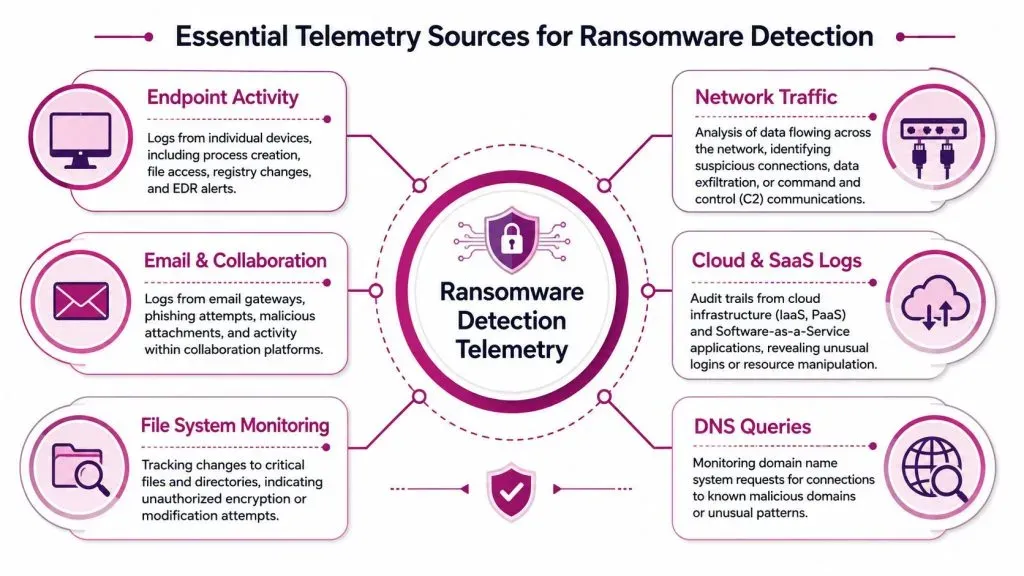
The highest-value telemetry sources usually fall into six groups:
- Endpoint activity: process creation, command execution, registry changes, service installs, script launches, and EDR alerts from workstations and servers
- File system monitoring: file writes, rename bursts, permission changes, integrity monitoring, and unusual access to shared folders
- Network traffic: east-west movement, suspicious protocols, unusual outbound sessions, and traffic patterns consistent with command and control or exfiltration
- Email and collaboration logs: phishing delivery, attachment detonation results, malicious links, and user actions inside mail and messaging platforms
- Cloud and SaaS logs: sign-ins, API activity, tenant configuration changes, control plane actions, and identity misuse in cloud apps
- DNS visibility: domains users and hosts try to resolve, especially strange patterns or connections that don’t fit normal operations
A lot of MSPs also benefit from external monitoring. For example, teams investigating threat actor coordination and distribution channels often study communities and collections like Telegram mega link groups to understand how malicious content, stolen data, and scam infrastructure circulate outside the customer network.
Treat telemetry like a layered sensor grid
Attackers like blind corners. Your job is to remove them.
If a user opens a phishing attachment, email telemetry may catch the delivery. If the payload launches, endpoint telemetry should show the process chain. If the malware starts calling outward, network and DNS should light up. If it reaches cloud storage or identity systems, cloud logs should show that movement. Detection gets stronger when those clues line up across systems.
A practical MSP approach is to map each source to a simple question:
| Telemetry source | What it tells you |
|---|---|
| Endpoint logs | What executed and what changed on the host |
| Network data | Where the host talked and how traffic patterns shifted |
| Email logs | How the attacker may have gained initial access |
| Cloud audit trails | Whether identities or services were abused in SaaS or IaaS |
| File monitoring | Whether encryption-like activity touched critical data |
| DNS records | Whether hosts are trying to find suspicious infrastructure |
When a client says, “We never saw anything,” that usually means the data existed nowhere central, nowhere correlated, or nowhere retained long enough to matter.
That’s also why external exposure monitoring is useful alongside internal telemetry. If you’re checking whether stolen credentials, exposed assets, or other risk signals are already circulating beyond the perimeter, a regular dark web scan for exposed business data adds context your endpoint tools won’t provide.
From Signatures to Deception Four Modern Detection Methods
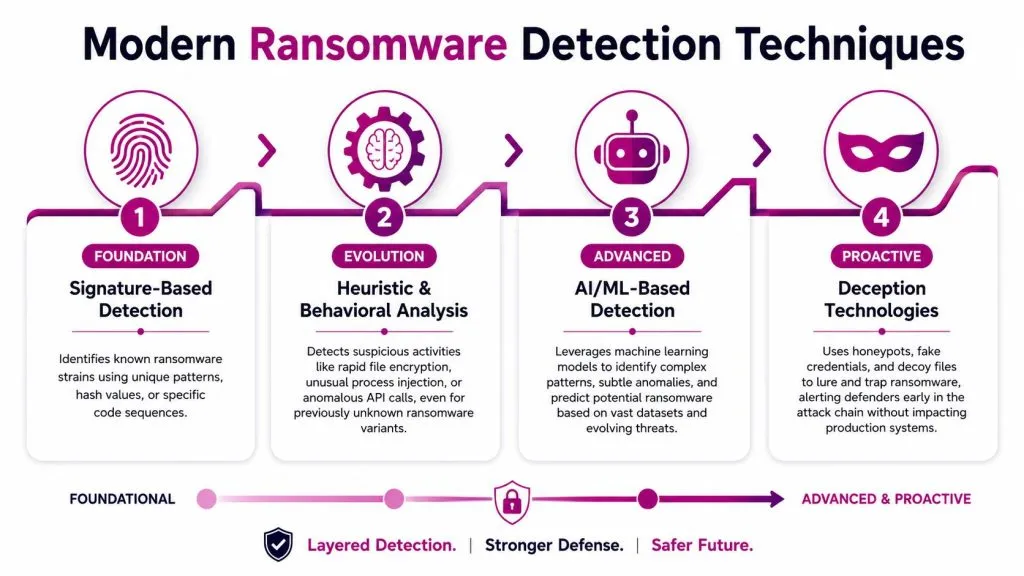
Most guides stop at three methods: signatures, behavior, and network analysis. That’s not enough anymore. For modern detection of ransomware, MSPs should think in four layers. The fourth is deception, and it changes the speed of detection in your favor.
Signature detection still has a role
Signature-based detection is the old guard. It looks for known file hashes, byte patterns, malware families, or explicit indicators that match something already cataloged. Antivirus and many email gateways still rely on this heavily.
You still need it. It’s fast, efficient, and useful against known strains and recycled tooling. But it has one obvious weakness. It depends on prior knowledge. If the ransomware is new, repacked, obfuscated, or delivered through a script chain that never drops the expected artifact, signatures may stay quiet.
That’s why you should treat signatures as a floor, not a ceiling.
Behavioral detection watches the attack unfold
Behavioral and heuristic detection asks a different question: not “what is this file?” but “what is this process doing?” That shift matters.
According to Commvault’s ransomware detection explainer, expert-level ransomware detection relies on heuristic and behavioral analysis that triggers alerts on rapid file modifications, unexpected encryption patterns, or suspicious file extensions. In plain terms, the system watches for the kind of activity ransomware must perform to succeed.
This works well because ransomware eventually has to act. It has to read, rewrite, rename, encrypt, delete backups, alter tasks, or abuse privileges. Even if the binary is unfamiliar, the behavior often isn’t.
Consider fraud monitoring on a credit card. The bank may not know the store, but it knows your spending pattern changed sharply. The same concept appears in other security domains, and these AI-driven fraud detection insights are useful because they show how behavior-based models can surface abnormal activity faster than fixed rules alone.
A strong behavioral rule set watches for combinations such as:
- Bulk file change activity: one process rapidly touching many files in sequence
- Privilege misuse: an account suddenly requesting increased access or moving laterally
- Execution anomalies: scripting engines, office apps, or remote admin tools launching unusual child processes
- System instability signals: crashes, service failures, or abrupt slowdowns paired with heavy disk activity
AI and anomaly detection look for drift from normal
Machine learning and anomaly detection build on behavior by asking whether an action differs from the environment’s baseline. The key word is baseline. If you don’t know what normal looks like for a tenant, you can’t identify meaningful drift.
Many MSPs get frustrated. They deploy a capable tool and drown in noise because every admin script, software rollout, and backup job appears suspicious at first. Baselines aren’t automatic truth. They’re a starting model that needs tuning by tenant, role, and asset class.
A simple way to explain this to your team is to compare it to building access. A cleaner entering at night may be normal in one office and alarming in another. Context makes the difference.
If you’re trying to reduce complexity in broad visibility planning, attack surface analysis for external exposure helps clarify which internet-facing paths and identities deserve stronger correlation with internal detections.
Deception changes the defender’s position
This is the missed layer.
Deception technology plants something attractive but fake inside the environment: canary files, decoy shares, fake credentials, or honeypot systems. Legitimate users and applications should never touch them. Attackers often will. When they do, you get a high-confidence alert.
That’s powerful because it flips the detection problem. You’re no longer trying to infer maliciousness from an ambiguous action on a production asset. You’re watching for any interaction with something that has no valid business purpose.
Independent research cited by Vectra’s discussion of ransomware detection notes that deception can detect encryption in roughly 12 seconds. Used properly, that makes deception one of the fastest practical tripwires in your stack.
Field note: A canary file isn’t magic because it’s hidden. It’s effective because touching it is almost always suspicious.
A useful deception design for MSPs usually includes:
| Deception asset | What it catches |
|---|---|
| Canary files | Early encryption and broad file traversal |
| Decoy credentials | Credential harvesting and lateral movement |
| Honeypot shares | Automated ransomware scanning for reachable storage |
| Fake admin paths | Curiosity-driven attacker exploration and privilege misuse |
The value is speed and fidelity. A ransomware operator can evade signatures. They can try to slow down behavior-based thresholds. It’s much harder to justify why a legitimate workload encrypted or accessed a file designed never to be used.
This short walkthrough is a useful visual primer before you operationalize the four-layer model:

Building Your Automated Detection Engine
Detection ideas don’t protect clients until they become rules, alerts, and response actions in tools your analysts use every day. At this juncture, many MSP programs either mature or stall.
The goal isn’t to write the most clever rule. The goal is to create a detection engine that surfaces likely ransomware activity, routes it to the right queue, and launches the first containment steps before an analyst even opens the case.
Write detections for behaviors not brand names
Start with behavior chains, not family labels. “Ransomware” is a category. Your rules should target actions that category requires.
Examples of useful rule logic include:
- Office app to script engine to network connection: often a sign of malicious document execution
- Rapid file rename and rewrite burst from one process: common during encryption activity
- New scheduled task plus unusual outbound communication: often part of persistence and staging
- Admin tool use from an atypical host or account: suspicious lateral movement behavior
Rules written this way age better. If the attacker swaps payloads but keeps the same attack pattern, your detection can still fire.
Automate the first moves
When an alert crosses a high-confidence threshold, don’t wait for a human to click the obvious buttons. Predefined playbooks should handle the first actions safely and consistently.
Common automated actions include:
- Isolate the endpoint from the network while preserving forensic access.
- Disable or suspend the involved account if identity abuse is likely.
- Block known malicious communications at email, web, or network control points.
- Preserve artifacts such as process trees, logs, and volatile data where possible.
- Open a case automatically with the right tenant, severity, and enrichment attached.
That pattern matters in busy SOCs. Analysts should spend time validating edge cases and coordinating response, not repeating the same clicks for every obvious event.
Good playbooks don’t replace analysts. They save analysts for decisions that actually require judgment.
Tune until analysts trust the alerts
Tuning is where detection engineering becomes operationally useful. A noisy rule is often worse than no rule because analysts learn to distrust it. Once that happens, even a valid alert may get delayed.
A disciplined tuning cycle usually looks like this:
| Step | What the team does |
|---|---|
| Review | Examine true positives, false positives, and near misses |
| Refine | Adjust thresholds, exclusions, and correlation logic |
| Segment | Apply different logic to servers, user endpoints, and shared infrastructure |
| Retest | Replay scenarios or simulations to confirm the rule still catches meaningful behavior |
The best MSP teams also keep a short narrative with each rule: what behavior it’s meant to catch, what data sources it depends on, and what the first responder should check. That sounds simple, but it prevents confusion during a live event at 2 a.m.
Integrating Your Ransomware Detection Tool Stack
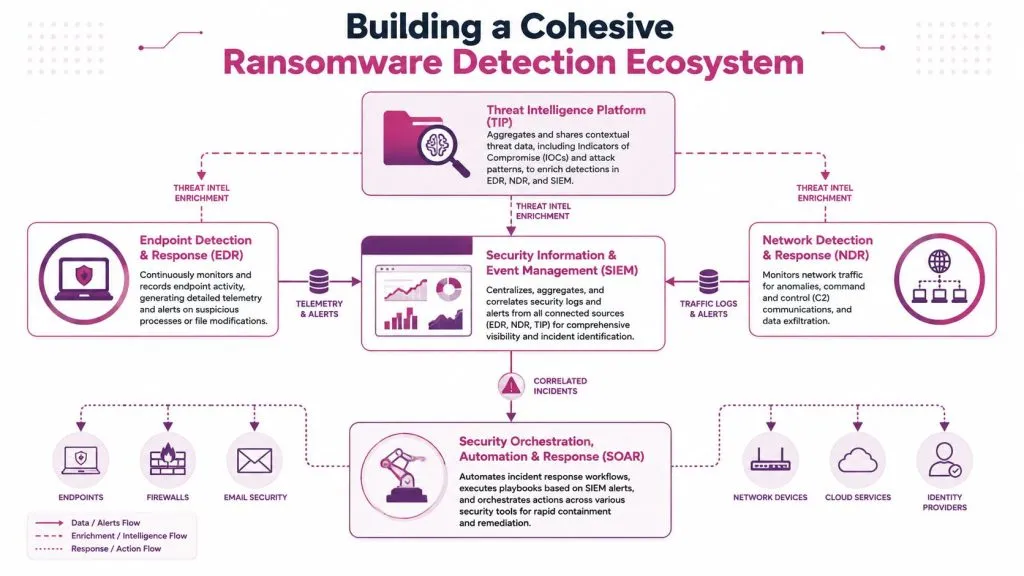
No single platform sees enough to handle ransomware alone. A strong stack works because each tool contributes a different angle, then shares context with the rest.
Research summarized in Taylor’s University’s publication on ransomware detection architecture emphasizes that effective detection requires integrating Endpoint Detection and Response, Intrusion Detection and Prevention Systems, and email security into a multi-layered defense, especially to counter modern ransomware’s EDR evasion techniques. The same guidance also highlights practical hardening steps such as disabling unnecessary protocols like RDP (TCP 3389) and SMBv1.
What each platform does best
Here’s the practical division of labor MSPs should expect:
| Platform | Primary job in ransomware detection |
|---|---|
| EDR | Watches endpoint behavior such as process execution, file changes, and suspicious activity on hosts |
| IDS/IPS or NDR | Monitors traffic patterns, lateral movement, and suspicious communications across the network |
| Email security | Filters phishing messages, malicious attachments, and suspicious links before execution begins |
| SIEM | Aggregates and correlates signals across tools so analysts can see the attack chain, not isolated alerts |
| SOAR | Executes playbooks that isolate hosts, disable accounts, enrich cases, and notify responders |
Where teams get confused is the overlap. EDR may show a suspicious process. NDR may show the same host talking oddly. SIEM shouldn’t compete with those tools. It should connect them. SOAR then acts on that combined picture.
Why integrated tools beat isolated tools
A single alert is often ambiguous. Correlated alerts are usually not.
Consider a common progression. Email security sees a risky attachment. EDR records a user app launching an unusual child process. Network monitoring notices new outbound communication. File monitoring sees bulk rewrites begin. Separately, those could be dismissed or delayed. Together, they describe a ransomware event in motion.
That’s why integration design matters as much as product selection. Your stack should answer:
- Can tools enrich each other’s alerts?
- Can one alert trigger actions in another system?
- Can the SOC view a single tenant timeline across endpoint, network, identity, and mail?
- Can you suppress duplicates without hiding the story?
The stronger your answer to those questions, the more likely your team catches the attack before the client calls first.
Operational Workflows for MSPs and MSSPs
Detection capability isn’t just a technical stack. It’s a service workflow. MSPs and MSSPs succeed when they can onboard tenants consistently, establish what “normal” looks like in each environment, and run investigations without burying analysts in cross-tenant noise.
A good reference point for service design is how mature providers package IT managed security as an ongoing operational function, not just a tool deployment. That mindset matters for ransomware detection because the actual work starts after the agents are installed.
A practical multi-tenant workflow
A workable onboarding pattern often looks like this:
Week one: deploy telemetry sources, confirm log flow, tag critical assets, and identify high-risk identity paths.
Week two: observe normal admin behavior, backup jobs, patch windows, and common automation so the team doesn’t flag every legitimate task as suspicious.
Week three and beyond: enable tuned detections, deception assets, and response playbooks in stages.
That staged rollout matters. If you drop every rule into every client on day one, you’ll spend the first month sorting harmless noise from real signal. Mature MSPs resist that urge.
Here’s a simple scenario. A manufacturing client has file servers that change heavily overnight because of batch processes. A law firm client sees large daytime document activity but very little scripted admin work. The same “rapid file modification” logic won’t fit both clients without context. Baselines are tenant-specific.
The fastest way to lose analyst confidence is to pretend every client has the same normal.
Validation is part of the service
Clients don’t just want assurance. They want evidence. That means testing detections in controlled ways and documenting what happened.
Useful validation methods include:
- Controlled simulations: trigger benign test patterns that resemble suspicious file activity, lateral movement, or account misuse
- Purple team exercises: let offensive and defensive staff work together to confirm detections fire where expected
- Playbook drills: verify that alerts create tickets, enrich data, isolate endpoints, and notify the right contacts
- Quarterly reviews: show the client which alerts mattered, which rules were tuned, and which blind spots remain
A mature service desk also defines escalation rules clearly. Some alerts should go straight to isolation. Others should require analyst review if they involve critical servers, executive endpoints, or shared identity systems.
For MSSPs in particular, deception assets are useful operationally because they produce high-confidence events. That helps triage across many tenants. If a canary file triggers, analysts don’t need to debate whether touching it was “probably okay.” They can move directly into containment and scoping.
Your Ransomware Detection Implementation Checklist
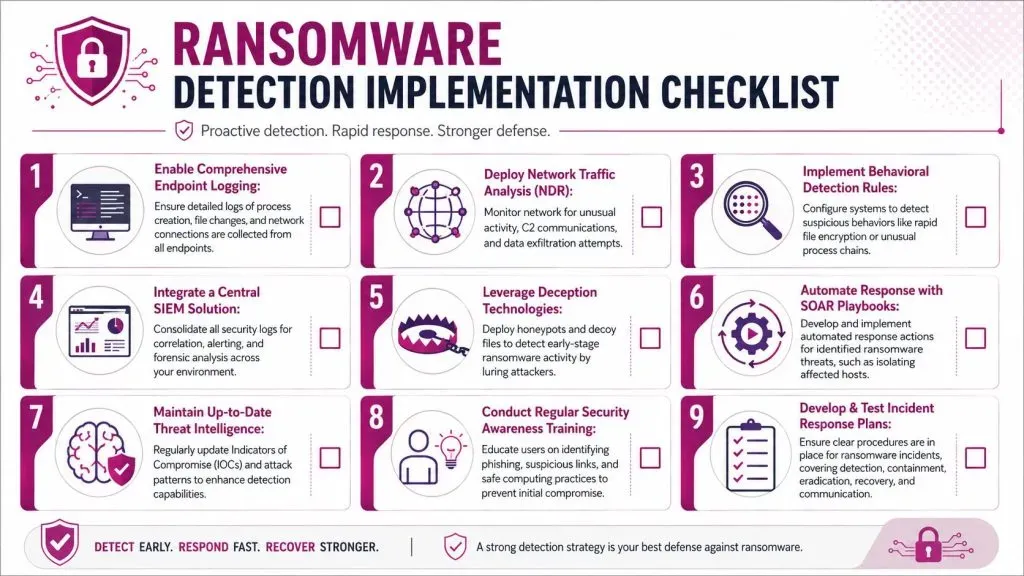
Practical application and a clear sequence are often prioritized over additional theory. Use this as a practical checklist for building or auditing your current detection of ransomware capability.
Data collection
- Enable detailed endpoint logging: collect process creation, file access, script execution, service changes, and EDR telemetry on workstations and servers.
- Watch the network path: deploy monitoring that can reveal suspicious communication, unusual traffic volume, and signs of lateral movement.
- Pull email and collaboration logs into the same workflow: phishing remains a common starting point, and those logs often provide the first clue.
- Capture cloud and SaaS audit trails: monitor sign-ins, admin changes, API usage, and identity activity in platforms clients rely on daily.
- Add file integrity visibility on critical systems: shared storage, backup infrastructure, and line-of-business servers deserve direct monitoring.
Detection logic and tooling
- Keep signature-based protections in place: they still catch known threats quickly and efficiently.
- Build behavioral detections around attack actions: look for bursts of file changes, suspicious child processes, privilege changes, and unusual task creation.
- Use anomaly detection carefully: establish baselines by tenant and by asset type before trusting the noise level.
- Deploy deception assets deliberately: canary files, honeypot shares, and decoy credentials should sit where ransomware operators are likely to scan or encrypt.
- Correlate across tools in a SIEM: isolated alerts create confusion. Combined alerts create incident narratives.
Operations and resilience
- Create response playbooks now: define what happens when high-confidence ransomware activity appears. Isolation, account suspension, communication, and evidence preservation shouldn’t be improvised.
- Tune detections on a schedule: review false positives and near misses regularly so rules improve instead of stagnating.
- Segment by client and asset sensitivity: domain controllers, backup servers, executive laptops, and shared storage need different thresholds and response actions.
- Harden known attack paths: remove unnecessary exposure, disable outdated protocols where appropriate, and tighten remote access controls.
- Test the full workflow: verify not only that a rule fires, but that analysts receive context, automation runs correctly, and the client contact process works.
A final checklist question matters more than the rest: if ransomware began moving through one of your client environments today, which alert would tell your team first, and what would happen automatically in the next few minutes? If the answer is vague, the system isn’t ready.
If you’re building ransomware detection services for clients, InsecureWeb gives MSPs and security teams external threat visibility that complements internal monitoring. Its dark web monitoring, fake site and account detection, threat intelligence, vulnerability scanning, AI-guided penetration testing, and reputation monitoring help you spot risks earlier and deliver those capabilities under your own brand.