Data Breach News16 min read
Proactive Threat Hunting: A Guide for Modern MSPs
By InsecureWeb Team
This report reflects observations of dark web activity. InsecureWeb makes no representations regarding the accuracy of this data.
If you run an MSP or MSSP today, you’re probably already collecting more security data than your team can meaningfully review. The SIEM keeps filling. The EDR throws alerts. Clients expect fast answers. Analysts spend their day triaging what the tools surfaced, while the underlying question goes unanswered: what’s happening that none of those tools flagged?
That’s the gap proactive threat hunting is meant to close. Not as a buzzword, and not as a luxury service for only the largest enterprise SOCs. For service providers, it’s becoming a practical way to deliver better outcomes, differentiate from commodity monitoring, and build recurring security revenue around work clients can understand.
The challenge is that most guidance stops at definitions. MSP owners need something else. They need an operating model, a tool blueprint, a way to package hunts into a service, and a credible way to show value even when a hunt doesn’t uncover an active intruder.
Why Waiting for Alerts Is No Longer Enough
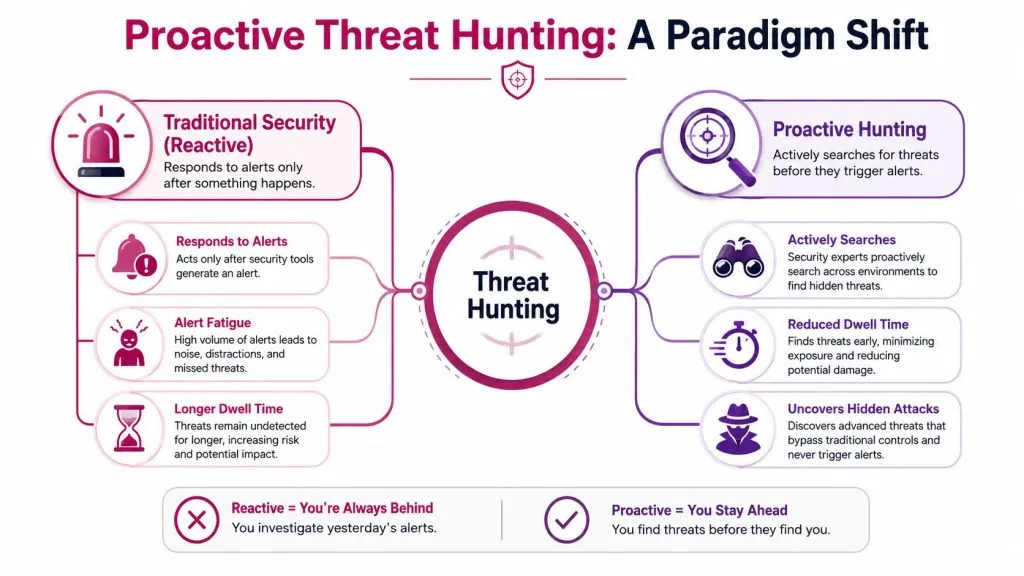
Most MSP security stacks are reactive by design. A client buys SIEM, EDR, email security, firewall logs, and maybe some managed detection. The team then waits for telemetry to cross a threshold, trigger a rule, or match a known pattern. That works for noisy attacks. It doesn’t work nearly as well for patient attackers who blend into normal admin activity.
The practical problem isn’t that automated controls are useless. It’s that they are selective. They detect what they were built to detect. Attackers know this, so they use valid credentials, common tools, living-off-the-land techniques, and low-volume activity that looks close enough to business as usual.
According to Vectra’s threat hunting overview, proactive threat hunting reduces the average detection time for cyber threats from 181 days to mere hours or days, and 51% of organizations now maintain active hunting programs. That matters to an MSP owner because dwell time is where client damage compounds: lateral movement, privilege escalation, data access, and ransomware staging all get easier the longer an attacker stays invisible.
Reactive monitoring creates predictable blind spots
A pure alert-driven model usually breaks down in four places:
- Alert fatigue: Analysts see too much low-confidence activity and learn to prioritize only the loudest signals.
- Rule dependency: If the detection engineer never wrote the rule, the SOC may never see the behavior.
- Tool silos: Identity logs, endpoint activity, DNS behavior, and cloud events often live in different consoles.
- Client expectations: Customers assume “monitored” means “covered,” even when the service mostly means triaged alerts.
Practical rule: If your analysts only investigate what your tools already labeled as suspicious, you don’t have a hunting function. You have a queue.
That gap becomes more obvious after a public breach cycle. Clients read about exposed credentials, cloud abuse, brand impersonation, and ransomware operators staying undetected for long stretches. Many MSPs end up having the same conversation repeatedly: “Why didn’t the tools catch it sooner?” Articles tracking major data breach patterns in 2023 are useful because they help frame that discussion in business terms, not just technical ones.
Hunting changes the operating posture
Proactive threat hunting shifts the question from “What alerted?” to “What evidence would exist if an attacker were already here?” That’s a major difference. It forces the team to investigate intent, context, and weak signals instead of waiting for a platform to make the first move.
For an MSP, that shift is also commercial. Clients will pay more for a service that actively looks for hidden threats than for one that forwards notifications from third-party tools. The strongest providers don’t sell hunting as an add-on checkbox. They sell it as the layer that makes the rest of the stack smarter.
What Proactive Threat Hunting Actually Is
Think of standard security monitoring as a guard who responds when a door alarm goes off. Proactive threat hunting is the detective who walks the property before the alarm sounds, notices the scratched lock, the unusual login pattern, and the process chain that doesn’t fit the environment.
That distinction matters because many buyers confuse threat hunting with adjacent services. Hunting is not the same as vulnerability scanning. It’s not the same as penetration testing either. Those services answer different questions.
What hunters assume from the start
A good hunter begins with a hard truth: controls can fail, and compromise may already exist. The job is to look for traces that a stealthy adversary leaves behind across endpoints, identity systems, network traffic, and cloud logs.
That’s why the work is human-led. Automated analytics can rank, cluster, and surface anomalies. They can’t replace the judgment needed to decide whether a strange PowerShell event is legitimate admin work, a deployment artifact, or part of lateral movement.
What threat hunting is not
Use this distinction when you explain the service to clients:
| Security function | Core question | Typical output |
|---|---|---|
| Vulnerability scanning | What known weaknesses exist? | Misconfigurations, missing patches, exposed services |
| Penetration testing | Could an attacker break in this way? | Proof of exploitability, attack paths, remediation advice |
| Managed detection | What triggered a detection rule? | Alert triage and response actions |
| Threat hunting | What malicious activity may exist without an alert? | Investigative findings, confirmed threats, new detections |
This is also why many MSPs struggle to package it. Hunting doesn’t fit neatly into a simple “tickets closed” narrative. It produces value through investigation quality, environmental understanding, and detection improvement.
Clients usually understand hunting faster when you explain it as “active search” instead of “advanced monitoring.”
If you’re refining your service catalog, it helps to compare your hunting offer against broader managed security offerings in the market. Not to copy them, but to make sure your own positioning is clear. Clients should know exactly where hunting sits relative to MDR, vulnerability management, and incident response retainers.
The mindset that makes it effective
The best hunting teams don’t chase everything unusual. They look for specific attacker behaviors in a specific environment. A finance client, a healthcare client, and a software company won’t generate the same hypotheses because their admin patterns, crown jewels, and threat exposure differ.
That’s where many immature programs fail. They buy tools first, then ask the analysts to “go hunt.” Effective programs define likely abuse paths, map them to known attacker techniques, and hunt where the environment is most exposed.
The Hypothesis-Driven Hunting Workflow
Threat hunting works when it’s repeatable. The most reliable model is hypothesis-driven: analysts start with a testable assumption, collect the right telemetry, analyze it, validate the findings, and then convert what they learned into stronger detections.
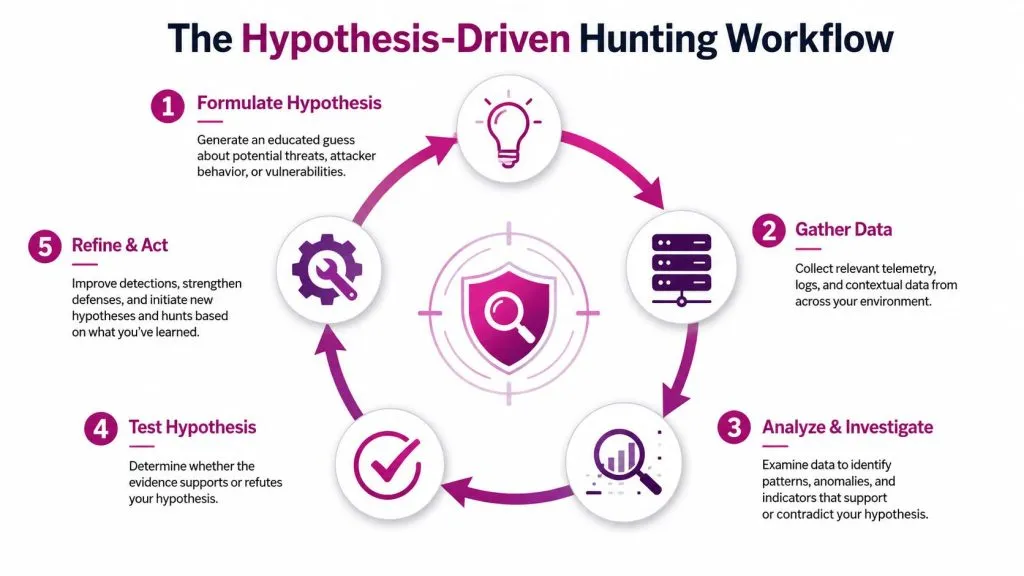
According to Deepwatch’s glossary on proactive threat hunting, the process follows a structured six-step cycle: hypothesis generation, automated data collection, anomaly analysis, threat validation, incident response or mitigation, and feedback enrichment. That last part matters more than many teams realize. If a hunt ends without producing better detection content, the SOC won’t compound its gains.
Start with a hypothesis worth testing
Weak hypotheses waste analyst time. “Look for bad stuff in PowerShell” is too broad. A stronger version sounds like this: an adversary may be abusing remote administration tooling or script execution to move laterally without triggering existing controls.
Good hypotheses usually come from three inputs:
- Threat intelligence and recent TTPs tied to the client’s sector or tooling.
- MITRE ATT&CK mapping that turns vague risk into huntable behavior.
- Environmental context such as exposed identities, privileged accounts, remote access tools, or cloud admin patterns.
A mature hunting team keeps a backlog of hypotheses, ranked by likely impact and feasibility. That alone makes delivery far easier for an MSP because it turns hunting into a scheduled service instead of ad hoc heroics.
Here’s a useful primer before the workflow gets operational:

Run the cycle with discipline
A practical hunt usually follows this pattern:
- Formulate the assumption: Define the attacker behavior, business system, and time window.
- Pull only relevant data: Query endpoint, identity, network, and cloud telemetry that can prove or disprove the hypothesis.
- Investigate anomalies: Compare against expected admin behavior, peer groups, baselines, and asset criticality.
- Validate the chain: Correlate artifacts until the activity is clearly benign, suspicious, or malicious.
- Respond and enrich: Isolate, contain, escalate, or tune detections based on what the hunt proved.
What works and what fails in real operations
What works is narrow scope. Limit the users, systems, technique, and period under review. What fails is broad, unbounded searching that tries to examine every suspicious event in the environment at once.
Another common failure is treating every hunt as a standalone project. A profitable MSP practice needs templates: repeatable queries, known data dependencies, analyst notes, response paths, and client-ready reporting language. Your analysts should never be starting from a blank page for common scenarios like credential abuse, suspicious script execution, or unusual service creation.
The highest-value output from a hunt often isn’t the incident. It’s the new rule, parser, dashboard, or enrichment logic that prevents the SOC from missing the same pattern again.
Gathering Your Evidence Tools and Telemetry
A hunt is only as good as the evidence behind it. If your telemetry is thin, fragmented, or short-lived, your analysts will spend more time proving they can’t answer a question than investigating it.
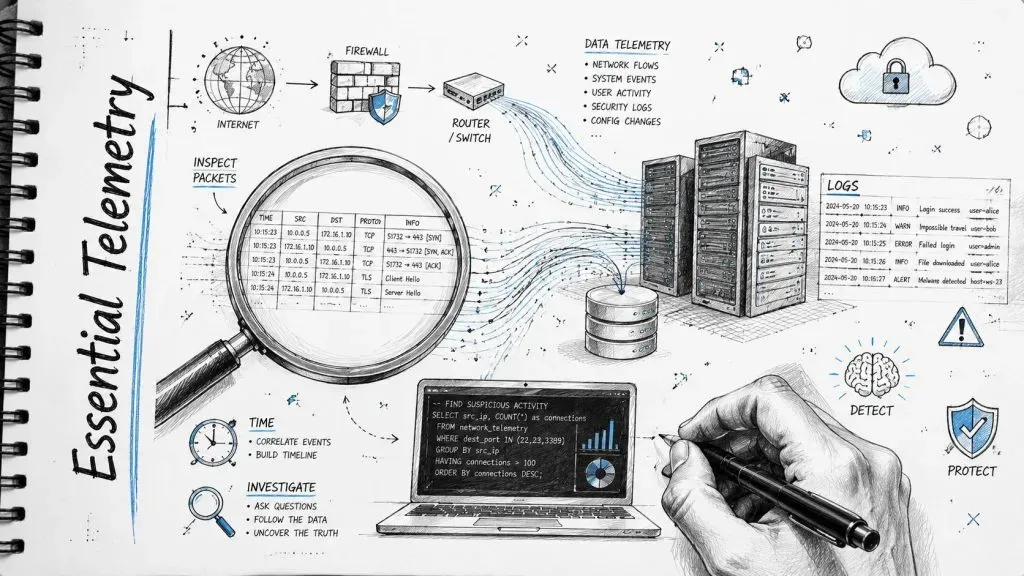
That’s why tool selection for proactive threat hunting should start with data coverage, not brand preference. You need enough visibility to follow an attacker’s path from identity event to endpoint activity to network behavior and cloud action.
The telemetry that actually supports hunts
According to StickmanCyber’s breakdown of threat hunting tools and techniques, effective hunts require scoped time windows, specific data populations, and the ability to pivot from one clue to connected evidence across devices, processes, and network connections. The same source notes that strong hunting services combine skilled professionals, multi-source telemetry, and powerful analytics.
For an MSP, that usually means collecting from these categories:
- Endpoint telemetry: EDR events, process creation, parent-child relationships, command lines, persistence changes, and memory-related context where available.
- Identity telemetry: Active Directory logs, SSO activity, privileged group changes, impossible travel reviews, MFA events, and service account behavior.
- Network telemetry: DNS, proxy logs, firewall sessions, NDR metadata, and internal east-west visibility where feasible.
- Cloud telemetry: Control plane actions, audit logs, role changes, storage access, and workload activity across the client’s major platforms.
- Exposure context: Vulnerability findings, asset criticality, external exposure, and runtime posture.
Build for pivots, not just ingestion
A common MSP mistake is buying a SIEM and assuming that’s enough. It isn’t. A SIEM aggregates. Hunting requires pivoting. If an analyst sees an anomalous login, they need to jump quickly to the device, process lineage, network activity, and related identities. Slow pivots kill throughput and make hunts commercially unattractive.
Use this checklist when evaluating your stack:
| Capability | Why it matters for hunting |
|---|---|
| Searchable long-term logs | Lets analysts test hypotheses across defined periods |
| Rich endpoint context | Supports process lineage and execution analysis |
| Identity correlation | Connects account abuse to device and cloud actions |
| Network metadata | Reveals external contact patterns and lateral movement clues |
| Threat intel enrichment | Helps prioritize suspicious infrastructure and known tradecraft |
Tooling choices that improve service margins
You don’t need every premium product to start. You do need consistency. Pick a SIEM or data platform your analysts can query well. Pair it with EDR that exposes useful telemetry, not just verdicts. Add NDR or strong network logging where your client base justifies it.
Some teams also enrich hunts with external collection and research workflows. If you’re investigating suspicious web artifacts, campaign infrastructure, or public-facing references that support threat analysis, a structured website scraping api can help automate collection into analyst workflows without turning every research task into manual copy-paste.
Client-facing hunting can also improve when it’s paired with dark web monitoring for managed service providers, because exposed credentials and identity signals often sharpen hunt prioritization. The key is to use external intelligence to guide hypotheses, not to replace the hunt itself.
Playbooks for MSPs Building a Threat Hunting Service
A client calls after a credential abuse incident and asks a fair question: “If we already pay for monitoring, why didn’t anyone look for this earlier?” If your answer depends on analyst intuition or one-off heroics, the service will be hard to sell, hard to staff, and hard to scale. MSPs make threat hunting profitable when they package it as repeatable playbooks with clear inputs, defined analyst steps, and reporting a buyer can understand.
Demand is growing. Competition is too. The providers that win are not the ones with the most impressive slide deck. They are the ones that can run the same hunt across 20 clients, adapt it for each environment, and show what changed after the work was done.
A good, better, best model clients can actually buy
Tiering works when each level changes scope, analyst time, and outcome. It fails when every package uses different language for the same work.
A practical model looks like this:
- Good: Monthly hunts against a fixed library of common attacker behaviors. Fits smaller clients with decent logging and limited budget.
- Better: Biweekly hunts designed for the client’s sector, identity risks, and recent incident patterns. Includes tighter reporting and detection tuning recommendations.
- Best: Ongoing hunts built into managed detection operations, with named analyst ownership, regular hypothesis review, and direct coordination with incident response.
Keep the base process standardized. That protects margin. Add client context in the hypothesis backlog, business-specific exclusions, and remediation guidance. That is where premium pricing holds up.
Starter playbooks that are realistic to run
Start with a short catalog your analysts can execute well and your account team can explain in plain language.
| Playbook / Hypothesis | Objective | Key Data Sources | MITRE ATT&CK Tactic |
|---|---|---|---|
| Suspicious PowerShell usage | Identify script execution that falls outside approved admin patterns | EDR process telemetry, command-line logs, identity events | Execution |
| Credential dumping behavior | Detect tools or process access patterns tied to credential theft | Endpoint telemetry, memory-related alerts, privileged account logs | Credential Access |
| Unusual remote admin activity | Find remote administration events outside expected hosts, users, or time windows | Identity logs, endpoint events, VPN or remote access logs | Lateral Movement |
| Persistence through services or scheduled tasks | Detect newly established footholds that survive reboot or logoff | Windows event logs, EDR persistence telemetry | Persistence |
| Suspicious cloud admin changes | Surface control plane actions that may indicate privilege abuse or staged persistence | Cloud audit logs, identity provider logs | Privilege Escalation |
| Data staging before exfiltration | Look for archive creation, unusual file access, or outbound activity tied to collection | Endpoint telemetry, file activity, proxy or network logs | Collection |
Six to ten playbooks is enough for a launch.
More than that usually creates inconsistency unless you already have mature QA, content management, and analyst coaching. I have seen providers build a 30-playbook catalog too early, then deliver only five of them because the rest were too expensive to run or too hard to explain to clients.
What makes a playbook operational instead of theoretical
Each playbook should answer five questions before it ever reaches a client package:
- What hypothesis are we testing?
- What telemetry is required?
- What analyst steps are mandatory every time?
- What counts as a meaningful finding?
- What detection, hardening, or response action should follow?
That last point matters for revenue and retention. Clients do not renew hunting because they like the concept. They renew when hunts produce decisions. Disable an abused account. Add a new detection. Expand log retention. Restrict remote tooling. Tighten admin role assignment.
Packaging and pricing without burning analyst time
Price hunting as a premium service with defined deliverables. Include hunt cadence, number of hypotheses tested, reporting format, tuning recommendations, and escalation criteria. Do not hide it inside a low-end MDR package where senior analyst hours disappear into a flat fee.
A simple structure works well in practice: a recurring fee for a set number of hunts per month, plus a surcharge for investigations that break scope or require incident response support. That gives clients predictable spend and protects your team when a hunt turns into a larger case.
Support services can strengthen prioritization if you use them carefully. For example, dark web monitoring for OSINT and investigations can help explain why one client needs extra focus on credential abuse, impersonation, or exposed identities. It should guide hunt selection, not replace endpoint, identity, and cloud analysis.
One rule is simple. If an executive cannot understand what a playbook looks for, why it matters, and what your team will do with the result, the service is still packaged for analysts instead of buyers.
Measuring Success and Integrating into Your SOC
A client asks a fair question after three months of threat hunting. What did we get for the spend?
If the answer is a stack of analyst notes and a count of hunts completed, renewal gets harder. If the answer is three new detections, better identity logging, one confirmed privilege abuse path closed, and a 30-minute reduction in validation time for suspicious admin activity, the service is easier to defend and easier to expand.
That is the standard MSPs should use. Threat hunting needs to improve the client environment and strengthen SOC operations at the same time. Palo Alto Networks’ threat hunting overview reinforces the same point. Hunting has value when it drives detection improvements, investigation speed, and risk reduction, not just analyst activity.
Metrics that prove the service is working
Measure outcomes your client can understand and your SOC can repeat.
- Time to validate suspicious behavior: Track how long it takes analysts to confirm or dismiss high-risk activity before and after hunt-derived detections and triage steps are added.
- Detection content created from hunts: Count new correlation rules, EDR analytics, watchlists, parser fixes, dashboards, and enrichment logic produced by hunting work.
- Visibility gaps uncovered: Record where weak telemetry blocked conclusions, including short retention, missing cloud logs, poor identity coverage, or unmanaged endpoints.
- Escalations that changed the environment: Report hunts that resulted in credential resets, control changes, host isolation, policy updates, or incident response engagement.
- Hypothesis yield: Measure how many hunt hypotheses produced useful decisions, even when they did not uncover active compromise.
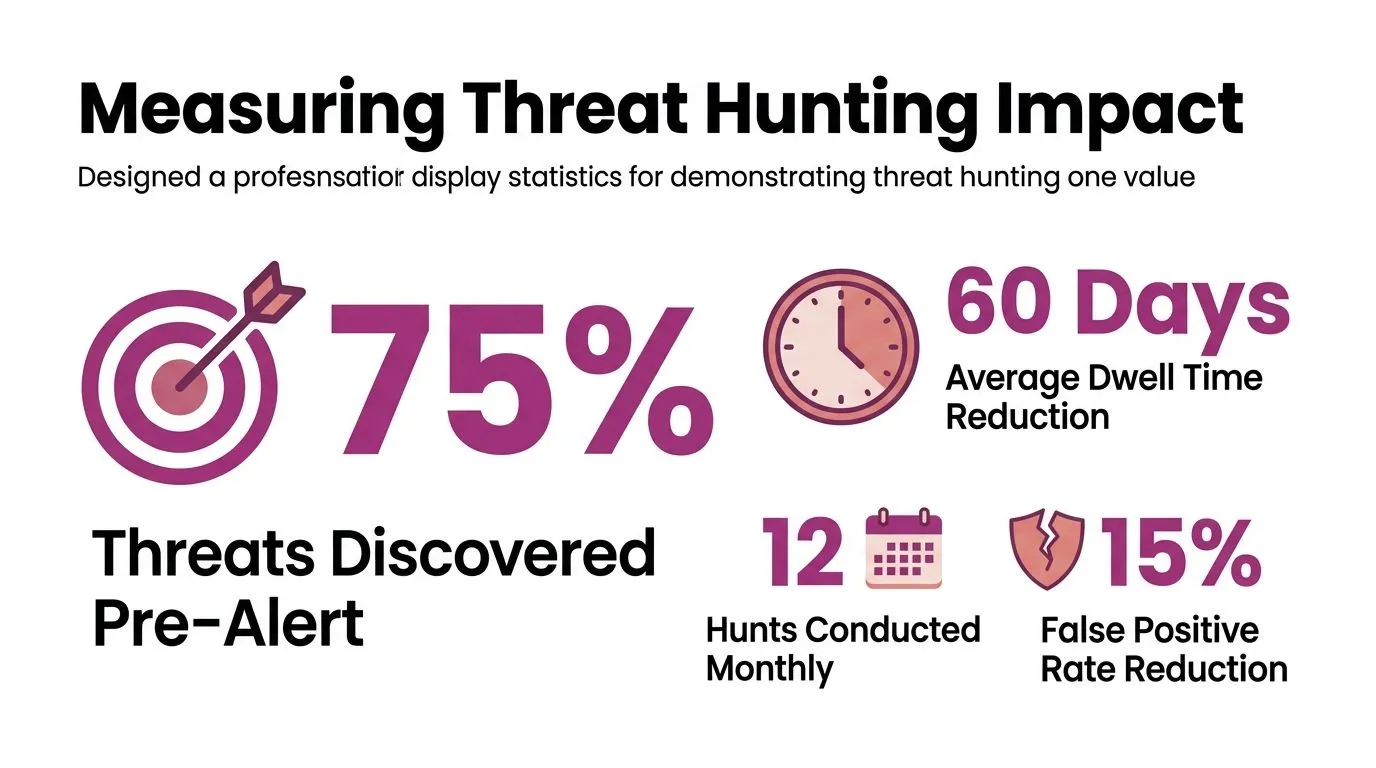
One point matters more than many teams admit. A hunt that finds no attacker still has value when it closes uncertainty around a serious scenario and produces a concrete next step. That may mean extending retention, adding PowerShell logging, tagging privileged accounts correctly, or fixing an ingestion problem that would have hidden real abuse later.
Feed hunt output into daily SOC operations
Threat hunting should change how the SOC runs next week, not just what appeared in a monthly report.
Use every completed hunt to update four parts of the operating model. First, convert repeatable findings into detections so the SOC does not pay senior analyst rates to rediscover the same pattern. Second, adjust triage workflows so Tier 1 and Tier 2 analysts can investigate similar activity faster and with fewer escalations. Third, improve context, such as asset criticality, user role data, cloud account ownership, and threat intelligence joins, so alerts arrive with enough detail to act on. Fourth, document telemetry changes required on the client side and track them to completion.
Automation helps with scale. It does not replace analyst judgment.
Teams that use AI well apply it to query generation, clustering, enrichment, and prioritization. The trade-off is precision. Automated systems tend to favor patterns they have seen before, while skilled hunters spend time on low-volume activity that looks ordinary until the context is assembled. For MSPs, the profitable model is clear. Automate the repetitive parts, reserve analyst time for interpretation, and push every reusable outcome back into the SOC stack.
Strong hunting programs use automation to reduce manual search effort and increase analyst focus on judgment, validation, and containment decisions.
What clients should see month after month
Client reporting needs to show trend lines, not isolated wins.
| Client-facing outcome | What it demonstrates |
|---|---|
| More detections added from prior hunts | The service improves the stack over time |
| Better log coverage in key systems | Visibility is getting stronger |
| Faster analyst validation of suspicious activity | The SOC is becoming more efficient |
| Repeated playbooks against high-risk behaviors | The service is systematic, not ad hoc |
The best reports are short, specific, and tied to business decisions. Show what changed, what risk was reduced, what still cannot be seen, and what action the client should approve next. That reporting format does two jobs. It gives the SOC a feedback loop, and it gives account managers a clean renewal story based on measurable service improvement.
MSPs need security services they can deliver repeatedly, explain clearly, and integrate into the rest of their stack. InsecureWeb helps providers add external threat visibility, dark web monitoring, vulnerability scanning, AI-guided penetration testing, fake site detection, and reputation monitoring under their own brand, with API access included for easier integration into existing workflows.