Data Breach News13 min read
Your Guide to a Dark Web Scan: From Data to Defense
By InsecureWeb Team
This report reflects observations of dark web activity. InsecureWeb makes no representations regarding the accuracy of this data.
A client calls because Microsoft 365 sign-ins look odd. Your firewall is clean. Endpoint alerts are quiet. MFA prompts don’t show a clear compromise. Then a dark web scan turns up the client’s email domain inside a credential dump, along with a handful of employee logins. That moment is where a lot of MSPs get stuck. They can prove exposure exists, but they don’t always have a repeatable way to turn that finding into remediation, reporting, and a security service the client will keep paying for.
That gap matters. The dark web monitoring market is projected to reach $762 million in 2025, and intelligence gathered from these scans is estimated to prevent $12.4 billion in annual cybercrime, according to Xtended View’s dark web statistics roundup. Buyers already understand that exposed credentials create risk. What many partners still need is the operating model for handling that risk well.
This is the practical version. Not just what a dark web scan is, but how to run it like a service, how to interpret the alerts, and how to turn external exposure data into defensive action for clients.
Beyond the Firewall A New Frontline
Most MSPs first treat a dark web scan like a prospecting tool. Run a scan against a client domain, find exposed accounts, start a security conversation. That’s useful, but it’s too narrow. In practice, a dark web scan belongs in the same operational category as patching, identity hardening, and external exposure management.
The reason is simple. Attackers don’t need to break through your client’s perimeter if valid credentials are already circulating outside it. That’s why external visibility matters just as much as internal telemetry. If you already think in terms of internet-facing risk, attack surface analysis is the right companion mindset. The firewall only shows part of the picture.
A dark web finding also changes the conversation with clients. You’re no longer discussing hypothetical risk. You’re discussing a known exposure tied to their brand, users, or systems.
Practical rule: Treat every credential-related dark web alert as identity risk first, breach evidence second.
That posture helps in real engagements. If the exposed data is current, the immediate work is access reduction, session review, password resets, MFA enforcement, and downstream account checks. If the data is old, it still tells you something useful about password reuse, stale accounts, or weak security hygiene. Either way, the scan produces operational value.
The MSPs that get the most from dark web scanning don’t sell “visibility” alone. They sell a fast path from exposure to containment.
What a Dark Web Scan Actually Uncovers
A good dark web scan is basically a credit report for digital exposure. It doesn’t tell you everything about a client’s environment, but it tells you what’s already out in circulation and what could be used against them next.
The environment is large and messy. In 2024, search efforts tracked over 65,000 active .onion domains, about 42% of Tor hidden services functioned as marketplaces for illicit goods like stolen credentials, and these scans had to traverse a network used by 2.5 to 3 million people daily, according to this dark web ecosystem summary. That scale is why manual searching doesn’t work as a service model.
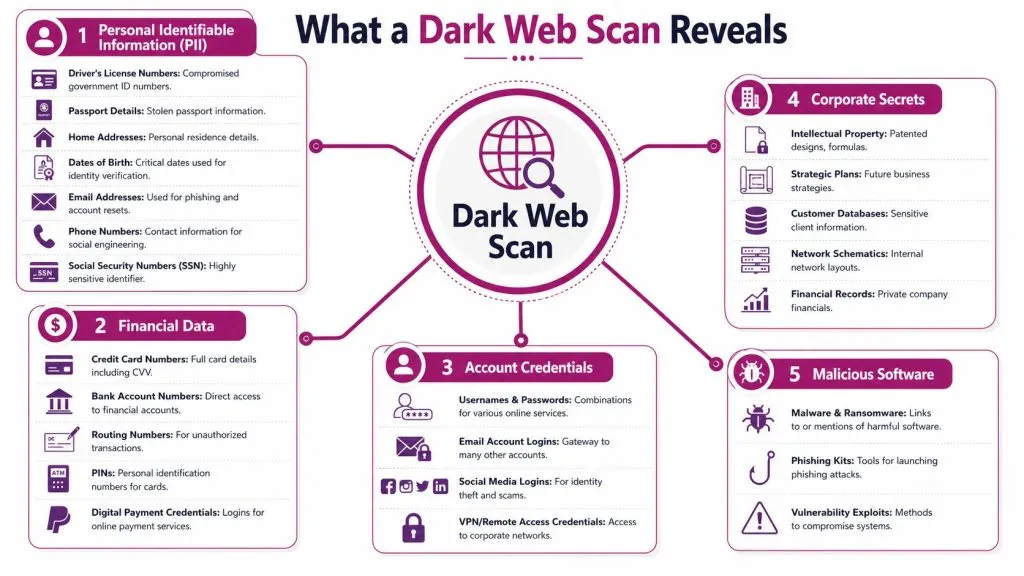
The environments that matter most
Not all dark web locations mean the same thing operationally.
- Marketplaces: These usually indicate monetization. If a client’s data appears here, someone is trying to sell access, identities, or financial value.
- Forums: These often provide context. You may see discussions about a brand, a breached vendor, or a collection of stolen credentials being verified by other actors.
- Paste sites and dumps: These are often where raw leaked data lands first or gets reposted later. They’re noisy, but still useful.
- Private communities: These are harder to access and often contain fresher, more actionable information. Many commercial scans won’t fully cover them.
Data types found in a dark web scan
The data itself matters more than the dramatic setting. What you find determines what you do next.
| Data Category | Examples | Associated Risk Level |
|---|---|---|
| Credentials | Corporate email addresses, passwords, VPN or remote access logins | High |
| Personal identifiable information | Dates of birth, phone numbers, home addresses, government ID details | High |
| Financial data | Credit card information, bank details, digital payment credentials | High |
| Corporate information | Customer records, internal documents, network details, financial records | High |
| Threat tooling references | Malware, phishing kits, exploit mentions tied to a brand or user set | Medium to High |
Some findings are immediately dangerous. An exact email and password pair for a current employee usually demands action. Other findings are more contextual. A mention of a client brand in a forum thread may not mean compromise, but it can indicate targeting, reconnaissance, or supply chain interest.
A useful scan doesn’t just list records. It helps you understand which records create immediate access risk.
For MSPs, the priority order is usually straightforward. Start with anything that can enable login or account recovery. Then move to anything that enables fraud, impersonation, or regulatory exposure. Last, investigate chatter and tooling that may point to upcoming attacks.
Behind the Curtain How Scans Are Performed
A dark web scan isn’t a Google search with a darker theme. It relies on tooling designed for places that standard search engines don’t index well, if at all.
A dark web scan uses specialized crawlers to traverse Tor-based marketplaces and forums, along with pattern matching algorithms and machine learning to identify high-confidence threats such as exact email and password combinations, according to Kaseya’s explanation of dark web monitoring. That matters because raw dark web content is fragmented, duplicated, and often intentionally misleading.
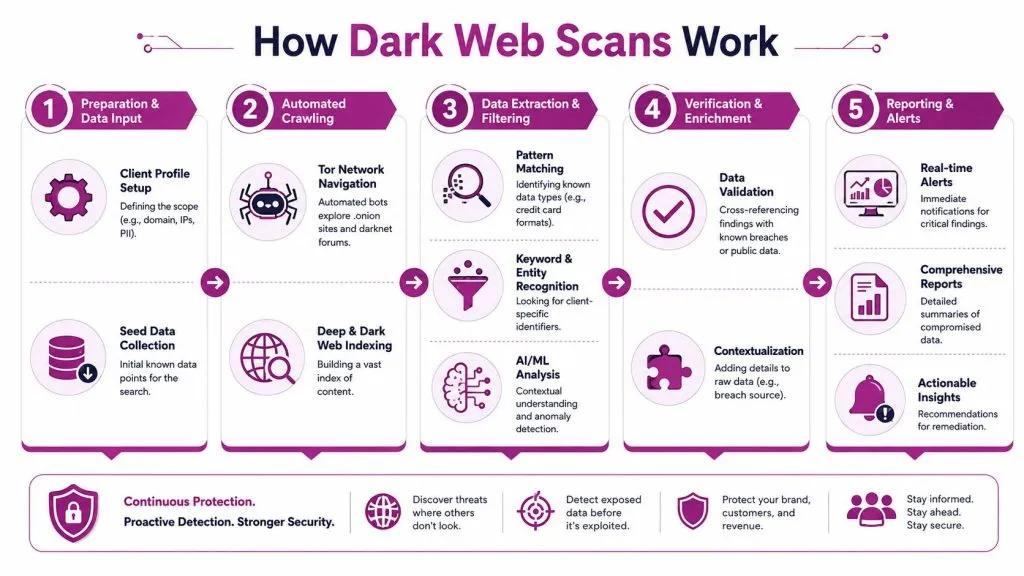
What the tooling actually does
In practice, the process usually looks like this:
- Scope the targets
The platform starts with seed data such as client domains, executive names, monitored email addresses, and known identifiers. - Crawl hidden services and data sources
Automated collectors move through Tor-accessible sites, dumps, paste locations, and known repositories. - Extract and normalize records
The scanner identifies credential pairs, domain mentions, PII patterns, and references to corporate assets. - Correlate findings to real entities
Correlating findings transforms a random email in a dump into “belongs to an active client tenant” instead of just another string. - Alert and report
High-confidence matches generate alerts. Lower-confidence items may sit in reports for analyst review.
Why automation needs analyst review
Automation gets you coverage and speed. It doesn’t always get you judgment.
Many MSPs overestimate the value of raw feeds. A machine can tell you that an address appears in a dump. It may not tell you whether the account still exists, whether the password is likely current, whether the source is a fresh breach or a recycled bundle, or whether the same user appears in multiple unrelated datasets.
A mature service puts a human between the feed and the client-facing decision when the finding could trigger account resets, legal review, or executive notifications.
Consider what analyst review should answer:
- Is the record current enough to matter now
- Does it tie to an active account or legacy identity
- Was it found in a location associated with new trade activity or old reposting
- Does the finding align with any current login, phishing, or endpoint concerns
The difference between a noisy tool and a useful one usually shows up here.
Interpreting Scan Results and Prioritizing Alerts
A dark web scan creates value when you can separate urgent exposure from background clutter. That sounds obvious, but most alert fatigue comes from treating every result as equal.
Dark web scanning often detects exposure within hours of a dump appearing on illicit communities, long before many internal controls would surface the issue, according to Siberpol’s analysis of enterprise dark web scanning. Speed is good. Speed without triage just creates noise faster.
Fresh exposure versus recycled breach data
The first question after any alert is whether you’re looking at new signal or old debris.
Recycled data is common. Threat actors repackage breach archives, rename collections, and repost stale records to make them appear fresh. If your team doesn’t check for that, you’ll end up rotating credentials for users who changed passwords years ago while missing the handful of records that indicate present-tense risk.
Use context to judge freshness:
- Source context: A newly active marketplace listing is different from an old paste repost.
- Credential completeness: Exact username and password combinations deserve more attention than a mention of an email alone.
- Account status: Active users, privileged accounts, and remote access identities move to the front of the queue.
- Supporting evidence: Match the alert against recent sign-in anomalies, endpoint findings, or phishing reports.
A practical triage model
This model works well for MSP operations because it’s simple enough to run consistently.
| Alert Type | What it usually means | First response |
|---|---|---|
| Exact corporate credential pair | Likely usable access risk | Reset password, revoke sessions, review MFA and sign-ins |
| Executive or admin account mention | Elevated targeting risk | Escalate immediately, verify account protections |
| Employee email in a broad dump | Possible old or low-context exposure | Validate account status, check password age and reuse risk |
| Customer or financial record exposure | Fraud and compliance risk | Contain access, notify internal stakeholders, assess legal obligations |
| Brand mention with no direct data | Early targeting or chatter | Monitor, enrich, correlate with other threat signals |
Don’t ask whether the data is “on the dark web.” Ask whether someone can use it today.
That question keeps teams focused. The point isn’t to collect dramatic screenshots from hidden forums. The point is to reduce the chance that exposed data becomes a compromised mailbox, a hijacked VPN account, or a client breach notification.
Operationalizing Scans A Playbook for MSPs and MSSPs
At this stage, most providers either create a service or create a report nobody acts on.
The biggest gap in the market isn’t detection. It’s remediation. Security guidance around dark web monitoring often treats the scan as an early warning system while leaving teams without a real post-discovery workflow, as noted in Security Scientist’s review of common dark web monitoring questions. That’s exactly where MSPs can differentiate.
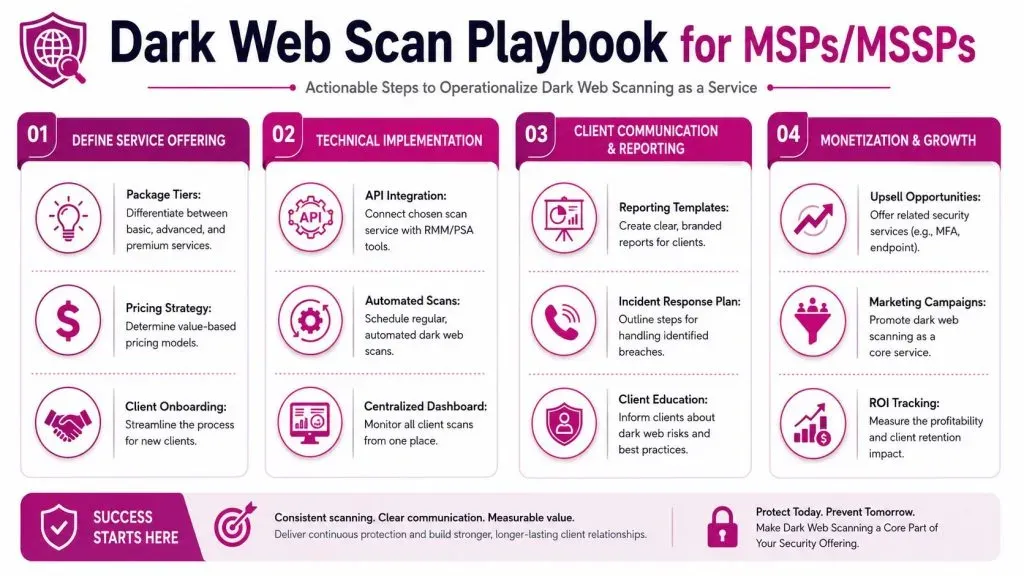
Build the service around response not discovery
If you sell a dark web scan as a standalone report, clients will treat it as a curiosity. If you attach it to a response workflow, it becomes part of managed security.
The service should define three things up front:
- What gets monitored
Domains, executive accounts, high-risk users, client brands, and remote access identifiers. - What triggers action
Exact credentials, privileged identities, financial records, and client-specific thresholds for escalation. - Who owns each step
Your SOC, the client’s IT contact, compliance, legal, and executive stakeholders when needed.
This is also where packaging matters. A basic tier might include monitoring and monthly reporting. A higher tier should include analyst validation, incident workflow execution, and identity hardening support.
A workable workflow for client environments
A practical MSP playbook usually looks like this:
- Validate the finding
Confirm whether the account is active, whether the record is unique, and whether the exposure appears fresh. - Classify the risk
Put the alert into a response bucket. Identity risk, fraud risk, executive targeting, third-party exposure, or informational only. - Contain access
Reset passwords, revoke sessions, check MFA enforcement, disable stale accounts, and review high-risk sign-ins. - Investigate scope
Look for related accounts, repeated passwords, affected SaaS platforms, and signs of downstream misuse. - Communicate in business terms
Tell the client what was found, what was done, and what still needs approval or follow-up. - Document and upsell rationally
If the alert exposed gaps in identity controls, offer the fix. MFA rollout, conditional access, awareness training, endpoint coverage, and external monitoring all fit naturally when tied to a real exposure.
A lot of smaller businesses need that structure from their provider. If you work with regional firms that don’t have internal incident response depth, examples of secure IT services for Edmonton businesses show the broader model clients expect. They don’t want raw intelligence alone. They want someone to translate findings into action.
Service design insight: The client rarely remembers the alert itself. They remember how quickly you explained it and what you did next.
For providers building this into a managed offering, dark web monitoring for managed service providers is the right operational lens. The useful product isn’t the scan. It’s the workflow wrapped around it.
One tool option in this category is InsecureWeb, which supports dark web monitoring and includes API access for MSP and security partner integrations. That matters if you want alerts flowing into an existing PSA, RMM, ticketing process, or client portal instead of forcing analysts to monitor another standalone console.
Choosing the Right Dark Web Scan Service or API
Most buyers ask the wrong first question. They ask how much of the dark web a provider covers. The better question is what kind of findings the provider can deliver reliably, quickly, and in a format your team can act on.
That distinction matters because coverage claims are often inflated. A common misconception is that scans cover the full darknet. In reality, some analyses suggest only 15 to 25% penetration of active criminal venues, and 40% of stolen credentials now circulate in private chat groups that standard scanning algorithms can’t access, according to VC3’s discussion of dark web monitoring limitations. If a vendor promises total visibility, that’s a warning sign.
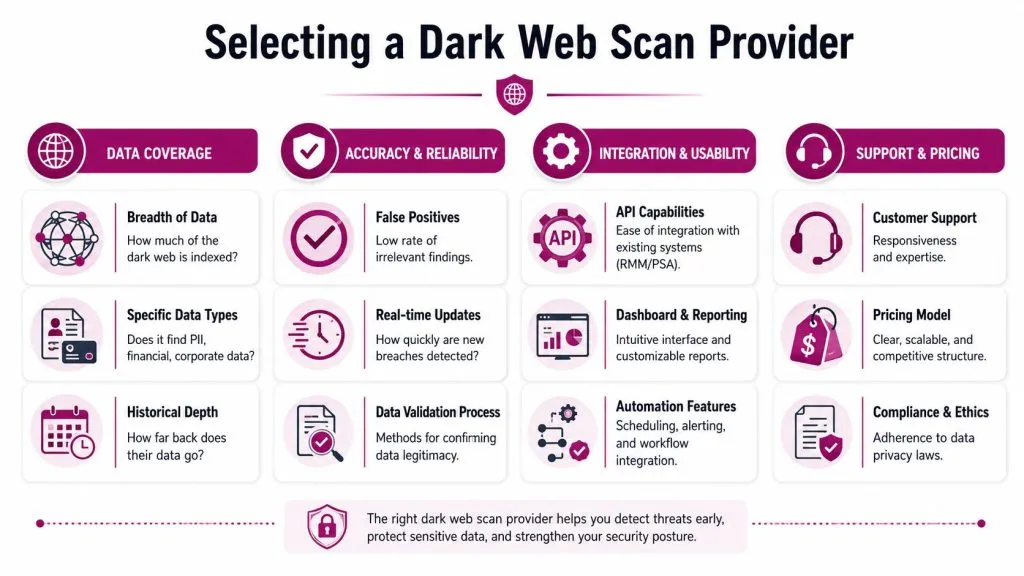
What to ask vendors before you sign
You don’t need a giant checklist. You need a few hard questions.
- What data sources are monitored
Ask whether the service focuses on known dumps and marketplaces only, or whether it includes more restricted communities through analyst-led collection. - How are findings validated
A useful answer includes correlation, duplicate handling, and some method for distinguishing likely current exposure from stale reposts. - What does a high-confidence alert look like
You want examples. Exact credential pairs, privileged account matches, and context-rich records are more useful than brand mentions with no supporting detail. - How does the API work in practice
If you’re an MSP, integration matters as much as detection. Can you route alerts into your ticket queue, reporting pipeline, or customer-facing portal? - What reporting is included
Client-safe summaries, analyst notes, and export options save time. Raw dumps create work.
One time scans versus continuous monitoring
A one-off dark web scan has a place. It works for prospecting, account reviews, and post-incident exposure checks. But one-time scans have a built-in weakness. They’re snapshots.
Continuous monitoring is more useful for retained services because it supports:
- Faster response when fresh records appear
- Trend visibility across the same client population
- Better reporting for renewals and quarterly reviews
- More automation through alerts and integrations
That doesn’t mean every client needs the same package. Some only need periodic checks and remediation support. Others need ongoing monitoring tied to identity controls, incident handling, and executive risk review. The right provider makes both models possible without forcing you into manual workarounds.
Navigating Compliance and Ethical Boundaries
Defensive dark web scanning is a legitimate security activity, but the way you handle the results matters as much as the collection itself.
Handle exposed data like regulated data
If a scan surfaces PII, financial information, customer records, or employee credentials, treat that material with the same care you’d use for sensitive data found inside the client environment. Limit access. Store only what’s necessary for response. Keep audit trails around who reviewed the finding and what action followed.
For compliance-sensitive clients, the key question isn’t whether monitoring the dark web is acceptable. It usually is, when done defensively. The question is whether your internal handling of exposed records aligns with privacy, breach response, and retention obligations.
A few operating rules help:
- Minimize collection: Don’t keep full exposed datasets if a validated summary is enough to act.
- Restrict visibility: Only analysts and client stakeholders with a response role should see the details.
- Document purpose: Make it clear the monitoring exists to identify and reduce harm, not to access or trade illicit material.
Stay on the defensive side of the line
Teams cross into bad practice when curiosity overtakes need. You don’t need to interact with threat actors, buy stolen data, or perform intrusive access to make dark web scanning useful. The value comes from lawful intelligence gathering, validation, and response.
That distinction is worth stating clearly to clients. Done properly, a dark web scan helps an organization identify exposure, reduce misuse, and improve controls. It doesn’t require offensive behavior, and it shouldn’t create extra legal risk when your process is disciplined.
Turning Intelligence into Action
A dark web scan is only valuable when it changes what your team does next. The scan uncovers exposure. The workflow turns that exposure into password resets, identity hardening, user outreach, executive escalation, and stronger client retention.
For MSPs and MSSPs, that’s the opportunity. Don’t sell hidden-web drama. Sell disciplined response. Build triage rules, validation steps, client communication templates, and service tiers around real findings. Connect the alerts to the rest of your stack so they don’t die in another dashboard.
If you’re tightening that broader security process, guidance on avoiding SIEM deployment disasters is worth reviewing because dark web intelligence is most useful when it feeds sane operations, not alert sprawl. And when a client discovery points to broader compromise risk, your team should already have a documented path for steps after a data breach.
InsecureWeb helps MSPs, MSSPs, and security teams monitor external threats across the dark web, open internet, and social media, with API access for integration into existing workflows. If you want to turn dark web scan results into a repeatable client service instead of a one-off report, explore InsecureWeb.