Data Breach News15 min read
What Is Domain Spoofing and How to Stop It
By InsecureWeb Team
This report reflects observations of dark web activity. InsecureWeb makes no representations regarding the accuracy of this data.
You’re in the middle of a normal workday, and a message lands in your inbox that looks routine. The sender name matches a vendor you know, the logo looks right, the tone sounds familiar, and the link seems tied to a service your team uses. That’s the trap. Domain spoofing works because attackers borrow the trust people already have in a domain or sender identity, then use that borrowed trust to steer a click, a login, or a reply.
The phrase sounds technical, but the risk is practical. A spoofed domain can show up in an email header, a lookalike website, a forged sender field, or even a manipulated DNS path that makes an impersonation look credible. The payload may be ordinary phishing, but the spoofed identity is what gives it reach, because people decide whether something is safe before they fully inspect it. That’s why defenders need a wider lens than “fake website,” and why a strong response starts with understanding the trust signal attackers are abusing.
How a Trusted Domain Becomes an Attacker’s Weapon
An employee opens an email that looks like it came from a familiar supplier. The note asks for a quick invoice review or a password reset, and the sender name matches what the employee expects to see. The message may also point to a site that looks close enough to the actual one to pass a rushed glance. That small gap between recognition and scrutiny is where the attack either stalls or succeeds.
Attackers rely on a trusted domain identity because people often judge legitimacy by the name in the inbox, the domain in the browser, or the brand cues on the page. They may forge the email From field, register a lookalike domain, or reuse familiar logos and layout details to make the request feel ordinary. The domain becomes the trust anchor, and the malicious action hides behind that borrowed trust.
The tactic reaches beyond a fake website. It can show up in email headers, in lookalike domains that differ by a letter or a hyphen, and in DNS-related abuse that helps the impersonation hold together. CrowdStrike on domain spoofing describes spoofing as an impersonation problem that can move across email and domain infrastructure, and that wider view matters because defenders need to watch the whole path, not only the landing page.
A spoofed domain usually is not trying to look dangerous. It is trying to look normal long enough for someone to trust it.
That broader view also explains why attackers keep working even after SPF or DKIM checks are in place. Those controls can block some simple forgeries, but they do not make the impersonation disappear. An attacker may switch to a lookalike domain, change the sender path, or move the lure to another channel while keeping the same social engineering goal. The pressure shifts from one weak spot to another, much like a thief trying a different door after finding the first one locked.
A strong example is a vendor invoice email sent from a domain that looks almost right. The message can arrive through a valid mailbox, point to a cloned login page, and still feel believable because the recipient sees familiar branding and timing. If the email route is blocked, the attacker can reuse the same domain idea in a website, a redirected link, or another message that appears to come from the same trusted source. Capgo reliability for apps shows how much confidence people place in familiar names, and spoofing takes advantage of that habit by turning trust itself into the delivery mechanism.
Defining Domain Spoofing as a Trust Attack
A finance manager opens an email that appears to come from a known vendor. The sender name looks right, the branding feels familiar, and the link leads to a login page that resembles the portal. That moment of recognition is the attacker’s goal. Domain spoofing is the impersonation of a trusted domain identity so a target believes the message, site, or sender is legitimate when it isn’t.
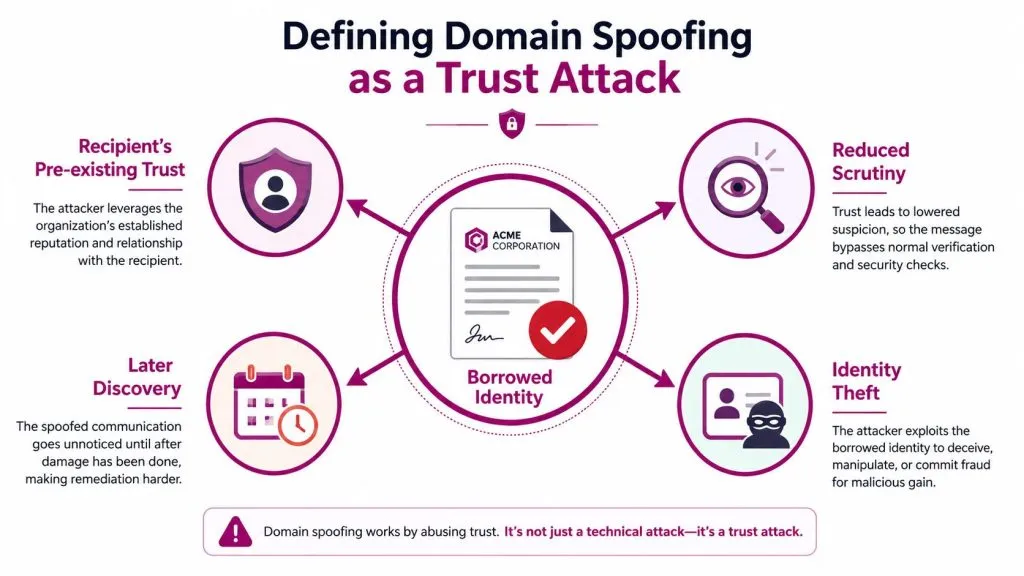
A forged letterhead works because it borrows authority before anyone checks the details. Domain spoofing follows the same pattern. The attacker uses a domain, sender identity, or site that resembles a trusted organization closely enough to reduce suspicion, then relies on that borrowed trust to get the target to click, reply, sign in, or hand over information.
Why the trust anchor matters
The first thing people often check is the content. Spoofing exploits that habit by putting identity in front of substance. If the sender name, browser address, or certificate-style visual cue looks credible, the target is more likely to keep reading, clicking, or entering credentials.
That is why domain spoofing can work even when the message content is clumsy. Users are rarely reading DNS records or email headers line by line. They are scanning for a familiar brand mark, a plausible domain name, or a sender they have seen before. SpiderAF’s prevention guide notes that SMTP lacks built-in sender authentication, so defenses like SPF, DKIM, and DMARC have to carry the burden of validation on the receiving side SpiderAF on domain spoofing prevention.
How the attack shows up across channels
Domain spoofing is broader than a fake website. It can start in an email header, move through a lookalike domain, and then reach down into DNS or redirect paths that make the impersonation harder to spot. A message may appear to come from a real mailbox, yet the link can point to a cloned login page controlled by the attacker. If email authentication blocks one route, the attacker may shift to a similar domain, a different sender path, or another channel while keeping the same social engineering objective.
A simple analogy helps here. A forged invoice is dangerous because finance teams trust the label before they inspect the payment details. Domain spoofing works the same way. The attacker borrows the header, the domain, or the identity, then counts on the recipient to react to familiarity rather than verify origin. That is why visual similarity checks, domain monitoring, and authenticated mail policy matter together. One control rarely catches every angle.
If you want a practical reference for how trust and reliability are presented in product environments, Capgo reliability for apps offers a useful parallel. The point is not that app trust and domain spoofing are the same problem. It is that trust has to be visible, verified, and checked over time, or the wrong party can borrow it.
The clearest definition to keep in mind is this, domain spoofing is a trust attack that uses borrowed identity to change how a user behaves. Once you see it that way, the question shifts from “Is this a fake site?” to “Which identity signal is being forged?”
The Four Main Types of Domain Spoofing
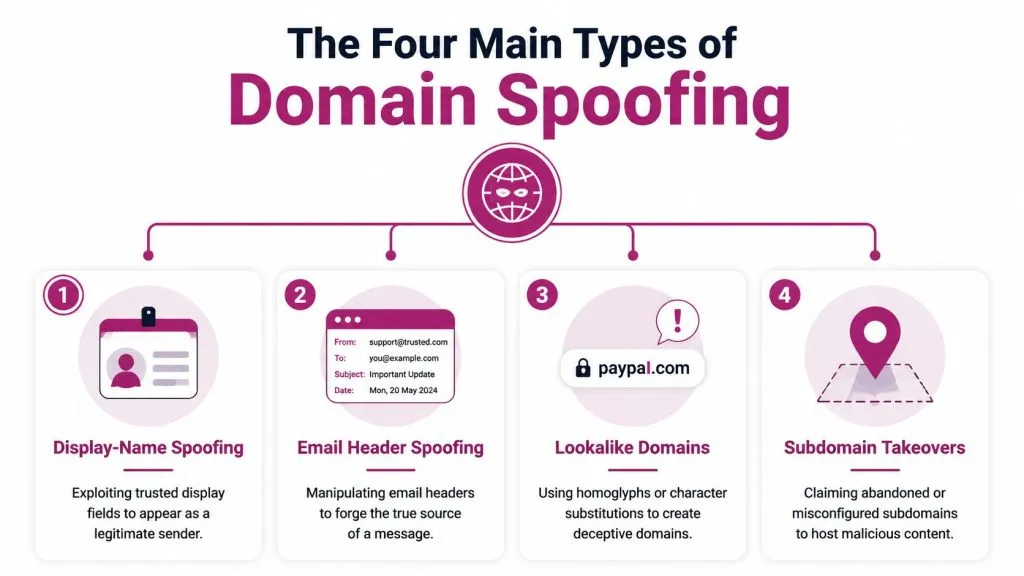
A defender usually sees domain spoofing as one problem, then discovers it arrives through several different surfaces. An attacker can fake the visible sender name, imitate the domain itself, abuse abandoned DNS paths, or ride on broken authentication controls. Each method targets trust in a slightly different place, like a lock picker choosing the easiest latch rather than breaking the door.
Display-name and email header spoofing
This form abuses what the recipient sees first. An attacker can make the sender name look like a CEO, a vendor, or an internal help desk contact, then pair that display name with a forged or misleading header. The mailbox may not belong to the person shown on screen, but the familiar name is enough to trigger a quick reply or a rushed click.
A common case is an email that appears to come from a supplier’s billing team even though the actual sending account is unrelated. Most users do not inspect message headers line by line. They read the name, trust the role attached to it, and move on.
Lookalike and typosquatting domains
These domains copy the shape of a real brand address while changing just enough characters to slip past a quick glance. Attackers may use homoglyphs, one-character substitutions, or similar naming patterns that look close to the original at a glance. The trust signal being faked here is the domain name itself.
A lookalike domain might replace one letter, swap in a similar-looking character, or add a small variation that feels harmless to a busy reader. The target is usually a hurried employee, customer, or partner who recognizes the brand and does not stop to verify the spelling carefully. That tiny difference is the gap the attacker depends on.
Subdomain takeovers
A subdomain takeover happens when an organization leaves a DNS-related path behind and an attacker claims the abandoned space. Forgotten records can still look official, so a stale service hostname may continue to carry trust even after the company no longer controls what sits behind it. The fake feels legitimate because it sits inside the organization’s own domain footprint.
A practical example is an old service hostname that still looks official but no longer points to something the company controls. Attackers exploit that leftover trust to host content or redirect users.
DNS, SPF, DKIM, and DMARC abuse or misconfiguration
This category weakens the gates that are supposed to prove identity. If authentication records are missing, incomplete, or misaligned, spoofed mail and domain abuse have more room to move. Hornetsecurity explains that SPF and DKIM help prevent unauthorized use of domain names, and spoofing often shifts to other impersonation paths when those controls are in place Hornetsecurity on domain spoofing.
The victim can be a mailbox user, a security team, or a downstream partner who assumes authentication tells the whole story. It usually does not. A message can pass one check and still carry a deceptive display name, a lookalike domain, or a redirected path that changes the attack surface without changing the social goal.
The practical distinction is this, display-name spoofing fakes who sent it, lookalike domains fake where it came from, and subdomain abuse fakes what the organization still controls.
A Realistic Domain Spoofing Attack Flow
A realistic campaign rarely relies on one trick. It usually stitches together reconnaissance, infrastructure, and impersonation so the target never gets a clean chance to separate the pieces. The attack behaves like a relay race, each handoff making the next step easier to believe.
From public clues to a believable lure
The attacker starts by gathering names from LinkedIn, press pages, or staff directories. They look for a vendor relationship or internal workflow that already exists, then register a lookalike domain that feels close to the original. The goal is not just to own a domain, it is to create a believable place to send the victim.
Next, the attacker builds the message. The email may use a familiar display name, a cloned signature block, and a link to a login page that copies the brand’s layout. That page does not need to be perfect. It only needs to be close enough that a rushed employee enters a username and password without pausing.
The YouTube walkthrough below shows how a domain spoofing campaign can unfold as a chain, not a single event.

What happens after the first click
Once credentials are captured, the attacker may try to replay them against a legitimate login portal or a spoofed single sign-on page. If multifactor approval is required, they often pivot again, using another impersonation message to create urgency or prompt a second action. The campaign keeps moving because each stage is designed to preserve the appearance of legitimacy.
The final step is usually monetization. That might mean mailbox access, invoice fraud, data theft, or use of the compromised account to send more spoofed mail. By then, the original domain has already done its job. It got the target to trust the wrong identity.
Reading the flow as a dependency chain
Reconnaissance comes first. The attacker learns who talks to whom, which vendors are trusted, and which names are likely to lower suspicion. From there, the campaign needs infrastructure, such as a lookalike domain or an abused subdomain, to give the lure a place to live. Crafting follows, with the email or page borrowing the right brand cues so the bait feels familiar. Delivery then pushes the message into the target inbox or browser, and compromise happens when credentials or access tokens move into the attacker’s hands.
That sequence matters because each stage supports the next one. A spoofed domain works best when the message, sender name, and destination all tell the same lie. If the email headers look acceptable, the domain name looks close, and the login page looks familiar, the attacker does not need perfect imitation. They only need enough consistency to keep the victim from stopping to inspect the details.
The line between email spoofing and domain spoofing also blurs here. A defender may first notice a message with a convincing display name, then discover the link leads to a domain that copies a real service, and finally trace the traffic to DNS abuse or a misused host that still appears connected to the organization. That mix is what makes the attack flow hard to spot in practice, because the deception is spread across the header, the domain, and the destination instead of living in one obvious fake site.
A useful reference point is the internal breach example in InsecureWeb’s coverage of a domain and email incident. Domain trust can be affected by more than a crude phishing page. The operational risk is usually spread across account security, registrar access, and identity management, not one isolated control.
Why Email Authentication Alone Does Not Stop It
SPF, DKIM, and DMARC matter. They reduce one major way attackers can abuse a domain, and they improve the signal your mail gateway can use. But they don’t make spoofing disappear.
Why the controls help, and where they stop
Email authentication is strongest when the attacker is trying to send mail as if they were the legitimate domain. Once those controls are enforced, exact-domain forgery becomes harder, which is why attackers adapt. The earlier section on threat types shows the pivot clearly, the campaign shifts toward lookalike domains, display-name deception, or abuse of infrastructure that still seems legitimate.
That is why authentication-only thinking creates a blind spot. If the attacker can’t imitate the envelope, they imitate the return address, the brand name, or the login destination. A stronger lock on the front door doesn’t stop someone from trying the window, and in domain spoofing the windows are often other trusted identity signals.
The internal breach example at InsecureWeb’s domain and email incident coverage is a useful reminder that domain trust can be affected by more than obvious phishing. The operational risk is usually spread across account security, registrar access, and identity management, not one isolated control.
What defenders often miss
A team can have good authentication settings and still miss compromise paths like a lookalike login portal, a cloned subdomain, or a trusted vendor account that’s been hijacked. The attacker doesn’t need to defeat every control. They only need one path that feels credible enough to a human or to an overworked inbox filter.
Authentication is a gate, not a complete map of trust.
That’s why mature defenses combine mail policy with domain monitoring, brand impersonation detection, and DNS hygiene. One layer reduces one class of abuse. The wider program deals with the fact that attackers will shift to another trust signal when the first one closes.
Detection and Monitoring That Actually Catches Spoofing
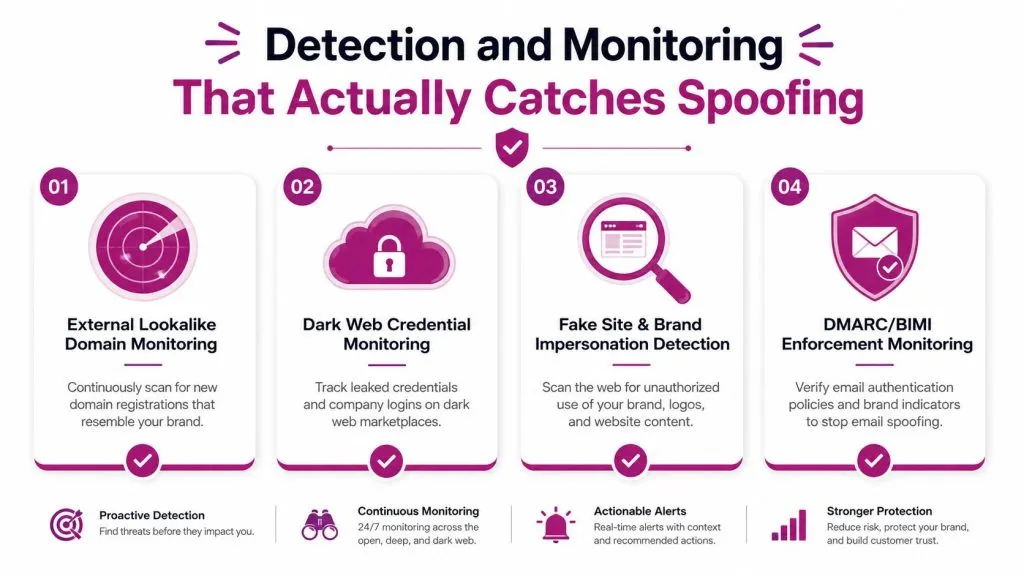
External watchtowers
The first watchtower is external lookalike domain monitoring. Security teams should scan for newly registered domains that resemble the brand, product names, or executive names that attackers tend to reuse. The signal here is close visual or structural similarity, not just exact matches. Ownership often belongs with brand protection, security operations, or a shared fraud team.
For teams that want a reference point on reputation and sender hygiene around Gmail delivery behavior, Icypeas’ B2B sender reputation protection tips are a useful companion read. The value is in understanding how email reputation and delivery signals can affect whether impersonation traffic gets noticed or filtered.
The second watchtower is dark web credential monitoring. If stolen credentials connected to a corporate domain show up in criminal channels, that’s a strong clue that spoofing or phishing activity may already be working. InsecureWeb’s dark web scan resource fits naturally here as a way to track exposure connected to corporate identities.
Web and DNS signals
The third watchtower is fake site and brand impersonation detection. Security teams look for unauthorized pages, cloned logos, copied login flows, and brand misuse across the open web. The signal is not just “does it exist,” but “does it pretend to be us, a vendor, or a service that our users already trust?”
The fourth watchtower is DNS and record-change monitoring. Abused or stale records can create trust gaps, especially around subdomains and old services. Teams should treat unexpected DNS changes as a live security event, because attackers often rely on quiet infrastructure changes rather than dramatic ones.
A practical operating model looks like this:
- Daily: Review urgent lookalike registrations and active impersonation reports.
- Near-real-time: Alert on DNS or record changes tied to owned domains.
- Weekly: Correlate leaked credentials with brand-related domains and sender patterns.
- Monthly: Audit which business units own takedown decisions and response steps.
A program like this works because it treats spoofing as an ongoing pattern, not a one-time scan. The attacker’s domain may be temporary, but your monitoring has to be persistent.
A Practical Response and Mitigation Playbook
When spoofing is confirmed, speed matters more than polish. The first job is to stop the current abuse from spreading, then make the attacker’s next step harder.
Immediate containment
Security teams should block known malicious senders, submit takedown requests, and revoke exposed sessions or passwords if a login page captured credentials. If the fake site is active, sinkholing or related blocking actions can keep more users from reaching it while legal or registrar channels work in parallel. Fraud, SOC, and identity teams should share the same incident record so they don’t duplicate effort.
Mid-term hardening
The next step is to tighten the controls that made the spoofing possible. DMARC should move toward quarantine or reject where the organization can support it, DKIM keys should be rotated when needed, and domain portfolios should include defensive registrations for likely lookalikes. Awareness training still matters, but it works best when it’s tied to the exact lures your teams are seeing, not generic reminders.
Long-term controls
Longer-term, the goal is to make spoofing more expensive and less useful. Vendor authentication requirements, MTA-STS, TLS-RPT, registrar lock practices, and a formal brand protection program all help close the gaps that phishing campaigns exploit. If your team needs a broader view of where spoofing fits in the attack surface, attack surface analysis is a useful lens for connecting domain risk to the rest of your external exposure.
A practical sequence looks like this:
- First hours: Contain, revoke, block, and preserve evidence.
- First week: Enforce mail policy, inspect domain exposure, and register obvious lookalikes.
- First month: Formalize ownership, monitoring, and vendor requirements.
- Ongoing: Rehearse response and keep a live inventory of domains, subdomains, and trust paths.
The right response isn’t just takedown work. It’s reducing the number of ways an attacker can borrow your identity in the first place.
Building a Complete Defense With the Right Capabilities
Domain spoofing sits at the intersection of email, DNS, and brand abuse, so one control rarely covers it all. A complete program combines dark web monitoring, fake site and account detection, threat intelligence, and vulnerability scanning so each vector from earlier gets a matching control. InsecureWeb offers those external monitoring and testing capabilities, and it also supports MSPs and security firms that want to deliver them under their own brand. For teams that also care about user-facing trust signals, encrypted email read receipts can be part of the broader conversation about message visibility and email handling.
If domain spoofing is on your risk list, InsecureWeb can help you watch for impostor domains, stolen credentials, and fake brand activity before the damage spreads. Visit InsecureWeb to see how its external monitoring and scanning tools fit into a practical defense program for spoofing and other internet-facing threats.