Data Breach News12 min read
How to Spot Fake Websites a Practical Playbook
By InsecureWeb Team
This report reflects observations of dark web activity. InsecureWeb makes no representations regarding the accuracy of this data.
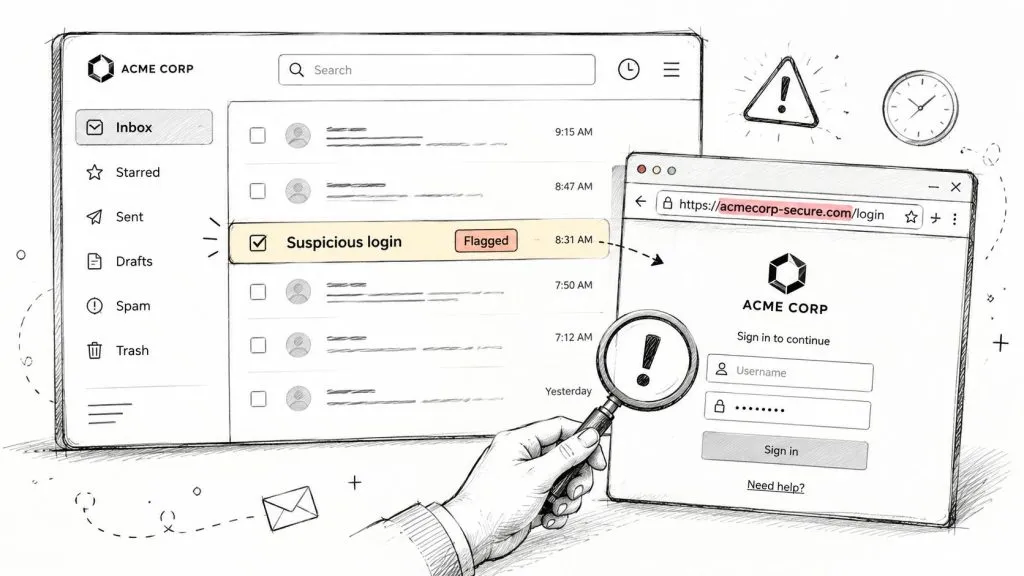
A suspicious login page lands in your inbox, and the first reaction is usually the same, a quick glance at the logo, the URL, and the padlock. That instinct is useful, but it’s not enough anymore. Scam operators know the old visual tells, and they’re building sites that look clean, polished, and urgent enough to push a user into handing over credentials before anyone on your team can take a second look.
This playbook follows the path I’d use in a real triage, starting with infrastructure, then checking the page code and assets, then the automated signals that catch scale, and finally the workflow that turns a one-off suspicion into a repeatable service. If you’re already handling forwarded phishing links, brand abuse alerts, or a client who swears a portal “looked legitimate,” this gives you a way to score the risk instead of arguing over gut feel. For a broader adjunct on visual inspection, the practical steps in practical steps to detect deepfakes are a useful companion when the attack blends fake pages with manipulated media.
A Phishing Portal Just Landed in Your Client’s Inbox
A client forwards a login page that “looks exactly like Microsoft 365,” or your brand monitoring tool pings a domain that is one letter off the customer’s real name. You open the page, and at first glance it is clean. The logo is crisp, the form renders correctly, and the lock icon sits where users expect it.
That is the trap. Modern phishing pages do not need sloppy design to work, they need speed and enough credibility to get one user to submit a password or payment detail before anyone checks the evidence. CISA tells defenders to treat suspicious email and portal activity as a triage problem, then confirm the destination, the domain, and the surrounding indicators before anyone interacts with it. CISA phishing guidance
A useful triage path starts with one question, not ten. Is this page backed by infrastructure that looks like a genuine business, or does it look like something spun up fast to capture credentials and vanish? The answer usually comes from a combination of domain age, certificate timing, page-code similarity, and reputation, not from any single cosmetic clue.
Practical rule: treat a brand-new domain asking for credentials as high-risk until multiple independent signals line up in its favor.
If you are triaging for an MSP or MSSP, that mindset matters because the client usually does not care whether the site had decent fonts. They care whether someone authenticated into the wrong page, entered card data, or exposed an employee mailbox. The rest of the evidence has to support a decision fast, cleanly, and in language a client can understand. For teams that also handle lookalike brands and synthetic media, the same discipline helps with practical steps to detect deepfakes.
Why the Old Red-Flag Checklist No Longer Works
The classic checklist still has value, but only as a starting point. Typos, awkward grammar, missing contact details, and vague policies still show up on scam sites, yet those cues are cheap to copy and easy to polish away. A scam operator can buy a clean template, steal a logo, and produce a page that passes a visual sniff test long enough to fool a distracted user.
That’s why the old “spot the misspelling” advice fails so often in triage. Consumer guidance still tells people to check lookalike domains, padlocks, and contact pages, but it rarely explains how to weigh those signals when the page looks professional. The BBB’s guidance highlights that modern scam pages can imitate trusted design closely enough that visual inspection alone isn’t reliable, which matches what analysts see in the field. BBB advice on identifying fake websites
The shift from sight to evidence
A better model is to score evidence quality, not just count red flags. A suspicious spelling mistake is a weak signal. A recently registered domain, mismatched certificate details, and page code that doesn’t match the legitimate brand’s known assets are stronger. Once you start ranking evidence that way, the conversation changes from “it looks fake” to “here’s why I’d treat it as fraudulent.”
Polished design is no longer exculpatory. A clean page can still be a credential trap if the infrastructure, certificate, and asset fingerprints don’t line up.
For practitioners, that means your workflow should highlight signals attackers can’t change instantly. Age, hosting history, certificate issuance, redirect behavior, and source-code similarity are harder to fake consistently than grammar or a logo placement. The rest of this playbook leans on that reality, because the human eye is still useful, but it’s no longer the deciding factor.
Reading the Infrastructure Behind the Domain
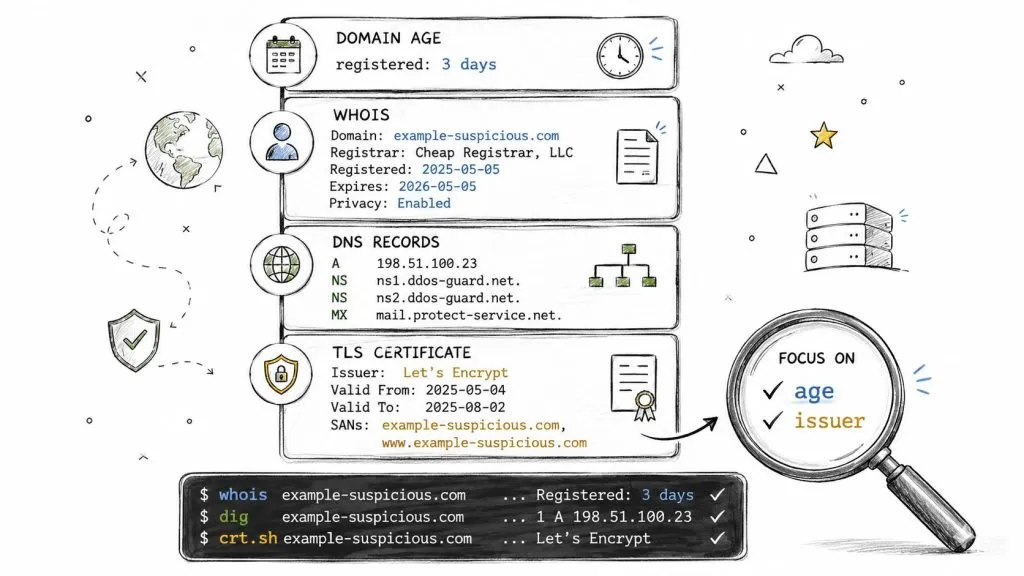
Start with the domain itself, because that is where the first weak signals usually show up. Run whois on the suspicious name and check the registration date, registrar, and ownership pattern. If the name was created recently and is already asking for a login, a payment, or employee data, the risk goes up fast. Recent registration is one of the clearest signs that a site may be disposable, so analysts should also compare the domain against Whois records and the Wayback Machine when they need to understand whether the brand has any real history.
Use dig to see whether the domain is stable or constantly shifting infrastructure. Frequent changes in hosting or name resolution do not prove fraud on their own, but they matter when the page is supposed to represent a mature business. I care less about the exact host than about consistency. A real brand usually leaves a footprint that matches its public presence, while a scam site often looks rushed, moved, and repointed to whatever infrastructure was easiest to grab.
Certificates tell you more than the padlock
The padlock only tells you the connection is encrypted. It does not tell you the site is legitimate. DigiCert’s guidance is clear on this point, TLS confirms encryption, not trust, so you still need to check the certificate subject, SAN match, issuer, and issuance timing. How to identify fake websites with TLS and certificate checks
A quick workflow looks like this:
- Inspect the URL and run
whoison the domain. - Check whether the registration age fits the business it claims to be.
- Review the certificate details in the browser or with a certificate viewer.
- Open SSL Labs to see whether the certificate and configuration behave like a normal production site.
- Compare the certificate name and issuance timing against the brand’s expected footprint.
If the certificate was issued recently, the domain was just registered, and the page is asking for credentials, treat that as a joined-up signal. The individual pieces are weak on their own. Together, they point to a site that may have been built for a short-lived credential grab.
For a broader way to think about hostile exposure, an attack surface analysis helps frame the question correctly. You are not just checking one URL. You are checking whether the online presence makes sense as a whole, including the domain, the DNS behavior, the certificate trail, and the timing of each piece.
Operational takeaway: a recently registered domain is not proof of fraud by itself, but a newly minted domain collecting credentials deserves immediate scrutiny.
Comparing the Page Itself to Known Legitimate Assets
Once the infrastructure looks suspicious, inspect the page itself. Open the source, grab the HTML, and compare what you see against the legitimate brand’s normal login flow, asset paths, and redirect behavior. Scam operators can copy visible content quickly, but they’re often sloppier underneath the surface, where form actions, script references, and favicon assets reveal what the page is really doing.
A practical method is to view-source the page, save the HTML, and then compare it with what the genuine site serves. If the phishing page pulls scripts from odd paths, posts credentials to a domain that doesn’t belong to the brand, or uses a favicon that doesn’t match the legitimate property, you’re looking at stronger evidence than a mismatched footer link. In triage, I trust the code path more than the styling.
What to compare first
Focus on four things before you get lost in the noise:
- Favicon hash, because brand impersonators often reuse visible logos but forget to replicate the exact asset chain.
- Redirect sequence, because a fake portal may bounce through multiple hosts or tracker-style URLs.
- Form action destination, because the page can look right while sending credentials somewhere else.
- Script and CSS references, because copied visuals with mismatched asset hosts often expose the scam.
The research on phishing detection by Abbasi and colleagues is useful here because it highlights that HTML and URL features strengthen classification beyond URL-only checks. That matters in practice, because a slick-looking page can still carry source-code fingerprints that differ from the legitimate brand’s assets. Feature-based phishing detection using URL and HTML features
A view-source check can feel tedious until it catches the thing the browser hides. I’ve seen polished portals collapse the moment the favicon hash didn’t match the brand’s real login page and the form-action URL pointed to an unrelated host. The page looked ready for production, but the code made it clear no genuine service owned it.
Don’t let design language sway the verdict. A convincing face on top of mismatched code is still a fake site.
Choosing the Right Detection and Monitoring Tools
Manual review is valuable, but it can’t keep pace with the volume of malicious URLs in circulation. The U.S. Army Cyber Command notes that Google Transparency Report checks billions of URLs daily for unsafe sites, which is a clear sign that automated reputation systems are table stakes, not a luxury. MIS Quarterly research on fake-website detection
For an MSP or MSSP stack, I’d group tools into four buckets. First, reputation feeds like Google Safe Browsing catch known-bad destinations quickly. Second, certificate transparency monitoring surfaces new certificate issuances that can expose typosquatting and new impersonation domains early. Third, URL heuristic engines score suspicious structure, redirects, and other signs a human might miss. Fourth, brand-monitoring platforms watch for domains, pages, and social profiles that borrow a client’s name or marks.
What matters when you choose
Don’t choose by marketing labels. Choose by operational fit.
- API access: If the tool can’t feed your PSA, SIEM, or ticketing stack cleanly, it becomes an island.
- White-labeling: MSPs need reports clients can read without seeing three different vendor names.
- Integration cost: A cheap detector that takes hours to operationalize is not really cheap.
- Alert latency: If a lookalike domain sits for too long before you see it, the service value drops fast.
Open-source tools are useful when you need flexibility and already have staff who can tune them. Commercial tools can save time when you need speed, customer reporting, and cleaner integration. The right answer depends on your service model, but the shortlist should always be judged by how fast a suspicious domain moves from alert to analyst to customer action.
For MSPs building external-surface monitoring into a broader service line, dark web scan is a useful companion concept, because the same operational discipline applies when the evidence lives outside the client perimeter.
Building a Repeatable Triage Workflow for MSPs and MSSPs
A good triage workflow should produce the same answer whether the alert came from a client email, a certificate transparency hit, or a brand-monitoring platform. The first step is intake, where you capture the URL, the sender, the timestamp, and any screenshots or forwarding headers the client included. The second step is scoring, and the score should be based on the evidence you can defend later, not on how convincing the page felt in the moment.
Here’s the rubric I’d use as a starting point.
| Signal | What to look for | Weight in practice |
|---|---|---|
| Infrastructure age | very recent registration, fresh certificate issuance, inconsistent ownership | High |
| Code and asset similarity | mismatched favicon, odd form actions, inconsistent script hosts | High |
| Reputation hits | Safe Browsing or similar feeds flagging the URL or domain | High |
| TLS anomalies | certificate name mismatch, issuer oddities, timing that doesn’t fit | Medium to High |
A useful habit is to make the verdict explicit. Low risk means monitor and close. Medium risk means escalate for deeper validation and client awareness. High risk means proceed with abuse reporting, takedown request, and user exposure review. That removes the “looks fake to me” argument and replaces it with a defendable decision path.
From ticket to client communication
The fastest teams assign one analyst to evidence collection and another to response coordination. One person checks the domain, certificate, redirect path, and page assets. The other prepares the client-facing note, including why the site was flagged, what evidence was captured, and what end users should do if they interacted with it.
A triage process only works if the analyst can finish the evidence trail before the page disappears.
That’s why a single suspicious domain should move from ticket to abuse contact to client summary quickly. The practical value for an MSP is consistency, because a repeatable workflow turns phishing monitoring into a service with documentation, not a pile of screenshots. For managed-service teams building this into an offer, dark web monitoring for managed service providers fits the same operational mindset, even when the threat source is different.
From Detection to Continuous Protection
A fake site that has been confirmed should move straight into abuse reporting, takedown requests through the registrar or hosting provider, and brand-monitoring checks that keep watching for the next copycat. The work does not stop because the first page is gone. The follow-on problem is usually a new domain, a new certificate, and the same lure with a different address. U.S. Army Cyber Command guidance on fraudulent websites
For MSPs, the service only becomes useful when it continues after the initial alert. A domain blocked today may be replaced tomorrow by a lookalike with fresh registration data and a new certificate chain. The client experiences the same fraud under a new URL, so the monitoring has to follow the pattern, not just the original string.
That is the trade-off. One-off detection is easy to explain, but it does not protect a client who is likely to be targeted again. Continuous protection means keeping watch on domain age, WHOIS changes, certificate activity, page-code reuse, and reputation signals until the campaign fades or the actor shifts tactics.
The five signals to score every time
- Domain age
- WHOIS consistency
- Certificate details
- Page-code similarity
- Reputation hits
The two automation hooks to set up this quarter
- Alerting into your PSA or ticketing system
- Certificate and lookalike monitoring tied to client brands
The reporting artifact that earns budget
A client-ready incident summary that shows the suspicious URL, the evidence trail, the response taken, and the business risk in plain language.
That report helps a CFO see why the service exists. It ties technical evidence to fraud prevention, reputational damage, and lower user exposure. The goal is not to prove you found one bad page. It is to show that the client now has a standing process for catching the next one before it turns into a bigger incident.
If your team needs a tighter way to detect fake sites, monitor lookalike domains, and turn suspicious findings into client-ready reports, InsecureWeb gives MSPs and security teams the workflow to do it without rebuilding the stack from scratch.