Data Breach News12 min read
What Is a Fake Brand Website and How
By InsecureWeb Team
This report reflects observations of dark web activity. InsecureWeb makes no representations regarding the accuracy of this data.
A brand can face 39.4 look-alike domains per month, then 73.75 per month in the following two months, according to an independent 2023 domain-impersonation study. That acceleration changes the problem completely. A fake brand website isn’t always a one-off page built by an individual scammer. It can be one component in an automated fraud operation that registers domains, clones pages, distributes scam ads, and changes infrastructure as defenders respond.
For business owners, MSPs, and security teams, occasional manual searches aren’t enough. Detection needs to combine domain intelligence, visual similarity, infrastructure telemetry, human review, and a response process that can move from confirmation to takedown without losing evidence.
The Scale of Brand Impersonation Online
A fake brand website is an unauthorized website designed to imitate a legitimate company, product, service, or executive. It might copy a login page, reproduce an online store, imitate a support portal, or use a familiar logo to persuade visitors to disclose credentials, payment details, or personal information.
The important operational detail is the speed of expansion. The Fortra study found that the average brand was targeted by 39.4 look-alike domains per month during the first half of 2023, rising to 73.75 per month from May to June. The report’s figures describe a campaign environment that can change rapidly over a short period, not a threat that appears once and remains static.
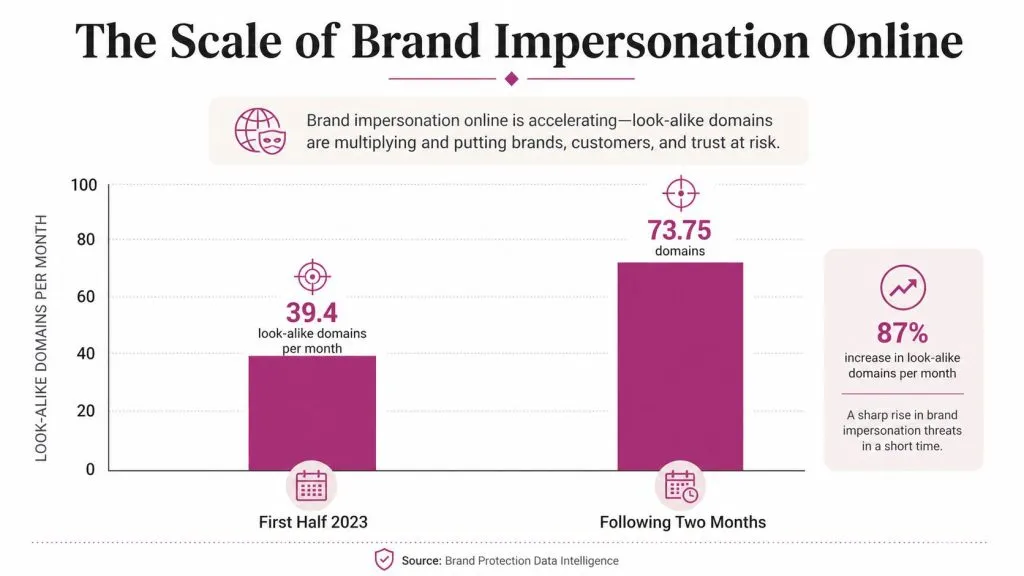
The same research found that 77% of classified look-alike domains hosted phishing sites. That matters because defenders shouldn’t treat every suspicious registration as a harmless parked domain. Many are active infrastructure built to collect credentials, payment information, or other data.
Why manual checks fail
A business might search Google for its brand name, inspect a few suspicious domains, and assume the exposure is understood. That process misses domains that haven’t reached search results, pages promoted only through social media or advertisements, and sites that activate briefly before changing behavior.
The broader phishing scene shows the same pattern. A global analysis covering 2024 to 2025 recorded 1,124,679 unique phishing domain names in one year, compared with 1,117,670 in the prior year. Maliciously registered phishing domains rose from 725,520 to 878,111, a 21% increase, according to the Phishing Landscape 2024 report.
Practical rule: Treat brand impersonation as an external attack surface. If your team checks only when someone reports a suspicious page, the attackers control the timeline.
The business impact extends beyond direct fraud. Customers may blame the legitimate brand after losing money, employees may submit corporate credentials to a cloned portal, and support teams may spend time handling confusion that started outside the company’s systems. Detection therefore has to be continuous, prioritized, and connected to response.
Types of Fake Brand Websites and How They Work
Fake brand websites now operate as repeatable infrastructure, not isolated hand-built pages. Attackers combine several impersonation methods, then reuse templates across domains and campaigns. Investigators should identify the technique first, because each method produces different detection signals and response priorities.
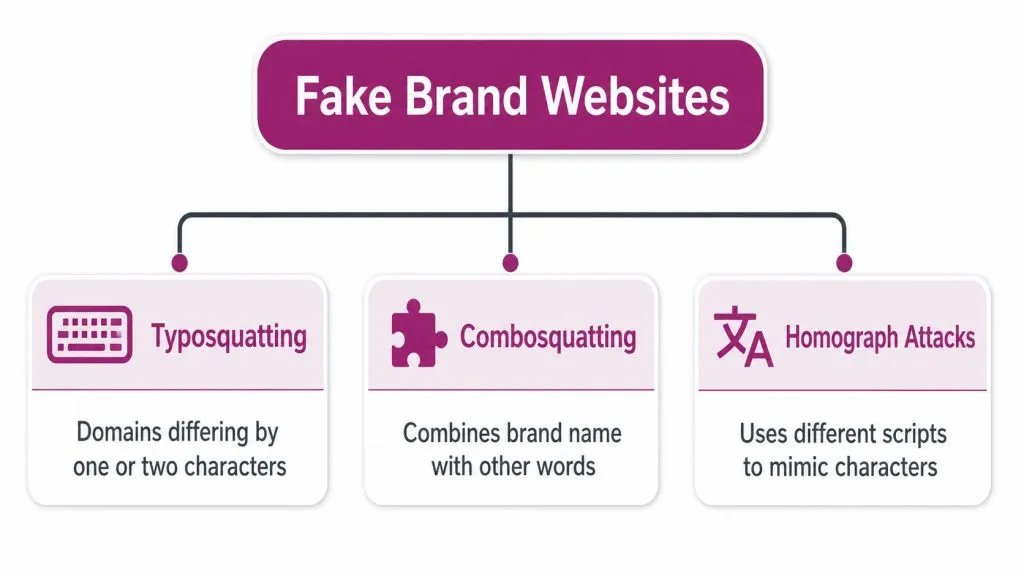
Typosquatting
Typosquatting changes a legitimate address through a missing character, transposed letters, an added character, or another common typing error. It targets users who enter addresses manually, follow an incorrect copied link, or overlook the domain.
Lexical comparison can identify many of these domains quickly. It will miss deliberate variations, however, especially if monitoring covers only a fixed list of common misspellings.
Combosquatting
Combosquatting joins a brand name with terms such as “secure,” “support,” “billing,” “account,” or “offers.” The address can appear credible in an email or social post even when the company has no connection to it.
The added term often reveals the campaign’s purpose. A “brand-support” domain may collect credentials, while “brand-deals” may imitate a storefront. Detection must examine the surrounding words, the page’s function, and whether the company authorized the domain.
Homograph attacks
Homograph attacks use characters from different writing systems that resemble familiar Latin characters. A visitor may see an apparently correct address while the underlying domain represents something else.
Detection requires internationalized domain name analysis, normalization, and controlled rendering. Browser display rules can change the risk, so visual inspection alone cannot establish legitimacy.
Cloned storefronts and login portals
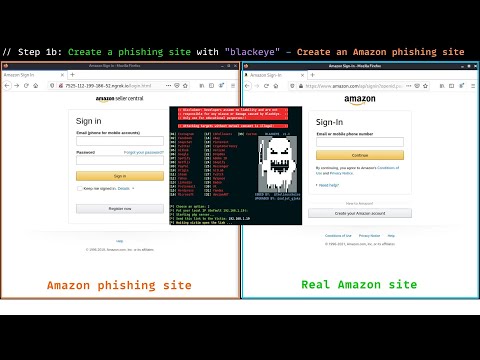
A clone site copies a legitimate brand’s layout, typography, images, forms, and interaction flow. More capable campaigns reproduce product pages, carts, shipping fields, and payment screens, giving visitors a complete customer journey instead of a single obvious lure.
AI-assisted builders and reusable kits let attackers apply the same clone to many brands with limited manual work. That shifts detection from occasional visual checks to automated comparison and coordinated takedown.
Response depends on the technique. Typosquatting may surface through domain similarity, while a cloned page can require favicon comparison, asset matching, screenshot analysis, and form-behavior review. Reporting on deceptive domain variations identified more than 28,000 deceptive domain variations linked to 20 major websites, showing how attackers use many small mutations instead of relying only on exact-domain copies, as described by Security Brief’s reporting on deceptive domain variations.
Technical Detection Methods and Limitations
The green padlock doesn’t prove that a website is legitimate. One analysis found that 48.4% of phishing domains used Let’s Encrypt certificates, and the Zscaler analysis of phishing, typosquatting, and brand impersonation explains how HTTPS can create an appearance of legitimacy while reducing browser warning friction.
Certificate presence is therefore a weak signal. It can tell you that encrypted transport is available, but it can’t establish who operates the site or whether the page is authorized by the brand.
Build a multi-signal pipeline
A practical detection workflow should combine independent indicators:
- Domain age and registration timing: A newly registered domain that closely resembles a brand deserves faster review, especially when it appears with other related registrations.
- Lexical similarity: Compare substitutions, omissions, added terms, punctuation, and internationalized characters against approved brand names and domains.
- Page and asset similarity: Hash favicons, compare logos, inspect repeated image assets, and use screenshots to identify cloned layouts.
- Infrastructure relationships: Look for shared hosting patterns, registrar behavior, certificate details, nameservers, and other infrastructure links across suspicious domains.
- Reputation telemetry: Enrich findings with malware, phishing, hosting, and abuse intelligence before assigning a severity.
- Behavioral evidence: Record redirects, login forms, payment requests, downloads, and changes in page behavior over time.
No single indicator should make the final decision. A legitimate reseller may use a similar phrase, and a newly registered corporate domain may be benign. A suspicious domain that combines brand similarity, copied assets, a credential form, and related infrastructure is a different class of event.
Add human validation
Automated systems are good at finding candidates and grouping related infrastructure. They’re less reliable at understanding whether a page is an authorized campaign, reseller, affiliate, or fraudulent clone without context from the brand owner.
Use a review queue that preserves screenshots, timestamps, URLs, redirects, page titles, certificates, and captured branding. Analysts should verify the user journey in a controlled environment and avoid submitting real credentials or payment details.
For teams that need broader external visibility, dark web scanning for exposed data can complement website monitoring. It won’t replace domain analysis, but it may help connect a fake portal to exposed credentials or other indicators already circulating outside the public web.
Human Investigation and Operational Signals
A suspicious domain rarely tells the whole story by itself. The useful question isn’t only whether the address resembles the brand. It’s what the visitor is asked to do, how the site was promoted, and whether other domains or accounts support the same campaign.
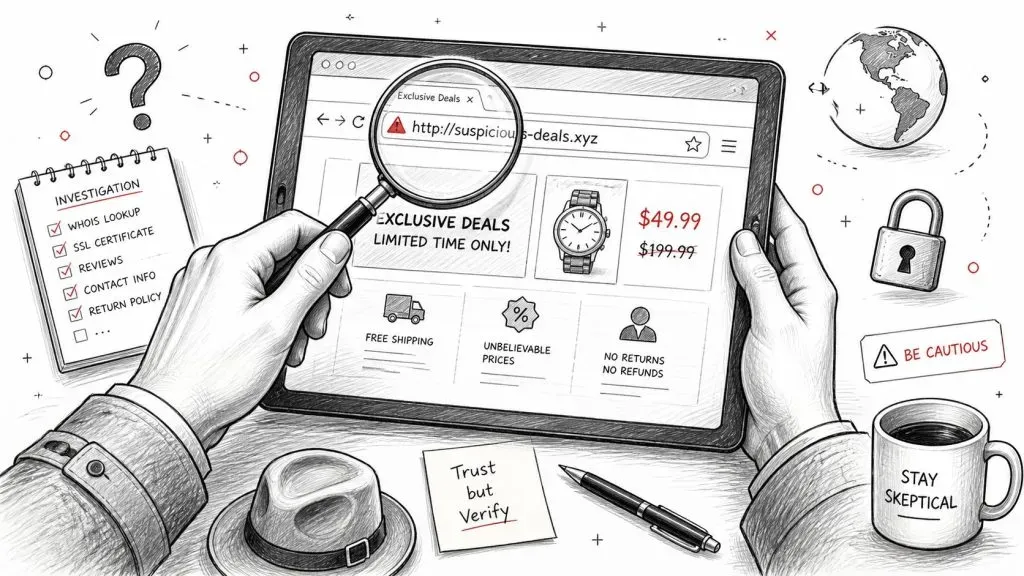
Consider a customer who receives a social post offering a limited-time discount. The linked page uses the brand’s colors, product photographs, and checkout design. The site may look polished, but the payment flow requests more information than the legitimate store normally needs, or redirects the visitor through several unrelated domains. That sequence is more revealing than visual quality alone.
Triage the experience
Start with the visitor’s path. Record the source link, landing page, redirects, forms, and final destination. Look for:
- Unexpected requests: A page that asks for credentials, full card information, identity documents, or one-time codes outside the normal customer journey should receive urgent review.
- Pressure tactics: Countdown timers, account suspension warnings, urgent refund notices, and unusually aggressive discounts can indicate an attempt to prevent careful verification.
- Inconsistent support details: Compare phone numbers, email addresses, chat links, policies, and social profiles with the company’s approved channels.
- Repeated design artifacts: Identical copy, button placement, favicons, tracking identifiers, or image files across domains can connect apparently separate sites.
- Distribution clues: Trace referrals from scam advertisements, social accounts, messaging groups, or impersonated retail and finance pages.
A legitimate reseller may use approved product images and describe the brand accurately. It should still provide verifiable company details, clear policies, and a relationship that the brand can confirm. A fraudulent site usually creates urgency, hides ownership, and pushes visitors toward data collection or payment.
Turn observations into evidence
Investigators should maintain a case record rather than relying on browser history or screenshots saved locally. Capture the domain, discovery time, page state, relevant assets, redirect chain, hosting relationships, and the exact user action that triggered concern.
Open-source intelligence can help identify the wider campaign. Dark web monitoring for OSINT and investigations may reveal connected usernames, leaked material, or references to the same operation. That information can help prioritize takedown targets and inform customer communications, but analysts should distinguish confirmed evidence from investigative leads.
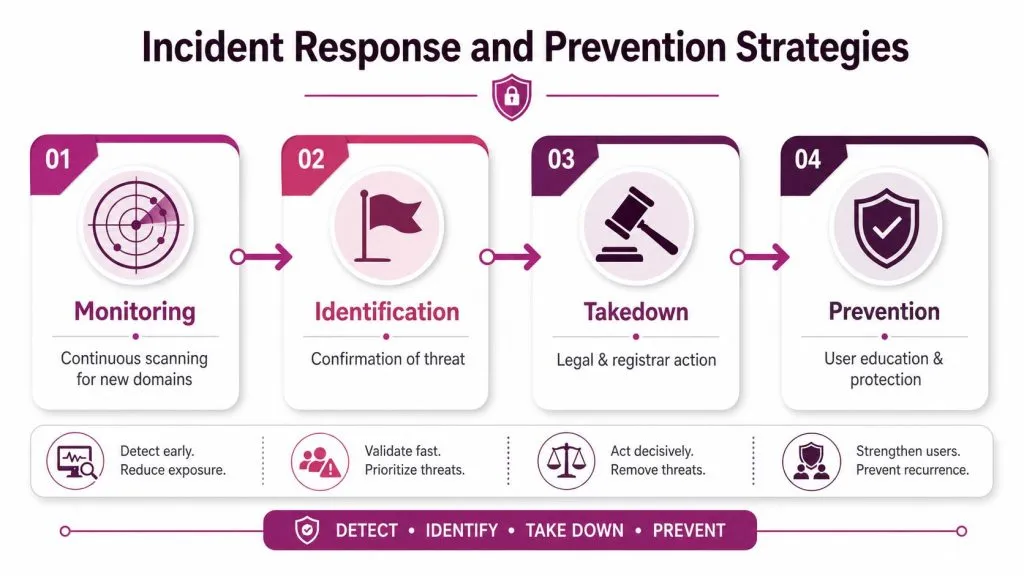
Incident Response and Prevention Strategies
A confirmed fake brand website is rarely solved by deleting one URL from a browser blocklist. The response should address the domain, hosting provider, registrar, advertising or social distribution, stolen data risk, customer communications, and the possibility of related infrastructure.
Establish the incident record
Preserve evidence before requesting removal. Save screenshots, page source where appropriate, redirect behavior, registration information, certificate details, copied logos, contact addresses, and examples of advertisements or social posts that directed users to the site.
Assign an owner who can coordinate security, legal, communications, customer support, and the relevant service provider. Without one accountable lead, teams often send duplicate requests, lose evidence, or publish inconsistent warnings.
Choose the fastest enforcement route
Takedown requests should go to the parties that can affect the infrastructure:
- Hosting provider: Provide evidence of phishing, fraud, malware, or unauthorized brand use and request suspension under the provider’s abuse process.
- Registrar: Report domain abuse and include the domain, evidence, affected brand, and indicators of active harm.
- Certificate provider: Report misuse where relevant, while recognizing that certificate removal won’t remove the domain or hosting.
- Advertising and social platforms: Submit the campaign, account, creative, destination URL, and evidence of impersonation.
- Payment providers: Escalate fraudulent checkout flows quickly, especially where customers may have submitted payment information.
- Legal and law enforcement channels: Use trademark enforcement, cease-and-desist processes, or law enforcement coordination when the campaign is persistent or financially harmful.
Removal is valuable, but it isn’t prevention. Attackers can register another look-alike domain, copy the same content, and redirect traffic through a new advertising account.
Protect affected people
Customer messaging should be specific. Identify the fraudulent domain or channel, explain what legitimate contact methods look like, advise users not to reuse exposed passwords, and provide a genuine support route for suspected payment or account compromise.
Employee education matters too. Staff may encounter fake supplier portals, executive impersonation pages, or fraudulent recruitment and support sites. Training should focus on verification habits and reporting, not on a simplistic promise that HTTPS, logos, or polished design can prove authenticity.
Response principle: Remove the infrastructure, preserve the evidence, trace the distribution, and close the communication gap that allowed users to trust the impersonation.
Operational Guidance for MSPs and MSSPs
MSPs and MSSPs face a scale problem before they face a tooling problem. Each client has different approved domains, brands, executives, products, resellers, and regional namespaces. Attackers now use AI-assisted builders and reusable kits to clone several brands in parallel, so manual searches cannot reliably evaluate exposure or connect related campaigns.
Treat brand protection as a repeatable service workflow. Define each client’s assets, collect detections through APIs or feeds, enrich them automatically, send high-confidence cases to analysts, and maintain response templates that account for client-specific approval and escalation requirements.
Create a client-specific brand baseline
Start with an inventory that includes:
- Authoritative domains: Record production websites, support portals, campaign domains, regional sites, and domains the client has explicitly approved.
- Brand vocabulary: Include company names, product names, common abbreviations, slogans, executive names, and high-risk terms such as support, login, billing, and careers.
- Visual assets: Store approved logos, favicons, product images, and page references so detection systems can compare suspicious content with known assets.
- Legitimate third parties: Document resellers, marketplaces, payment providers, affiliates, and agencies allowed to use brand materials.
- Response contacts: Capture legal, abuse, communications, and technical contacts, along with the client’s approval process.
This baseline reduces false positives and gives analysts a defensible reason for classifying a match. A suspicious-looking domain that belongs to an approved partner should not receive the same response priority as a cloned login portal collecting credentials.
Integrate detection with existing operations
Monitoring should feed the systems analysts already use. An API can create a SIEM event, enrich a threat-intelligence case, or trigger SOAR actions such as deduplication, evidence collection, and ticket creation.
Useful workflow fields include:
| Field | Operational purpose |
|---|---|
| Similarity reason | Shows whether the match involves typosquatting, combosquatting, or homograph characters |
| Discovery time | Establishes response urgency and supports evidence preservation |
| Page classification | Separates parked domains, storefronts, login portals, redirects, and malware delivery |
| Asset matches | Records copied logos, favicons, images, or page structures |
| Infrastructure links | Groups related domains, hosting patterns, and certificates |
| Distribution source | Connects the site to ads, social accounts, email, or messaging |
| Client owner | Routes approval and communication to the right account team |
Automate low-risk enrichment, not final attribution. A workflow can gather registration and page metadata safely, while an analyst validates whether the domain is a malicious impersonation, an approved third party, or an ambiguous case requiring client review.
Write the playbook before the alert
A usable playbook defines severity, evidence requirements, notification timing, and action owners. A credential-harvesting clone should follow a faster path than a parked domain with no active content. A site promoted through paid advertising may require platform escalation at the same time as hosting and registrar reports.
Detection must cover visual replication as well as domain names. Typo lists remain useful, but they miss cloned pages and coordinated multi-brand campaigns. Combine screenshot comparison, favicon reuse, copied text, asset hashes, domain similarity, registration timing, and infrastructure clustering. Monitor newly registered domains, similar-character substitutions, internationalized domain names, reused favicons, and repeated hosting patterns, as noted earlier in the discussion of impersonation trends.
For providers reviewing broader external exposure, attack surface analysis can place brand domains, public services, cloud assets, and third-party dependencies in one inventory. That context matters because a fake website may target a public-facing login, a customer-support process, or a brand asset managed outside the security team. It also helps analysts link a cloned page to the infrastructure and business process it is abusing.
Measure service quality without vanity metrics
Track whether the workflow finds relevant threats, preserves useful evidence, and moves cases to the right owner. Review false positives, repeat campaigns, unresolved domains, response bottlenecks, and the channels that repeatedly deliver fraudulent traffic.
Measure the handoff, not just discovery. A high alert count has little value if analysts cannot confirm ownership, preserve evidence, or coordinate action with the client and affected platforms. The service should give each client a defensible process for identifying impersonation, responding to coordinated campaigns, warning affected users, and improving detection after the next clone appears.
InsecureWeb provides fake site and account detection, look-alike domain monitoring, threat intelligence, dark web monitoring, and API access that MSPs and security firms can connect to existing workflows. Visit InsecureWeb to assess how its external threat monitoring can support detection and response for fake brand websites across clients’ online presence.