You’re probably dealing with one of two situations right now. Either a client still has a business Facebook account protected by a password and maybe SMS, or someone already had a scare: a suspicious login, an ad account change no one approved, or a Page admin who left the company but still has access.
For MSPs, Facebook security isn’t a consumer convenience issue. It’s an asset protection issue. A compromised account can turn into brand impersonation, ad spend abuse, message tampering, and messy incident response across marketing, IT, and leadership. The fastest baseline improvement is simple: move every eligible account to an authentication app for Facebook, then manage recovery and documentation like you would any other business-critical access control.
Facebook has supported third-party authenticator apps since it refined its 2FA flow in 2018, removing the mandatory phone-number requirement and adding support for app-based login codes through tools such as Google Authenticator and Duo Security, as covered by ESET’s summary of Facebook’s 2FA changes. That change matters because it made stronger 2FA easier to deploy without tying security to a mobile carrier.
The Real Risk of Unsecured Business Facebook Accounts
A business Facebook account rarely lives in isolation. It’s usually tied to a Page, Meta Business assets, ad accounts, messaging workflows, staff devices, and sometimes third-party publishing or analytics tools. One weak login can spill into several business functions at once.
The damage usually isn’t theoretical. An attacker who gets into the wrong admin account can change Page roles, lock out the legitimate team, alter campaign settings, or pivot into connected systems. If the marketing team stores screenshots of invoices, cards, or expense records in shared channels, that creates another exposure path. Security teams that manage social assets should also understand understanding image-based financial data risks, because operational shortcuts often create side channels attackers can exploit after account compromise.
Business impact isn’t limited to the Facebook login
A weak Facebook login expands the organization’s exposure in ways non-technical stakeholders often miss:
- Brand control risk. Attackers can post, message, or advertise as the business.
- Billing risk. Ad account access can be abused long before someone notices.
- Access sprawl. Former staff, agencies, and contractors often retain more access than they should.
- Data spillover. Connected apps and shared admin habits widen the blast radius.
That’s why I treat Facebook like any other internet-facing business system. If it has admin roles, stored value, customer interaction, and third-party integrations, it belongs inside your access-control program. A good starting point is to review the client’s broader exposure through attack surface analysis for external risk reduction, then tighten Facebook authentication as one concrete remediation item.
Practical rule: If an account can administer a Page, ad account, or business asset, password-only access is already below baseline.
An authentication app for Facebook isn’t the whole answer. But in a real MSP environment, it’s the minimum standard that stops a lot of preventable pain.
Why an Authentication App Beats SMS for Facebook Security
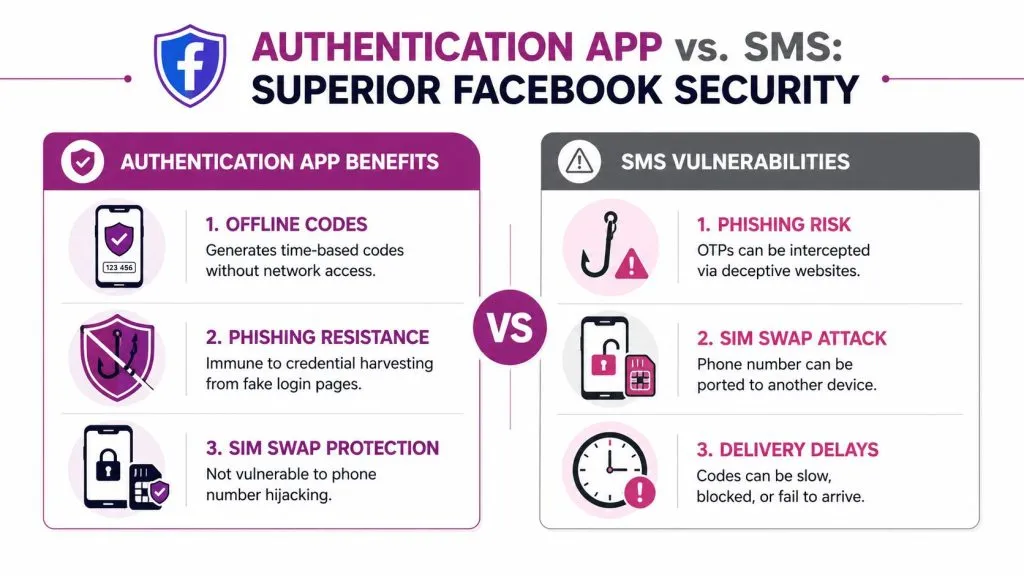
For Facebook accounts tied to Pages, ad spend, or Business Manager administration, app-based 2FA should be the default control. SMS is easier to turn on, but it is weaker in ways that matter during real incidents. It relies on a phone number, a carrier, and message delivery. An authentication app relies on a trusted enrolled device generating codes locally.
What changes when you move off SMS
With an authenticator app, the code is generated on the device as a time-based one-time password. Facebook supports app-based 2FA with tools such as Google Authenticator, LastPass, Duo, and Authy. Those codes refresh regularly and do not depend on cell service or text-message delivery, as noted in Avast’s discussion of authentication apps for Facebook and Google, which also states that app-based 2FA reduces account compromise success rates by over 99% compared to SMS-only methods.
That local generation model removes several SMS failure points. It also changes your operational responsibilities. You trade carrier risk for device and recovery management.
| Method | Main dependency | Common weakness | Operational issue |
|---|---|---|---|
| SMS | Carrier and phone number | Number hijacking and message interception risk | Delays, delivery failures, travel issues |
| Authentication app | Enrolled device and stored secret | Device loss if poorly documented | Better security, but needs backup planning |
The trade-off is straightforward. SMS is simpler to explain and faster to enroll under pressure. Authentication apps are harder to deploy correctly, but they hold up better against SIM swaps, port-out fraud, and plain old message delays. For business Facebook access, that is the better trade.
MSPs should also pay attention to rollout failure, not just control strength. Avast notes that users often fail app-based setup because the interface is confusing or the account already has access problems. In practice, I see the same pattern. The security control is sound, but weak process breaks the deployment.
What MSPs should standardize
A one-off consumer setup can be informal. A managed client rollout cannot. Before enabling an authentication app for Facebook across owners, marketers, and outside agencies, standardize these decisions:
- Choose one supported authenticator standard. Limit exceptions so support does not become app-by-app troubleshooting.
- Define factor ownership. Decide whether the code lives on the user’s phone, a managed company device, or a documented shared-admin process.
- Set recovery rules before enrollment. Lost phones, staff turnover, and device refreshes happen constantly.
- Document the exact Facebook path and account context. Accounts Center, linked identities, and business asset roles can change what the admin sees.
- Decide who performs support. If your help desk will handle resets, write the verification procedure before the first lockout ticket arrives.
- Tie the work to billing and documentation. If 2FA rollout is part of onboarding or a security hardening project, capture it that way so the client understands the ongoing support scope.
App-based 2FA is stronger than SMS, but only if enrollment, backup, and support ownership are handled deliberately.
For MSPs, that is the key decision point. Do not treat Facebook 2FA as a one-click user preference. Treat it like any other access control for a client-owned business system. Standardize the app choice, document recovery, assign ownership, and price the support work accordingly.
Step-by-Step Configuration for a Single Account
A common failure case looks like this: an owner is on a rushed support call, an engineer gets Facebook 2FA turned on, everyone sees the success message, and two months later nobody knows which device holds the codes. The setup itself is easy. The control around the setup is what determines whether the account stays secure and supportable.
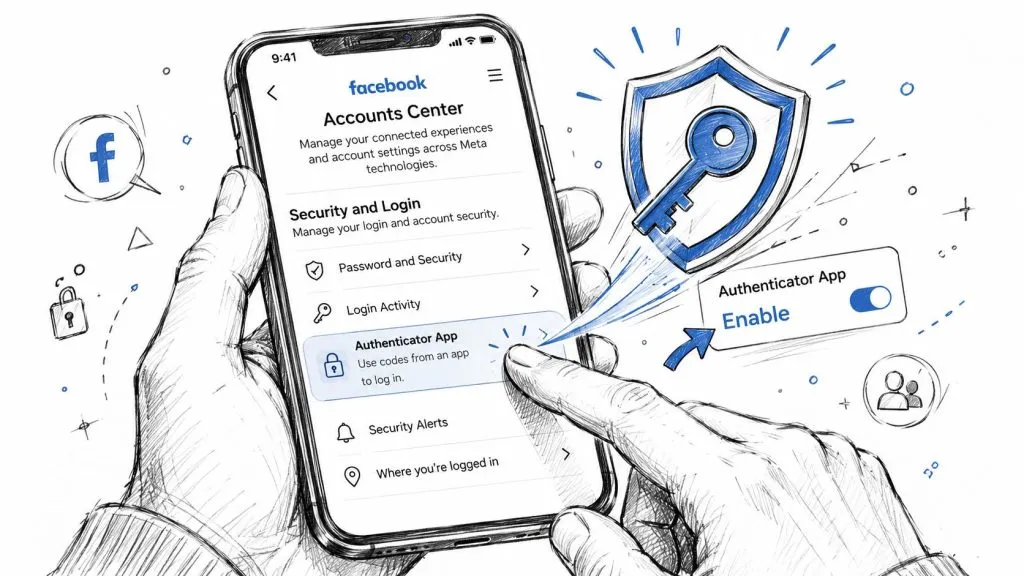
Find the right control path in Facebook
Facebook’s current path is Settings & Privacy > Settings > Accounts Center > Password and Security > Two-factor authentication. From there, select the account, choose Authentication app, then scan the QR code or enter the manual key, as shown in this setup walkthrough on YouTube.
Run this change while the legitimate account owner is already signed in on a trusted device. If the client has multiple linked profiles or business assets in Accounts Center, verify you are enabling 2FA on the correct identity before you scan anything.
For a single-account MSP session, use a tight process:
- Verify the admin’s role and access first. Confirm the person in the session still has the right permissions for the Facebook asset you are protecting.
- Start with the authenticator app ready. Google Authenticator and Microsoft Authenticator are both common choices.
- Control remote visibility. If you are screen sharing, limit who can view the QR code or setup key.
- Review existing factors. If SMS is already enabled, decide whether client policy allows it to remain as fallback.
The QR code and the manual setup key are both enrollment secrets. Anyone who captures either one can generate valid login codes later.
Handle the QR code and setup key correctly
This is the part that creates later incidents if the team gets casual.
When Facebook shows the QR code, it is presenting the shared secret the authenticator app will store to generate time-based codes. Manual entry works too, but the security requirement stays the same. Treat that key like a privileged credential, because that is exactly what it is.
Use these rules during enrollment:
- Do not paste the setup key into chat. Chat platforms are poor places for secret handling.
- Do not email screenshots of the QR code. That creates extra copies you now have to control.
- Store recovery-related enrollment material only in an approved vault if the client’s process requires it.
- Document the enrolled device and app. “2FA enabled” is weak. “2FA enabled in Microsoft Authenticator on company-issued iPhone assigned to the page owner” is useful during support.
If your team already has an incident workflow for compromised accounts, tie this documentation to it so recovery actions are faster during post-breach account containment and remediation.
A short visual walkthrough can help when a client admin is driving the session:

Validate before you close the ticket
Do not stop at the “enabled” message in Facebook. Prove the control works.
Run a quick validation sequence:
- Enter a live code during setup. Confirm Facebook accepts the authenticator output.
- Test a new sign-in when practical. That confirms the prompt appears in a real login path.
- Record who owns recovery responsibility. Someone specific should be accountable.
- Update the runbook before the session ends. Delayed notes turn into missing notes.
If the client cannot explain who has the codes, what device holds them, and how support will respond to a device loss, the job is incomplete. That standard matters even for a single account, because single-account Facebook access often still controls business pages, ad spend, and brand communications.
Bulletproof Backup and Recovery Strategies
Most Facebook 2FA failures aren’t caused by attackers. They’re caused by normal operations: a replaced phone, a wiped device, a departed admin, or an authenticator that was never backed up properly.
That’s why recovery planning belongs in the same change window as setup.
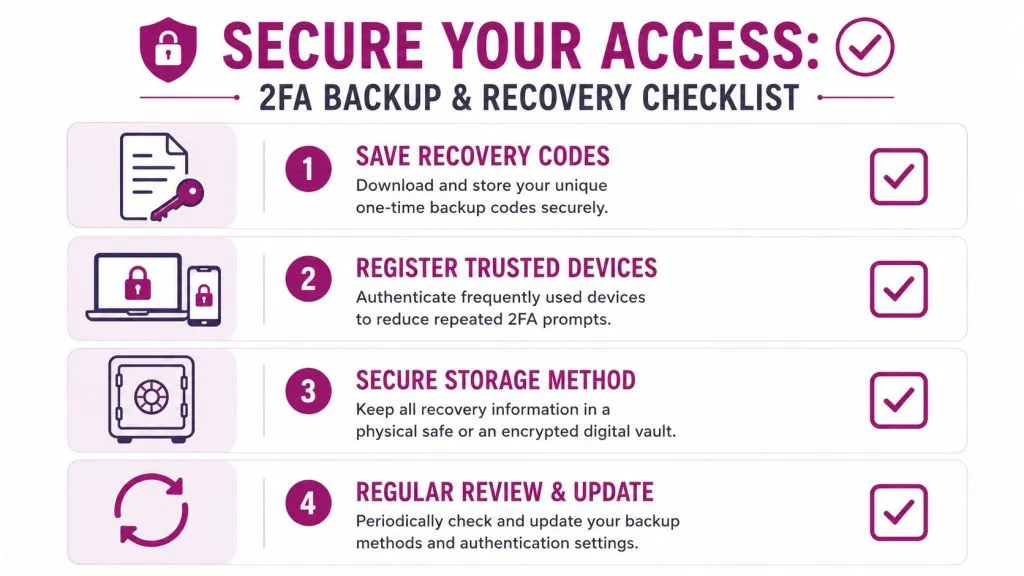
Build recovery into the rollout
Facebook’s own support history shows there is a limited recovery path when a user is fully locked out. In those cases, Facebook support has historically provided five single-use codes, valid for three days, to help the user regain access and then change 2FA settings, according to Facebook’s help guidance on two-factor authentication recovery.
That’s useful, but it’s not a primary strategy. It’s a last resort.
A better SOP includes:
- Store recovery material offline or in an encrypted vault. Avoid loose notes, screenshots, and unmanaged personal storage.
- Assign an owner for recovery records. Shared responsibility usually means no responsibility.
- Document the escalation path. Help desk staff should know who authorizes recovery actions.
- Review after staffing changes. Role transitions are where hidden lockouts surface.
If you’re writing incident procedures for clients, tie account lockout planning into the same thinking you use for post-breach response steps and containment. The mechanics are different, but the discipline is the same: preserve access, record ownership, and remove guesswork during stress.
Choose backup methods deliberately
Not all authenticator apps support recovery the same way. Some are built around a single device. Others support sync, export, or cloud-backed recovery. That’s not automatically good or bad. It depends on the client’s risk model.
A solo business owner may prefer a simple app on one managed phone and printed recovery records in a safe. A marketing team with rotating role coverage may need a more deliberate shared-access design that avoids tying business continuity to one person’s handset.
Here’s the practical trade-off:
| Approach | Strength | Weakness | Best fit |
|---|---|---|---|
| Single-device authenticator | Smaller exposure footprint | Higher lockout risk if device is lost | Individual owner-managed accounts |
| Synced or backed-up authenticator | Easier recovery and transitions | More policy decisions around storage and access | Teams and MSP-managed clients |
Recovery should be boring, documented, and tested. If it depends on memory, it will fail at the worst time.
When I review client environments, the weak point is rarely the code generator. It’s the absence of an agreed recovery process. Fix that, and Facebook 2FA becomes manageable instead of fragile.
The MSP Playbook for Rolling Out Facebook 2FA
Rolling out Facebook 2FA at scale isn’t a technical challenge. It’s a process challenge. The difference between a clean deployment and a recurring support burden comes down to standardization, ownership, and documentation.
Standardize the service
Build Facebook 2FA into a repeatable service package. Don’t treat it as a favor your technicians squeeze into unrelated tickets.
Your baseline package should define:
- Supported authenticator apps. Pick the apps your team will support and document exceptions.
- Eligible account types. Separate personal profiles used for Page administration from shared business roles and agency accounts.
- Required attendees for setup. Usually that means the account owner plus the technician, and sometimes a manager if role changes are involved.
- Required outputs. Ticket notes, recovery storage confirmation, and an updated access register.
A lot of MSP friction comes from multi-platform sprawl. Clients don’t just have Facebook. They have Instagram, LinkedIn, X, YouTube, TikTok, schedulers, agency tools, and shared inboxes. If the client’s marketing operations are messy, this practical guide on how to handle multiple social platforms is useful context for understanding where access usually fragments.
Document ownership and recovery
In this situation, many providers underperform. “2FA enabled” is not meaningful documentation.
A useful record should answer these questions without another discovery call:
| Documentation item | What to record |
|---|---|
| Account scope | Which Facebook profile or business asset was protected |
| Factor type | Which authentication app was used |
| Device custody | Who controls the enrolled device |
| Recovery location | Where backup or recovery material is stored |
| Business approver | Who authorized the setup and who can approve changes |
Keep the actual secrets out of general ticket notes. Store them only in the approved secret-management location defined by your policy.
The technician’s job isn’t just to enable 2FA. It’s to leave behind an access record that another technician can support six months later.
This is also the point where broader managed security services connect. If you’re already helping clients monitor exposed credentials and external threats, services such as dark web monitoring for managed service providers fit naturally beside social account hardening. The client conversation becomes clearer when Facebook 2FA is one control inside a wider identity-risk program.
Turn it into an operational offering
If you do this repeatedly, package it. Clients understand outcomes better than settings.
A solid managed offering can include:
- Onboarding audit. Identify which users administer Facebook assets and what factors they use today.
- Remediation session. Move eligible accounts to an authentication app and remove weak or unmanaged fallback paths when policy allows.
- Access register maintenance. Track role changes, contractor offboarding, and app ownership.
- Quarterly review. Validate that the enrolled factor still matches business reality.
Billing gets easier when the service has clear boundaries. Charge for audit and rollout work as a project, then fold ongoing review into a managed security or vCISO-style package. Clients don’t buy “clicks in Accounts Center.” They buy reduced account takeover risk and less chaos when staff, devices, or agencies change.
The MSP win is simple. Once your process is standardized, technicians spend less time improvising and less time recovering clients from preventable lockouts.
Beyond the App Your Advanced Security Checklist
An authentication app for Facebook is the foundation. It’s not the whole security posture.
After app-based 2FA is in place, review the rest of the account like you would any externally exposed business platform:
- Review active sessions. Remove old devices and unknown logins.
- Trim admin roles. If someone doesn’t need Page or business access anymore, revoke it.
- Audit connected apps. Old publishing tools and unused integrations create unnecessary risk.
- Enable login alerts. The right person should know when access patterns change.
- Check fallback methods. Weak backup paths can undo a strong primary factor.
- Align privacy settings where appropriate. For organizations handling sensitive staff or regional concerns, guides on steps to privatize Facebook for China users can help frame privacy controls that sit alongside authentication hardening.
One more operational point matters. Facebook business access often depends on personal profiles with business authority attached. That means HR offboarding, agency termination, and device replacement all affect your security posture. Treat those events as access-control changes, not just admin chores.
The best client environments aren’t the ones with the fanciest tool stack. They’re the ones with disciplined ownership, clear records, and no mystery around who can get into what.
If you manage client-facing social assets and want a broader way to detect exposed credentials, fake accounts, brand impersonation, and internet-facing risk, InsecureWeb gives MSPs and security teams a practical platform to monitor external threats and turn that visibility into managed protection services.