Data Breach News10 min read
DNS Server Security: Essential Strategies for 2026
By InsecureWeb Team
This report reflects observations of dark web activity. InsecureWeb makes no representations regarding the accuracy of this data.

If your users can still reach email, SaaS apps, and customer portals, DNS probably feels invisible. That’s exactly why it gets missed until a login page looks wrong, a site starts timing out, or a client asks why traffic is landing somewhere it shouldn’t. DNS server security is the work that keeps that invisible layer trustworthy, and attackers know it.
For MSPs, that makes DNS a practical control point, not just a protocol detail. A compromised resolver, a stale record, or a weakly protected zone can turn into phishing, outage, or brand damage fast. In real-world reporting, 87% of organizations suffered a DNS attack in the prior year, up 8 percentage points from the year before in IDC’s 2021 Global DNS Threat Report, as cited by Cloudflare’s DNS security guidance (Cloudflare’s DNS security overview).
Introduction to DNS Server Security
A mid-sized company’s staff enters the right domain, sees a convincing login page, and types in credentials without hesitation. Nothing on the endpoint looks broken, because the redirect happened one layer deeper, inside DNS resolution. That’s what makes DNS abuse so dangerous, it can feel like a normal web event until the damage has already spread.
DNS sits at the front door of almost every internet request. If attackers tamper with it, they can reroute users, break services, or make a trusted domain look untrustworthy. That’s why DNS server security isn’t just about keeping a nameserver online, it’s about preserving the integrity of every connection that depends on it.
The exposure is not theoretical. 87% of organizations suffered a DNS attack in the prior year, up 8 percentage points from the year before (Cloudflare’s DNS security guidance). For MSPs and hosting providers, that should shift DNS from a background utility to a core security service.
A DNS issue often shows up as a user complaint first, not a console alert.
That’s why the best operators treat DNS like a critical control plane. If it fails, the business feels it immediately, even when every other tool says the network is “up.”
Understanding DNS Server Architecture
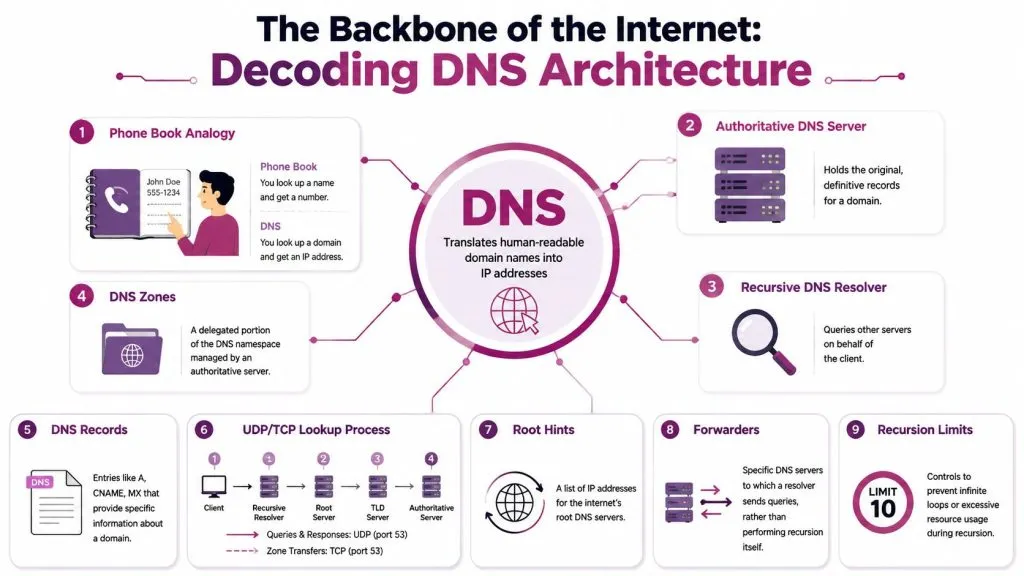
Think of DNS like a phone book with many branches. The user wants a name, the system returns a number, and the lookup only works because different servers hold different parts of the directory. The key is knowing which server is authoritative for the truth and which one is helping answer the question.
Who does what in a lookup
An authoritative DNS server stores the official records for a domain. A recursive resolver works on behalf of the client, asking other servers until it finds the answer. That split matters because attackers often target the middle layer, where caching and trust intersect.
A DNS zone is a delegated portion of the namespace, while DNS records are the entries inside it, such as A, CNAME, and MX. The resolver uses cached responses when possible, which improves speed but also means bad data can spread if trust is broken. That’s one reason cache integrity is such a big deal in security discussions.
The lookup process usually starts with a client query, then moves through root guidance, TLD delegation, and finally the authoritative server. UDP is the common transport for simple queries, while TCP is used where reliability matters more, such as zone transfers. If you want to map where risk enters the picture, this attack-surface analysis primer is a useful companion: attack surface analysis.
Why topology changes the risk
Root hints, forwarders, and recursion limits shape how a resolver behaves under stress. Forwarders can simplify operations, but they also create dependency chains that need to be understood and monitored. Recursion limits help prevent runaway behavior, which is one reason hardened DNS environments rarely look “flat.”
If you can’t name the resolver path, you can’t secure the resolver path.
That’s the practical lesson for MSP teams. DNS security starts with knowing where the answer comes from, who can ask for it, and where cached data can be trusted or abused.
Common DNS Attack Vectors
A weak DNS environment doesn’t need one dramatic flaw to fail. It can be nudged apart by a series of smaller weaknesses, some old, some operational, and some hiding in plain sight. The attack types below matter because they show how DNS gets turned from a directory into a weapon.
Cache poisoning and spoofing
Cache poisoning works when an attacker injects false DNS data into a resolver’s cache. Once a fake answer is stored, users can be sent to a malicious destination that looks legitimate from the outside. DNS spoofing is closely related, because the result is still a false answer delivered as if it were trusted.
A landmark 2008 global survey found more than 10% of DNS servers were vulnerable to cache poisoning, and researchers estimated about 1.3 million nameservers were trivially vulnerable because they allowed open recursion and lacked patches (PC World coverage of the survey). That history matters because it shows the underlying weakness often isn’t mystical protocol wizardry, it’s basic exposure and slow patching.
Flooding and amplification
A DNS server can also be overwhelmed with traffic. When enough requests pile up, legitimate lookups slow down or fail, and the business sees the outage before the root cause is obvious. In that scenario, the attacker doesn’t need to hijack answers, they just need to exhaust capacity.
Tunneling and masquerading
DNS tunneling is different. Instead of breaking DNS outright, attackers abuse query patterns to move data through a channel defenders often trust too much. That can hide exfiltration inside normal-looking traffic, which makes the abuse harder to spot if logs aren’t reviewed carefully.
Why misconfiguration keeps showing up
Open recursion, missing patches, and exposed services make these attacks easier to launch. The old lesson still applies, bad defaults turn ordinary infrastructure into an easy target. In DNS, small missteps become broad exposure because so many systems depend on the same resolution path.
Best Practices for DNS Server Hardening
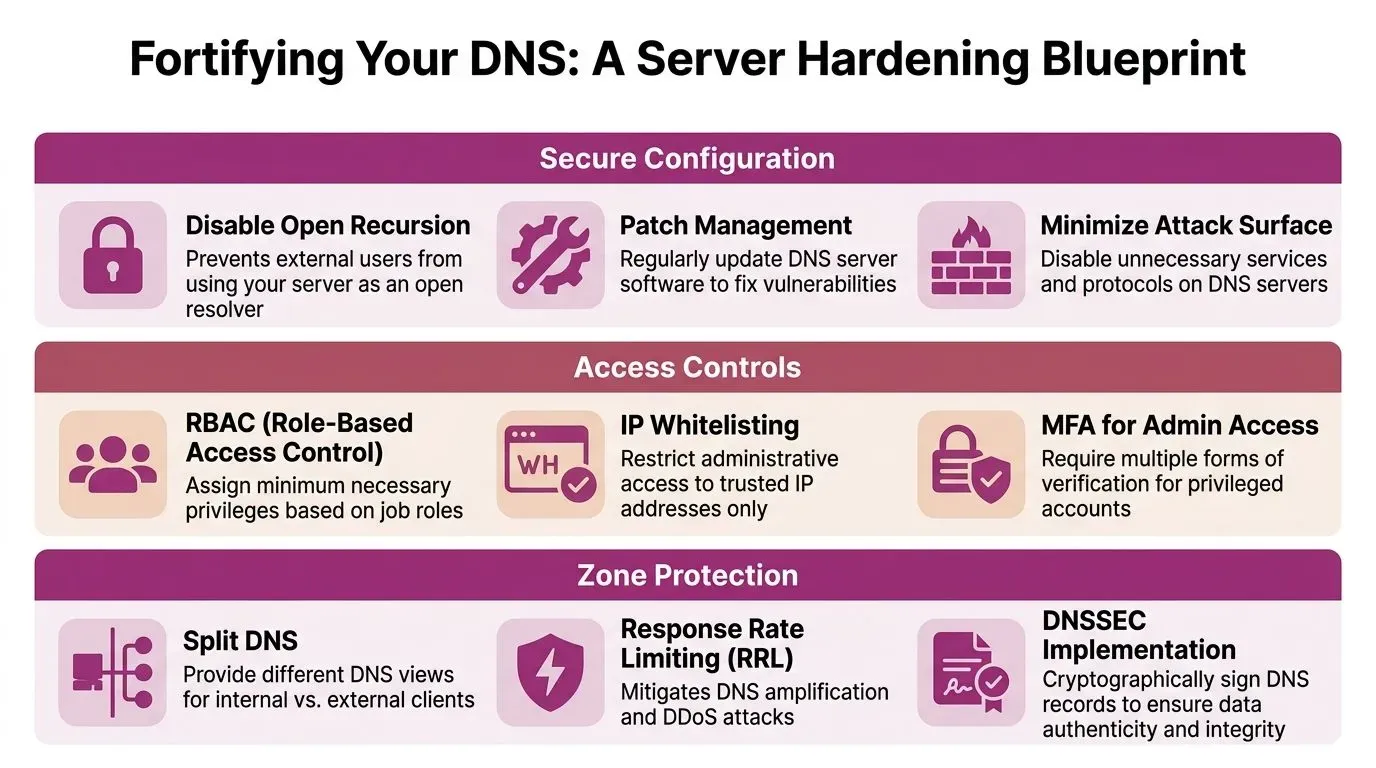
Hardening DNS works best when you start with the simplest failures first. If a server is open to the wrong audience, or if its records are stale and poorly maintained, advanced controls won’t save you from a basic oversight. The job is to reduce trust, limit exposure, and make tampering harder at every layer.
Secure the server before you add complexity
Start by disabling open recursion on servers that shouldn’t behave as public resolvers. Keep DNS software patched on a regular schedule, because the oldest vulnerabilities are still the ones that get reused most. Remove unused services and keep the server role as narrow as possible.
Tighten who can change what
Use role-based access control so administrators only get the permissions they need. Limit management access to trusted networks, and require strong authentication for privileged accounts. That way, the server isn’t relying on a single password or a loosely shared admin path.
Protect zones and records
Zone protection should include split DNS where internal and external views need to differ. Response rate limiting can reduce abuse during high-volume query floods. DNSSEC is also a major control here, because it adds digital signatures and a chain of trust so resolvers can verify data origin authentication and integrity, which helps mitigate cache poisoning and DNS hijacking (Google Public DNS security guidance).
Don’t ignore stale data
A lot of DNS guidance stops at patching and signatures, then misses the maintenance problem. Misconfigurations and stale records remain some of the most overlooked DNS exposures, because attackers can exploit orphaned CNAMEs that firewalls and standard scans miss (Akamai on DNS misconfigurations). Inventory the footprint, look for abandoned references, and remove what no longer belongs.
The safest DNS record is the one you can still explain.
For teams that need a utility layer for blocking and monitoring, protective DNS can complement authoritative hardening by screening risky queries before users reach them. It’s a control choice, not a replacement for clean zone management. If you’re comparing platform options, InsecureWeb also offers custom DNS-related monitoring and alerting as part of its broader threat visibility tooling.
Monitoring and Mitigating DNS Threats
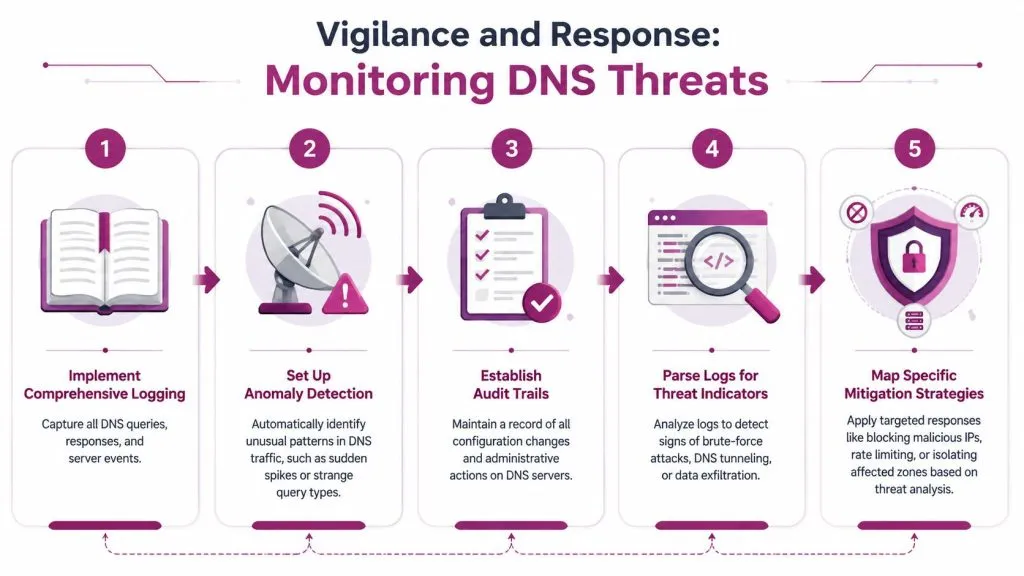
A hardened server still needs watching. DNS issues often begin as odd patterns, not obvious alarms, so the team that sees the anomaly first usually has the best chance to stop the damage. Monitoring is most useful when it leads to a specific response, not just another dashboard.
Build logs you can actually use
Record queries, responses, and administrative changes. If the logs are only useful after a crisis, they’re too thin. Good logging lets you ask simple questions later, such as which zone changed, who approved it, and whether a spike in queries came from normal traffic or misuse.
Look for patterns, not just events
Anomaly detection should flag sudden spikes, strange query types, and repeated lookups that don’t match the normal workload. Log review becomes much more valuable when you use it to spot tunneling, brute-force behavior, or a resolver that starts answering in a way it never did before.
Match the response to the threat
Volumetric attacks need capacity, so distribution matters. Combining overprovisioned Anycast infrastructure with DNS firewalling and rate limiting is the most effective pattern for withstanding volumetric attacks (Cloudflare’s DNS security guidance). That combination spreads load across healthy nodes while reducing the chance that one nameserver becomes the bottleneck.
For operational triage, pull in the team that owns suspicious domains and external exposure. A workflow like dark web monitoring can help correlate external chatter, leaked assets, and credential exposure with DNS anomalies. That doesn’t replace DNS logs, it gives them context.
If the pattern is changing, don’t wait for the outage to prove it.
Encrypted DNS can help reduce passive visibility into query content, but it should be deployed with a clear operational model. The goal is to preserve confidentiality while keeping the resolver fleet observable enough to defend.
Compliance Auditing and Security Checklist
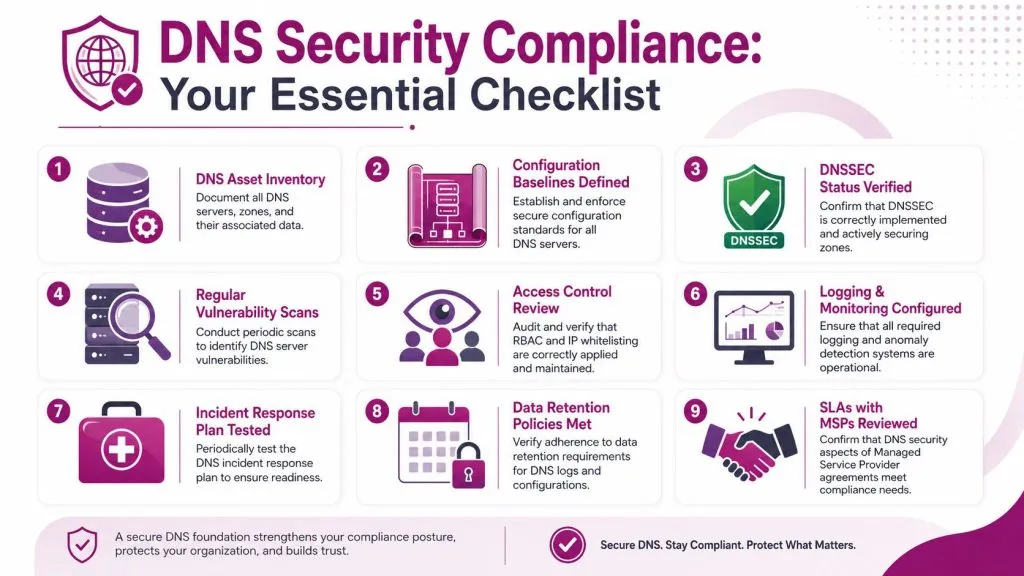
Audit work gets easier when it’s tied to evidence, not just policy language. Regulators and clients don’t want to hear that DNS is “covered,” they want proof that assets are inventoried, controls are consistent, and changes are tracked. For MSPs, that means DNS needs a checklist that maps to actual service ownership.
What to verify
- DNS Asset Inventory: List every DNS server, zone, and service dependency.
- Configuration Baselines Defined: Keep a documented standard for secure settings.
- DNSSEC Status Verified: Confirm signing and trust chain status where it’s in use.
- Regular Vulnerability Scans: Review the DNS estate on a scheduled basis.
- Access Control Review: Check privileged roles, whitelists, and admin paths.
- Logging and Monitoring Configured: Prove alerts, retention, and review processes are active.
- Incident Response Plan Tested: Walk through DNS-specific response steps.
- Data Retention Policies Met: Confirm logs and change records are retained as required.
- SLAs with MSPs Reviewed: Make sure security obligations are written into service agreements.
What counts as evidence
Screenshots are helpful, but they’re not enough on their own. Keep change tickets, zone inventories, audit exports, and signed review notes together so a client or regulator can follow the chain. A practical way to think about it is the same discipline used in securing your small business website, where the point is not just finding issues, but proving they were checked and handled.
That proof matters when records drift or ownership changes. Misconfigurations and stale records remain some of the most overlooked DNS exposures, because orphaned CNAMEs can sit outside normal firewall visibility (Akamai on DNS misconfigurations). If your audit doesn’t include a stale-record sweep, the checklist is incomplete.
Before any review closes, document what changed and who approved it. If a DNS incident already happened, the remediation path in steps after a data breach is a useful reminder to preserve evidence before you clean up.
Real World DNS Security Case Studies
A hoster saw repeated bursts of traffic aimed at a small set of zones. The first instinct was to blame generic internet noise, but the query pattern stayed too consistent to ignore. The team shifted traffic across healthy nodes, tightened response controls, and kept the affected zones available while the flood was absorbed.
An MSP working with a regulated client found a different problem. Logs showed DNS requests with unusual repetition and payload behavior that didn’t match normal browsing, which led them to investigate tunneling. Once the team isolated the pattern and restricted the suspicious paths, the exfiltration channel stopped behaving like a hidden transport lane.
A service provider uncovered stale DNS data during a routine review. The record chain looked harmless at first, but an abandoned CNAME pointed to a destination no longer owned by the client. After removing the orphaned reference and rechecking the zone, the team closed off a path that standard perimeter tools had missed.
These examples share the same lesson. DNS incidents often start as hygiene problems, not headline exploits. The teams that win are the ones that keep looking for weak links after the obvious checks are done.
Conclusion and Next Steps
DNS security works when you treat it as a living system. You need to understand the architecture, know the common attack patterns, harden the server, monitor the traffic, and keep the audit trail clean. The overlooked piece is continuous detection of misconfigurations and orphaned records, because those are the gaps attackers can slip through while everyone else is focused on the headline threats.
For MSPs, the immediate move is simple. Inventory every DNS asset, review stale records, verify access controls, and test the response plan against a real incident path. Then fold the checklist into your recurring client review so DNS doesn’t drift back into the background.
Use InsecureWeb to add automated DNS visibility, monitoring, and threat detection into your client workflows, so you can protect uptime, data integrity, and trust before a small naming problem becomes a full-scale incident.