Data Breach News14 min read
Your Guide to DNS Forwarder IP Configuration and Security
By InsecureWeb Team
This report reflects observations of dark web activity. InsecureWeb makes no representations regarding the accuracy of this data.
If you’re troubleshooting random application slowness, failed SaaS logins, or odd security gaps that don’t show up in firewall logs, DNS is one of the first places to look. A lot of teams check bandwidth, CPU, and endpoint agents, then miss the resolver path entirely. The result is familiar: users say “the internet is slow,” but the issue is name resolution taking bad paths, timing out, or bypassing controls.
A DNS forwarder IP is one of the simplest ways to regain control. Instead of letting every server, appliance, or client make its own decisions about external resolution, you funnel queries through a small set of approved systems. That gives you one place to enforce policy, inspect traffic, log queries, and fail over cleanly when something upstream breaks.
This matters beyond browsing. Email security, cloud access, web filtering, SaaS reliability, and incident response all depend on predictable DNS behavior. If your team also manages mail flow, this primer on DNS for email is a useful companion because the same discipline that prevents mail delivery issues also reduces DNS drift and security blind spots across the network.
Introduction Why Your DNS Forwarder Matters
Most DNS problems don’t announce themselves as DNS problems. They show up as delayed page loads, intermittent cloud app failures, and security tools that seem inconsistent from one site to another. Teams often assume the WAN is congested or the firewall is over-inspecting traffic. In practice, the resolver path is frequently the weak point.
A DNS forwarder is the system your internal DNS server uses to send queries it can’t answer locally. The DNS forwarder IP is the address of that upstream target. That choice affects speed, but the bigger issue is control. A forwarder determines where your queries go, how failures are handled, whether encrypted DNS can be inspected at the gateway, and whether logs are centralized enough to support real incident response.
Think of DNS as a traffic cop for everything else. If it sends requests to the wrong place, stalls under load, or leaks internal lookups outward, every dependent service degrades with it. If it’s configured well, it becomes a quiet force multiplier for reliability and security.
Practical rule: Don’t treat forwarding as a convenience setting. Treat it like a security boundary.
MSPs feel this more than most. One sloppy forwarder design gets copied into multiple client stacks, then every outage becomes harder to isolate because DNS behavior isn’t standardized. A clean design, by contrast, gives you predictable resolution paths, simpler monitoring, and far fewer “works from one site but not another” escalations.
What Is a DNS Forwarder and When Should You Use One
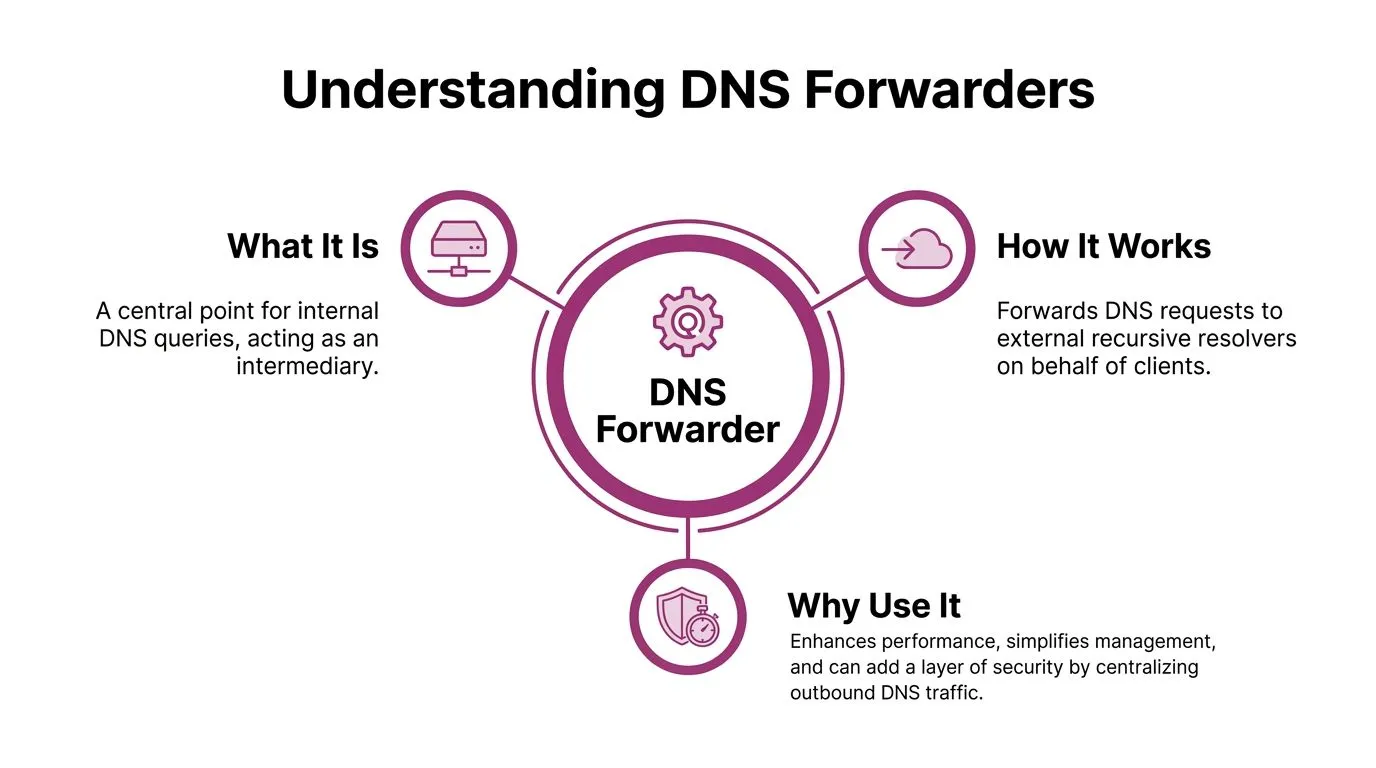
A DNS forwarder sits between your internal clients and the outside DNS world. Your workstations and servers ask your internal resolver for answers. If that resolver doesn’t host the zone and doesn’t already have the answer cached, it forwards the request to a specified upstream resolver instead of resolving everything from scratch.
That makes the forwarder a bit like a specialist librarian. Your staff doesn’t walk into the archive room directly. They ask a trained person at the front desk, who either answers from local records or routes the request to a trusted outside reference desk. The benefit isn’t only speed. It’s consistency.
Forwarder versus recursive resolver
A full recursive resolver can walk the DNS hierarchy itself. A forwarder usually delegates that job to another resolver. In smaller environments, that separation keeps internal systems simpler. In larger environments, it centralizes policy enforcement.
The operational difference is important:
- Forwarder model: Internal DNS servers send external lookups to approved upstream resolvers.
- Direct recursion model: Internal resolvers reach outward on their own and handle recursion directly.
- Hybrid model: Internal resolvers use forwarding for most traffic but use special handling for selected zones.
A forwarder is usually the better fit when you want one inspection point, one log source, and one place to enforce allowed DNS behavior.
When a forwarder is the right call
There are three common situations where a DNS forwarder IP strategy beats ad hoc resolution.
- Security enforcement across all users
If you want to block malicious domains, restrict unsanctioned DNS paths, or inspect encrypted DNS at the boundary, forwarding gives you a chokepoint. Without that, users and devices can drift toward inconsistent resolver behavior. - MSP standardization across many clients
Forwarding reduces entropy. Instead of documenting dozens of mixed resolver setups, you can define approved upstream resolvers, timeout behavior, and logging standards once, then apply them consistently. - Partner and hybrid network routing
Conditional forwarding is often the cleanest answer when a client must resolve partner namespaces, private cloud zones, or split internal domains without exposing everything to public DNS.
A good forwarder design doesn’t just answer questions faster. It makes DNS behavior predictable enough to secure and support.
Where teams get it wrong
The mistake isn’t using a forwarder. It’s assuming any upstream resolver is interchangeable. It isn’t. Resolver choice affects privacy posture, inspection capability, outage behavior, and how much operational visibility your team retains.
Another common error is treating DNS as a background service with no owner. If no one owns forwarding policy, teams end up with mixed client settings, hard-coded resolvers on network gear, and internal queries escaping to public infrastructure.
How to Choose the Right DNS Forwarder IP Strategy
Picking a DNS forwarder IP strategy is less about brand preference and more about deciding who should resolve what, where inspection happens, and what failure mode you’re willing to accept. The wrong choice can leave you with fast lookups but weak visibility, or strong privacy claims but no usable controls in a managed environment.
The three practical options
Organizations typically choose among three patterns: ISP resolvers, public resolvers, or encrypted DNS handled through a managed inspection point.
| Strategy | Best For | Performance | Security Features | Key Consideration |
|---|---|---|---|---|
| ISP-provided forwarders | Small sites that need simple upstream reachability | Often acceptable, but varies by provider and geography | Usually basic | Support quality and policy control can be limited |
| Public recursive resolvers | Teams that want predictable external infrastructure | Often consistent | May include filtering or strong operational maturity | You’re outsourcing trust and logging exposure |
| Encrypted DNS through a gateway forwarder | Security-conscious environments with compliance requirements | Depends on gateway design and inspection path | Strongest control when done properly | Requires careful firewall rules and governance |
The real trade-off is inspection versus blind trust
For business networks, the modern issue isn’t just whether to use DNS over HTTPS or DNS over TLS. It’s where that encryption terminates. Australian government guidance states that organizations should not permit end-to-end use of DoH/DoT without inspection at the gateway, and points to DNS forwarders as the mechanism for interception in managed environments, as described in the DNS security guidance for domain resolvers.
That changes the decision tree. If users or devices send encrypted DNS directly to outside providers, your firewall may see the session but not the intent. If a gateway forwarder handles that traffic, you regain policy enforcement and logging while still protecting traffic in transit beyond the local edge.
What actually works in managed environments
For MSPs, the strongest default is usually a central forwarding tier that handles external queries, with conditional forwarding for partner or private namespaces and a clear policy on encrypted DNS. That preserves control without requiring every endpoint team to understand recursive behavior.
What doesn’t work well is mixing endpoint-defined public resolvers with server-side forwarding and hoping policy will be consistent. It won’t.
One useful caution when evaluating privacy-focused DNS services is to separate marketing from operational risk. This review of AdGuard DNS and its privacy trade-offs is worth reading because it highlights the broader point: forwarding strategy isn’t just about filtering features. It’s also about who sees your metadata and how much resilience you gain or lose by centralizing trust.
Selection criteria I’d use in a design review
- Control over outbound DNS paths: Can you guarantee clients use the approved path?
- Inspection capability: Can you inspect encrypted DNS at the gateway when policy requires it?
- Operational clarity: Can your team tell where a failed query went and why?
- Failure behavior: Does the environment degrade gracefully, or does name resolution completely stop?
- Supportability: Can junior admins maintain it without creating circular dependencies or hidden exceptions?
Step-by-Step DNS Forwarder Configuration Examples
Configuration is where good architecture often falls apart. The design may be fine, but small choices like timeout values, fallback behavior, and where you point internal resolvers can turn a stable setup into an outage generator.
Start with one rule: clients should query internal DNS. Internal DNS should forward outward in a controlled way. Don’t scatter public resolvers across clients, printers, firewalls, and random virtual machines.
Windows Server DNS
On Windows Server, the forwarder settings are easy to find. The dangerous part is assuming the defaults are safe.
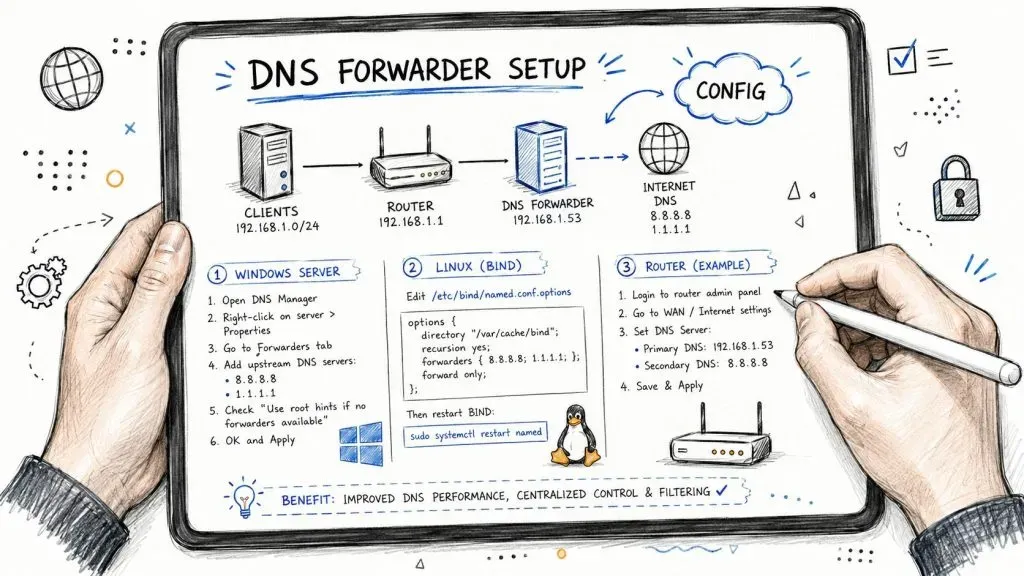
Open DNS Manager, right-click the server, open Properties, then go to Forwarders. Add at least two external recursive resolver IPs. A common example in lab and production environments is using a public resolver such as Google Public DNS, but the exact provider should follow your security policy.
The critical checkbox is Use Root Hint if no forwarders are available. If you leave that disabled and all forwarders become unreachable, Windows will stop rather than fall back, causing a 100% query timeout rate in that failure state, as noted in this Windows forwarding guidance.
Set the timeout conservatively. The same guidance recommends 2–3 seconds before forward queries time out, and notes that values above 5 seconds can increase average resolution latency by 40% during forwarder degradation. That’s exactly the kind of setting that looks harmless in a GUI but feels awful to users.
A few patterns matter more than the rest:
- Use external forwarders only: Pointing a Domain Controller to another internal Domain Controller as a forwarder creates circular logic and brittle dependency chains.
- Keep fallback enabled: Root hints are your safety net when upstream forwarders are unreachable.
- Standardize the setting: If you manage many servers, script it rather than trusting hand-edited GUI work.
Example with dnscmd:
dnscmd <Server> /ResetForwarders <IP1> <IP2> /TimeOut 3 /noslaveThat same source notes this approach helps standardize settings across large estates and reduce manual drift.
Field note: The fastest way to create a DNS incident is to let each admin “set what works” on their local server.
If your team is building repeatable deployment standards, it helps to think in terms of lifecycle, not one-time setup. This overview of understanding network solution lifecycles is useful because DNS forwarding often fails during change and growth, not during the initial install.
A quick visual walkthrough can help if you’re documenting the process for junior staff:

BIND and Unbound on Linux
Linux-based resolvers are more explicit. That’s good for change control because the config is reviewable, versionable, and easy to audit.
A basic BIND pattern looks like this:
options {
    recursion yes;
    forward only;
    forwarders {
        <IP1>;
        <IP2>;
    };
};
An Unbound example is similarly direct:
server:
    do-ip4: yes

forward-zone:
    name: "."
    forward-addr: <IP1>
    forward-addr: <IP2>
The main decision isn’t syntax. It’s whether you want forward only behavior or a more flexible approach that allows local recursion if upstream forwarding fails. In tightly controlled environments, forward only can be cleaner. In resilience-focused environments, fallback needs more careful thought.
pfSense and business firewalls
On pfSense and similar appliances, DNS forwarding often lives alongside DNS filtering, DHCP, and outbound policy. That makes it convenient, but it also means mistakes spread quickly.
Use the firewall or appliance as a forwarder only if you’re prepared to monitor it like infrastructure, not like a convenience feature. Review these items:
- Restrict who can query it: Only approved internal networks should use the service.
- Separate roles when needed: If the firewall is overloaded, move DNS to dedicated resolvers.
- Document conditional domains: Hybrid networks break subtly when no one records why a domain is forwarded differently.
For small offices, appliance-based forwarding is often enough. For MSP-managed environments with multiple sites and compliance obligations, dedicated DNS infrastructure is usually easier to audit and troubleshoot.
The Hidden Security Risks of DNS Forwarders
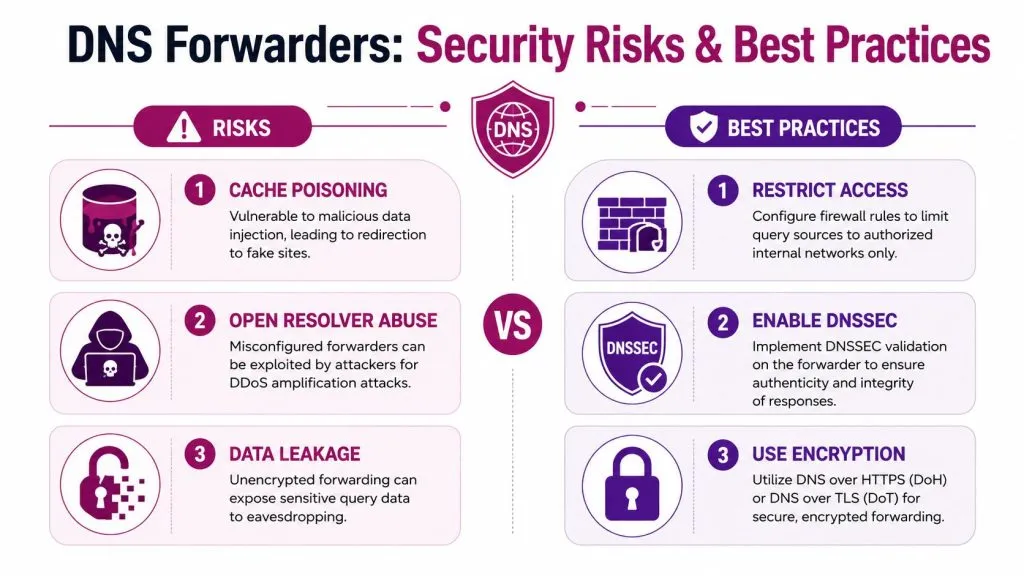
A DNS forwarder can be a control point or an attack surface. Which one it becomes depends on how it’s exposed, what it forwards, and whether anyone is monitoring for abuse. The biggest risk isn’t the obvious open resolver everyone already knows to avoid. It’s the quieter category of forwarders that were never meant to be visible and still end up participating in attacks.
Why transparent forwarders change the risk model
Research from TU Dresden identified approximately 536,000 distinct IP addresses operating as transparent forwarders worldwide. That accounts for 26% of the open DNS infrastructure and adds roughly 18% more components to the ecosystem than previously recognized, according to the study on transparent forwarders in open DNS infrastructure.
That matters because transparent forwarders aren’t just another implementation detail. They represent a large, historically undercounted layer of DNS infrastructure sitting between requesters and recursive resolvers. If your security model only considers authoritative servers and traditional recursive resolvers, you’re missing a meaningful part of the path.
Even worse, more recent analysis highlighted the abuse potential. One study found that transparent DNS forwarders can generate attack traffic up to 1.43 Gbit/s using a single forwarder with a conservative amplification factor of 40×, and can sustain 320 Mbit/s at the victim because the recursive resolvers send the amplified traffic directly to the target rather than back through the forwarder’s own constrained uplink, as detailed in the research on amplification via transparent DNS forwarders.
What MSPs should audit immediately
Legacy customer premises equipment is a common blind spot. Some devices act as transparent forwarders without anyone intending them to. Vercara described this problem in the context of October 2025 research, noting that these misconfigured devices can generate traffic 40–80× larger than original requests and amplify attacks by over 14× compared to traditional methods in certain scenarios, as discussed in DNS forwarders gone rogue.
That’s why MSPs should treat forwarder exposure as part of attack surface review, not just service configuration. If you need a broader framework for that work, this guide to attack surface analysis is relevant because DNS forwarding often sits in the gap between “documented service” and “accidentally reachable infrastructure.”
Audit priorities should be simple:
- Check external exposure: A forwarder that answers from untrusted networks is a liability.
- Review old CPE and edge gear: Especially devices inherited through acquisitions or provider swaps.
- Look for source-IP transparency: Some devices relay in ways that bypass assumptions built into DDoS mitigation models.
- Verify logging exists: If queries pass through a device and no one records them, incident response becomes guesswork.
Open forwarders aren’t the only problem. Unknown forwarders are often worse because no one is watching them.
Monitoring Troubleshooting and Best Practices for MSPs
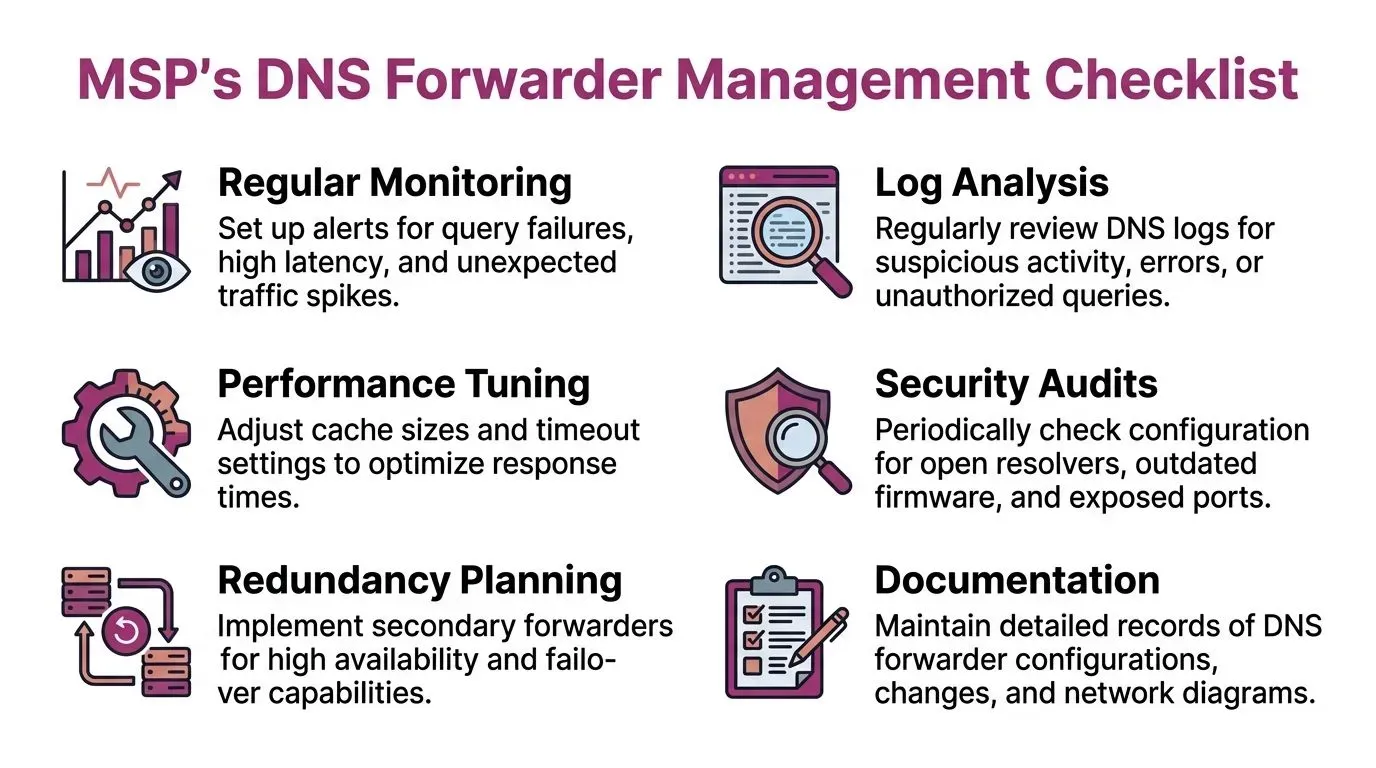
Forwarding isn’t a set-and-forget feature. If you don’t monitor it, you’ll eventually find out it broke because users lose access to cloud apps or because internal names started leaking to public resolvers. Good MSP practice is to treat DNS health like you treat backup success or VPN tunnel state. It needs routine validation.
What to monitor every week
Redundancy is paramount. Benchmark data shows systems with a single forwarder IP experience a 32% higher query failure rate during transient network issues than dual-forwarder configurations, while dual-forwarder setups maintain 99.2% success even when one forwarder fails, according to this benchmark summary on DNS forwarder reliability.
The same source provides several operational thresholds worth using:
- Deprioritize slow upstreams: Forwarders with sustained response times above 150ms should be reviewed or reordered.
- Avoid ultra-low TTLs for cache tuning: TTLs below 300 seconds increase upstream query load by 60% without meaningful user benefit.
- Avoid overly long TTLs for dynamic environments: TTLs above 3600 seconds can delay critical updates, with stale propagation averaging 47 minutes.
- Use conditional forwarding where it belongs: For specific domains, it can reduce cross-network query latency by 35%.
- Watch for split-horizon mistakes: Misconfigurations can leak 15–20% of internal domain queries to public forwarders, and ACL enforcement plus DNS segregation resolves this in 94% of monitored cases.
- Inspect abnormal NXDOMAIN patterns: Rate limiting and NXDOMAIN monitoring detected DNS tunneling with 91% accuracy in penetration testing scenarios.
Troubleshooting patterns that actually matter
When users report intermittent failures, look at DNS timeouts first, not last. Most recurring issues come from a short list:
- Forwarder unreachable
Symptoms include random external failures and spikes in timeout events. Check path reachability, then verify fallback behavior and ordering. - Circular internal forwarding
This shows up as delays, inconsistent caching, and confusion about which server answered a query. Internal DNS servers should serve clients, not point at each other blindly. - Wrong domain sent to the wrong place
Conditional forwarders fail when domain scope is incorrect. Hybrid environments with partner namespaces are especially prone to this. - Stale answers after change windows
Usually a cache TTL issue or split-horizon inconsistency.
Keep a simple resolver map for every client: who asks, who forwards, who recurses, and who logs. Most troubleshooting gets easier once that path is visible.
MSP best-practice checklist
A mature baseline looks like this:
- Use at least two upstream forwarders: Single points of failure show up during brief network instability, not only full outages.
- Standardize timeout settings: Don’t let each site or admin improvise.
- Apply conditional forwarding deliberately: Use it for partner, cloud, and private namespaces that require it.
- Block unauthorized outbound DNS: If endpoints can bypass policy, your forwarder strategy exists only on paper.
- Monitor logs for spikes and leakage: Sudden NXDOMAIN volume, SERVFAIL bursts, or internal names hitting public resolvers are operational signals.
- Audit split-horizon behavior: Internal and external views of the same namespace need explicit ownership.
- Review adjacent exposure: DNS issues often correlate with broader threat visibility gaps. MSPs that already invest in dark web monitoring for managed security operations tend to respond faster because they centralize external risk signals instead of treating them as separate projects.
If you’re responsible for multiple client environments, DNS forwarding is one of the highest-impact areas to standardize. Done well, it improves performance, sharpens security visibility, and reduces support noise. Done poorly, it creates outages that feel random and security gaps that stay hidden until someone else finds them first.
If you support clients across multiple sites, clouds, and edge devices, InsecureWeb can help you spot external exposure before it turns into an incident. It gives MSPs and security teams tools for threat intelligence, vulnerability scanning, dark web monitoring, fake site detection, and AI-guided testing so you can identify weaknesses around the internet-facing edge, including the kinds of blind spots that often sit next to DNS.