Data Breach News11 min read
How to Prevent Data Breaches: A Practical Playbook for MSPs
By InsecureWeb Team
This report reflects observations of dark web activity. InsecureWeb makes no representations regarding the accuracy of this data.
Most advice on how to prevent data breaches starts in the wrong place. It tells teams to buy more tools, tighten a few internal controls, and run another awareness campaign, as if breaches mostly begin inside the building. In practice, the first problem is usually outside the perimeter, where stolen credentials, exposed internet-facing assets, and vendor access give attackers a direct path in.
That’s why modern prevention has to start with attack paths, not just checklists. CISA’s ransomware guidance pushes the same direction, limit sensitive data stored, avoid putting sensitive data on internet-facing systems unless it’s essential, encrypt data at rest and in transit, keep offline encrypted backups, test them regularly, and exercise incident response, resiliency, and communications plans (CISA ransomware data-breach guidance). Those controls matter because they reduce the exposure attackers exploit, especially in ransomware-driven incidents.
Why Most Breach Prevention Plans Fail
Most breach prevention plans fail because they confuse activity with risk reduction. Teams stack up MFA policies, vulnerability scans, training modules, and backup jobs, then assume coverage equals resilience. It doesn’t. If an attacker gets in through a stolen password, a misconfigured remote service, or a vendor account that still has access after offboarding, the internal checklist won’t matter much.
The stronger recent guidance is to start with the crown-jewel data and the paths that can reach it. That means asking a blunt question: which systems, accounts, and vendors can touch the data that would hurt most if exposed? If you don’t answer that first, you’ll keep hardening low-value systems while the entry points stay open.
Practical rule: if you can’t explain the attacker’s shortest path to sensitive data, you’re still doing generic hygiene, not prevention.
Many MSPs get trapped. Clients ask for a “breach prevention package,” and the temptation is to sell a broad best-practices checklist. A better answer is to identify externally reachable systems, high-value identities, and third-party access paths first, then harden those before widening the scope. That approach lines up with the more actionable guidance in recent breach-prevention playbooks, which emphasize exposed assets, vendor access, and identity abuse over generic control lists (DeepStrike’s exposure-first guidance).
There’s also a practical reason to focus on external compromise paths first. Credential theft and exposed services compress the timeline between intrusion and data loss. If the attacker already has a valid login or a public-facing foothold, the defensive work shifts from prevention to containment. That’s a much more expensive place to be.
For teams that need recovery help after the fact, it’s useful to know who can support the cleanup side as well. If data has already been damaged, corrupted, or encrypted, trusted data recovery specialists can help restore access to affected systems while your security team focuses on containment and hardening.
Mapping Crown Jewel Data and Attack Paths
Start with the data, not the inventory. That sounds backwards to teams used to asset-first assessments, but it’s the fastest way to separate useful work from noise. List the datasets that would create the biggest legal, operational, or reputational problem if exposed, then trace every system and identity that can reach them.
Work backward from the data store
The easiest way to do this in a small or mid-sized environment is to pick three to five sensitive repositories and build a simple reachability map. Include applications, servers, user accounts, cloud services, and any remote admin path that can get to them. Then ask which of those paths is internet-facing, which one depends on a vendor, and which one relies on a privileged identity.
The point isn’t to create a perfect architecture diagram. The point is to expose the routes an attacker would use. If an asset can’t be reached except through a hardened jump process, that’s useful. If a cloud admin console is reachable from anywhere and protected by a weak account policy, that’s a priority.
Sort the paths by realism, not by theory
A lot of assessments fail because they treat every possible weakness as equally urgent. Don’t do that. Rank paths by how likely they are to be abused, starting with stolen credentials, exposed internet-facing systems, and vendor connections that still have standing access.
A simple filter helps:
- Can this path be used from the open internet? If yes, treat it as high-priority.
- Does this path require privileged access? If yes, it deserves extra control and monitoring.
- Does a third party touch it? If yes, validate the vendor’s access scope and offboarding state.
- Would compromise here expose crown-jewel data directly? If yes, it moves to the top of the list.
That’s also where attack surface analysis becomes useful. Good analysis doesn’t just count assets, it shows which ones are reachable and what happens if they’re compromised.
Keep the output short enough to use
The deliverable should be a short list of high-risk paths, not a giant register nobody revisits. A concise map forces decisions. It tells the IT team where to apply MFA first, which systems need tighter logging, which vendors need access review, and which internet-facing services should be patched or isolated before anything else.
The best prevention plans are boring in the right places. They reduce the number of ways in, then make the remaining paths noisy and expensive to abuse.
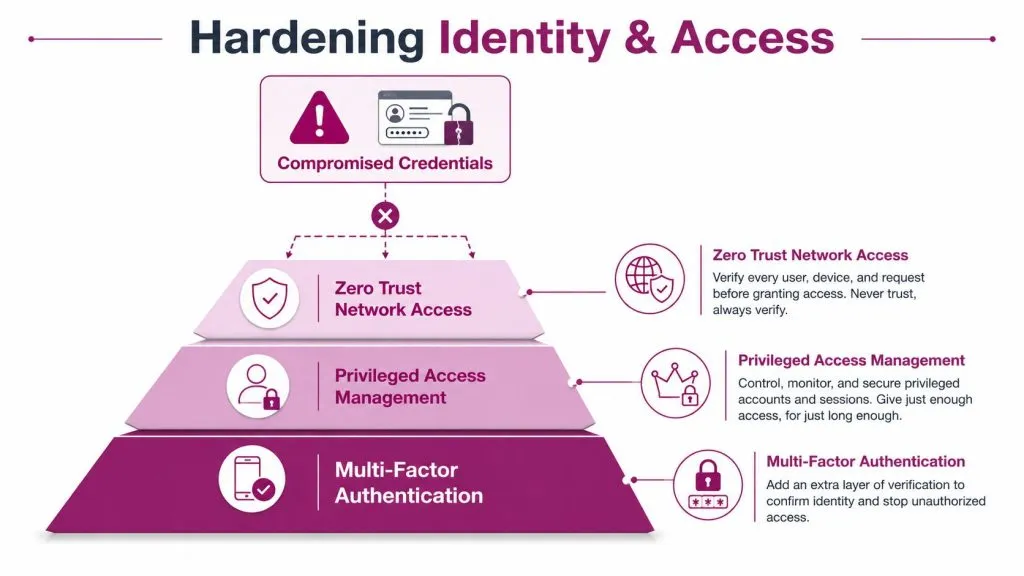
Hardening Identity and Access to Stop Credential Abuse
Identity is where prevention pays off fastest. The reason is simple, compromised credentials are involved in roughly 80% of breaches according to modern breach research summarized in 2026, and the global average cost of a breach was $4.44 million in 2025 (practical breach-prevention playbook). That combination makes identity security the most effective place to start, especially for MSPs defending multiple clients with mixed maturity levels.
Put MFA in front of the accounts that matter most
MFA isn’t equal across all accounts. Enforce it first on remote access, cloud admin portals, email, password vaults, and any account that can change security settings or reach sensitive data directly. If you only protect the average user and leave privileged accounts exposed, you’ve built the wrong layer.
Phishing-resistant methods matter more than SMS codes or reusable push approvals. The reason isn’t elegance, it’s resistance to credential replay and social engineering. When attackers already have usernames and passwords from phishing or data leaks, the second factor has to be hard to steal, not just easy to click through.
Treat privileged access as a separate problem
Privileged accounts need tighter rules than general user accounts. Admin access should be separated from day-to-day work, access should be limited to the tasks that need it, and standing privilege should be reduced wherever possible. Service accounts deserve the same scrutiny, because they’re often over-permissioned and forgotten after deployment.
Operational rule: if an account can change security policy, reach backup systems, or move laterally across segments, it doesn’t belong in the same trust bucket as a standard user.
For MSPs, this becomes a packaging decision as much as a technical one. A sensible service tier includes privileged access reviews, authentication hardening, and rapid deprovisioning when employees or contractors leave. The value isn’t in the label, it’s in removing the easy path attackers use after they get one set of credentials.
Reduce the blast radius before the login happens
Least privilege, segmentation, and fast deprovisioning all serve the same goal, which is to make a stolen account less useful. If every account can reach everything, a single phished user becomes a full compromise. If access is narrow, time-bound, and tied to a specific role, the same stolen password becomes far less dangerous.
This is also where zero trust style controls fit naturally. Don’t assume a user is safe just because they’re inside the network. Recheck access to sensitive resources, log unusual privilege use, and require stronger proof when someone requests high-risk actions. The goal is not to block every attack. It’s to stop a stolen credential from becoming a full breach.
Shorten the time to kill bad access
Fast deprovisioning matters more than many realize. When contractors leave, when vendors rotate staff, or when employees change roles, old access has to disappear quickly. A stale privileged account is a standing invitation.
If you want one practical improvement to start with, audit the accounts that can reach crown-jewel data and remove anything that isn’t actively needed. That single exercise often exposes old admins, shared logins, and service identities nobody has reviewed in years.
Layering Detection and Dark Web Monitoring
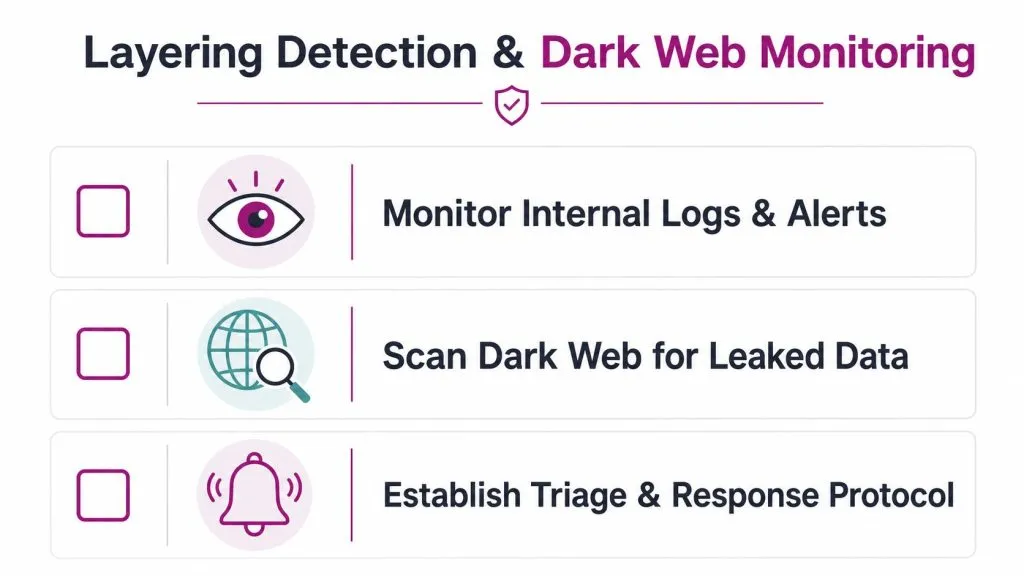
Prevention will not catch every path in time, so detection has to be in place before exposure turns into a breach. Internal logs show what is happening inside your environment. External monitoring shows whether stolen data, fake sites, or impersonation attempts have already surfaced elsewhere. Used together, they give you a chance to respond before an attacker turns access into exfiltration.
Watch for exposure, not just incidents
The most useful signals show that data or identities have left your control. That includes leaked credentials, exposed customer records, and brand impersonation that can support phishing. If an attacker is already advertising access or selling data, you want that signal early enough to shut down the path and reset the affected identities.
Dark web monitoring is one useful option here, especially for MSPs that need a visible service layer for clients. A dark web scan can help surface exposed credentials, domains, emails, usernames, phone numbers, and IPs, along with threat intelligence, fake site and account detection, vulnerability scanning, and AI-guided penetration testing. Used well, that kind of tooling supports triage and response work, not just alert generation.
Build a triage path before alerts start firing
Monitoring without a response process creates noise. Every alert should have a clear owner, a priority level, and a standard next step. If the signal is a leaked credential, the immediate actions are straightforward, disable or reset access, check for reuse, and review the related logins. If the alert is impersonation, the response shifts toward takedown, user warning, and mail or web filtering.
A practical response stack looks like this:
- Log correlation: tie the external alert to internal authentication and endpoint events.
- Ownership assignment: name the person or team that decides what happens next.
- Containment action: reset, disable, block, or isolate based on the exposure type.
- Validation step: confirm whether the alert is real, because false positives do happen and need manual review.
Integrate external monitoring with existing security work
External monitoring should not sit in a separate silo. Feed high-confidence alerts into your SIEM, ticketing platform, or managed service queue. For MSPs, that turns a standalone tool into a service clients can understand. A dark web hit on a client domain can become a remediation ticket, a credential reset, and a management report that shows exactly what was done.
The same approach applies to fake sites and brand abuse. When users see a lookalike login page or a spoofed social profile, the problem is often outside the firewall but still inside the risk envelope. Responding quickly protects both access and trust, which is the point of any serious prevention program.
Continuous Testing, Vendor Risk, and Human Factors
The strongest prevention programs don’t treat testing, vendor risk, and awareness as separate workstreams. They treat them as one operating rhythm. That matters because most breaches don’t arrive through a single dramatic failure, they arrive through a small gap that nobody revisited after the last audit.
Test the paths you actually care about
Continuous scanning is useful only if it focuses on externally reachable systems and high-value accounts. A monthly report full of low-risk findings won’t help much if your internet-facing remote access gateway, cloud admin portal, or vendor integration still has a weak spot. Penetration testing should validate the shortest route into the data that matters, not just prove that the scanner ran.
Practical rule: test the systems an attacker can touch from the outside before you spend time proving the posture of internal endpoints.
That includes patch validation, configuration review, and credential abuse testing where it makes sense. The goal is to answer a simple question, can someone with stolen access or a known exposure still move into sensitive data?
Manage vendors as active attack paths
Vendor risk is not a questionnaire exercise. It’s an access problem. If a vendor can reach your environment, that access should be reviewed on onboarding, watched during the relationship, and removed cleanly at termination.
Use a tighter standard for vendors that touch sensitive data or admin functions. Confirm what they can reach, how they authenticate, and who reviews their access changes. If they’re part of a client’s business process, they’re also part of the client’s attack surface.
Train for the behaviors that cause real damage
Security awareness works best when it targets the actual behavior chain behind breaches. That means teaching people how phishing works, how to verify unusual login prompts, and when to report a suspicious request instead of complying quickly. Generic annual training rarely changes behavior on its own.
Simulated phishing still has a place, but it should be paired with fast feedback and a simple reporting path. People don’t need a lecture on every threat class. They need to know what to do when a login page looks wrong, a vendor asks for unusual access, or an email requests a fast credential reset.
For teams that need a post-incident playbook as well as prevention guidance, steps after a data breach are worth reviewing before an incident happens. The response plan and the prevention plan should fit together, not live in separate binders.
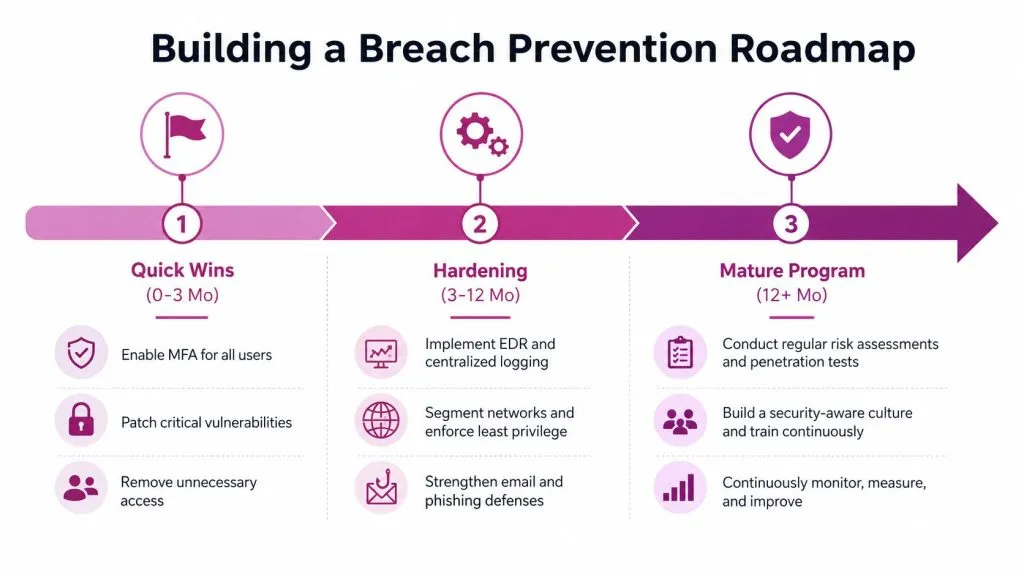
Building a Prioritized Breach Prevention Roadmap
A workable roadmap starts small, because security teams can’t fix everything at once. The fastest wins are the controls that reduce external exposure immediately, especially around identity, internet-facing systems, and vendor access. Once those are under control, expand into deeper monitoring, tighter segmentation, and more formal resilience testing.
Quick wins first
Start with the controls that immediately shrink exposure. Lock down privileged accounts, require strong authentication on remote and admin access, remove stale vendor access, and review internet-facing systems that shouldn’t be public. At the same time, verify encrypted backups and make sure the restore process is tested.
Hardening next
After the easy wins, tighten the operational layer. Improve logging, connect alerting to real response steps, clean up service accounts, and run focused testing against crown-jewel paths. Prevention becomes repeatable instead of reactive.
Mature program last
A mature program ties prevention, detection, and recovery together. Incident response, communications, resiliency, and access governance all need to work as one process, because modern breaches don’t stay inside one team’s lane. The result is not perfect safety. It’s a smaller attack surface, a faster response, and less damage when something slips through.
If you’re building this for your own environment or packaging it for clients, InsecureWeb gives MSPs and security teams a way to monitor exposed credentials, fake sites, vulnerabilities, and other external threats from one place. Visit InsecureWeb to see how its monitoring and testing capabilities can fit into a breach prevention service that starts with real attack paths, not just checklists.