Data Breach News14 min read
Practical Guide to Data Exfiltration Detection
By InsecureWeb Team
This report reflects observations of dark web activity. InsecureWeb makes no representations regarding the accuracy of this data.

The uncomfortable number is this, only 14% of simulated attacks generated a security alert, while data exfiltration was blocked in just 3% of attempts in a 2025 Picus benchmark, and valid-credential attacks succeeded 98% of the time as summarized here. That’s not a tuning problem at the edge. It’s a visibility problem after access has already been gained.
Once an attacker is inside, speed matters more than many organizations want to admit. Incident-response timing data published in 2025 showed a median 72.98 hours, or 3.04 days, from attack start to exfiltration, and only 2.7 hours from exfiltration to detection in the referenced study. In practice, that means the window to stop theft is usually before the data leaves, or after you’ve already lost enough telemetry to be sure.
Why Data Exfiltration Detection Is Failing
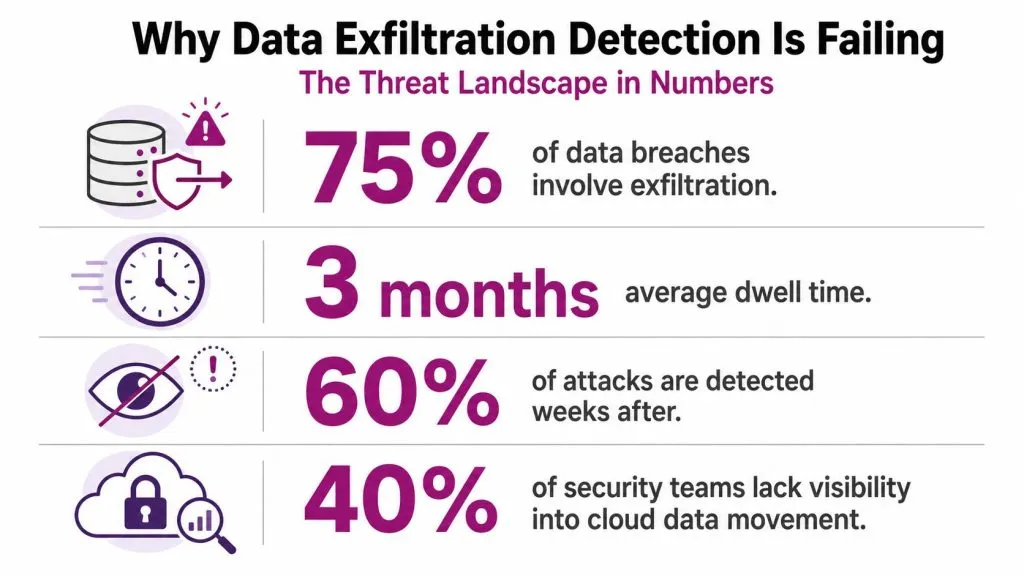
The problem starts with a narrow control mindset. Many environments are built to stop the first move, not the final transfer, and attackers know how to work around that gap. Analysts at Picus found that across more than 160 million breach-and-attack simulations, only 14% generated a security alert, and data exfiltration was blocked in just 3% of attempts, down from 9% the year before according to the benchmark summary. That is a hard reminder that the last stage of an intrusion is still where many teams lose visibility.
The timing data is just as uncomfortable. If the median time from attack start to exfiltration is 72.98 hours and the median time from exfiltration to detection is 2.7 hours from the 2025 incident-response study, then after-the-fact detection only helps when response is fast and the logging is intact. In plenty of environments, that is too optimistic.
Prevention still matters, but it is not the finish line
Egress controls, DNS filtering, and least-privilege access reduce the chance of theft, but they do not guarantee detection. Attackers often move after they have authenticated with valid credentials, and that path is hard to spot because it can look like ordinary business traffic. Those benchmark results show why post-compromise activity is now the battleground, not just perimeter hardening.
That changes the job for SOCs and MSPs. The question is not only, “Did we block the download?” It is also, “Did we notice the staging, the unusual transfer pattern, the odd protocol, or the account that suddenly behaved like a file mover?”
Practical rule: if a control only understands the first connection, it is usually too early to catch exfiltration.
Exfiltration is usually a visibility problem
The most dangerous assumption is that theft has to look dramatic. Modern exfiltration often rides inside valid sessions, cloud collaboration, remote-work traffic, AI tools, clipboard activity, or credential abuse. Once an attacker gets a usable foothold, the question is whether you can separate their activity from the normal noise quickly enough to act.
The right mental model is this, exfiltration detection is a visibility program, not just a block list. Prevention can narrow the blast radius, but detection has to tell you when normal-looking activity stops being normal. That requires telemetry, baselines, and a willingness to tune for context instead of chasing every outbound spike.
A practical example is encrypted SaaS use. A file sync to a sanctioned cloud app may be valid, but the same pattern from a dormant account, a new device, or an unusual location deserves scrutiny. InsecureWeb’s dark web scan is a different use case, but the same principle applies, you need surrounding context before you decide whether an event is routine or suspicious.
For MSPs and SMBs, the baselining problem is where many programs stumble. Small environments do not have the volume or staff to review everything, so the better approach is to learn what normal looks like by user role, device type, and business process, then flag deviations that matter. That is what makes low-and-slow exfiltration hard, it does not break the profile in one obvious burst, it blends into expected work patterns until the data is already out.
Telemetry Sources That Reveal Data Movement
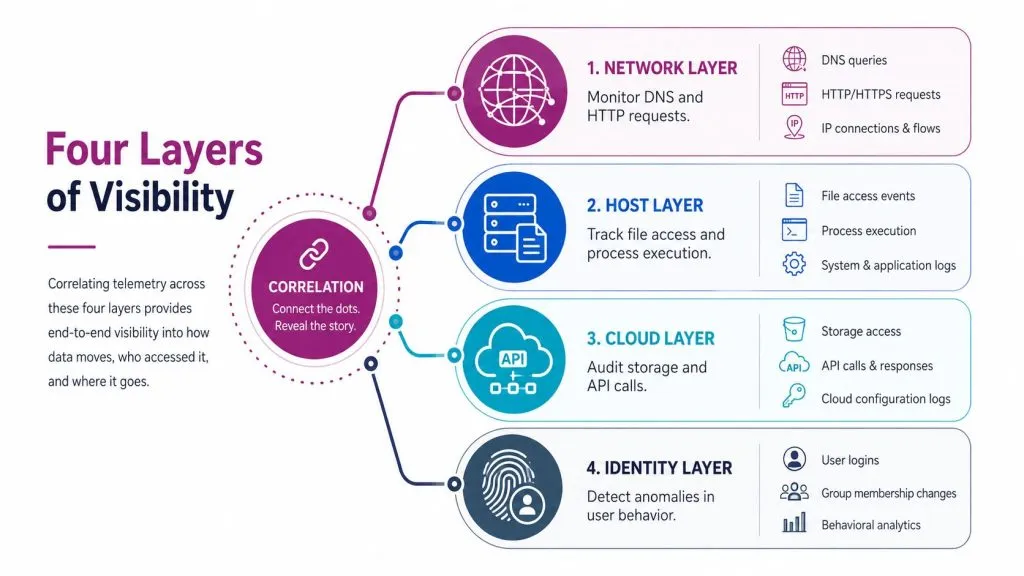
Good exfiltration detection does not come from one log source. It comes from correlating what the network shows, what the endpoint did, what the cloud control plane allowed, and how identity behaved. Each layer captures a different slice of the same event, and attackers routinely use the gaps between them to move data without obvious alarms.
Network logs show the shape of the egress path
Network telemetry is the first place to look because it exposes destination, protocol, timing, and volume patterns. Vectra recommends watching for unusual data transfer volumes, DNS query spikes, high-entropy tunneling, protocol misuse such as FTP or SMTP from hosts that do not normally use them, and connections to newly registered domains, because attackers often stage and move data through channels that differ from ordinary business traffic Vectra’s guidance. That is a practical starting point, especially when firewall, proxy, and DNS logs are already in place.
The trap is treating every large outbound transfer as suspicious. High-volume backups, software updates, and cloud sync jobs can look similar. Strong network detections usually need context from the process that opened the connection and the account that initiated it.
Host logs show staging before the transfer
Endpoint data matters because exfiltration is often prepared locally before it leaves the box. File access, archiving behavior, unusual compression, scripted movement of documents, and odd parent-child process trees can reveal staging that network logs never explain. If a user account suddenly drives a file packaging workflow right before outbound traffic begins, that sequence deserves attention.
Host telemetry also helps with low-and-slow activity that never trips a volume threshold. Repeated access to a narrow set of files, clipboard-heavy workflows, and command-line tools used outside their normal role can show up here before anything obvious reaches the network.
Cloud and identity logs expose hidden paths
Cloud logs show what the control plane allowed through APIs and SaaS services. Identity logs show credential misuse, suspicious sign-ins, and abuse of authorized sessions. In Azure environments, telemetry from Activity logs, Entra ID Audit and Sign-in logs, and Storage diagnostic logs can help spot role abuse, credential abuse, and storage-related exfiltration behavior as described in Wazuh’s Azure detection example. The same pattern applies across other cloud stacks.
These logs matter because many exfiltration paths never touch a traditional perimeter in a clean way. Files move through SaaS sharing links, API calls, browser uploads, or synced folders inside an already trusted session. A review of identity and cloud activity, paired with a dark web scan, can also help confirm whether stolen material is surfacing outside the environment, which is useful when you are trying to separate rumor from actual leakage.
Cross-layer correlation is what makes the alert usable
A useful correlation pattern is pairing DNS anomalies with endpoint process trees. If a host starts making unusual DNS lookups while a browser, scripting engine, or sync client is active, you have a better lead than either source alone. Single-stream telemetry rarely tells the full story, especially when attackers blend into SaaS and remote-work traffic.
For teams building an external exposure picture around this telemetry, a separate asset inventory like explore this BCA programme can help staff understand how cloud, identity, and endpoint signals fit together operationally.
Detection Techniques Beyond Traditional DLP
Traditional DLP still has a place, but it is not enough by itself. It works best when content is visible and the data flow is conventional. It weakens quickly when traffic is encrypted, when the exfiltration path is a browser session, or when users move sensitive content into prompts, chats, screenshots, or clipboard snippets before any file transfer ever happens.
What each technique is good at
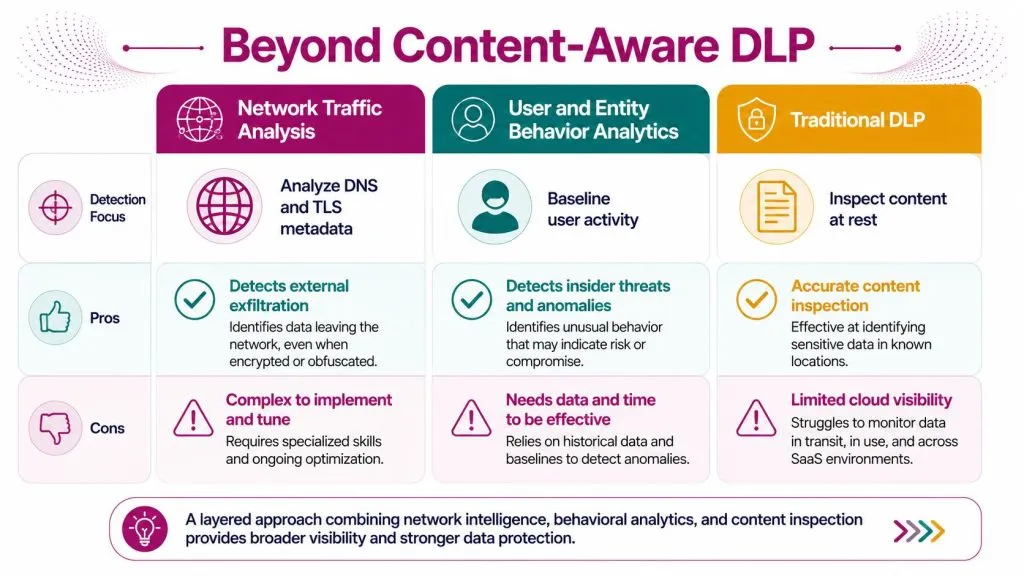
Network traffic analysis is best for spotting the shape of theft, not the content. It can reveal unusual destinations, odd protocol use, and transfer patterns that do not fit the baseline. User and entity behavior analytics, or UEBA, is stronger when the attacker’s activity looks abnormal for that person, device, or role. Traditional DLP is still valuable for inspecting content at rest or in controlled transfer paths, but it struggles when the payload is encrypted or transformed before leaving.
| Technique | Strength | Weakness |
|---|---|---|
| Network Traffic Analysis | Spots egress anomalies and destination changes | Limited content visibility |
| UEBA | Flags unusual behavior relative to the user or host | Needs strong baselines |
| Traditional DLP | Inspects sensitive content in supported channels | Weak on encrypted and nontraditional paths |
Nontraditional channels need different telemetry
Clipboard activity, browser paste events, and AI tool prompts are where a lot of teams get surprised. The risk is not only the final file transfer. It is the transformation of sensitive content into snippets, prompts, or text copied into an unmanaged app. Cyberhaven’s guidance calls out copy and paste involving sensitive content as an early warning signal and also notes that attackers can move data through command-and-control paths or stay below transfer thresholds in its data exfiltration overview. That is a good reminder that DLP inspection alone does not cover the whole attack surface.
If you are building a practical stack, think in layers. Network tells you that something is leaving. UEBA tells you who is behaving oddly. Endpoint and identity tell you whether that activity fits the role, device, and session history. DLP helps when content is visible, but it should not be the only control you rely on.
Operational insight: if a channel hides the content, the telemetry has to move one layer earlier, toward the user action that prepared the data for transfer.
Choose tools based on visibility, not slogans
Canary tokens are useful for decoy files and decoy access paths. They are not a full exfiltration platform, but they can provide a clean, high-signal tripwire when an attacker touches something they should not. Machine learning models can help rank unusual transfer volumes or correlate weak signals, but they need enough context to avoid rewarding noise. The point is to combine techniques that cover different blind spots, not to assume one product name solves the problem.
For teams evaluating training and staffing around these trade-offs, the fact that modern detection now includes cloud, identity, and nontraditional channels is exactly why InsecureWeb also matters as part of a broader monitoring stack, especially for dark web credential exposure and external threat signals that often follow compromised access.
Detecting Low-and-Slow Exfiltration Without False Positives
Big outbound spikes are easy to chase and often easy to dismiss. The harder problem is the attacker who moves slowly enough to blend into backups, collaboration tools, cloud sync, or remote-work traffic. That’s where baseline-driven detection earns its keep.
Build baselines from real behavior, not assumptions
A solid egress baseline usually needs 30 days or more of flow data, proxy logs, and DNS queries to be meaningful, because isolated telemetry streams don’t show enough context as noted in the false-positive guidance. That baseline should be segmented by user role, device type, and time of day, so a finance analyst on a managed laptop doesn’t get compared to a developer on a build host or a remote worker on a travel day.
That segmentation matters because low-and-slow activity often looks normal in isolation. A file sync client, a backup job, and a browser upload can all produce modest transfers. Only the pattern over time tells you whether the traffic belongs.
Tier the alert, don’t fire on every deviation
The best teams don’t make every deviation a page. They rank it. A slight change in transfer size might create a low-priority analyst task. A new destination plus an unusual protocol plus a login from an odd location deserves much more attention. The rule is to separate weak anomalies from correlated anomalies so the SOC doesn’t drown in noise.
Practical rule: an exfiltration alert should answer three questions fast, what left, who did it, and why wasn’t this pattern already normal?
MSPs and SMBs often struggle most here, because legitimate SaaS usage, backup traffic, and collaboration apps blur the line between normal and suspicious. Mainstream detection checklists still overemphasize big-volume anomalies, but hybrid environments need a sharper question, how do you distinguish a real exfiltration campaign from legitimate collaboration and storage behavior? The answer is rarely a single threshold. It’s the combination of baseline, identity context, and destination reputation.
Watch for ordinary traffic used in unusual ways
Attackers like ordinary channels because they’re less likely to stand out. Cloud storage, DNS, browser-based transfers, and remote-work tools are all part of normal business activity in many environments, which is exactly why they’re attractive. The defense is not to block everything. It’s to understand what “normal” looks like for each business unit and spot the subtle break from that shape.
A mature low-and-slow program accepts that not every anomaly is malicious. It also accepts that the one you ignore might be the first sign of a real theft chain.
Detection Engineering for Actionable Alerts
Telemetry alone doesn’t stop exfiltration. Detection engineering turns telemetry into alerts that a human can use. Without that step, teams end up with noisy findings, inconsistent severity, and response lag that helps the attacker more than the analyst.
Correlate before you escalate
A DNS tunneling alert is more useful when it includes the endpoint process, the account session, and recent login history. That context tells the analyst whether the event looks like a misconfigured tool, a benign edge case, or a malicious chain. The same logic applies to cloud storage activity and suspicious SaaS transfers, where the control plane may show the action but not the user intent.
Enrichment makes weak signals worth keeping
Strong alerts usually carry asset criticality, user role, and a small amount of recent history. A service account behaving oddly is not the same as a finance user behaving oddly. A managed device is not the same as an unmanaged browser session. If your detections don’t account for those differences, you’ll either miss malicious activity or burn out the queue with false positives.
Build a response path, not just a rule
The output of detection engineering should be a playbook, not just a log line. The analyst needs to know whether the right next step is account review, network containment, endpoint triage, or cloud access revocation. If the response path is clear, the alert becomes actionable. If it isn’t, even a correct detection can stall.
For teams mapping the fallout after a confirmed incident, a tighter incident workflow also belongs in the broader lifecycle around steps after a data breach, because exfiltration alerts are only useful when they lead to prompt containment and review.
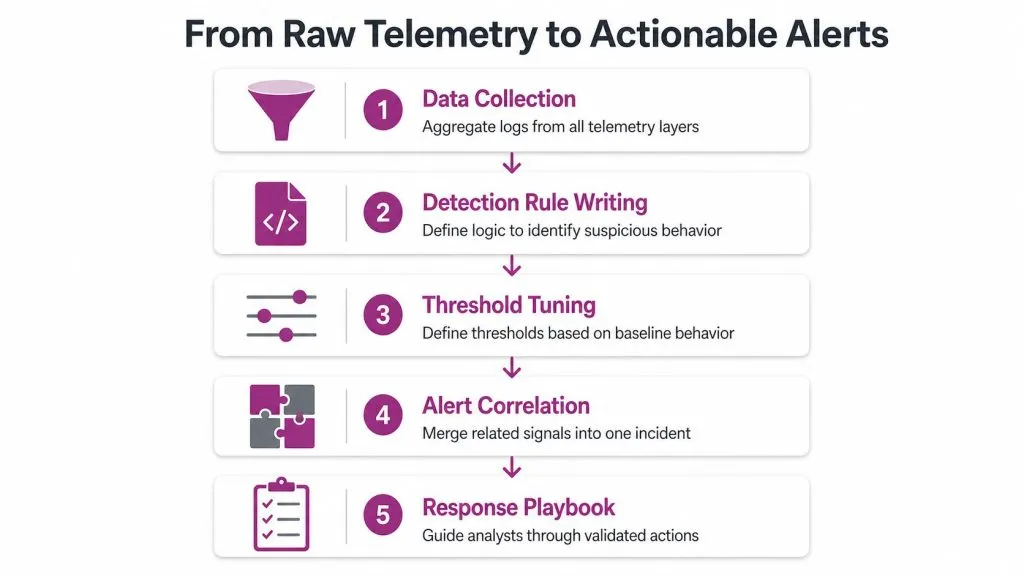
The primary goal is not more alerts. It’s better incidents, faster triage, and fewer dead-end investigations. That usually means correlating several weak signals into one high-confidence case instead of treating each signal as an isolated problem.
Implementation Roadmap for MSPs and MSSPs
MSPs and MSSPs need a deployment path that works across inconsistent client environments. You rarely get perfect telemetry on day one, and you usually inherit a mix of cloud apps, on-prem hosts, managed laptops, and one-off exceptions that nobody documented well.
Start with telemetry inventory and risk ranking
Begin by mapping which clients already provide useful network, endpoint, cloud, and identity data. Then rank them by exposure, data sensitivity, and operational maturity. High-value clients with decent telemetry are the right place to pilot because you can prove value without fighting every unknown at once.
Use one client to validate the playbook
A pilot should test your detection assumptions, your routing into the SIEM, and your ticketing integration. If a client has decent identity logs and DNS visibility, you can usually validate baseline-driven exfiltration detections before pushing them to a wider portfolio. The goal is to learn which alert shapes survive real operations and which ones need to be softened or dropped.
Standardize onboarding and reporting
Reusability matters more than novelty in a managed service. Build a small set of playbooks for common patterns, then automate as much onboarding as the client environment allows. If you’re looking at adjacent monitoring services for client-facing packages, dark web monitoring for managed service providers is often a natural add-on because compromised credentials and external exposure frequently show up before or after exfiltration-related incidents.
For MSPs that need a broader security operations curriculum for their teams, a program like InsecureWeb’s dark web monitoring can sit alongside exfiltration detection as one client-facing service, but the important point is operational fit, not feature chasing.
Plan for heterogeneous environments
Client reality is messy. Some have strong SaaS visibility, others only have firewall logs and endpoint agents. Some can support white-labeled reporting, others need plain-language incident summaries. The roadmap should tolerate that variation instead of pretending every environment will look the same.
A good managed-service deployment feels boring after it’s working. That’s a compliment. Boring means the onboarding is repeatable, the escalations are predictable, and the analysts know where to look first.
Tuning, KPIs, and Continuous Improvement
A detection program gets weaker when nobody revisits it. New SaaS tools appear, user behavior changes, remote-work patterns shift, and old baselines stop matching reality. If the rules don’t change with the business, the SOC ends up defending yesterday’s network.
Tune with analyst feedback, not guesswork
Analyst review is one of the fastest ways to separate useful detections from noise. If a pattern keeps hitting known-benign cases, suppress it deliberately and document why. If a rule keeps missing obvious staging behavior, widen the context or add a second telemetry source. The point is to make tuning a feedback loop, not a quarterly nuisance.
Measure the health of the program
The metrics that matter most are the ones that tell you whether the team can trust the alerts and whether coverage is improving. Mean time to detect, alert fidelity, and coverage gaps are the right management-level signals because they reflect both speed and quality. If those numbers are drifting the wrong way, the detections are probably drifting too.
Re-baseline when the business changes
Quarterly reviews are useful because they force teams to ask whether the old “normal” still exists. New collaboration platforms, new backup patterns, and new SaaS workflows can all make a once-useful alert suddenly noisy or blind. Analysts should also be trained to escalate clear exfiltration patterns quickly, because slow handoffs are how a good detection becomes a late one.
The strongest programs don’t treat tuning as cleanup. They treat it as maintenance for visibility itself.
If you want a practical way to extend external threat visibility around compromised credentials and data exposure, InsecureWeb can help teams monitor the open internet and dark web for signs that stolen data has surfaced. Visit InsecureWeb to see how its monitoring, exposed-credential alerts, and partner-friendly delivery model can fit into a broader exfiltration detection and response workflow.